
See a Demo
You're just one step away from seeing Call Loop in action.
Enter your information below to watch a demo right now.

You're just one step away from seeing Call Loop in action.
Enter your information below to watch a demo right now.

Ever wished you could send a personal voice message to thousands of customers at once, without ever picking up the phone? That’s the magic of automatic voice messaging (AVM). It’s a simple but powerful way for businesses to broadcast a pre-recorded audio message to a huge list of contacts all at the same time.
An automatic voice messaging system is software that sends a recorded or text-to-speech message to many contacts without an agent dialing each number one by one. In practice, businesses use it to deliver reminders, service alerts, promotional outreach, and follow-up messages at scale. The important distinction is that it is a delivery system, not just a voicemail tool: it can place a live outbound call, drop a message into voicemail, or trigger an interactive phone flow depending on the platform and campaign setup.
That distinction matters because several related tools get lumped together:
I’d make this the first filter when choosing a platform: not “does it send voice messages?” but “how does it deliver them, and what happens next?” That answer changes compliance obligations, customer experience, and campaign results.
The systems businesses evaluate usually include the same core components: message creation, contact import, scheduling, delivery rules, opt-out handling, analytics, and integrations with CRM or contact-center software. Some teams care most about easy script-to-audio creation; others need voicemail detection, local caller ID, automated retries, and suppression lists that sync with their CRM. If you want a broader look at how SaaS teams assess reliability and scale, this short resource from MakeAutomation's guide is useful context. For a related look at how automated calling workflows support billing and outreach, see this Automated Phone Payments Complete Guide.
The channel has also matured under heavy pressure. In the United States, people received about 4.2 billion robocalls in April 2026 alone, according to the FTC, while the National Do Not Call Registry surpassed 258 million numbers by the end of FY 2025 in the agency’s biennial report to Congress. That’s why legitimate business use now hinges less on raw reach and more on consent, targeting, and clear use-case fit.
You’ll often hear another term thrown around: ringless voicemail. It's a key part of this world. Unlike a standard automated call that makes someone's phone ring, ringless voicemail slips your pre-recorded message straight into their voicemail inbox. No ring, no interruption.
This quiet, non-intrusive approach is perfect for things like marketing outreach and sales follow-ups where you want to get your message across without disrupting someone's day.
Here’s why so many businesses are turning to this tech:
Getting the difference between a standard voice broadcast (phone rings) and a ringless voicemail drop (goes straight to voicemail) is the first step. They both use a pre-recorded message, but how they land and when to use them are totally different. Nailing this distinction is what sets you up to pick the right tool for the job.
We assessed systems and delivery methods using the criteria that matter most in real business rollouts: delivery options, consent controls, list management, scheduling flexibility, caller ID support, voicemail handling, analytics, and integration depth. We also weighed how easy it is to launch a small pilot without creating compliance risk.
A few things stood out in our review. First, feature lists are often misleading. A platform can claim voice broadcasting, but if it lacks time-zone controls, suppression management, or usable reporting, it becomes risky the moment you move beyond a tiny list. Second, the best tool depends heavily on the workflow. A medical office sending confirmations needs different safeguards than a retail brand reactivating lapsed buyers.
We also compared delivery methods based on business fit rather than hype:
Compliance and reporting were weighted heavily because weak controls create expensive problems fast. FTC complaint data has fallen from 3.4 million robocall complaints in FY 2021 to 1.1 million in FY 2024, but the Do Not Call Registry kept growing past 253 million active registrations in FY 2024, according to the FTC’s FY 2024 data book. My takeaway is simple: businesses should assume recipients are less tolerant, not more, even if complaint totals are down.
Ever wondered what's going on behind the scenes with automatic voice messaging? It’s surprisingly simple. The whole process is handled by a software platform, cutting out all the tedious manual dialing and letting you reach hundreds or thousands of people at once.
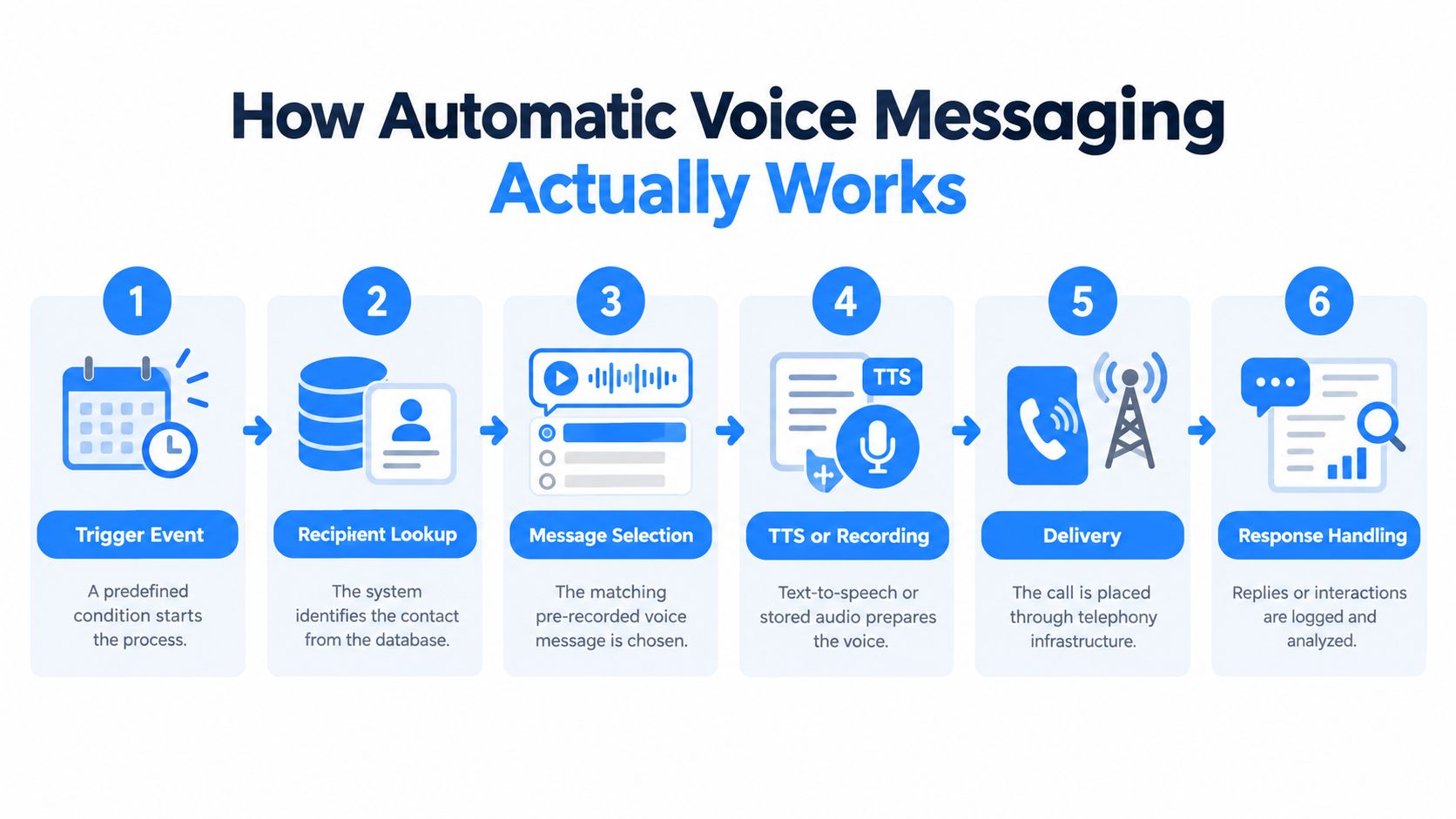
It all starts with your message. You've got two main options here: either record a high-quality audio clip in your own voice or use a slick text-to-speech voice generator that turns a written script into a natural-sounding message. This gives you the flexibility to nail the perfect tone for whatever campaign you’re running.
Once your message is good to go, you just need to upload your contact list. A quick heads-up: for your campaign to really fly, make sure this data is clean, formatted correctly, and follows all the rules.
This quick diagram breaks down the simple, three-step flow that powers every campaign.
As you can see, the whole thing is built for speed. You go from creating your message to broadcasting it out in just a few clicks.
With your audio and contacts loaded up, the next part is tweaking the campaign settings, and you get to play director. You can schedule the broadcast for a specific date and time, set the caller ID people will see on their phones, and even create rules for what happens if a call goes unanswered, like setting up automatic redials.
The moment you hit "launch," the platform's engine roars to life. It uses Voice over Internet Protocol (VoIP) to place all the calls at the same time. If you're curious about the tech, learning about how VoIP phone systems function can give you a better sense of how these calls zip across the internet instead of old-school phone lines.
At its core, an automatic voice messaging system is a powerful automation tool. It handles the repetitive, time-consuming task of dialing so you can focus on crafting a message that connects with your audience.
Where teams usually go wrong is in the setup details, not the recording itself. A solid implementation starts with list hygiene: remove invalid numbers, deduplicate records, separate mobile from landline where relevant, and suppress anyone who has opted out or should not receive a given message type. Consent capture should be tied to the use case, so promotional lists are not mixed with informational reminders.
After that comes caller ID and schedule configuration. Use a recognizable number or business name where your provider supports it, and schedule by the recipient’s local time zone rather than your office time. For appointment reminders, many teams send a first attempt 24 hours ahead and a second reminder only to non-responders. For urgent alerts, speed matters more than spacing, so retries should be tighter and capped.
Voicemail detection is another practical setting buyers often overlook. Some systems can distinguish between a live answer and voicemail, then play a shorter recording, leave a voicemail version, or retry later. That can improve completion rates and reduce awkward customer experiences. In my experience, this is one of the most valuable “unsexy” features in a voice platform because it determines whether the message lands cleanly.
It's really important to know the two different ways a message can land, as they each have a specific job.
Once a campaign is live, the work shifts from delivery to diagnosis. The metrics that matter depend on the purpose:
Early warning signs of a poor setup are usually obvious within the first send: low completion rates from weak audio, spikes in opt-outs from broad targeting, high unanswered rates tied to bad timing, or callbacks from confused recipients because the script did not identify the business immediately. If you see those signals, pause and fix the setup before scaling.
Not all automated voice messages are created equal. Picking the right tool for the job is absolutely critical, because your choice completely changes the customer experience. Are you sending an urgent, can't-miss alert or a friendly, low-key marketing follow-up?
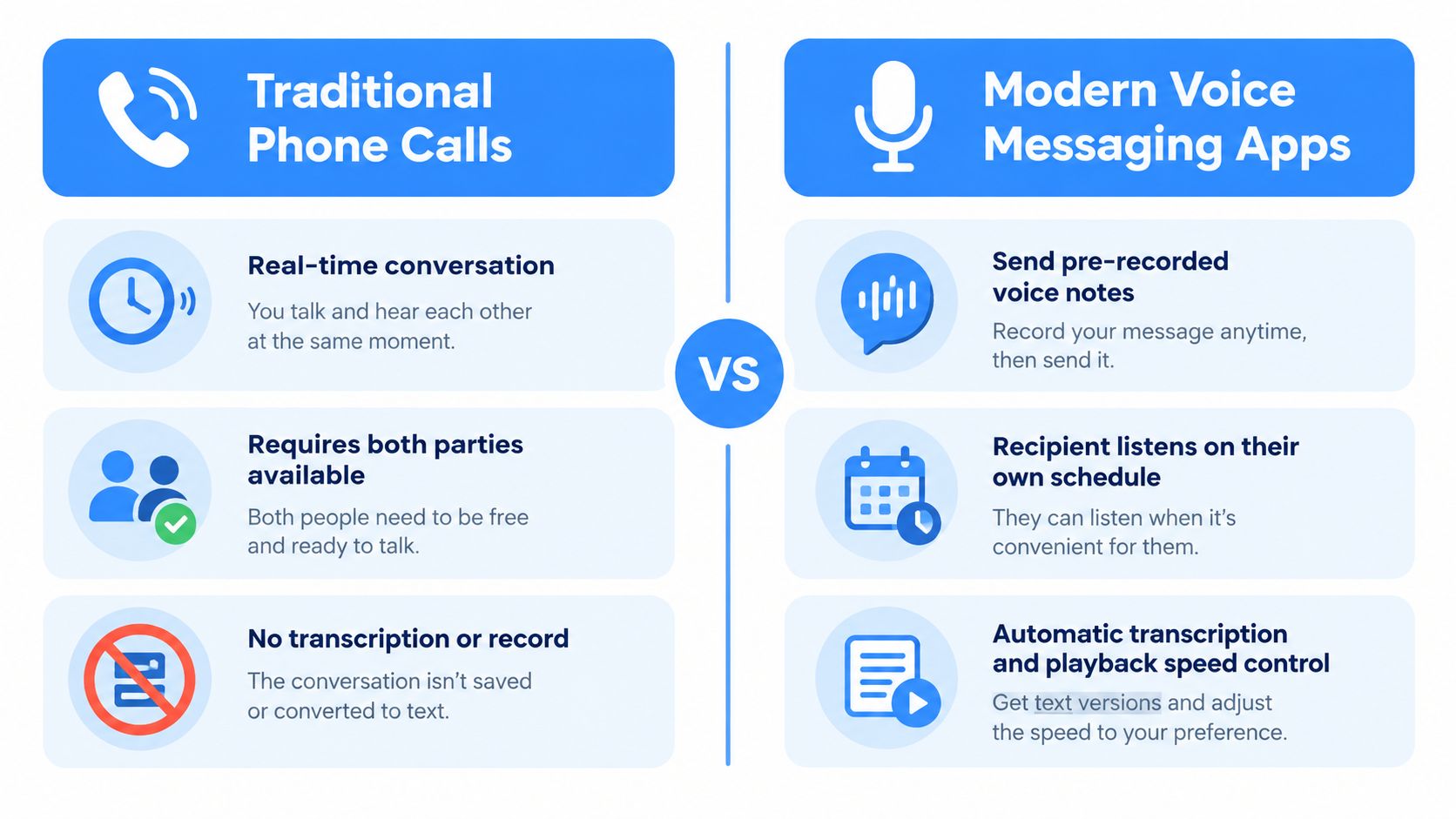
Let's break down the main technologies you'll come across so you can build a smarter outreach strategy.
We're going to look at three main approaches: standard automated calls, the subtle power of ringless voicemail, and the back-and-forth of Interactive Voice Response (IVR). Understanding how they work and where they shine is the first step to campaign success.
Think of this as the classic approach. The system physically dials a person’s phone number, making it ring just like any other call. If they pick up, your pre-recorded message plays instantly. If they don't, it gets left in their voicemail.
This method is built for speed and getting immediate attention.
Now, things get interesting. Ringless voicemail is a much more subtle, non-intrusive technology. Instead of ringing the phone, it bypasses the call completely and delivers your audio message directly to the carrier's voicemail server.
The person just sees a voicemail notification pop up. No interruption, no missed call. This is sometimes called a voicemail drop or direct-to-voicemail messaging.
This makes it the perfect tool for sales and marketing outreach. It greatly improves lead follow-up because you can deliver a personal-sounding message without being pushy. You can learn more about how to use ringless voicemail for your business to connect with customers respectfully.
The real magic of ringless voicemail is that it respects the recipient's time. By skipping the disruptive ring, you make a much better first impression and start building a relationship instead of just broadcasting a message.
Finally, we have Interactive Voice Response (IVR), which turns a one-way message into a two-way conversation. An IVR system plays a message and then asks the listener to do something, usually by pressing a key on their phone.
Think: "Press 1 for sales, Press 2 for support."
That interactive piece makes IVR fantastic for more complex jobs where you need to gather information or send callers to the right place. It’s the backbone of automated customer surveys, bill payments, and inbound call routing for support centers.
To make the choice even clearer, let's put these three methods side-by-side. Each one has a distinct role to play depending on what you're trying to accomplish.
| Feature | Automated Voice Call | Ringless Voicemail | Interactive IVR |
|---|---|---|---|
| User Experience | Disruptive (phone rings) | Non-disruptive (no ring) | Interactive (needs input) |
| Primary Use Case | Urgent Alerts, Reminders | Marketing, Sales Follow-ups | Surveys, Call Routing |
| Communication Style | One-way broadcast | One-way message drop | Two-way interaction |
| Best for Engagement | Low (often ignored) | Medium (listened to later) | High (requires action) |
As you can see, the "best" method really depends on your goal. For high-priority alerts, a standard call makes sense. For respectful marketing, ringless voicemail is king. And for collecting feedback or routing calls, IVR is your go-to.
The strongest business results usually come from matching the delivery method to a specific workflow, not from blasting the same recording to everyone. That means focusing on three categories: reminders and confirmations, promotions and reactivation, and support or feedback collection.
This is the most operational use case and often the easiest place to see ROI. Think medical offices, home services, auto shops, schools, and any business where missed appointments or schedule confusion create direct cost.
A practical example: a dental office sends a call the day before a cleaning appointment. If the patient presses 2 to reschedule, staff can prioritize only the exception cases instead of calling the full schedule manually. I’ve seen reminder workflows outperform generic text-only reminders when the appointment is high value or easy to forget.
Promotional voice campaigns work best when the audience already knows the business. Cold outreach is where voice campaigns become both less effective and more legally risky.
A local retailer, for example, might send a short voicemail to lapsed VIP customers about a weekend event or seasonal sale. The message should sound specific, not broadcast-heavy: mention the business, the offer, and one next step. In most cases, ringless voicemail is the better fit here because it lowers interruption while still creating a human touch.
Voice outreach also helps when customers need updates, routing, or fast follow-up after an issue. That can include outage notices, delivery disruptions, queue callbacks, or simple self-service prompts that reduce pressure on live teams. Industry trend data in Nextiva.com has often been cited in discussions about how AI voice agents are reshaping support workflows, but the practical takeaway here is simpler: use automation to handle repetitive updates while giving customers a clear path to a human when needed.
Voice campaigns are also useful after the sale. Businesses can use phone interactions to understand friction points, service quality, and recurring customer needs.
A home services company might send a post-job call asking customers to rate the visit from 1 to 5 and press 0 if they want a manager callback. That does more than collect a score—it surfaces which technicians, locations, or service types create problems. To me, this is one of the most underused voice workflows because it turns responses, callbacks, and keypresses into operational insight instead of just another campaign metric.
Using automatic voice messaging is a powerful way to connect with your audience, but it's not the wild west. You have to use it responsibly. A strict set of rules governs this space, designed to protect consumers from unwanted calls.
Following these regulations isn't just a good idea, it's absolutely essential for building trust, making sure your messages get delivered, and avoiding some seriously painful legal penalties.
Think of it like this: these rules are the "rules of the road" for voice broadcasting. You wouldn't get behind the wheel without knowing what a stop sign means, right? Same thing here. You shouldn't launch a campaign without getting a handle on the legal side first.
Two big players you need to know are the Telephone Consumer Protection Act (TCPA) and the National Do Not Call (DNC) Registry. These are the bedrock of compliant calling in the U.S.
The TCPA is a federal law that puts limits on telemarketing calls, autodialed calls, and pre-recorded messages. Its whole purpose is to shield people from a flood of unwanted calls. Mess this up, and the fines can be brutal, ranging from $500 to $1,500 per call. That adds up faster than you can imagine on a big campaign.
Then there's the National DNC Registry. This is basically a giant list of phone numbers from people who have raised their hands and said, "Please, no more sales calls." Before you even think about launching a marketing campaign, you're legally required to check your list against this registry and remove anyone who's on it.
Here's the critical part: these rules aren't one-size-fits-all. A marketing call faces way stricter rules than a purely informational message, like a simple appointment reminder or an alert about a service outage.
If there’s one word to burn into your brain, it’s consent. This is the absolute cornerstone of staying compliant. And—you guessed it—the type of consent you need changes based on what kind of call you're making. Getting this wrong is one of the most common and expensive mistakes businesses make.
Knowing the laws is step one. Step two is putting simple, practical systems in place that respect people's wishes and protect your business.
Usually not in the free-and-scalable sense most businesses hope for. There are free trials, limited test credits, and bundled plans with strict caps, but voice delivery has real telecom costs behind it, so fully free systems tend to be too restricted for ongoing business use.
What you’ll usually find falls into three buckets:
The tradeoff is rarely just price. Free or ultra-cheap tools often limit delivery controls, branding, analytics, or support. If your campaign is customer-facing, a weak caller ID setup or missing opt-out tools can cost more than the software saves.
My advice is to treat “free” as a testing option, not an operating model. Use a trial to verify audio quality, workflow fit, and reporting clarity. Then decide whether the platform can support the actual use case, such as reminders, promotions, urgent alerts, or feedback, without creating manual workarounds.
Launching well is less about pressing send and more about making a few decisions in the right order: choose the message type, segment by consent and purpose, write a script for the specific goal, pilot it on a small sample, and only then scale.
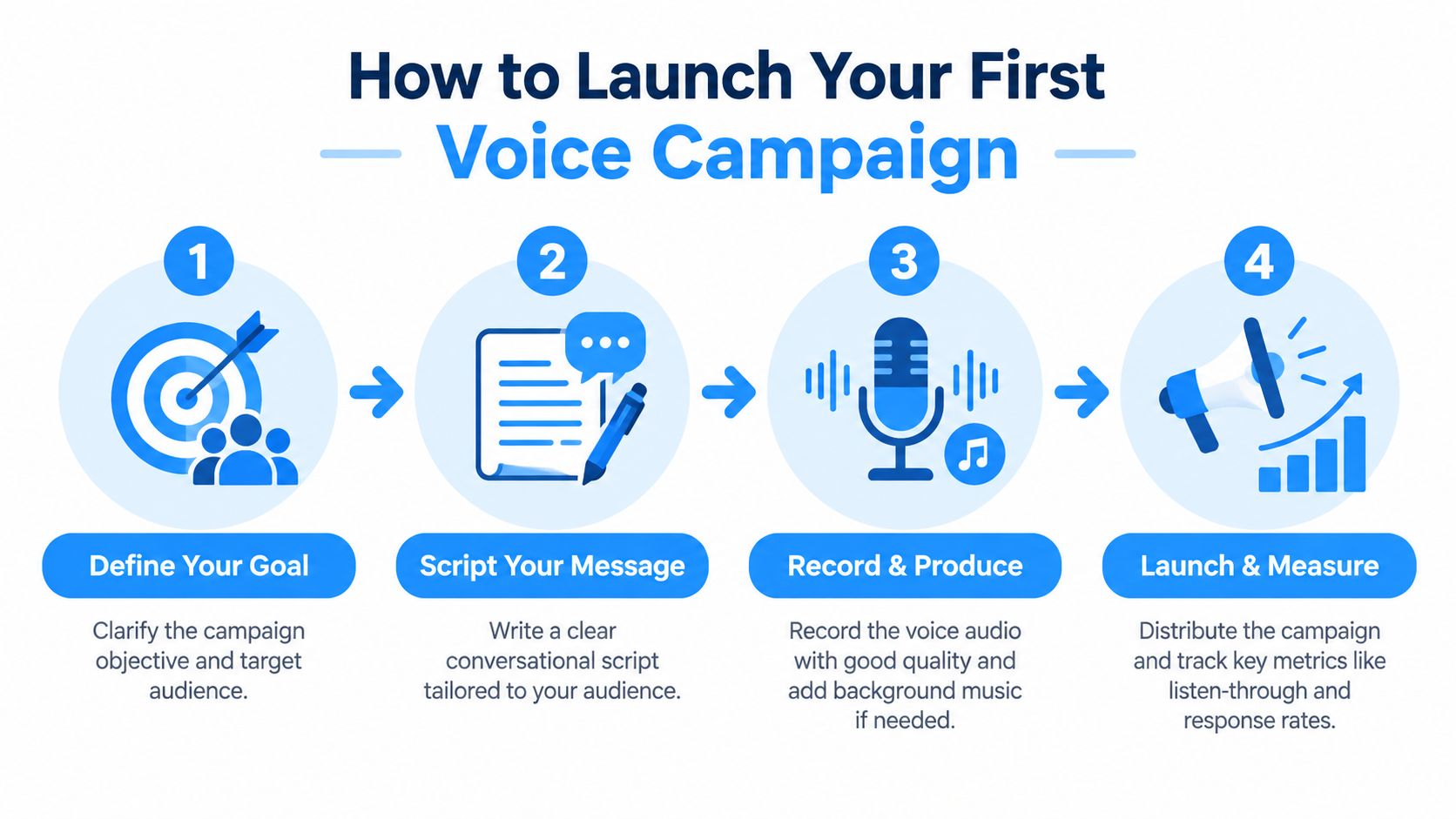
A useful pilot is not just “did the call go out?” Check whether the audio sounds trustworthy, the business name is stated in the first few seconds, the caller ID is recognizable, and the message is easy to follow without replaying it. Also check list quality: if a small pilot already shows high failed-delivery counts or confused callbacks, scaling will only magnify the problem.
If you're weighing your options, our guide to the best voice broadcasting software can help you sort through the noise. And if your workflow needs a larger automated call stack, the broader IVR and telecom market has continued to grow; one industry estimate cited by Fit Small Business projected the global IVR market rising from $4.2 billion in 2020 to $6.7 billion by 2026 in its IVR statistics roundup.
Jumping into the world of automated voice messaging can definitely bring up a few questions. We get it. Let’s clear up some of the most common ones so you can move forward and start connecting with your audience.
Yes, it absolutely is—as long as you do it the right way. Staying compliant means playing by the rules, mainly the Telephone Consumer Protection Act (TCPA).
For any marketing messages, you’ll need to get what’s called "prior express written consent" from the people you’re contacting. It's also critical to scrub your lists against the National Do Not Call Registry and make sure every single message has a clear and simple way for people to opt out.
The biggest difference comes down to how the message gets delivered and what the person on the other end experiences.
A standard voice broadcast rings someone's phone. If they pick up, they hear your message. If they don’t, it goes to voicemail. Simple enough.
On the other hand, ringless voicemail is a bit more elegant. The tech is designed to skip the ringing part entirely and place your message directly into their voicemail inbox. Because their phone never buzzes or makes a sound, it’s a much less intrusive way to reach out, especially for sales and marketing.
Keep it short and sweet. The sweet spot is right around 20 to 30 seconds.
You've got just a few seconds to grab their attention, so get straight to the point. Say who you are and why you're calling right away. Deliver the key info, and then wrap it up with one—and only one—clear call-to-action.
Ready to connect with your audience on a more personal level? Call Loop gives you powerful, compliant tools for automatic voice messaging, ringless voicemail, and SMS campaigns to help you scale your outreach. Start your free trial today and see how easy it is to deliver your message effectively.
Chris Brisson
Chris is the co-founder and CEO at Call Loop. He is focused on marketing automation, growth hacker strategies, and creating duplicatable systems for growing a remote and bootstrapped company. Chat with him on X at @chrisbrisson


Trusted by over 45,000 people, organizations, and businesses like


