
See a Demo
You're just one step away from seeing Call Loop in action.
Enter your information below to watch a demo right now.

You're just one step away from seeing Call Loop in action.
Enter your information below to watch a demo right now.

Imagine being able to cut through a jam-packed inbox and get your most important messages seen almost instantly. I'm talking about a 98% open rate. That's the kind of power you get with email-to-SMS, a simple but effective way to turn a standard email into a text message.
At first, sending texts from your email account might sound a little strange. Why not just send a text? But it's actually a clever strategy to make sure your message lands exactly when and where it needs to. While email is fantastic for detailed, long-form communication, its power fades when a message is truly urgent.
Think about it. How many important updates get lost in a cluttered inbox, buried under a mountain of newsletters and routine notifications? The real beauty here is tapping into the incredible speed and visibility of SMS without ever having to leave your email client. This is a game-changer for businesses that are already built around email-based systems but need the punch-through power of a text.
Just look at these real-world scenarios:
The data tells a pretty clear story. SMS open rates consistently hover around a staggering 98%, which absolutely dwarfs the typical 20-30% you see with email.
The difference in actual engagement is even more dramatic. SMS response rates can hit 45%, while email often struggles to get 6%. For businesses, connecting their email workflows to SMS can seriously boost conversions. In retail, for example, SMS campaigns often see success rates between 29-45%.
This isn't just about finding a technical workaround. It's about ensuring your most critical messages are seen and acted upon immediately. You're building a direct line for high-priority communication by bridging the gap between your existing email setup and your customer's phone.
A solid communication plan rarely relies on just one channel. Using email-to-SMS is a perfect complement to other tools, like ringless voicemail, helping you create a more complete, multi-channel approach. Ringless voicemail drops a pre-recorded audio message directly into a user's voicemail inbox without their phone ever ringing, offering a non-intrusive way to deliver a personal message.
You could send a detailed proposal through email, follow up with a non-intrusive ringless voicemail, and then use an email-triggered SMS for that final, can't-miss reminder. This approach respects your customers' time while making sure your message has the maximum possible impact. To get a better sense of how this fits into a larger picture, it's worth exploring different email marketing strategies and seeing how they all work together.
So, you've decided to send texts from your email. Great first step. But the big question is how you're going to pull it off.
There's no single, perfect solution here. The best choice really boils down to your specific needs, your budget, and frankly, how much you can afford for a message to not get through.
Let's walk through the three main ways to do this, starting with the simplest (and most fragile) and working our way up to the most robust option for any serious business.
To give you a quick overview, here's how the three main approaches stack up against each other. We'll dig into the details of each one right after.
Each path has its place, but as you can see, what you gain in simplicity with the free methods, you often lose in reliability—a trade-off that can be costly for a business.
The most basic way to do this is by using a carrier's own email gateway. You just take a person's 10-digit phone number, tack on the carrier's specific domain (like 5551234567@vtext.com for Verizon), and send an email. It’s free and seems easy enough on the surface.
But here’s the catch: this method is notoriously unreliable for any kind of business communication. I've seen messages get delayed for hours, get silently blocked as spam, or just vanish into thin air. Plus, it only works if you know the recipient's mobile carrier, which is almost never the case.
If you want to see just how limited this approach is, it’s worth taking a closer look at the technical side of an email to SMS gateway and why it's a non-starter for serious use.
A much more solid approach is to use a middleware service like Zapier. Think of it as a matchmaker between your email client (like Gmail or Outlook) and a professional SMS service. You can build little automated recipes, or "Zaps," that trigger a text message when a specific email lands in your inbox.
This is fantastic for automating recurring tasks. For example, you could create a rule that says any email with "Urgent Update" in the subject line automatically pings your on-call team via SMS. It gives you far more control and reliability than carrier gateways, but you are depending on a third-party service to keep everything connected.
A critical point to remember: The method you choose completely changes your ability to have a real conversation. Carrier gateways are a one-way street. Professional tools, on the other hand, let customer replies come right back to your email, closing the communication loop.
For any business that depends on consistent delivery, message tracking, and staying compliant, a direct platform integration is the only way to go. It's the gold standard for a reason.
With a dedicated messaging platform like Call Loop, you get a unique, private email address. Any email you send or forward to that address is instantly converted into an SMS and sent to your contacts through a reliable, business-grade network.
This approach neatly solves all the headaches from the other methods:
This simple decision tree really helps clarify when to use SMS versus sticking with email.
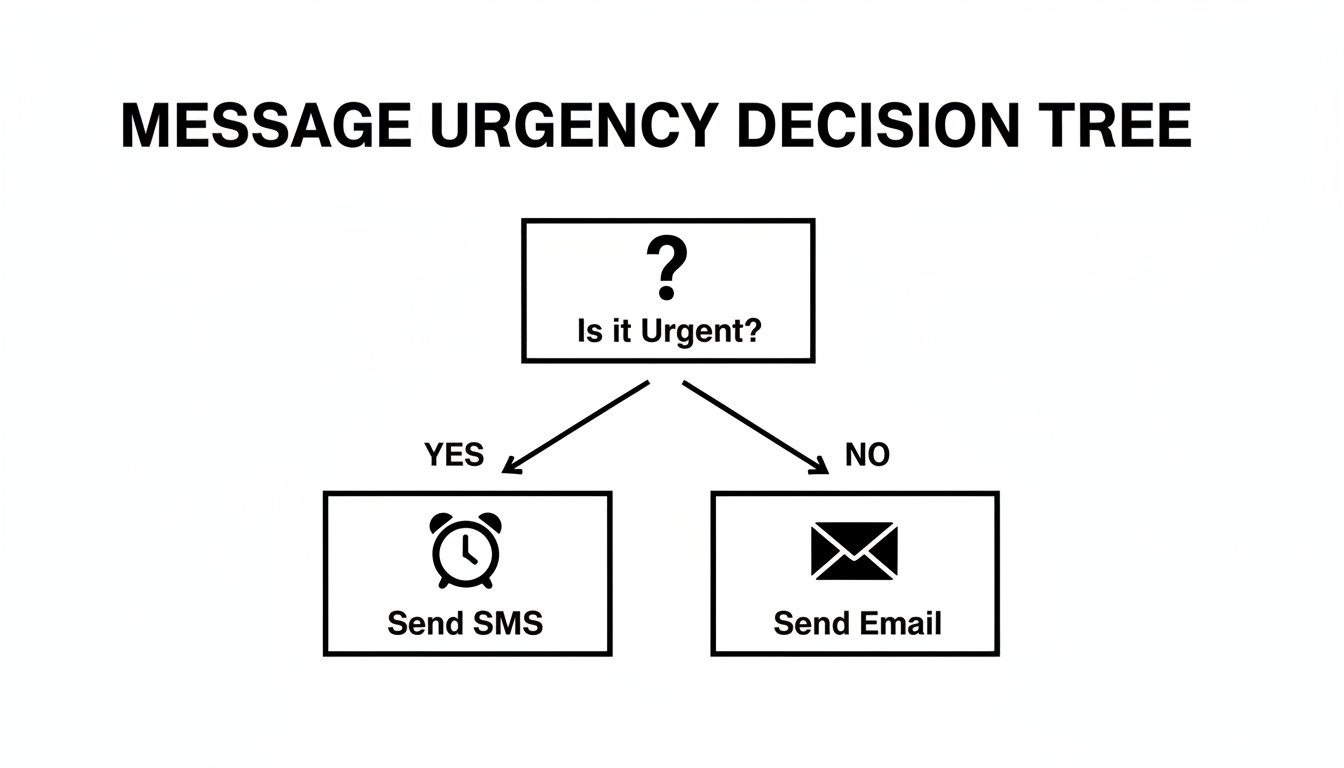
The takeaway is pretty clear: for anything that needs to be seen right now, SMS is king. That makes having a reliable email-to-SMS system an absolute must for any time-sensitive alerts or notifications. This is the only method that truly turns your email into a powerful trigger for a professional outreach strategy.
Alright, let's get out of the weeds and put this into action. I'm going to walk you through how to set up a solid email-to-SMS system by integrating directly with a platform. We'll use Call Loop as our example here so you can see just how fast you can get a powerful workflow up and running.
The whole point is to ditch the manual texting and build a slick process that connects your inbox right to your customers' phones. But first, a quick foundational tip: if you haven't already, it's worth taking a minute to learn how to create a company email. Sending from a professional address builds trust and makes sure your messages land where they're supposed to.
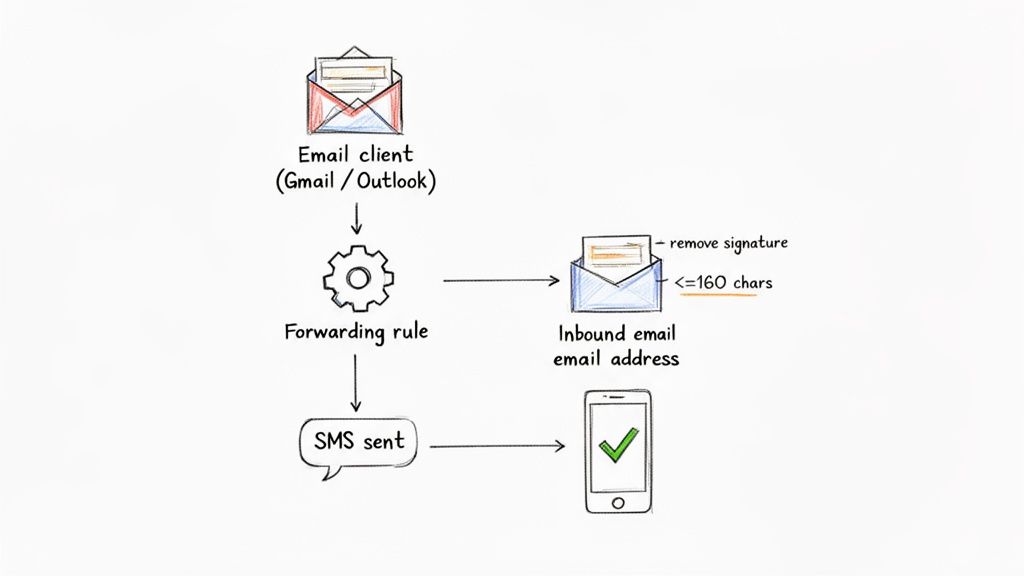
The secret sauce to a professional email-to-SMS setup is a unique, dedicated email address that your messaging platform gives you. Think of it like a special gateway—any email sent to this address gets instantly flipped into a text message.
Finding this in your Call Loop account is a breeze. Just pop over to your account settings or the integrations area, and you'll find your specific inbound email address. It'll be something like inbound-xxxx@send.callloop.com.
This address is for your eyes only. It’s super important to keep it private so you don't get spammy, unauthorized messages sent from your account.
Got your unique address? Great. Now it's time to teach your email client, whether it's Gmail or Outlook, to automatically forward specific messages to it. This is where the real automation kicks in. You can create some simple but seriously effective rules that act as triggers.
For instance, you could whip up a rule in Gmail that forwards any email that:
alerts@yourcompany.com.Don't underestimate how powerful this is. The simple act of turning an email notification into an SMS can generate 17 times more revenue than just letting it sit in a crowded inbox. You're taking a low-engagement channel—email, with its average 15.2% conversion rate—and turning it into an SMS powerhouse that can hit a 29% conversion rate.
Just setting up the forwarding rule is only half the battle. You have to make sure the text message that goes out is clean, professional, and gets the job done. Here are a few insider tips I’ve learned to help you avoid common mistakes.
The number one pitfall I see is people forgetting about their email signatures. That long signature with your name, title, and social media links looks great in an email, but it creates a messy, unprofessional text that blows past the character limit.
To get around this, create a forwarding rule that's smart enough to strip out the signature before it sends. Another key thing to keep in mind is the 160-character limit for a standard SMS. Sure, longer messages will get sent, but they’re split into multiple parts, which can be confusing and chew through your credits faster.
Keep the body of your trigger emails short and sweet. This ensures your entire message gets delivered as one cohesive text. It's a small bit of discipline that makes your whole email-to-SMS setup more reliable and professional.
And if you want to get even fancier with your automation, you can explore how to connect your apps using Call Loop's Zapier integration. That opens up a whole new world of possibilities.
Sending a text from your email is a great tool, but just getting the message delivered is step one. The real hurdle—and the one that matters most—is making sure every message you send is fully compliant with the law. This isn't just a friendly suggestion; it's an absolute must for any business using email to sms.
If you ignore the rules, you're looking at serious fines and the risk of carriers blocking your number entirely. The biggest regulation you need to know is the Telephone Consumer Protection Act (TCPA). This federal law is crystal clear: you must have explicit, written consent from someone before you can send them marketing text messages.
That means keeping a clear record of exactly when and how every single contact opted in. Just having someone's phone number on a list is nowhere near good enough.
On top of federal laws, the mobile carriers themselves have their own set of rules you have to play by. A huge one right now is A2P 10DLC (which stands for Application-to-Person 10-Digit Long Code). It’s essentially a registration system that carriers require for any business sending texts from local numbers. Getting your brand and campaigns registered helps your deliverability and stops your messages from getting incorrectly flagged as spam.
Certain industries also have extra layers of compliance to worry about. If you're in healthcare, for instance, any communication with patients has to be HIPAA-compliant to keep their private information safe. This is a non-negotiable detail you need to confirm when picking any messaging service.
At the end of the day, the golden rule of compliance is simple: your contacts must have clearly asked to hear from you. Respecting that simple fact builds trust and ensures your messages are a welcome sight, not an annoying interruption. For a much deeper look at what this means for you, check out Call Loop’s anti-spam policy.
Sometimes, a text message just isn't the right fit, or maybe you're looking to add another touchpoint to your outreach. This is where a tool like ringless voicemail can be a fantastic, compliant alternative.
Ringless voicemail lets you drop a pre-recorded audio message straight into someone's voicemail inbox without making their phone ring. It’s a far less intrusive way to deliver a message that feels personal and direct. Since it doesn't interrupt their day, it's often seen more favorably from a compliance angle for certain kinds of follow-up messages.
By pairing a solid, compliant email-to-SMS plan with other tools like ringless voicemail, you can build out a communication strategy that’s not only more effective but also respects your audience's preferences and legal rights.
Theory is great, but seeing how an email to SMS system works in the real world is where it all clicks. So, let's map out a few practical, automated workflows you can set up right now to drive action, improve service, and boost sales.
These aren't complicated setups; they're powerful examples of how a simple email trigger can create an immediate, impactful customer experience.
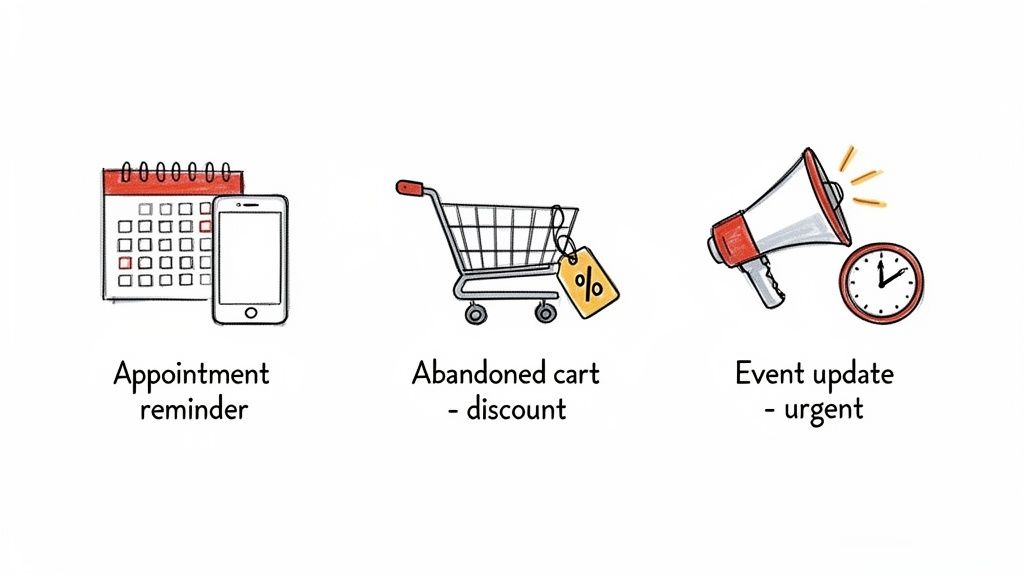
No-shows are a killer for any appointment-based business, from salons to dental clinics. An automated reminder sequence is one of the most effective ways to solve this problem for good.
Here’s how it works: your scheduling software fires off an email confirmation the moment a client books. By setting up a simple forwarding rule, that same email automatically triggers an SMS to your client.
Sample SMS Template:
"Hi [FirstName], just confirming your appointment with [BusinessName] on [Date] at [Time]. Please reply YES to confirm or call us to reschedule. See you soon!"
This simple workflow ensures your reminder is seen, dramatically cutting down on missed appointments. Better yet, it frees up your staff from having to make dozens of manual confirmation calls. It's a small change that delivers a huge return.
For any online store, recovering abandoned carts is a direct line to more revenue. While reminder emails are standard practice, they often get lost in a crowded inbox. Adding an SMS trigger creates a sense of urgency that email alone just can't match.
When your e-commerce platform sends an abandoned cart email, you can have it trigger an SMS a few hours later with a compelling offer. This one-two punch is incredibly effective.
In fact, SMS marketing is an absolute powerhouse for e-commerce. Conversion rates often land between 21-32%, completely overshadowing email's typical 2-8%. You can dig into more powerful SMS marketing statistics to see how they can transform your sales funnels.
Sample SMS Template:
"Hey [FirstName], still thinking it over? Your cart at [StoreName] is waiting! Use code SAVE15 at checkout for 15% off your order in the next 3 hours."
This message creates scarcity and provides a direct incentive, encouraging shoppers to complete their purchase on the spot.
Imagine a last-minute venue change or a weather delay for an outdoor event. You need to get that information to every single attendee immediately. Email is just too slow and unreliable for time-sensitive news like this.
With an email-to-SMS setup, an organizer can send one email to their dedicated address, and the system instantly blasts it out as a text message to the entire attendee list.
Sample SMS Template:
"URGENT UPDATE for [EventName]: Due to weather, we are moving to [NewVenue]. All times remain the same. See the new map here: [link]"
This workflow provides peace of mind, ensuring critical updates are delivered and actually read within minutes. It transforms a potential communication crisis into a smooth, professional update.
These examples just scratch the surface, but they show how easily you can build a responsive, automated system that drives real business results.
Whenever I talk to businesses about setting up an email-to-SMS system, a few questions always come up. It's a fantastic tool, but you need to understand the nuts and bolts to really make it work for you. Let's dig into some of the most common things people ask when they start sending texts from their email.
This is usually the first thing on everyone's mind. The short answer? It depends entirely on your setup.
If you're using a basic carrier gateway (the free, DIY method), it’s a one-way street. Any replies your contacts send will just vanish into the digital ether. It's not built for conversation.
But if you're using a professional platform, two-way communication is the name of the game. When a text goes out, any replies come straight back into your platform’s inbox. You can even have them forwarded to your email, letting you keep the conversation going seamlessly.
Another big one: what happens when your email blasts past the 160-character SMS limit? The system will automatically slice the message into multiple segments to make sure it gets delivered.
While that works, it can look a little clunky on the receiving end and will burn through your message credits faster. The best move is to keep your trigger emails short and sweet. A pro tip is to configure your email client to automatically strip out signatures and footers from any message you send to your dedicated texting address.
Think of email to SMS as a killer feature within a larger platform, not a replacement for one.
Using a platform that offers this feature gives you the sheer convenience of firing off texts from your email inbox. But you also get all the essential tools you need for serious messaging: contact management, compliance features, analytics, scheduling, and even other communication channels.
For example, you can pair your texting with ringless voicemail to create a much more powerful outreach sequence. Imagine sending a quick text reminder and following it up a few hours later with a non-intrusive voicemail drop. You can do all of that from one system, which dramatically increases the odds of your message getting heard.
By choosing an integrated system, you get the best of both worlds—the ease of email combined with the power of a complete messaging suite.
Ready to connect your email to a powerful messaging platform? Call Loop provides a reliable email to SMS solution along with ringless voicemail and voice broadcasting to help you automate, personalize, and scale your outreach. See how Call Loop can transform your communications today.
Chris Brisson
Chris is the co-founder and CEO at Call Loop. He is focused on marketing automation, growth hacker strategies, and creating duplicatable systems for growing a remote and bootstrapped company. Chat with him on X at @chrisbrisson


Trusted by over 45,000 people, organizations, and businesses like


