
See a Demo
You're just one step away from seeing Call Loop in action.
Enter your information below to watch a demo right now.

You're just one step away from seeing Call Loop in action.
Enter your information below to watch a demo right now.

An automated marketing workflow is a series of pre-built communications—like texts, calls, and voicemails—that are automatically sent to your contacts based on what they do. This whole approach gets you away from tedious, one-off campaigns and into building smart, ongoing conversations that save you a ton of time and drive real growth without you having to watch over every little detail.
Imagine having a dedicated assistant who works 24/7 to nurture leads and engage customers at the perfect moment. That's exactly what an effective automated marketing workflow does for you. It’s a strategic journey you map out just once, which then guides your contacts through a series of messages perfectly timed to their behavior.
Think of it less like a megaphone blasting one message to everyone and more like a GPS for your marketing. It gives each customer personalized, turn-by-turn directions, making sure they get the right message on the right channel, right when it matters most.
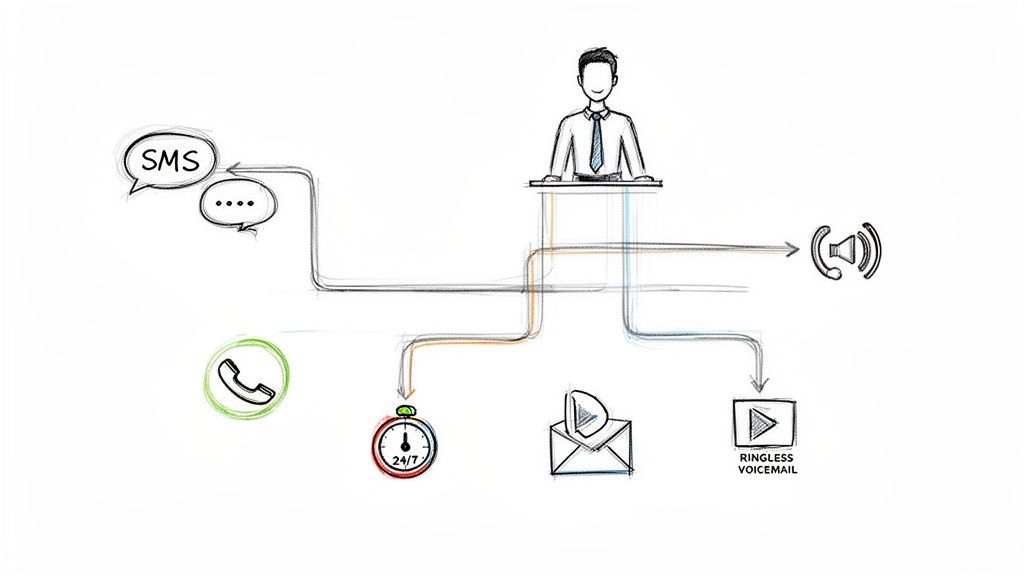
Marketing used to be a constant grind of manual tasks. You'd have to remember to send a follow-up email, make a call, or text a reminder. Not only is that a huge time suck, but it’s also easy for things to fall through the cracks. A hot prospect gets forgotten, a follow-up is sent too late, and poof—a sale is lost.
An automated marketing workflow completely eliminates these manual chores. By setting up rules and triggers ahead of time, you create a system that runs on its own.
The core idea is simple: instead of reacting to customer actions yourself, you build a system that reacts for you. This ensures every single lead gets prompt, consistent, and relevant communication every time.
This switch makes a massive difference in efficiency. Businesses that use marketing automation to nurture prospects see a mind-blowing 451% increase in qualified leads. By automating the repetitive stuff, your team can finally focus on high-value activities like closing deals and building relationships.
A truly great workflow doesn't just stick to one channel like email. Your customers are everywhere, and your marketing should be too. A multi-channel approach combines different communication methods to create a much more engaging experience.
For example, a new lead could kick off a workflow that:
By layering channels like SMS, voice calls, and ringless voicemail drops, you build a robust and responsive system. This kind of automated marketing workflow makes sure your message gets through, adapts to customer behavior, and ultimately drives better results by creating seamless, ongoing conversations.
To build an effective automated marketing workflow, you first need to get familiar with the fundamental parts. Think of it like setting a coffee maker the night before you wake up. Each piece has a specific job to ensure everything runs perfectly in the morning without you lifting a finger.
At its core, every single automation sequence is built from three simple but powerful building blocks: Triggers, Actions, and Delays. Once you master how these elements work together, you can create just about any communication journey for your contacts.
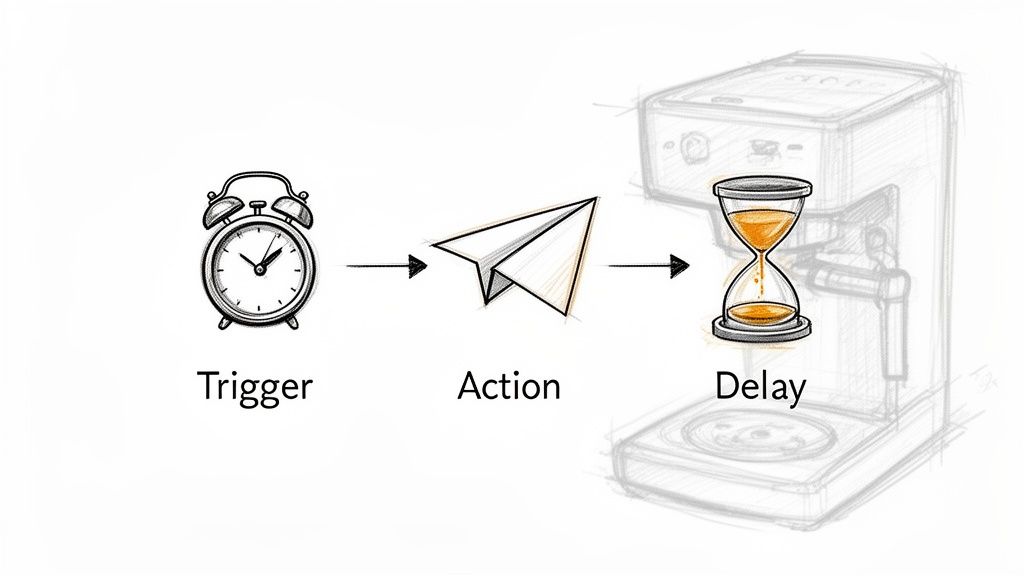
A trigger is the specific event that kicks off your entire workflow. It’s the starting gun that tells the system, "Go!" This event could be something a contact does, a change in their data, or even a specific date and time. Without a trigger, your workflow simply sits there, waiting for instructions.
Common triggers include things like:
Going back to our coffee maker analogy, the trigger is the alarm clock blaring at 6 AM. It’s the single event that initiates the whole pre-programmed sequence.
Once a trigger fires, the workflow performs an action. An action is the specific task you want the system to complete. This is where you actually communicate with your contacts, update their records, or guide them through your sales funnel.
An action is the "what" of your workflow. It's the tangible step your system takes in response to a trigger, moving the conversation or relationship forward automatically.
Examples of powerful actions include:
In our coffee maker example, the action is the machine starting to brew the coffee. It’s the direct result of the alarm clock trigger.
Finally, delays (or timers) are the waiting periods you build into your workflow. Let's be honest, not every action should happen instantly. Delays give you control over the pace of your communication, ensuring you aren't blowing up your contacts' phones with too many messages at once.
Perfect timing can make your outreach feel natural and considerate instead of robotic and spammy. You can find more information about how to build these sequences in our complete guide to marketing automation features.
You can set delays for minutes, hours, days, or even weeks. For instance, after that first welcome text, you might add a 24-hour delay before sending a follow-up ringless voicemail. This gives the contact time to breathe and digest the first message.
Back to our analogy, the delay is the time between when the alarm goes off and when you actually get out of bed to pour your perfectly brewed coffee. It’s the scheduled pause that makes the whole process work for your schedule. By combining triggers, actions, and delays, you can design any automated marketing workflow you can dream up.
Relying on a single communication channel is like trying to build a house with only a hammer. You might get a wall up, but you’re missing the right tools for the foundation, the wiring, and everything else. An effective automated workflow isn't about using just one tool; it's about combining multiple channels to create a complete experience that meets customers right where they are.
By weaving together SMS, voice calls, and ringless voicemail, you build a system that’s far more powerful than the sum of its parts. Each channel has a unique job, perfect for different situations and levels of urgency. This multi-channel approach makes sure your message doesn't just get delivered—it makes an impact.
Knowing when to use each tool is everything. SMS is your go-to for instant, bite-sized information. With a massive 98% open rate, texts are perfect for quick alerts, confirmations, and time-sensitive deals you need people to see now.
Automated voice calls, on the other hand, are for urgent messages that need immediate attention. Think about appointment reminders that require someone to press "1" to confirm, or critical alerts that can't risk getting lost in a sea of notifications. A voice call adds a level of importance that a simple text can't always match.
Then there's ringless voicemail, a slick tool for adding a personal touch without being intrusive. It lets you drop a pre-recorded message straight into someone’s voicemail, so their phone never even rings. This is perfect for warm follow-ups, thank-you messages, or updates that don’t need an instant reply, letting you connect on a more human level. You can get a deeper look at building this out in our guide to creating a multi-channel communication strategy.
The goal isn't just to use more channels; it's to use the right channel at the right time. An automated marketing workflow makes this orchestration seamless, moving contacts from one touchpoint to the next based on their behavior and the context of the conversation.
To help you decide which tool fits your goal, here’s a quick breakdown. This table compares the strategic uses of each channel so you can pick the best one for the job.
Ultimately, the best approach often involves using a smart combination of these channels to guide your customer through a thoughtful, automated journey.
Let's see how this all clicks together. Imagine a prospect fills out a "Request a Demo" form on your website. Instead of just firing off an email that could get buried, a smart multi-channel workflow kicks in.
Action 1: Instant SMS Confirmation
The second they hit submit, an SMS goes out. "Hi [FirstName], thanks for your interest in our demo! A team member will be in touch shortly. Here's a link to our case studies while you wait: [link]." This gives them instant acknowledgment and something valuable right away.
Action 2: Ringless Voicemail Follow-Up (24-Hour Delay)
If 24 hours go by and the lead hasn't clicked the link, the workflow automatically drops a ringless voicemail. The message could be from a sales rep: "Hey [FirstName], this is John from [Your Company]. I saw you were interested in a demo and wanted to personally reach out. Let me know what time works best for you this week. Thanks!" It’s personal, friendly, and zero-pressure.
Action 3: Automated Voice Call (Triggered by High Intent)
Now, what if the lead does click the case study link in that first text? That's a strong buying signal. The workflow can immediately trigger an automated call that connects them directly to a live sales agent to strike while the iron is hot.
This sequence layers communication logically. The SMS is fast and efficient, the ringless voicemail adds a personal touch, and the live call is saved for your most engaged prospects. This approach massively increases your odds of making a real connection.
By combining these powerful tools, you're not just blasting out messages—you're building a smart, automated conversation that adapts to your contacts and moves them toward your goal.
Alright, let's get our hands dirty. Moving from theory to practice is where you really start to see the magic of automation. Building your first automated marketing workflow can feel like a big deal, but it really just boils down to a few logical steps.
We'll walk through a classic scenario together: nurturing a new lead who just filled out a form on your website. This process takes a cold lead and turns them into a warm, engaged prospect—all without you lifting a finger.
Before you touch a single setting, you have to know what you're trying to accomplish. A workflow without a clear goal is like a road trip without a destination. You’ll burn a lot of gas but won't end up anywhere meaningful.
Your goal is the North Star for every message, delay, and action in your sequence.
Start with one simple question: What is the single most important thing I want a contact to do after entering this workflow?
Maybe your goal is to:
For our example, let's keep it simple. Our goal is to get a new website lead to schedule a 15-minute consultation.
Next up, you need to decide what kicks the whole thing off. The trigger is the starting pistol that tells your automation to "GO!" As we've covered, this could be anything from a contact texting a keyword to a specific date rolling around.
Since our goal is to nurture a new website lead, the trigger is a no-brainer.
Our Trigger: A contact submits the "Request a Consultation" form on our website.
This is a high-intent move. The person has literally raised their hand and shown interest, making them the perfect candidate for an immediate, structured follow-up. Setting this trigger ensures no lead ever falls through the cracks.
This is where you can start mixing channels to create a more powerful experience, just like in this visual.
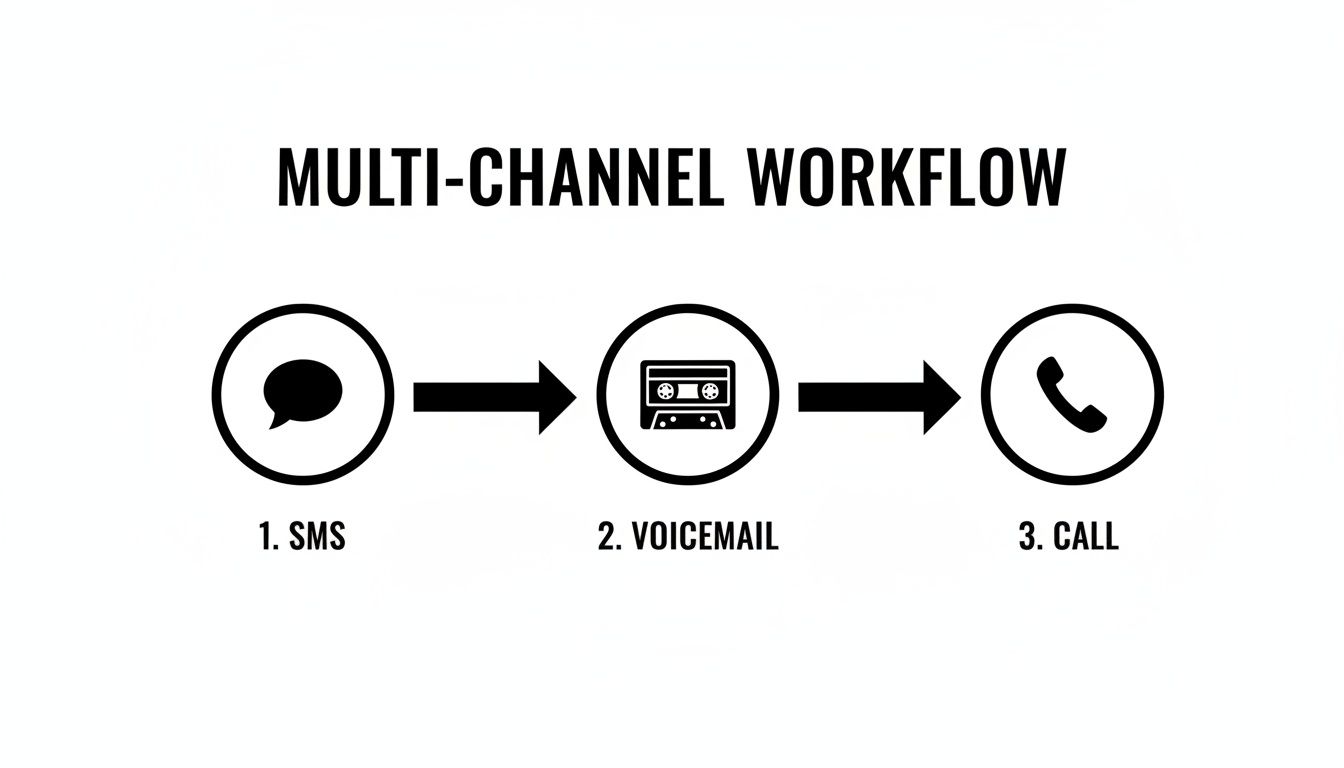
By weaving these different touchpoints together, you build a much more engaging and effective journey for your contacts.
Now for the fun part—mapping out the actual journey. You'll want to layer your communications and use a mix of channels to keep people engaged. Think about the timing and the why behind each message.
Here’s a simple, multi-channel map for our lead nurturing workflow:
This sequence delivers immediate value, follows up personally without being annoying, and gives the lead plenty of chances to take action.
With your map in place, it’s time to actually write the messages. Personalization is everything here. Using merge fields like [FirstName] is the bare minimum to make your automated messages feel like they were written just for them.
Here are a few templates you can steal for our workflow:
Message 1: Instant SMS Confirmation
"Hi [FirstName], thanks for requesting a consultation! My calendar is open to chat this week. You can book a time that works for you here: [scheduling link]. - [YourName] from [Company]"
Message 2: Ringless Voicemail Script
"Hey [FirstName], this is [YourName] from [Company]. I saw you were interested in a consultation and wanted to personally reach out. I'm excited to learn more about your goals. You can grab a spot on my calendar using the link I texted you, or just give me a call back at this number. Hope to talk soon!"
Message 3: Final Follow-Up SMS
"Hi [FirstName], just following up. Here's a quick case study on how we helped a client like you achieve [specific result]: [link]. Let me know if you have any questions!"
These scripts are short, sweet, and totally focused on pushing the contact toward the goal.
Your workflow is built and ready to rock. The last step is to flip the switch and see how it performs. Automation isn't a "set it and forget it" machine; it’s a living system you need to fine-tune.
Keep a close eye on these key metrics:
Tracking these numbers will show you what’s working and what's not. Maybe the 24-hour delay is too short. Maybe that final SMS needs a stronger call to action. Testing and tweaking your automated marketing workflow is how you'll continuously squeeze more and more value out of it over time.
Kicking off an automated marketing workflow is just step one. The real win comes from tweaking and refining that workflow until it’s not just effective and compliant, but actually connecting with your audience on a human level.
Think of your first workflow as a rough draft. These best practices are the editing process that’ll turn it into a powerhouse for your business. By zeroing in on personalization, compliance, and constant testing, you build a system that doesn't just save you time—it creates a genuinely better experience for your customers.
The goal here isn't just to send messages. It's to start conversations.
Automation should never, ever feel robotic. The biggest mistake businesses make is blasting out generic, one-size-fits-all messages that get ignored. Personalization is what turns an annoying interruption into a welcome hello, and it's simpler than you think.
The quickest win is using merge fields. A simple tag like [FirstName] instantly makes a bulk message feel like a one-on-one note. "Hello" becomes "Hello, Sarah," which immediately feels more engaging and respectful. It's not just a hunch; one study found that personalized calls to action convert a staggering 202% better than generic ones.
Personalization is more than just dropping in a name. It’s about using what you know about someone—their city, their last purchase, the specific service they looked at—to make your message hit home.
This creates an experience where your customer feels seen and understood, not just like another number on a spreadsheet. It builds trust and makes them far more likely to take the action you want them to.
When you're dealing with automated outreach—especially SMS and voice calls—compliance isn't just a good idea, it's the law. Regulations like the Telephone Consumer Protection Act (TCPA) in the U.S. have very strict rules about how you can contact people. Messing this up can lead to massive fines and wreck your brand's reputation.
Here are a few compliance checkpoints to bake into every single workflow:
Following these rules does more than just keep you out of legal trouble. It helps you maintain a positive sender reputation with phone carriers, which is critical for high deliverability rates. Bad practices can get your numbers flagged as spam, which means your messages won't even get delivered. You can dive deeper into these rules by checking out these SMS marketing best practices.
An automated workflow is not a "set it and forget it" machine. It’s a living system that you should always be looking to improve. And the only way to know what’s actually working is to test different approaches and measure the results like a hawk.
Start by tracking a few key performance indicators (KPIs) for each stage of your workflow:
Use this data to run simple A/B tests. Try tweaking your message copy. Play with the delay timers between messages. You could even swap the order of your channels. Who knows, maybe a ringless voicemail works better as the first touchpoint for a certain segment of your audience. The data will tell you the real story, letting you constantly refine your strategy for better and better results.
Jumping into your first automated workflow is exciting, but it almost always brings up a few questions. That's completely normal. Before you start building out sequences that talk to your customers, you want to be sure you're on the right track.
This section tackles the most common questions we hear. Think of it as a final gut-check before you flip the switch on your automation engine. These answers will help you avoid the usual stumbles and get straight to building workflows that actually work.
Start simple. Seriously. You don't need a massive, 20-step workflow for it to be powerful. In fact, some of the most effective automations are beautifully simple.
A two-step sequence—like an instant welcome text followed by a ringless voicemail 24 hours later—can work wonders for following up with new leads. The key is to focus on solving one specific problem first. Are you trying to reduce no-shows? Welcome new subscribers? A single, clear goal will keep your workflow clean and effective. You can always add more branches and logic later on once you know you need them.
The best workflows are clear, logical, and tied directly to a single business objective. Complexity for the sake of complexity often leads to confusion and poor results. Don't over-engineer it.
Absolutely. While it’s a beast for marketing, workflow automation is perfect for any process that needs consistent, on-time communication. Its power stretches way beyond lead nurturing, covering the whole customer journey and even your internal operations.
Think about using it for things like:
Basically, if a communication process is repeatable and can be started by a clear trigger, it's a prime candidate for automation. It takes the repetitive work off your team's plate and cuts down on human error.
When you're just getting started, a few common tripwires can derail your efforts. Knowing what they are ahead of time will save you a ton of headaches and help you build sequences people actually appreciate.
The three biggest mistakes to sidestep are:
Success is always measured against the goal you set in the first place. If your objective was to book more demos, then your main KPI is the conversion rate of leads who went through that workflow. If you wanted to slash no-shows, you need to measure that rate before and after you turned the automation on.
Beyond your primary goal, keep an eye on these key metrics:
Tracking these numbers gives you a clear picture of what’s working and what isn't. This data is your road map for making smart tweaks to get even better results.
Ready to build powerful, multi-channel workflows that save time and drive growth? Call Loop provides the tools you need to automate SMS, voice calls, and ringless voicemail with ease. Start your free trial today and see how simple high-impact automation can be.
Chris Brisson
Chris is the co-founder and CEO at Call Loop. He is focused on marketing automation, growth hacker strategies, and creating duplicatable systems for growing a remote and bootstrapped company. Chat with him on X at @chrisbrisson


Trusted by over 45,000 people, organizations, and businesses like


