
See a Demo
You're just one step away from seeing Call Loop in action.
Enter your information below to watch a demo right now.

You're just one step away from seeing Call Loop in action.
Enter your information below to watch a demo right now.

You can feel the pressure before you can name it. A dental clinic has a waiting list full of people who never confirmed their appointments, and the front desk is spending the morning on repeat calls. An ecommerce owner is watching inbox performance stall, while customers ignore another subject line and a coupon that's about to expire.
That's the exact moment automated voice broadcasting starts to look less like a niche tool and more like a practical channel. It gives you a live-sounding message that reaches people on the phone, which still matters when the job is urgent, simple, or time-sensitive. It also forces a different kind of discipline, because the same channel that can move people to action can also create compliance risk if you treat it like old-school mass dialing.
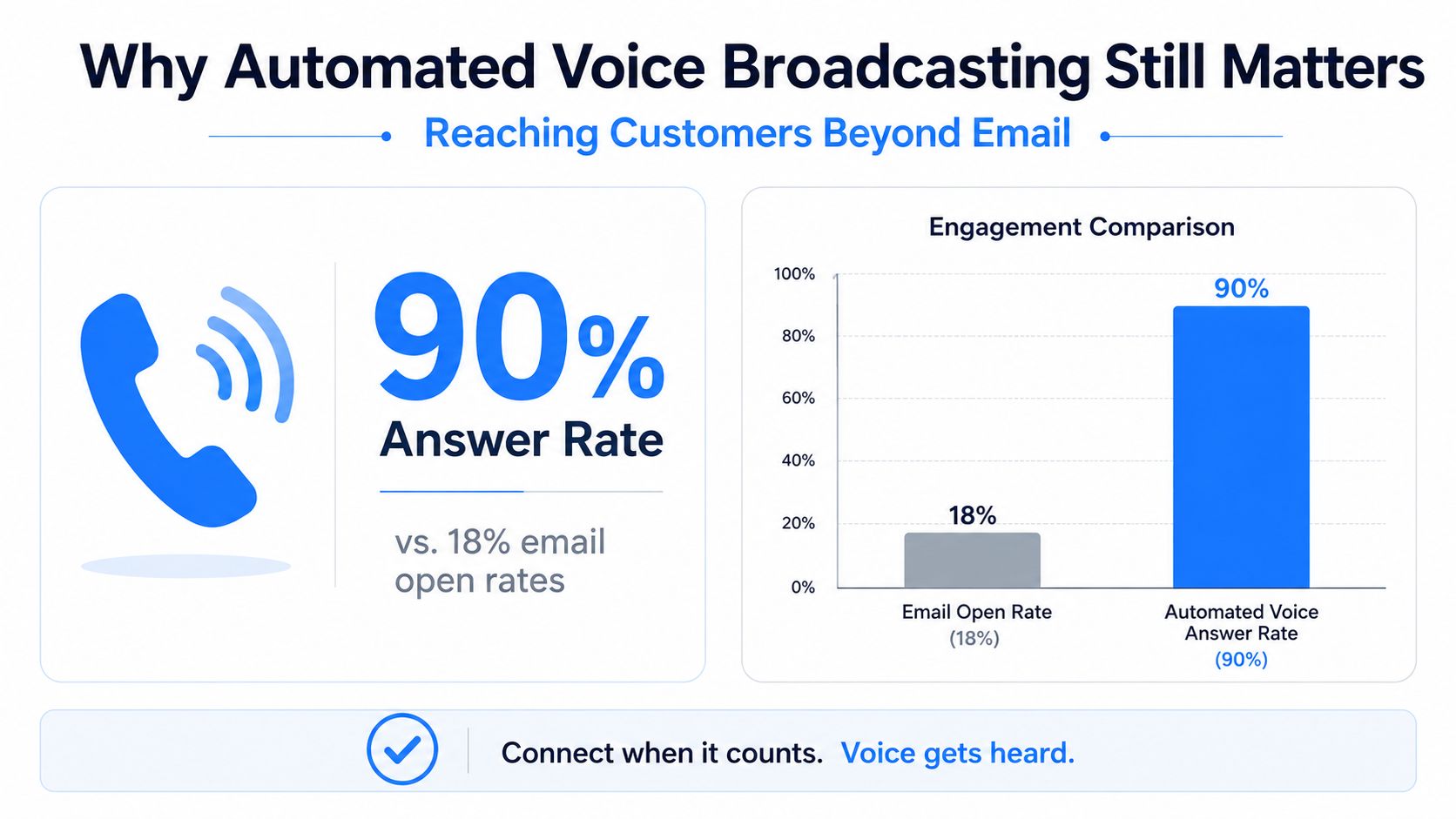
A clinic owner usually doesn't wake up thinking about outbound voice. They wake up to no-shows, unpaid balances, weather closures, or a stack of calls the front desk can't get through before lunch. In that environment, a spoken message does something email often can't, it gets attention quickly and sounds like a real person is reaching out.
The reason this channel still matters is partly behavioral and partly operational. A voice call can carry urgency, tone, and next steps in a way a short text can't always match. It also helps when the audience isn't checking email constantly, or when the message needs a decision now, not later.
The market conditions around automated calling also pushed teams to get more careful, not less. Robocall pressure in the U.S. climbed fast in the late 2010s, with the FCC recording 150,000 robocall-related complaints in 2016 and 232,000 in 2018, while YouMail estimated 2.4 billion robocalls per month in 2016 and 4.7 billion per month by July 2019, peaking at 5.2 billion in March 2019 (Congressional Research Service summary). That growth is exactly why the modern version of voice broadcasting has to be built around consent, filtering, and tight execution.
Practical rule: if your message needs speed, spoken clarity, or a direct next action, voice deserves a place in the mix. If you're blasting unfiltered lists, it doesn't.
The bigger shift is that teams no longer ask whether voice works. They ask whether they can run it without wasting list quality or creating TCPA exposure. That's the right question.
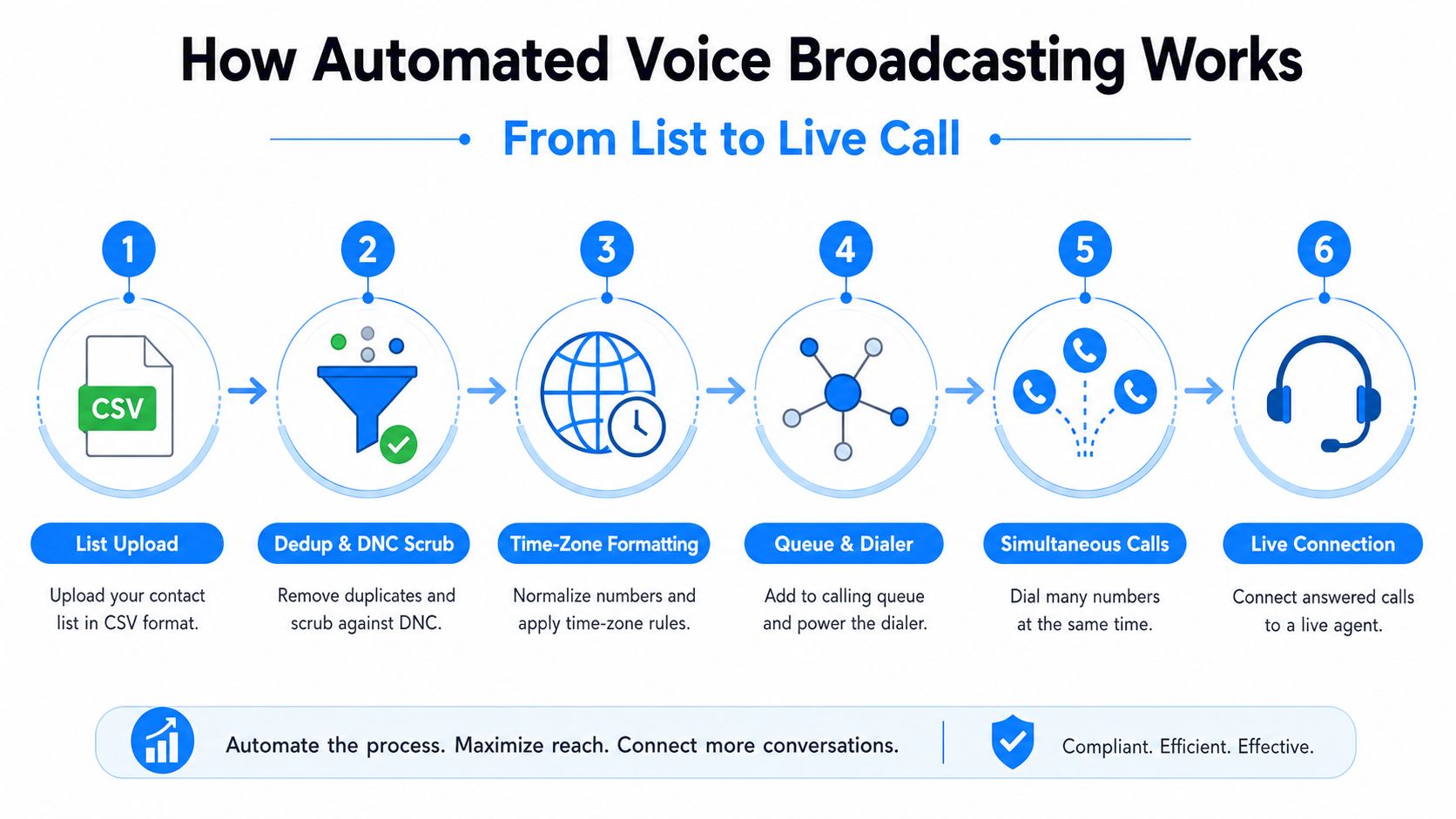
At a basic level, the system starts with a contact list and ends with a message being played only when someone answers. The middle is where the core work happens. A production platform will usually ingest a CSV or CRM export, remove duplicates, scrub against do-not-call records, map numbers into time zones, and queue the calls so the dialer can distribute them across parallel channels.
The platform doesn't always play audio the second a call connects. It first looks at the pickup pattern, then tries to decide whether a human answered, voicemail picked up, or the line is something else entirely. Answering-machine detection matters because the first 1 to 3 seconds of audio are often used to classify the result and route the call accordingly (LeadDesk support note).
That classification step sounds small, but it changes everything. If the system thinks voicemail is a person, it can play at the wrong time. If it thinks a person is voicemail, you lose a live connection and waste the opportunity to transfer or continue the call.
The message itself can come from a recorded file or from text-to-speech. Recorded audio gives you a fixed brand voice and consistent pronunciation, while TTS lets you insert live data like first name, appointment time, or provider name on the fly. Some platforms also support SSML tags, which help with pacing and pronunciation.
There are also two delivery styles people confuse all the time. Broadcast voice calls ring the recipient's phone normally, while ringless voicemail drops a message into the voicemail inbox without first triggering a ringtone. That distinction matters because the compliance rules are not the same, especially when wireless numbers are involved.
A simple campaign example makes the scale easier to understand. If a system is calling a 5,000-number list across parallel channels, the platform can clear it in a short window because it's not waiting on a human agent for every dial. The point isn't to “blast louder,” it's to move the dialing burden off people and onto the software while keeping control over what gets played, when it gets played, and where it lands.
A hobby tool can place calls. A production platform has to manage the entire campaign lifecycle. That means list management, scheduling windows, retry logic, throttle controls, dynamic variables, IVR menus, call recording, transcription, webhooks, CRM sync, and reporting dashboards that show more than just call count.
The most useful features are the ones that reduce manual cleanup. If you're running healthcare reminders, you want scheduling by time zone so a patient in one region doesn't get a call at the wrong hour. If you're running promotions, you want retry logic for unanswered numbers and throttles that keep the campaign from flooding a carrier route.
A useful rule is simple, if the platform can't tell you who answered, who transferred, and who opted out, it's not really campaign software. It's a dialer.
Practical rule: every campaign should end with a clean report, not just a pile of completed dials.
Recorded audio usually wins on trust and brand control. A real person's voice can sound warmer, and pronunciation tends to stay consistent once the file is approved. It also works well for fixed messaging, like a weather closure or a standard appointment reminder.
TTS wins when the message changes by recipient. If the patient name, appointment time, provider, or language needs to vary from call to call, TTS is far easier to scale. It also helps when you need to pivot late, or when you want to run a multilingual campaign without re-recording every version.
| Factor | Recorded Audio | TTS (Text-to-Speech) |
|---|---|---|
| Brand feel | Stronger human tone | More functional, less personal |
| Pronunciation | Stable once approved | Can vary by engine and field input |
| Personalization | Limited unless you splice files | Strong for dynamic fields |
| Speed of changes | Slower, needs re-recording | Fast, edit the script and relaunch |
| Best use case | Fixed announcements, trust-heavy messages | Appointment data, multilingual outreach, variable reminders |
| Production cost | Higher up front | Lower up front |
For a practical platform example, Call Loop's text-to-speech voice feature fits the same decision point many operators face, whether to preserve a human-sounding intro and use dynamic speech for the personalized middle, or keep everything in one recorded message.
The smartest teams often mix both. A human-recorded opener can establish tone, then TTS can carry the variables, and a recorded close can repeat the CTA in a familiar voice.
The mistake many teams make is treating live voice, ringless voicemail, and SMS as separate programs. In practice, they work better as a sequence. A patient or customer may ignore one channel, respond to another, and only convert when the message shows up in the right format at the right time.
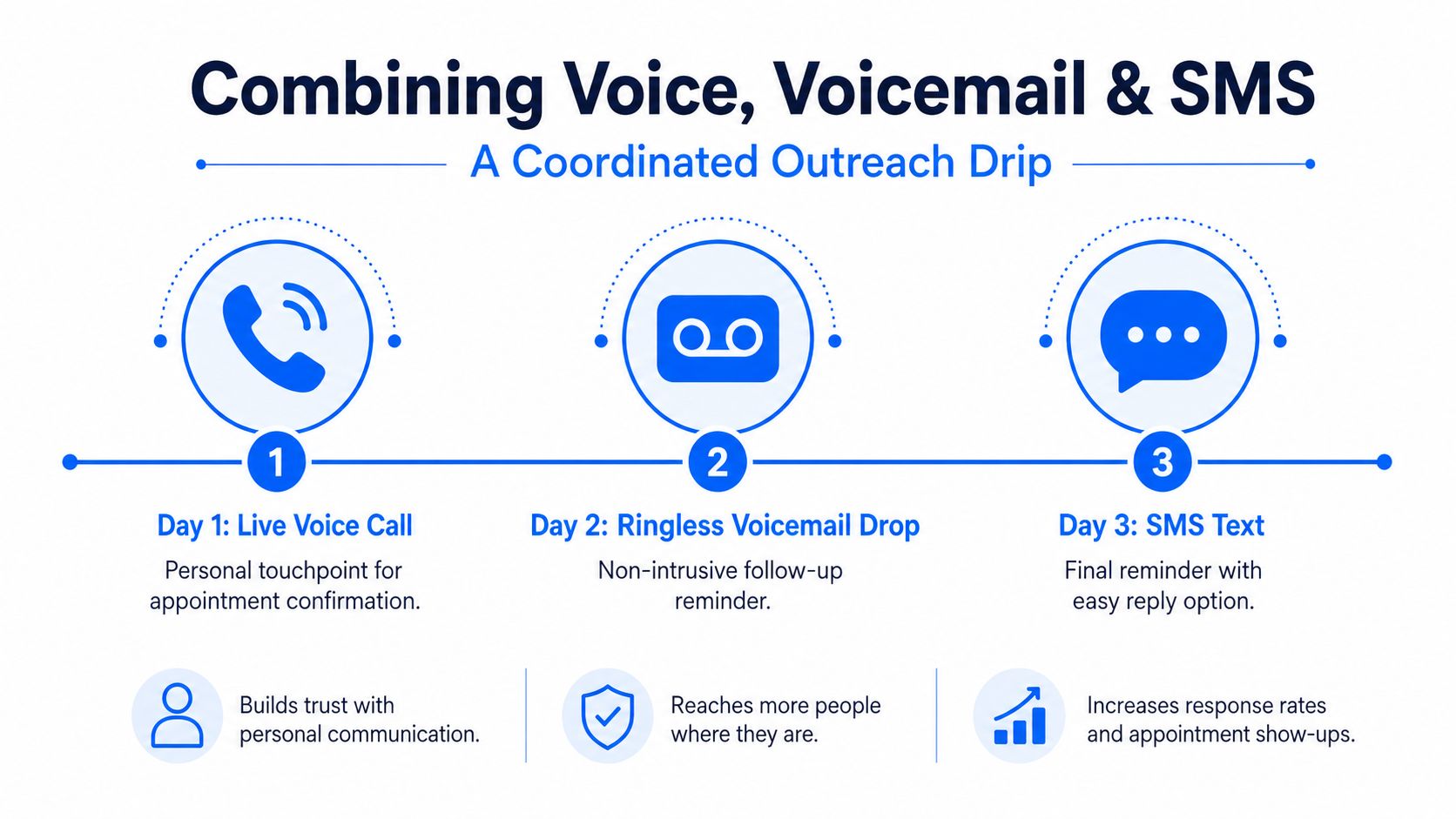
A dental clinic reactivation flow is a good example. Day one, the clinic sends a ringless voicemail that reminds lapsed patients they're due for a cleaning. Day two, the office sends a short SMS with a booking link. Day four, the team runs a live voice call that offers a press-1 transfer to the front desk for anyone who still hasn't booked.
The order matters because each channel has a different level of friction. Ringless voicemail is less intrusive than a live call, SMS is fast for links and confirmations, and live voice is best when you need a conversation. If the SMS is answered or the patient books, the number should be suppressed from later steps so you don't keep pushing a solved contact.
That's also where frequency capping comes in. If a patient has already replied, booked, or opted out on one channel, the campaign should stop treating them like a cold lead. A coordinated drip only works when the rules travel with the contact.
Ringless voicemail deserves special handling because the FCC treated it as a “call” made using an artificial or prerecorded voice in its 2022 Declaratory Ruling and Order, and said wireless delivery requires consent under the TCPA (FCC ringless voicemail summary). The FTC's 2023 Stratics Networks case also showed how aggressively enforcement can target large-scale unwanted VoIP and ringless voicemail robocalls (FTC case page).
For teams that want a broader playbook, Call Loop's ringless voicemail overview shows how voicemail drops fit into a managed outreach flow rather than a standalone blast.
Practical rule: if someone replies on SMS, stop the broadcast path on that number unless the person explicitly needs another follow-up.
The payoff is not channel volume. It's coordinated timing, fewer wasted touches, and a cleaner handoff into the front desk or sales team.
Not every voice campaign is treated the same way. The use case changes the consent standard, the number type changes the calling rule, and the content changes whether HIPAA or other privacy obligations come into play. That's why a promo blast, a reminder call, and an emergency alert don't belong in the same compliance bucket.
Promotional marketing is the strictest lane. If you're using automated or prerecorded voice for marketing, TCPA consent requirements get serious fast, especially for wireless numbers. The FCC also confirmed that calls using AI-generated human voices are treated as prerecorded under the TCPA, so prior express consent applies to those broadcasts (FCC AI voice ruling).
Healthcare reminders and treatment-related communications can be lawful, but the privacy layer still matters. If the message contains protected health information, you're in HIPAA territory, and the distinction between treatment, payment, and marketing affects how you draft the script and store the data. For patient outreach, the message should be built around minimum necessary disclosure and clean consent tracking, not just call completion.
Emergency and weather alerts sit in a different category because life-safety communication gets special treatment in many contexts. Political and GOTV outreach can also have distinct carve-outs from some DNC restrictions, but those messages still need campaign-specific review before launch.
| Use Case | Consent Required | DNC Treatment | HIPAA Applies | Key Caveat |
|---|---|---|---|---|
| Promotional marketing | Prior express consent, and often stricter written consent standards for automated outreach | Scrub against restrictions before launch | Usually no | Marketing content raises the most exposure |
| Appointment and payment reminders | Consent is still needed, depending on number type and message design | Honor opt-outs and suppression lists | Often yes for patient data | Keep the script narrow and avoid unnecessary PHI |
| Emergency and weather alerts | Usually governed by emergency exception frameworks | Rules may be different for life-safety notices | Sometimes, if patient data is involved | Don't mix alerts with marketing copy |
| Political and GOTV outreach | Consent and DNC treatment vary by jurisdiction and message type | Some political calls get different treatment | No | Local rules still matter |
| Healthcare patient communications | Consent documentation is critical | Suppress opted-out numbers | Yes | Script design and record handling both matter |
For a deeper operational checklist, Call Loop's TCPA compliance guide is the right place to sanity-check consent, disclosure, and opt-out handling before you launch.
The biggest operational gap is usually proof. Teams often know they got consent at some point, but they can't quickly show when, how, and for which campaign. That's where good logging matters more than a polished script.
A lot of teams still talk about list size like it's the main lever. It isn't. In 2026, the difference comes from whether your calls are answered, connected, and acted on. The list that performs better is usually the cleaner one, not the bigger one.
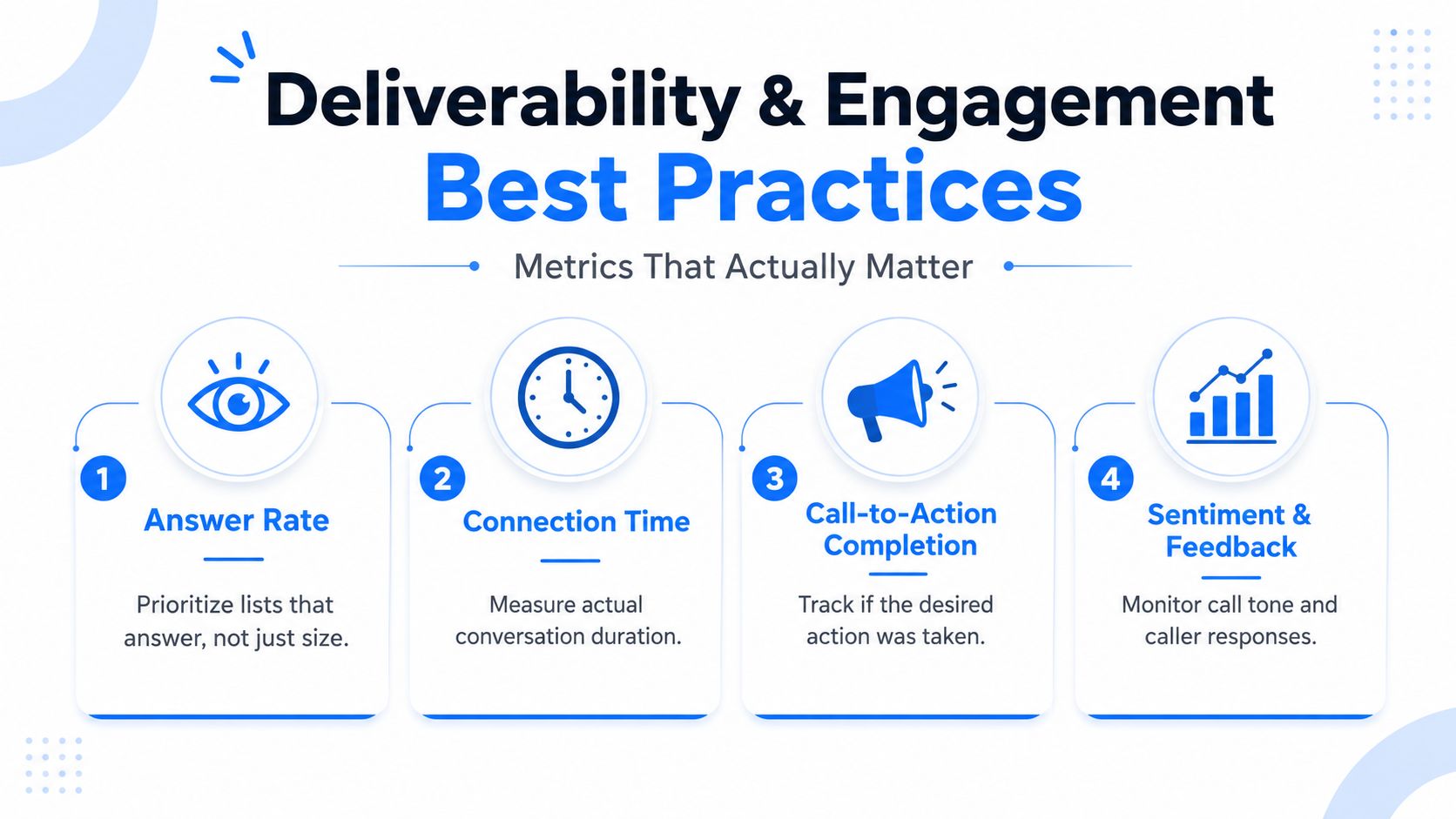
The most useful metrics are answer rate, average talk time, opt-out rate, and press-1 transfer rate. If people answer but hang up instantly, the script is off. If people transfer but no one picks up on the other end, the routing is broken. If opt-outs climb, the list or the message is wrong for the audience.
Send timing matters too. A reminder for a clinic and a promotion for a retail store shouldn't leave at the same hour just because the dialer can do it. Local-time compliance is table stakes, but the better move is to align the send with when your audience is most likely to answer, not just when your team is free.
Practical rule: a smaller, cleaner list with better connect behavior usually beats a larger list that gets screened out or ignored.
The FCC complaint numbers and scam volume data in the earlier section explain why carriers and consumers are more defensive now, so deliverability isn't just a technical concern. It's part of how the channel survives contact with the world. If the platform gets labeled as annoying or suspicious, the message never gets the chance to land.
A clean rollout saves more money than a clever script. The sequence should be boring on purpose, because the problems usually show up in the small things, not the headline campaign idea.
Start by defining the goal in one sentence. Then build the consent list, choose TTS or recorded audio, configure answer-detection thresholds, and run a 50-number pilot before you scale. That pilot should test message clarity, transfer behavior, opt-out handling, and whether the system routes voicemail the way you expect.
Once the pilot looks clean, widen the audience in stages. Healthcare teams should also check how patient data is passed, stored, and logged before moving from test records to live records. SMBs should do the same with CRM fields and caller ID settings, because broken merges and bad metadata cause real campaign drag.
| Failure | Likely Root Cause | Fix |
|---|---|---|
| AMD misfires | Thresholds too aggressive or audio starts too slowly | Shorten the intro and retune answer detection |
| Voicemail detection drops | Beep timing or detection window is off | Re-test with real carrier behavior and adjust timing |
| Blocked caller ID | Number reputation is weak or presentation is inconsistent | Stabilize the caller ID and clean the list |
| Dropped calls mid-message | Carrier issues, audio file problems, or route congestion | Check file length, delivery route, and retry logic |
| Low answer rates | Bad list quality or poor send windows | Segment the list and change timing before increasing volume |
| Evaluation Criteria | What to Look For | Red Flag to Avoid |
|---|---|---|
| Carrier relationships | Stable delivery routes and transparent routing practices | Vague claims about “guaranteed” deliverability |
| AMD accuracy | Tunable detection and clear logs | No explanation of voicemail classification |
| HIPAA BAA availability | Willingness to sign a BAA when needed | Refusal to discuss healthcare use cases |
| Consent logging | Clear proof of opt-in, opt-out, and campaign history | No audit trail |
| Throughput | Enough parallel capacity for your list size | Manual bottlenecks during scale-up |
| Pricing transparency | Clear fees tied to usage and outcomes | Hidden per-minute charges |
| CRM or EHR integration | Clean sync with your existing systems | No documented integrations |
| DNC scrubbing | Built-in suppression controls | No scrubbing or manual workarounds |
Call Loop fits this category as an outbound platform for SMS, voice broadcasting, and ringless voicemail, with answer detection, press-1 transfers, custom caller ID, recorded or TTS audio, and DNC management, so it's one of the platforms worth comparing against your own workflow rather than building a patchwork of tools around it.
If you're setting up your first or next campaign, start with one clean list, one narrow use case, and one measurable goal. Then visit Call Loop to see how a single platform can handle voice broadcasting, ringless voicemail, and coordinated follow-up without forcing your team to stitch the workflow together by hand.
Chris Brisson
Chris is the co-founder and CEO at Call Loop. He is focused on marketing automation, growth hacker strategies, and creating duplicatable systems for growing a remote and bootstrapped company. Chat with him on X at @chrisbrisson


Trusted by over 45,000 people, organizations, and businesses like


