
See a Demo
You're just one step away from seeing Call Loop in action.
Enter your information below to watch a demo right now.

You're just one step away from seeing Call Loop in action.
Enter your information below to watch a demo right now.

A back in stock alert is one of the few ecommerce messages that can convert while the shopper still remembers why they wanted the item in the first place. Benchmarks compiled in 2026 put average open rates at 58.03% to 65.32%, average click-through at 21.19%, and purchase rate among clickers at 30.5%. That's not courtesy messaging, it's a revenue-recovery channel that sits in a different performance class from ordinary email marketing, where average conversion sits around 5% to 6% and top stores can reach 18% to 22%, according to the same benchmark set. recover lost revenue with stock alerts is a useful reminder that the best restock programs are built around intent, not broadcast volume.
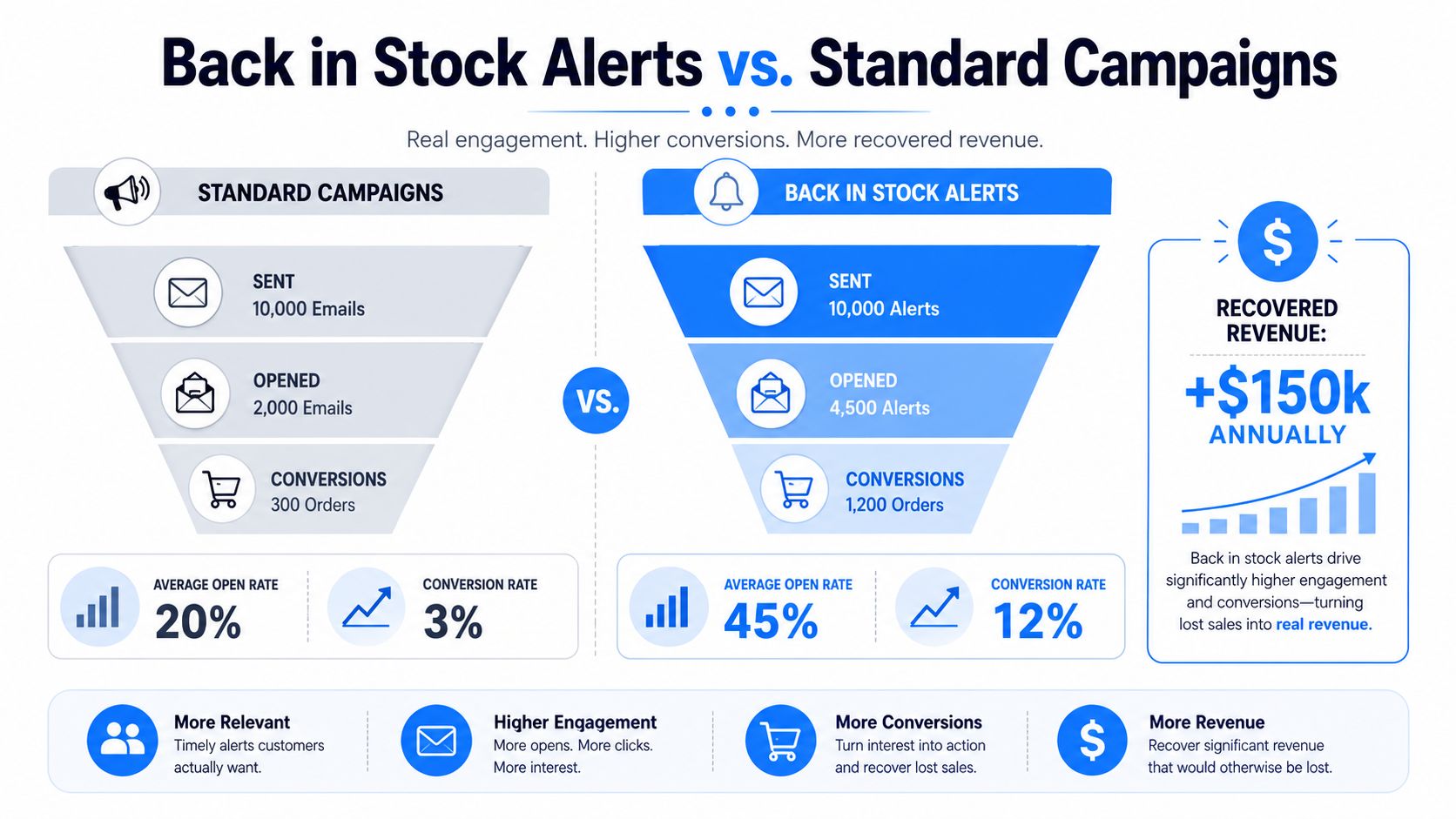
The reason a back in stock alert beats a routine promotion is simple, shoppers asked for it. They're not scanning a crowded inbox for inspiration, they're waiting for a specific item to return, which is why benchmark data for 2026 shows open rates of 58.03% to 65.32% and a click-through rate of 21.19% for restock alerts StoreBeep's 2026 back-in-stock benchmarks. That same benchmark set reports a 30.5% purchase rate among people who click, which makes the message feel less like marketing and more like a transaction trigger.
The gap versus standard email is the point. In the same source, overall email conversion averages 5% to 6%, while top-performing stores can reach 18% to 22%, and top back-in-stock programs can produce 30% to 35% click rates. That's a very different operating model. A normal campaign is trying to create attention. A restock alert is trying to capture existing demand before it cools.
Practical rule: treat the alert like a checkout assist, not a newsletter. The copy, timing, and button placement should all push the shopper back to the product page as fast as possible.
That framing matters because it changes how you judge success. If a restock message earns lower send volume than a promo blast but converts faster, it can still recover more lost revenue. For teams comparing use cases, the business logic is closer to inventory recovery than to brand email. A broader discussion of that framing appears in the Quikly resource on turning stock-outs into recovered revenue.
The practical lesson is to stop measuring these alerts against standard promotional content. Measure them against the value of the item that sold out, the cost of lost demand, and how quickly the alert reaches someone who already raised a hand.
A back in stock alert only works if the trigger is clean. If inventory flips back to available before the system recognizes the exact SKU or variant, the message goes late. If the trigger fires for the wrong size or color, the trust cost is immediate. The architecture has to start with the inventory source, then move through a real-time trigger, then into segmentation, and only then into the channel that reaches the subscriber.

The strongest programs tie each subscriber to the exact variant they asked for, not just the parent product. That means size, color, capacity, or any other differentiator has to be stored as part of the request. When the item returns, the system should look for that precise match before dispatching anything.
This is where integrations matter. Your ecommerce platform or inventory system needs to pass availability changes into a messaging tool through a trigger layer, and that layer needs to evaluate whether the request still matches the current stock state. A helpful model is the real-time synchronization mindset used in operational tools, which is why the logic described in synchronization for B2B pricing teams is a good mental parallel, even though the use case is different. The core idea is the same, the data has to be fresh enough to act on.
A clean trigger flow usually needs four decisions made up front:
For teams using SMS trigger logic, the internal feature overview at https://www.callloop.com/features/sms-trigger shows how a trigger can be tied to a specific event rather than a broad campaign. That structure is what keeps restock notifications from becoming random blasts.
The operational takeaway is blunt. If the data flow is sloppy, the restock alert will be sloppy. If the trigger is tied to the right SKU and the right subscriber record, the alert feels timely and relevant instead of noisy.
The best opt-in moment is the moment the shopper discovers the item is gone. That's when the desire is fresh and the trade-off is visible. If you make them hunt for a form or force them through a long signup path, some of that intent disappears before you've captured it.
The simplest flow is also the strongest. Put the signup close to the sold-out product, label it clearly, and ask only for the details you need to send the alert. If the customer wants a text, keep it to a phone number. If you need email, capture that without layering on extra fields that don't help the restock message.
Text-to-join keywords work well for existing customers who already know the brand, because the action is easy to remember and easy to repeat. A web form works better when the shopper is already on the product page and expects a direct notification path. In both cases, the sign-up should feel like a promise, not a lead magnet.
The opt-in explanation also matters. Tell people what they're signing up for, whether they'll get one message or a short sequence, and how the alert is tied to the specific product they chose. That clarity keeps unsubscribe complaints down later.
For a practical example of text-based enrollment flow, the internal guide at https://www.callloop.com/blog/opt-in-text is a useful reference point for how a keyword-based path can stay short without feeling vague.
Don't bury the promise behind extra marketing language. If the shopper wants the black size 9 running shoe, say that's what they'll be notified about.
A good signup flow doesn't just collect contact data. It stores the product name, variant, and any custom tags that help the alert hit the right person at the right time. Merge fields and custom fields are useful here because they let the outgoing message mirror the exact item the shopper requested. That keeps the experience coherent when the inventory returns.
Double opt-in can still make sense, especially for brands that want a cleaner permission trail. The trade-off is friction, so it works best when the product value or repeat purchase potential justifies the extra step. The key is to decide that upfront instead of bolting it onto a flow that was already designed for speed.
A strong restock message doesn't try to do everything. It announces the return, shows the product, and makes the buy path obvious. That structure is tight for a reason, because the shopper already knows the item and doesn't need a brand essay before they click.
The most useful notifications name the product and the exact variant up front. That means size, color, capacity, or whatever detail made the request specific in the first place. A subject line like “Your black 8oz travel bottle is back” is immediately clearer than “It's back,” because the shopper doesn't have to decode whether the message applies to them.
That same rule holds in SMS. Keep the first line direct, keep the item obvious, and put the CTA close to the top. In email, one source recommends 2 to 4 short lines before the CTA, while SMS should stay at 1 to 2 short lines before the button or link Timesact's back-in-stock email guidance. The value of that advice is not about word count for its own sake. It's about keeping the conversion path short enough that the shopper doesn't drift.
Practical rule: if a shopper has to read three paragraphs to figure out what came back, the alert is too long.
Email can carry a product image, a short reminder, and a purchase button without feeling cramped. SMS should be even leaner, because the medium rewards clarity over detail. Ringless voicemail sits somewhere else entirely. It can work as a follow-up for high-value products or for contacts who didn't move on the first alert, but the message still needs to stay focused on the returned item and the next action.
A concise template usually looks like this:
That's it. Anything extra has to earn its place. If you want more examples of clean restock copy, the StarApps guide on back-in-stock notification wording and structure is useful because it reinforces the same mechanics, exact identification and early CTA placement.
The best alerts sound calm, not desperate. They're specific, easy to scan, and designed to help a ready buyer move quickly.
The right channel depends on how fast the item moves and how much attention the shopper still has left. A back in stock alert for a hyped drop should behave differently from a notification for a routine replenishment, and the channel mix should reflect that. SMS wins on speed. Email wins when the message needs more room. Ringless voicemail can bridge the gap when a customer has not acted and the item is still worth pursuing.
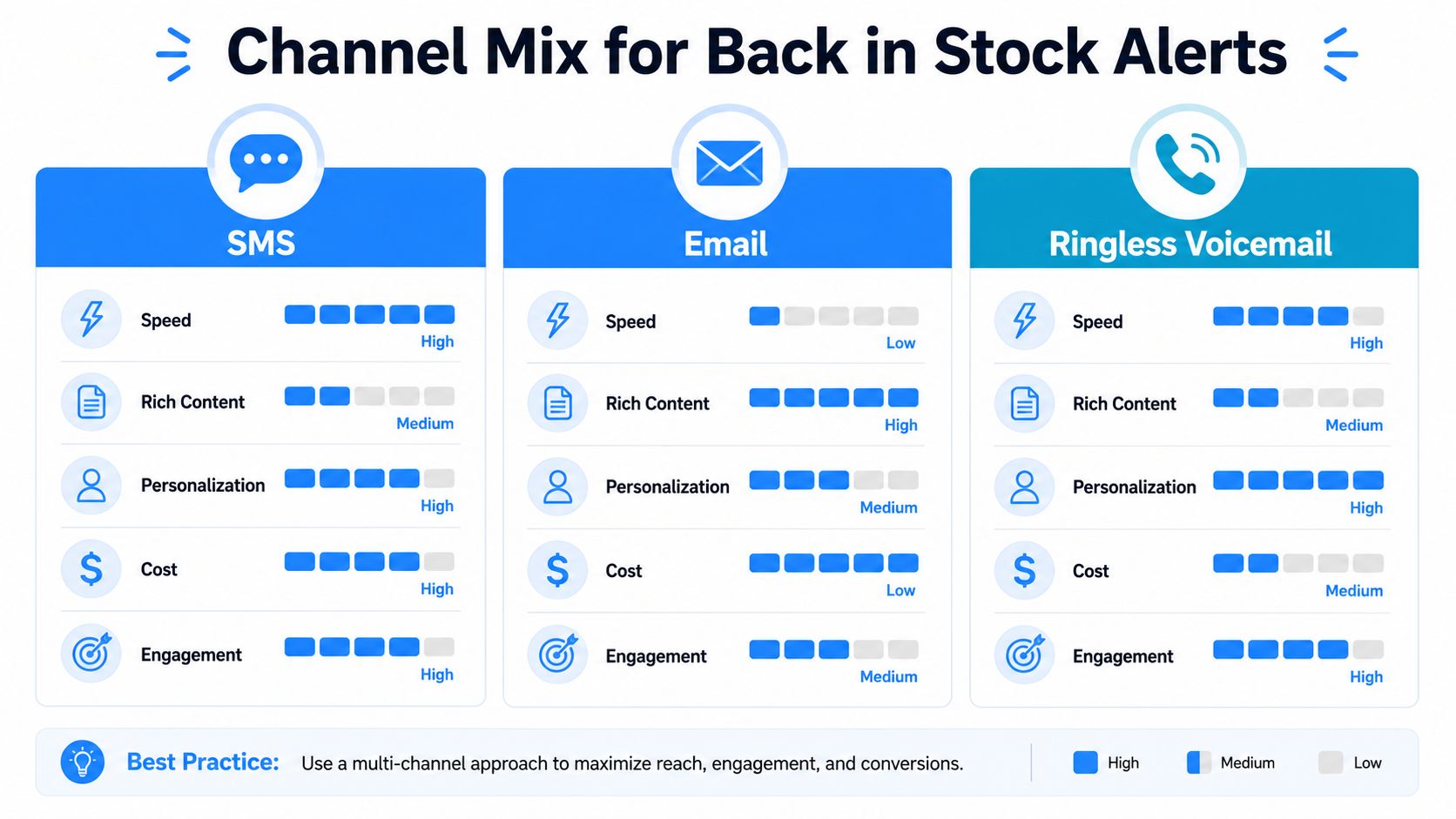
For fast-selling items, timing is everything. A 2026 analysis says that when restock emails go out within 5 minutes of inventory returning, conversion reaches 22%, but it falls to 14% after 1 hour and 8% after 24 hours Werner Strauch's back-in-stock analysis. That pattern is why SMS often makes sense when the stock window is narrow. The shopper still has a reason to act now.
Email can still win for considered purchases. If the item is expensive, technical, or part of a longer decision cycle, a richer message can help by showing the product and giving the buyer a calmer path back. Ringless voicemail is strongest when the first two touches didn't land, or when the product is high-value enough to justify a more personal follow-up.
A multi-channel sequence should feel coordinated, not repetitive. If SMS fires first, email can follow with a cleaner product view, and voicemail can act as the later nudge for people who didn't respond. The point is to stagger attention, not repeat the same sentence across three mediums.
A practical comparison looks like this:
That sequencing matters more than the channel itself. The wrong mix can make a shopper feel chased. The right mix makes the alert feel like help.
Not every sold-out product deserves its own restock flow. Some items sell through so fast that a notification arrives after the useful window. Others sit out of stock long enough that a simple alert is enough to capture demand. The mistake is assuming every product should get the same treatment.
Inventory velocity is the deciding factor. Independent monitoring guides note that hyped drops may sell out in 15 to 30 minutes, which is why they can require checks every 5 minutes, while regular retail restocks can stay available for hours or days and may only need checks every 30 to 60 minutes or even less often Visualping's back-in-stock monitoring guide. That difference changes the whole alert strategy.
If the item disappears almost instantly, an alert can still be valuable, but only if the message can reach people immediately and the stock lasts long enough for them to buy. If the item returns more slowly, the alert window is forgiving and the channel mix can be broader. In both cases, the question is whether the alert reaches a shopper while the item is still meaningfully available.
Practical rule: if the product is gone before the notification system can reasonably fire, the alert program is mostly creating false hope.
A better framework is to sort products into three buckets.
That last bucket matters more than teams admit. Turning on alerts for every out-of-stock item can lower trust if the subscriber keeps getting messages for products that never seem to matter. It's better to withhold the alert option entirely than to keep sending notifications that feel late or irrelevant.
The smarter program is selective. It protects the customer experience and concentrates effort on the items where timing changes the sale.
A restock program can look healthy on open rates and still be operationally weak. SMS compliance, permission handling, and data hygiene all shape whether the program stays useful over time. If the send path is sloppy, complaints rise and the whole channel gets harder to trust.
For SMS, the compliance baseline needs to be tight. DNC handling, double opt-in where appropriate, and clear permission language should be standard operating practice, not cleanup work after launch. For regulated products, especially in healthcare, the compliance bar is even higher. The internal checklist at https://www.callloop.com/blog/sms-compliance-checklist is a useful operational reference for the discipline needed around text messaging.
If your alert copy includes links, sender names, or promotional language, run the message through a deliverability lens before it goes live. A practical external tool like the MailGenius spam checker can help flag obvious inbox-placement problems before they affect a high-intent send.
Open and click data tell part of the story, but not the whole story. You also need to look at whether the alert reaches the right SKU, how often subscribers convert after clicking, and whether people keep engaging with future restock notices. If open rates are strong but purchases are weak, the issue may be timing, product-page friction, or a mismatch between the message and the actual inventory state.
Optimization should be boring and repetitive. Test subject lines, compare SMS against email for the same product group, and watch whether a shorter message performs better than a slightly longer one. If complaints start to rise, the fix is usually not more urgency, it's tighter relevance.
The best restock programs get better because the team keeps removing friction, not because they keep adding hype.
If you want a restock system that recovers sales instead of creating inbox clutter, build it around timing, variant accuracy, and the right channel mix. Call Loop gives teams the SMS, voice, and ringless voicemail tools to automate that kind of follow-up without turning each alert into a manual task. Visit Call Loop to see how a tighter alert workflow can fit your ecommerce stack.
Chris Brisson
Chris is the co-founder and CEO at Call Loop. He is focused on marketing automation, growth hacker strategies, and creating duplicatable systems for growing a remote and bootstrapped company. Chat with him on X at @chrisbrisson


Trusted by over 45,000 people, organizations, and businesses like


