
See a Demo
You're just one step away from seeing Call Loop in action.
Enter your information below to watch a demo right now.

You're just one step away from seeing Call Loop in action.
Enter your information below to watch a demo right now.

23 billion texts are sent worldwide daily, a scale that makes SMS hard to dismiss as a side channel or a nice-to-have add-on. That number helps explain why keyword text messaging works so well for local businesses, healthcare practices, ecommerce brands, events, and service teams that need a faster path from attention to action, according to Mobivity’s history of text messaging.
The appeal is simple. A customer sees a clear prompt, texts one word, and starts a direct conversation with your business. No form friction. No app download. No waiting for a salesperson to follow up three days later.
Used well, keyword text messaging does more than grow a list. It can become the front door to a full customer journey that includes SMS, voice broadcasting, and ringless voicemail. That matters if you want one action to trigger a sequence instead of a dead-end autoresponder.
Keyword text messaging is a permission-based opt-in method where a customer texts a specific word or phrase to your business number to start an interaction.
Think of it as a digital handshake. The customer makes the first move. You respond instantly with the next step.
A karate studio might ask parents to text CLASS to get trial details. A retailer might use SALE for a same-day coupon. A clinic might use APPT to start reminder enrollment. The keyword is the trigger. The reply is the first promised value.
SMS has been around long enough to prove it is not a fad. The first text message was sent on December 3, 1992, by engineer Neil Papworth over the Vodafone network in the UK, reading “Merry Christmas.” By 2007, Americans sent more texts than calls monthly, and today texting operates at global scale, as outlined in this brief history of SMS messaging.
That history matters because keyword campaigns sit on top of a behavior people already understand. Customers do not need training to send a text. They already know how.
For small and mid-sized businesses, keyword text messaging solves a few practical problems at once:
Tip: The strongest keyword campaigns feel like a direct exchange. The customer sends one word. You deliver one clear value right away.
If you are trying to build a list without making people fill out another form, keyword text messaging is one of the simplest ways to start.
The easiest way to understand the mechanics is to think of a digital vending machine.
The keyword is the button the customer presses. The platform reads that input, matches it to a configured action, and dispenses the right response immediately.
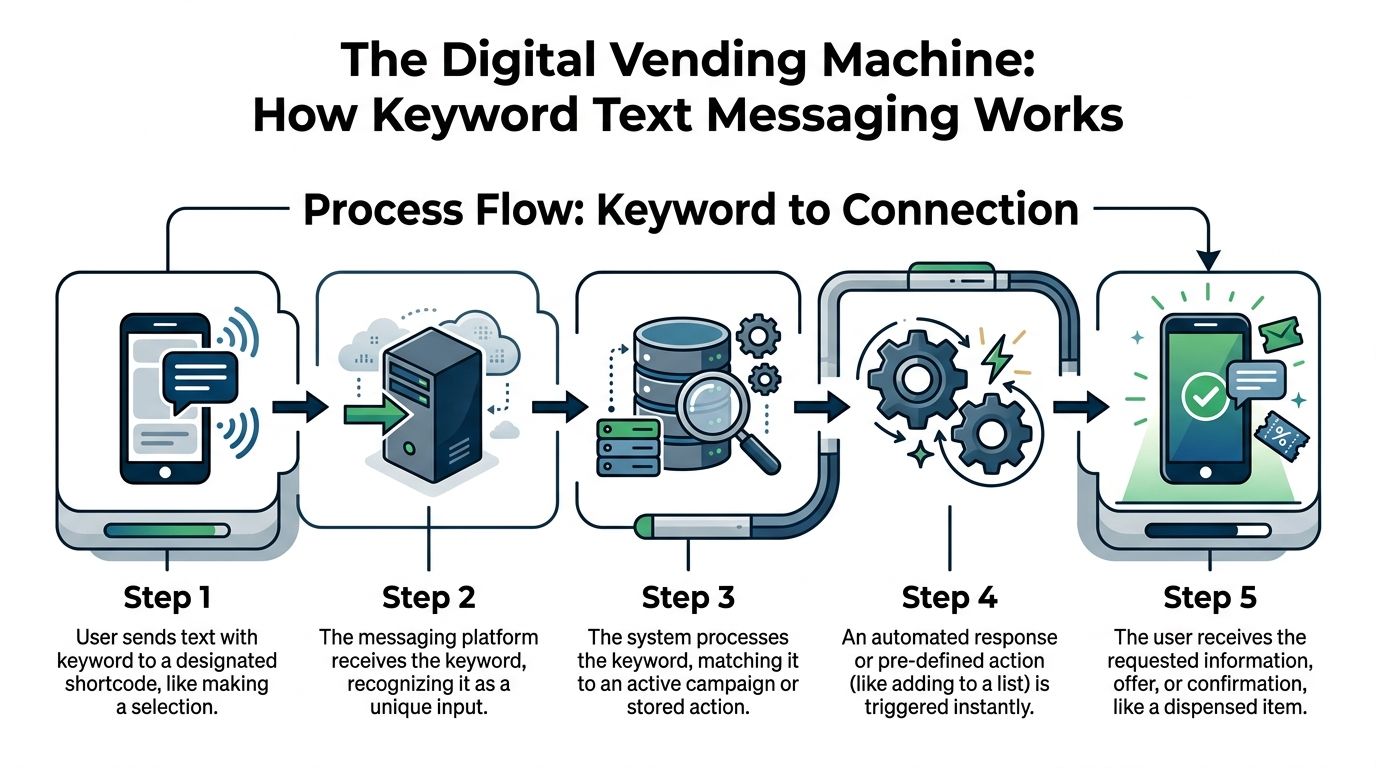
A keyword campaign usually follows this sequence:
A customer sees the call to action
Example: “Text DEAL to our number for today’s offer.”
The customer sends the keyword
That message goes to a designated short code, toll-free number, or registered long code. If you need the basics on number types, this overview of what short codes are is useful.
The platform matches the keyword
The SMS system uses pattern matching to recognize the incoming word and identify the right campaign.
An automated reply goes out instantly
That reply can confirm the opt-in, deliver a coupon, send a link, or ask for the next piece of information.
The contact is added to a segmented list
The person is tagged based on the keyword they used, which shapes future messaging.
When a consumer texts a keyword, the SMS platform’s autoresponder instantly recognizes it via pattern matching and dispatches a pre-programmed reply, while simultaneously appending the user to a segmented subscriber list. This mechanism also supports TCPA compliance by capturing explicit double opt-in consent in the auto-reply, such as “Reply YES to confirm,” and registered 10DLC campaigns can reduce carrier filtering risks by 40-50%, according to Vibes on SMS keywords.
That sentence sounds technical, but the business takeaway is straightforward. A good setup does three jobs at once:
Poor setups break at the exact point where intent is highest. Common issues include a vague keyword, an unclear reply, or a campaign that dumps everyone into one generic list.
A solid setup is tighter. It uses one memorable keyword per intent, one clear auto-reply, and one segmentation rule that tells the rest of your system what to do next.
Here is a simple comparison:
| Setup choice | What works | What fails |
|---|---|---|
| Keyword | Short, obvious, tied to the offer | Clever wording people forget |
| Reply | Confirms action and delivers value | Generic “thanks” with no next step |
| List logic | Tags by source or interest | Sends all contacts into one bucket |
| Consent flow | Explicit confirmation path | Assumes permission without proof |
Key takeaway: The best keyword text messaging systems do not stop at an autoresponder. They create a usable subscriber record the second the text arrives.
That is why keyword campaigns scale. The customer experiences one simple action. Your backend captures structure, consent, and context in the same moment.
The quickest way to see the value of keyword text messaging is to look at how different businesses use it in practice.
SMS is strong when speed matters. SMS boasts 98% open rates, compared with 20-30% for email, with 90% of messages opened within 3 minutes and average responses around 90 seconds, according to SimpleTexting’s texting benchmarks. That makes keyword campaigns a practical fit for offers, reminders, check-ins, and event actions that lose value when delayed.
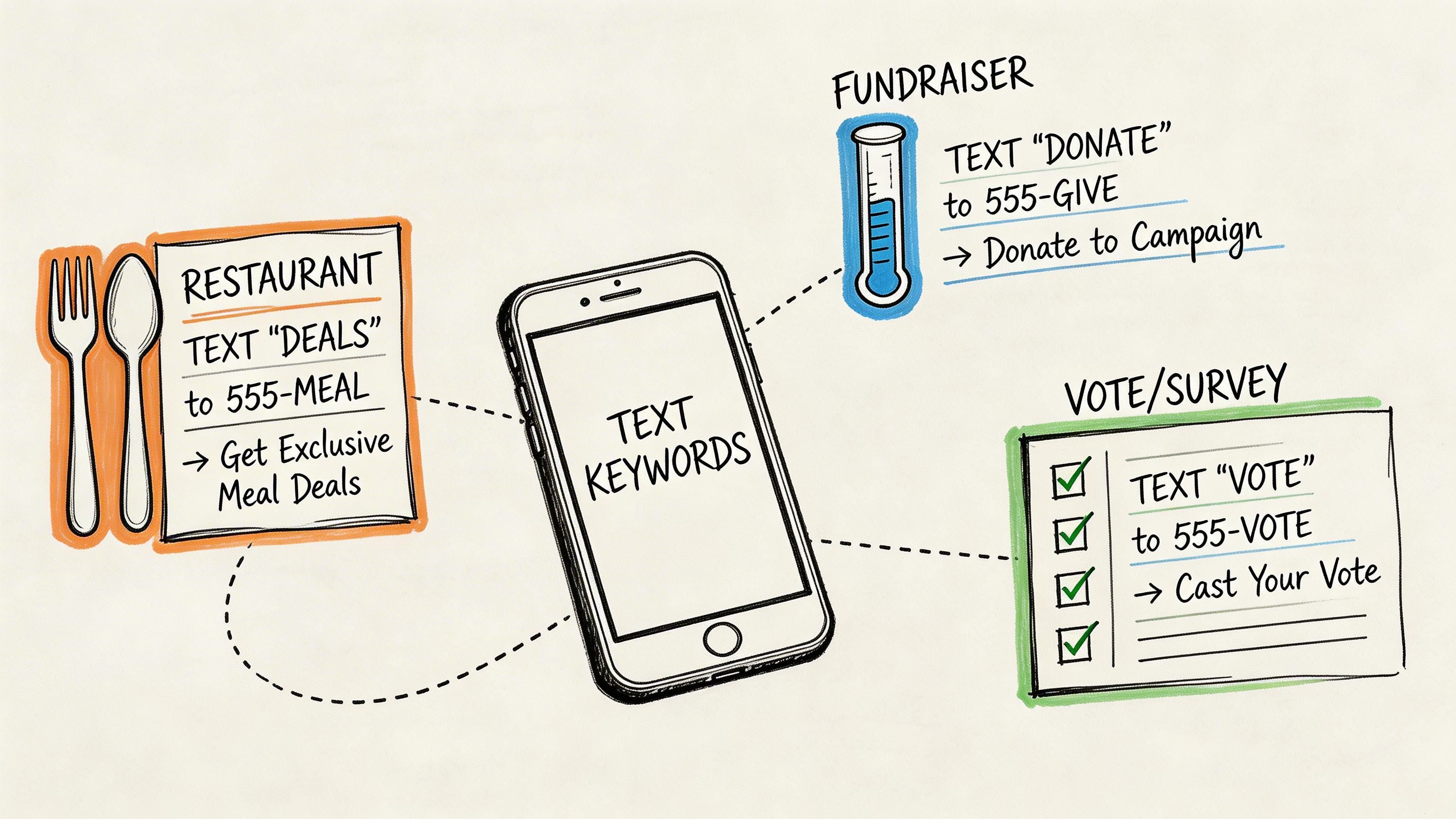
A neighborhood shop does not need a complicated funnel to benefit from keywords. It needs a fast opt-in tied to a visible offer.
Window sign:
Receipt footer:
In-store poster:
These campaigns work best when the reward is immediate and specific. “Join our list” is weaker than “text VIP for first access to weekend drops.”
Restaurants often have multiple moments where a keyword can capture intent without interrupting the customer.
A few examples:
The mistake here is overloading the first reply. Deliver the promised item first. Save the longer sequence for later follow-up.
Live events produce attention in bursts. Keywords let you catch that attention before it disappears.
A webinar host can display:
An event organizer can place on-screen:
A training business can use:
What works is alignment between the keyword and the next action. If the audience expects slides, send the slides or the link immediately. Do not bait people with one offer and route them into something unrelated.
Healthcare teams often need a clean, patient-initiated opt-in path for reminders, updates, or follow-up instructions.
A clinic might use:
In regulated settings, the biggest win is not novelty. It is clarity. Patients need to know what they are opting into and what kind of communication they will receive.
Home services, auto repair shops, insurance offices, and consultants can use keywords to reduce back-and-forth.
Examples include:
These are especially useful when calls come in after hours. A missed call can still turn into a text-based lead path if your voicemail, ad, or follow-up message gives the customer a keyword to use.
Agencies and franchise-style businesses can use separate keywords to keep sources clean.
A practical setup might look like this:
| Audience | Keyword | Purpose |
|---|---|---|
| Facebook ad leads | INFO | General inquiries |
| Storefront foot traffic | LOCAL | Location-specific offers |
| Event booth visitors | DEMO | Product interest |
| Past customers | VIP | Loyalty or reactivation |
The advantage is operational, not just marketing-related. Different keywords create cleaner lists, better follow-up logic, and fewer irrelevant broadcasts.
Tip: If you cannot explain the value of a keyword in one short sentence, the offer is probably too vague.
The strongest use cases all share one trait. They remove friction at the moment when the customer is already paying attention.
A keyword campaign usually succeeds or fails before the first message goes out.
The difference is planning. Not complex planning. Just the right decisions made in the right order.
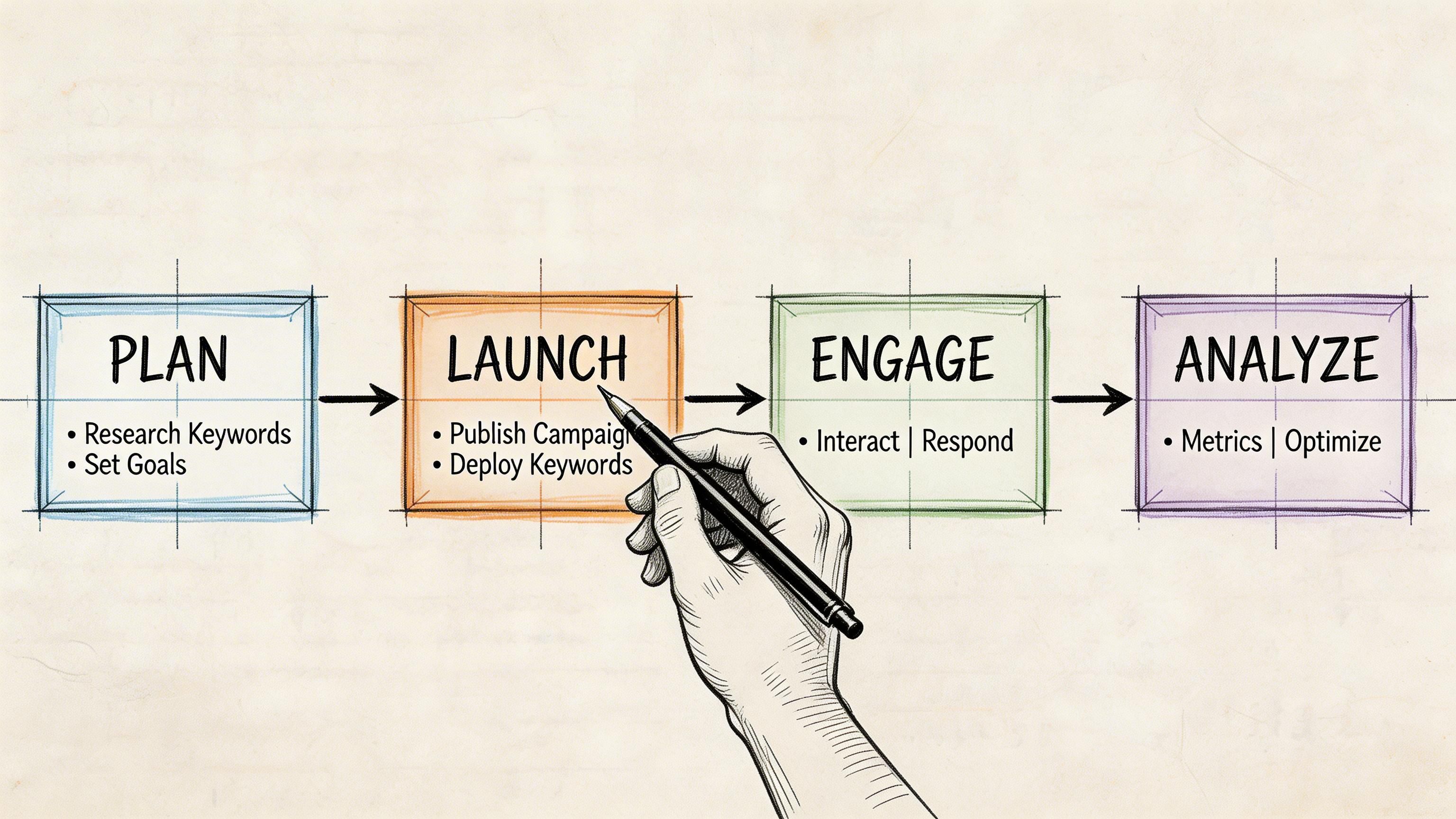
Short beats clever.
A good keyword is tied to the offer or intent. SALE, APPT, DEMO, VIP, CLASS, and MENU all work because the customer can understand them at a glance. Long phrases, odd spellings, and punctuation-heavy ideas create avoidable mistakes.
Three useful tests:
If a business runs multiple campaigns, naming also needs discipline. NEWS and VIP can coexist. NEWS1, NEWS2, NEWSX usually become a mess unless there is a clear internal system behind them.
The first auto-reply should confirm the action and deliver the promised value.
That is not the place for brand storytelling. It is the place for clarity.
A strong first reply usually includes:
Bad first reply:
Better first reply:
The difference is obvious. One creates uncertainty. The other tells the customer exactly what happens next.
Tip: Every keyword promise should be fulfilled in the first response, not buried in message three.
Do not collect subscribers into one big list and “figure it out later.”
The keyword itself is a segmentation tool. Someone who texts APPT has different intent from someone who texts SALE. Someone who texts DEMO is not asking for the same follow-up as a person who texts NEWS.
A simple segmentation plan can look like this:
| Keyword | Subscriber intent | Best follow-up |
|---|---|---|
| SALE | Promotional interest | Time-sensitive offers |
| DEMO | High-intent lead | Appointment and sales follow-up |
| NEWS | General updates | Ongoing announcements |
| APPT | Service coordination | Reminder and scheduling messages |
This is also where platform choice matters. Tools that support list organization, merge fields, scheduling, double opt-in, and integrations make the campaign easier to maintain after launch. For practical ideas on subscriber growth before you promote your first keyword, see these ways to grow your SMS marketing list.
A keyword on a website popup behaves differently from a keyword on a voicemail or a countertop sign.
For each channel, ask:
On a live event slide, short and direct wins. On packaging, a loyalty or reorder keyword may make more sense. On hold audio or voicemail, the wording must be simple enough to remember without seeing it.
Internal testing catches most avoidable problems.
Check:
This is not glamorous work, but it saves wasted traffic. A campaign that looks fine in your dashboard can still confuse users if the wording is vague or the first reply feels incomplete.
Keyword text messaging only works long term if customers trust the process and carriers accept your traffic.
That means compliance is not a box to check after launch. It is part of the campaign design.
If someone texts your keyword, you still need a clean record of what they agreed to receive. The prompt, the reply, and the follow-up flow should all align.
Customers should understand:
This is one reason double opt-in matters in many workflows. It creates a clearer audit trail and reduces ambiguity if a complaint ever appears.
Technical specifications for SMS keyword autoresponders mandate universal support for the STOP keyword as per CTIA guidelines, triggering immediate opt-out. Carrier-enforced penalties for non-compliance can be up to $1,500 per violation in the US, which is why automated compliance handling matters, according to Sakari’s guide to texting keywords.
In practice, that means your system should process opt-outs immediately and consistently. No manual delay. No hidden unsubscribe path. No “contact support to be removed.”
Businesses sometimes treat compliance language as a burden. That is the wrong frame.
Clear consent and easy opt-out behavior make the interaction feel safer. Customers are more likely to join when they understand the terms, and less likely to complain when they can leave just as easily.
A practical compliance checklist looks like this:
If your keyword campaign connects to voice broadcasts, ringless voicemail, CRM syncing, or appointment reminders, review the entire workflow, not just the first text.
For teams building a wider governance process, this guide to complying with regulations is a useful reference because it frames compliance as an operating discipline rather than a last-minute legal review.
Key takeaway: The safest keyword campaign is also the clearest one. Customers know what they signed up for, your platform records it, and opt-out handling is automatic.
That approach protects deliverability, lowers risk, and keeps your list healthier over time.
A keyword should not always end in one reply.
In many campaigns, the smarter move is to treat the keyword as the front door to a coordinated sequence across SMS, voice broadcasting, and ringless voicemail.
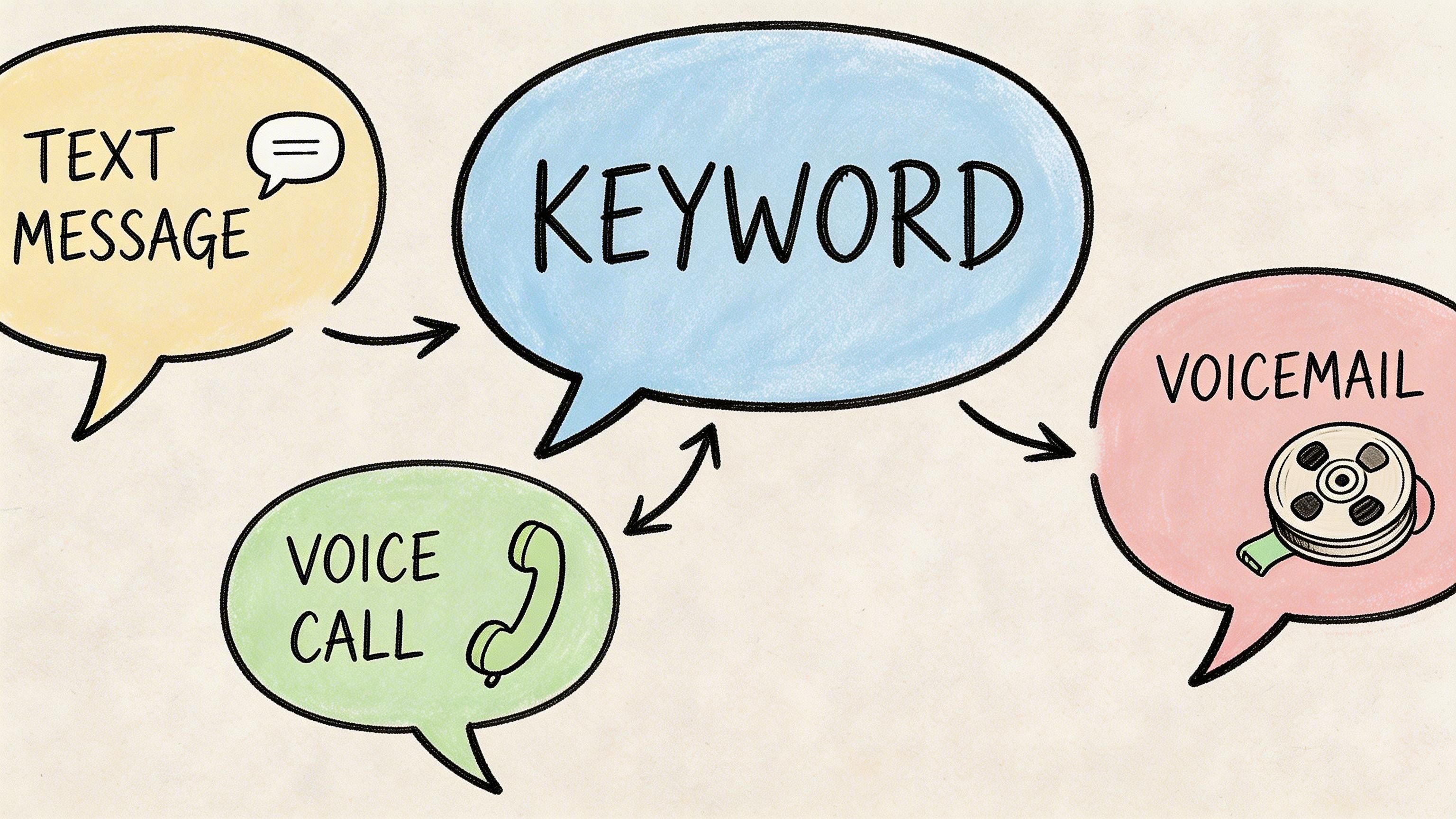
Some leads are ready for a text and nothing more. Others need reinforcement.
A few practical examples:
Text DEMO
Immediate text confirms interest and shares a booking link. If no booking happens, the next step can be a ringless voicemail from a sales rep inviting the person to schedule.
Text EVENT
The first text delivers registration details. A later voice broadcast can remind registrants about start time or changes.
Text APPT
The initial message confirms enrollment in reminders. Follow-up can include appointment texts plus voicemail when a response is missing.
Text VIP
A retailer can send the initial welcome by SMS, then use a recorded voice message for a limited launch announcement that feels more personal than another blast.
Text is excellent for speed and utility. Voice is better for tone, urgency, and personal presence.
Ringless voicemail sits in a useful middle ground. It lets a business leave a message that the customer can hear on their own time, without requiring a live conversation. That is especially useful for welcome messages, event reminders, reactivation campaigns, and local-business owner intros.
The trade-off is obvious. If you overuse voice or voicemail, the campaign feels intrusive. If you use them only when the message benefits from human tone, they can support the SMS flow instead of competing with it.
The keyword tells you what the customer wants. Use that to decide the channel sequence.
A practical decision model:
| Keyword type | Best first step | Good second step |
|---|---|---|
| Info-seeking | SMS with link or details | Follow-up text |
| High-intent lead | SMS confirmation | Ringless voicemail or call invite |
| Reminder-based | SMS reminder | Voicemail if no response |
| Community updates | SMS broadcast | Occasional voice announcement |
One option that supports this kind of orchestration is Call Loop, which combines text-to-join keywords with SMS, voice broadcasting, ringless voicemail, segmentation, scheduling, and CRM integrations in one workflow environment. The useful part is not the channel count by itself. It is the ability to trigger the right next step from the original keyword.
Tip: Add voice only when it adds context, urgency, or personality. If a plain text does the job better, keep it text-only.
The strongest multi-channel funnels feel intentional. The customer does not get blasted from every direction. They receive the next communication in the channel that fits the moment.
Keyword text messaging works because it is simple for the customer and structured for the business.
One word can start an opt-in, trigger a reply, segment a subscriber, and open the door to a larger follow-up journey. That is useful whether you run a clinic, a karate studio, an online store, a local service business, or an event program.
The details matter. Pick a clear keyword. Write a first reply that delivers on the promise. Build compliance into the flow. Then decide where voice broadcasting or ringless voicemail improves the journey instead of adding noise.
The businesses that get the most from keyword text messaging usually do one thing well. They remove friction at the moment of interest.
Choose one campaign. One offer. One keyword. Launch that first, test it carefully, and build from there.
Yes. In fact, using multiple keywords usually makes your list cleaner.
Different keywords let you separate promotions, appointments, event signups, support requests, and lead inquiries from the start. The main rule is to keep each keyword tied to one clear purpose so your follow-up logic stays organized.
Short, relevant, easy to spell, and easy to remember.
Words like VIP, SALE, APPT, DEMO, and CLASS usually work better than longer or clever phrases. If a customer hears it once in a voicemail or sees it briefly on a sign, they should still be able to text it correctly.
Yes, but they need to be more deliberate about consent, privacy, message content, and recordkeeping.
Healthcare teams should make the opt-in language specific, limit sensitive content appropriately, and use systems designed to support compliant workflows. The keyword itself is simple. The surrounding process needs to be disciplined.
No. Some of the best-performing keyword campaigns start outside SMS.
You can place them on:
The point is to place the keyword where customer intent already exists.
Not always.
Some campaigns only need a clean confirmation and occasional future updates. Others benefit from a short sequence. Start with the smallest flow that matches the customer’s intent, then expand only if each extra step adds value.
If you want to put keyword text messaging, voice broadcasts, and ringless voicemail into one practical workflow, take a look at Call Loop. It gives you a way to capture opt-ins, automate follow-up, segment contacts, and build multi-channel outreach without stitching together separate tools.
Chris Brisson
Chris is the co-founder and CEO at Call Loop. He is focused on marketing automation, growth hacker strategies, and creating duplicatable systems for growing a remote and bootstrapped company. Chat with him on X at @chrisbrisson


Trusted by over 45,000 people, organizations, and businesses like


