
See a Demo
You're just one step away from seeing Call Loop in action.
Enter your information below to watch a demo right now.

You're just one step away from seeing Call Loop in action.
Enter your information below to watch a demo right now.

Your contact list can help you grow, or it can drain budget, hurt deliverability, and create compliance headaches. One of the most important list management best practices starts with a hard reality: email lists decay by an average of 28% per year, according to 2024 industry data. That level of attrition matters far beyond email. Phone numbers change, employees leave companies, and old consents stop being useful if your records are incomplete or outdated.
That's why list management best practices matter so much in multi-channel outreach. If you send SMS, voice broadcasts, or ringless voicemail drops to stale or poorly segmented contacts, you don't just waste sends. You also increase the odds of complaints, bounces, bad timing, and messages reaching people who no longer expect them.
Healthy lists also tend to show healthier engagement. Industry benchmarks place a healthy open rate between 15% and 25% for engaged email lists, which is a practical signal that your data quality, targeting, and cadence are still working. If performance slips below that band, the issue usually isn't the creative alone. It's often the list.
Below are 10 list management best practices that are proven effective. They work for marketers, agencies, healthcare teams, local businesses, and sales teams running coordinated outreach across SMS, voice, and ringless voicemail.
The fastest way to damage a list is to let low-quality contacts in at the front door. Double opt-in fixes that by asking people to confirm their subscription after they submit a form, keyword, or signup request.
That extra step filters out typos, fake entries, shared inbox mistakes, and signups from people who weren't paying attention. It also gives you a cleaner consent trail, which matters when you're sending promotional SMS, automated voice messages, or ringless voicemail campaigns.
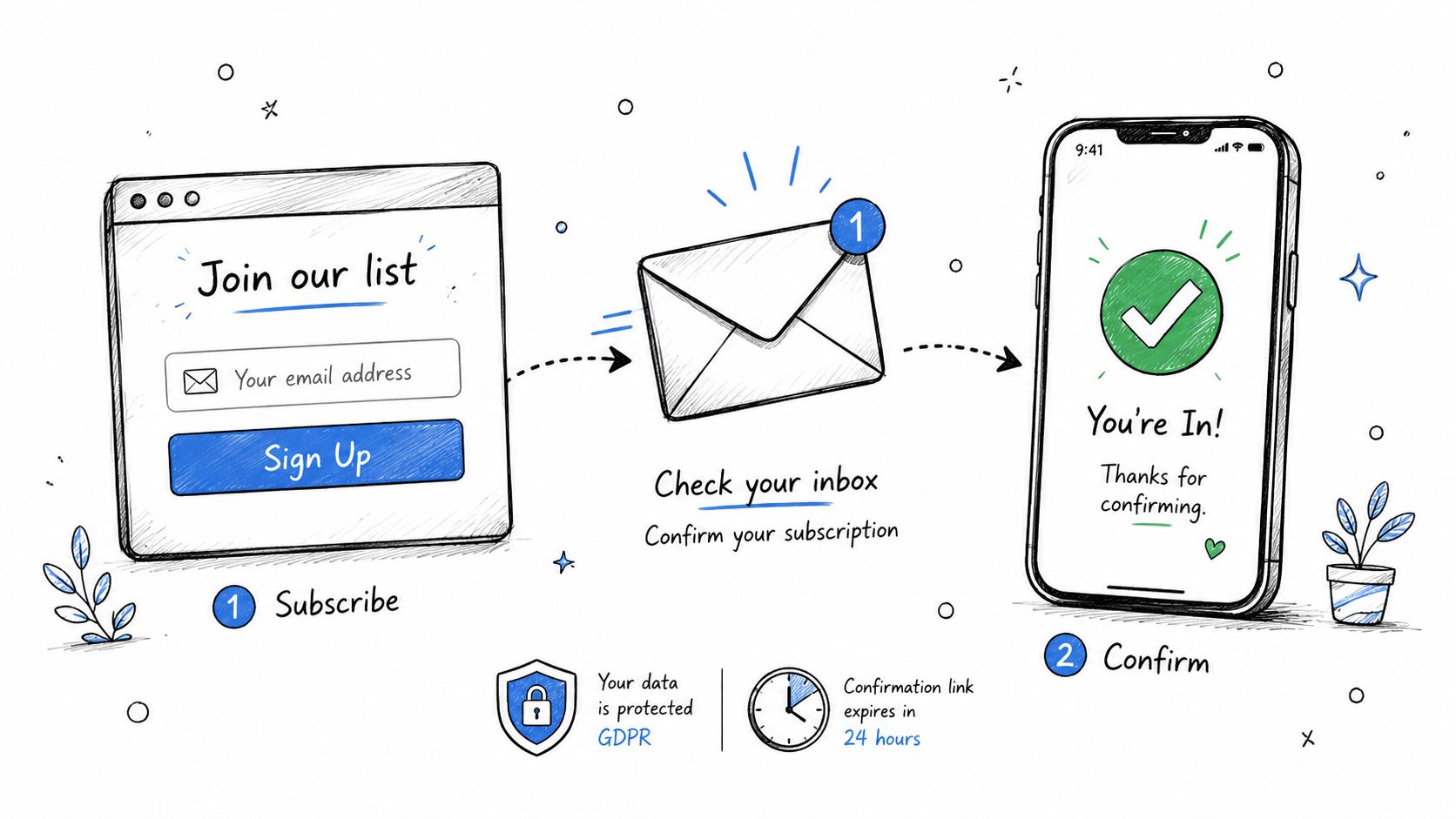
MoEngage and Validity both emphasize double opt-in, CAPTCHA on forms, immediate suppression of bounces, unsubscribes, and spam complaints, plus regular re-engagement cleanup as core controls for list quality and deliverability in MoEngage's email list management guidance.
In practice, that means your workflow should confirm the address or number belongs to the intended recipient before you start regular outreach. For healthcare providers, that can mean verifying a patient mobile number before appointment reminders go out. For ecommerce brands, it means confirming promotional SMS consent before the first campaign. For event organizers, it means validating attendee contact info before reminder sequences start.
Practical rule: If a number or address hasn't been confirmed, don't put it into your main promotional flow.
A few habits make double opt-in work better:
Big lists impress people in meetings. Segmented lists make campaigns perform.
If you send the same message to everyone, your list quality will look worse than it really is because relevance drops. A karate studio shouldn't send the same promotion to new trial students, active families, and former members. A healthcare practice shouldn't treat first-visit patients like long-term patients. Channel choice should also vary. Some contacts respond well to SMS reminders, while others are better suited to voice or ringless voicemail follow-up.
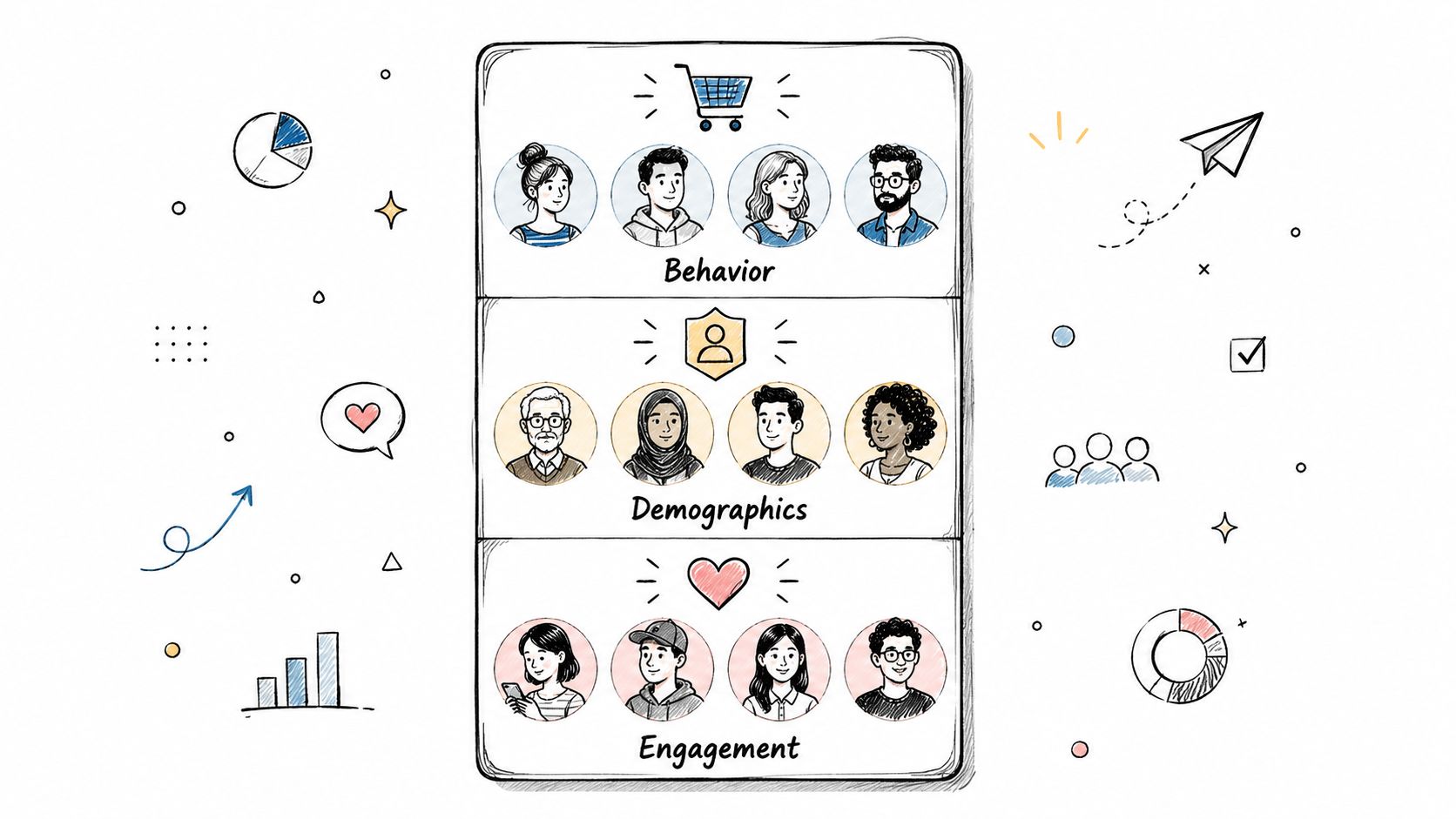
Bloomreach reports that personalized campaigns can generate 760% higher revenue and recommends segmenting by demographics, purchase behavior, engagement level, lifecycle stage, signup source, geography, and browsing history in its guide to email list management best practices.
That doesn't mean you need dozens of micro-segments on day one. Start with the data you trust. For example:
If you're doing outbound sales or lead nurture, it also helps to align segmentation with lead quality and follow-up priority. The DMpro founder's guide to leads is useful background for teams tying list segments to sales readiness.
What usually fails is segmenting on fields nobody maintains. What works is using a smaller set of fields that update automatically from actual behavior, such as purchase activity, appointment status, attendance, or reply history.
Organizations frequently wait too long to clean their lists. They notice a spike in failed sends, then scramble before a launch. That's backward.
List cleaning should be routine. Remove duplicates. Fix obvious formatting errors. suppress hard bounces immediately. Review soft bounces before they pile up. For SMS, voice, and ringless voicemail, validation matters because every invalid number wastes budget and can distort your reporting.
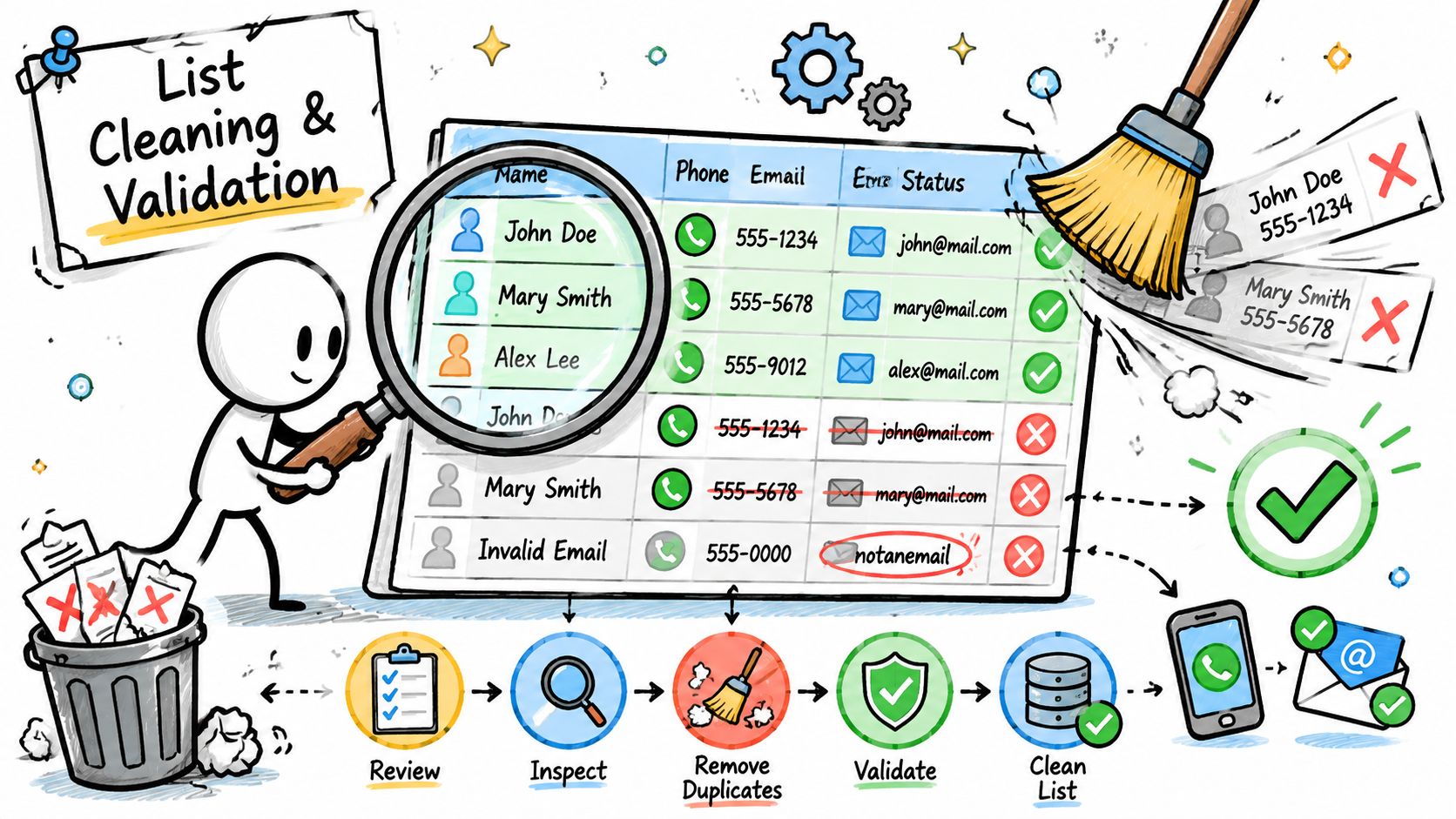
One of the most useful benchmarks in list management best practices is that lists decay by an average of 28% per year, based on 2024 industry data. That's why quarterly hygiene is a common floor, and why cleaning right before a major launch is smart. The same principle applies to phone-based outreach. Numbers go stale, contacts change jobs, and old records linger far longer than they should.
For teams that collect phone numbers through forms, event registrations, or text-to-join campaigns, point-of-entry validation is the biggest win. Catch the error before it becomes part of your system. If you want a practical overview, Call Loop's guide to number validation for contact lists is directly relevant here.
A simple operating rhythm works well:
A dirty list usually shows up as a messaging problem first, but the root issue is almost always data management.
Unsubscribes aren't always a rejection. Often, they're a sign that your controls are too blunt.
A preference center gives people options short of leaving entirely. They can choose SMS instead of voice, pause promotions but keep reminders, or lower message frequency without opting out of everything. That matters more in multi-channel programs, where one person may welcome appointment reminders by text but prefer ringless voicemail for general updates.
The strongest preference centers are simple. They don't ask people to manage a maze of toggles, and they don't bury the page behind a login wall. They let subscribers change channel, topic, and cadence quickly.
Mailtrap highlights a useful privacy angle in its discussion of email list management and compliance audits. Consent quality affects deliverability, CRM accuracy, and compliance risk. That same logic applies to SMS and voice records. If your system can't show what someone agreed to receive, through which channel, and when that preference changed, you're operating on shaky ground.
Good examples look like this in practice:
The trade-off is real. More choices can reduce total volume. But they usually improve relevance, lower complaints, and keep more contacts available for the messages they want.
Personalization is not putting a first name into a bad message. It's using the right data to make the message useful.
Merge tags and custom fields are what make that possible at scale. They let you insert names, appointment dates, order details, class times, account owners, locations, or any other field that helps the message feel accurate and timely. This matters even more for voice and ringless voicemail, where a generic script sounds lazy fast.
A healthcare reminder that says, “Hi Sarah, your appointment is tomorrow at 2:30 PM,” is helpful. A karate studio text that says, “Hi Marcus, your sparring class starts at 6 PM,” is better than a generic attendance reminder. An ecommerce shipping update with order number and delivery date reduces support tickets because the message already answers the likely question.
What fails is over-personalizing from bad data. If your CRM field mapping is sloppy, merge tags expose the mess immediately. You've probably seen messages like “Hi, your order is ready.” That's not a copy problem. That's a data hygiene problem.
Keep the setup disciplined:
Personalization works when the data is operational, not aspirational.
You can't manage a list by feel. You need signals that tell you whether the audience is still engaged, whether a segment is weakening, and whether one channel is carrying the load for another.
For email, a healthy open rate benchmark sits between 15% and 25% for engaged lists. That range is useful because it gives you a reality check. If a segment runs below it for long stretches, it often points to inactivity, weak segmentation, or accumulated decay. If performance is comfortably above it, you're usually looking at a highly curated and engaged audience.
Those benchmarks are most helpful when paired with channel behavior. In multi-channel outreach, don't lump SMS clicks, voice responses, and ringless voicemail callbacks into one blurry engagement score. Break them apart.
Track performance by:
For example, a healthcare office may find that appointment confirmations respond best to SMS while overdue follow-ups get more action from voice. An event organizer may get stronger attendance from reminder texts but better sponsor outreach from ringless voicemail. Agencies should track each client separately, because weak performance in one account can hide behind stronger results in another.
The point isn't to chase vanity metrics. It's to identify where list quality and message fit are slipping before complaints or wasted sends force the issue.
Not every inactive contact is dead weight. Some people are seasonal. Some binge-engage during buying cycles. Some ignore promotions but respond the minute a relevant reminder lands.
That's why broad rules like “delete everyone inactive after a few months” often do more harm than good. Smarter list management best practices treat inactivity as a behavior pattern, not a single calendar threshold.
Emercury recommends a more nuanced approach in its guidance on email list cleaning best practices. It specifically advises tracking engagement velocity, preserving seasonal contacts year-round, and extending inactivity thresholds to 12 to 18 months for burst-engagers rather than removing them too quickly.
That matters practically. A tax advisor may hear from some clients only during filing season. A conference organizer may see former attendees go quiet until the next annual event cycle. A karate studio may have students who return after school schedules change. A healthcare provider may need to keep a low-frequency contact active for annual wellness reminders.
A useful re-engagement flow usually has three possible outcomes:
Don't confuse silence with disinterest until you've looked at the person's actual buying or response cycle.
The wrong move is hammering inactive contacts with aggressive offers. The right move is testing one or two relevant attempts, then shifting them to a more appropriate status if they stay cold.
Manual follow-up breaks down fast. Someone forgets to send the reminder, the timing slips, and the contact gets a message too late to matter. Drip campaigns solve that by tying outreach to a trigger, a timer, or a specific milestone.
Multi-channel list management gets practical by coordinating SMS, voice, and ringless voicemail. This ensures each touch has a role instead of sending random repeats across every channel.
A strong automation sequence starts with a customer event. Appointment booked. Cart abandoned. Demo requested. Event registration completed. Trial class scheduled. Then you decide which message belongs where.
A healthcare workflow might send an SMS confirmation, then a timed reminder, then a post-visit follow-up. An ecommerce team might use SMS for urgency and reserve voice for higher-value abandoned checkouts. An event team might use ringless voicemail for last-call reminders to registered attendees who haven't opened prior messages.
Call Loop's overview of drip campaign best practices is useful if you're building coordinated SMS, voice, and ringless voicemail sequences inside one platform.
A few implementation rules keep automation from becoming noise:
The biggest mistake is building sequences around what your platform can send instead of what the contact needs next.
Compliance starts in your list, not in your legal disclaimer. If your records are weak, your outreach is weak. It doesn't matter whether the channel is SMS, voice broadcasting, or ringless voicemail.
For teams handling healthcare communications, the stakes are even higher. Contact data, consent records, suppression logic, and message routing all need to hold up operationally. For agencies and outbound teams, poor consent tracking can create avoidable risk across multiple clients and campaigns.
This is the practical standard: you should be able to show who consented, what they consented to, how that consent was captured, and how opt-outs are enforced. If that information lives in five disconnected systems, you don't really have it.
For SMS marketing, Call Loop's explanation of express written consent requirements is directly relevant to how teams document and operationalize permission before sending promotional messages. Agencies building client programs may also find operational context in the LinkedFuse agency playbook on marketing automation, especially where workflows and accountability intersect.
In practice, strong compliance operations include:
What doesn't work is treating compliance like a final approval step. It has to be built into list capture, storage, segmentation, and send logic from the start.
Disconnected systems create list problems faster than bad copy does. One tool says a contact opted out. Another still marks them active. Sales updates a phone number in the CRM, but the messaging platform keeps the old record. That's how teams end up sending the wrong message to the wrong number at the wrong time.
Centralization fixes that. Your CRM, forms, scheduling tools, and messaging platform should feed one another cleanly enough that segmentation, suppression, personalization, and scheduling all run from the same current record.
The technical stack doesn't need to be fancy. It does need clear ownership. If your sales team updates contact status in HubSpot, your outreach platform should reflect it. If a patient changes a mobile number in an intake workflow, your reminder system should inherit the update. If Shopify, ActiveCampaign, or Zapier creates a new event, the right list rules should fire automatically.
Timing belongs in the same conversation. Good scheduling is part of list management because it respects timezone rules, quiet hours, and subscriber expectations. A reminder sent at the wrong local time can create complaints even when the list itself is valid.
A strong setup usually includes:
When teams centralize list data and timing controls, outreach becomes much easier to trust. Reporting improves too, because you're not reconciling activity across half-connected systems after every campaign.
| Item | Implementation complexity | Resource requirements | Expected outcomes | Ideal use cases | Key advantages |
|---|---|---|---|---|---|
| Implement Double Opt-In Verification | Medium, setup automated confirmation workflows | Email/SMS provider, verification automation, modest dev effort | Higher list quality, lower bounces, improved deliverability and compliance | SMS/voice campaigns, regulated industries (healthcare), promotional lists | Better engagement; legal proof of consent; fewer invalid deliveries |
| Segment Lists Based on Customer Behavior and Demographics | Medium–High, requires rules and data logic | CRM/data integration, segmentation tools, analytics support | Increased open/CTR/conversions and improved targeting | Personalization, lifecycle marketing, multi-channel campaigns | More relevant messaging; higher conversion; efficient resource use |
| Maintain Regular List Cleaning and Validation | Low–Medium, ongoing processes and scheduled checks | Validation tools/services, automation, operational discipline | Reduced messaging costs, improved deliverability and sender reputation | High-volume SMS senders, quarterly audits, regulated senders | Cost savings; fewer bounces; compliance protection |
| Use Preference Centers and Consent Management Systems | Medium, UI + consent tracking and sync | Preference UI, consent database, real-time sync with systems | Lower unsubscribe/complaint rates; stronger subscriber trust | Multi-channel programs, frequent messaging, regulated industries | Subscriber control; granular consent records; better retention |
| Implement Merge Tags and Custom Fields for Personalization | Medium, data mapping and testing required | Clean CRM data, field mapping, template testing | Higher engagement and conversion through personalized messages | Transactional messages (appointments/orders), e‑commerce, healthcare | One-to-one personalization at scale; improved relevance |
| Establish and Monitor List Engagement Metrics | Medium–High, analytics and dashboards needed | Tracking infrastructure, dashboards, attribution tools, analysts | Data-driven optimization, early detection of list decline, ROI insights | Performance teams, agencies, multi-channel reporting | Actionable insights; better budget allocation; channel intelligence |
| Create and Execute Re-engagement Campaigns | Low–Medium, sequence design and timing | Messaging budget, incentives, segmentation logic | Recover inactive users, decide retention vs removal, refresh lists | Lapsed customers, long-tail subscribers, periodic cleanups | Recovers value; reduces churn; clarifies true inactivity |
| Implement Drip Campaigns and Marketing Automation Sequences | High, sequence design, conditional logic and testing | Automation platform, content assets, CRM integration, analytics | Consistent nurturing, higher conversion rates, reduced manual follow-up | Onboarding, lead nurture, appointment reminders, cart recovery | Scalable follow-ups; improved conversion; time savings |
| Maintain Compliance with Regulatory Requirements (TCPA, GDPR, HIPAA, CAN-SPAM) | High, legal review and compliant systems required | Compliant platforms, legal counsel, DNC/suppression integration, training | Reduced legal risk, ability to operate in regulated markets, preserved reputation | Healthcare, large-scale SMS/telemarketing, EU/CA audiences | Avoids fines; builds trust; enables regulated communications |
| Centralize with CRM & Platform Integration and Schedule Messages for Optimal Timing | Medium–High, integration and timezone logic | CRM, middleware (Zapier), data mapping, timezone database, monitoring | Unified customer view, higher engagement from optimal timing, fewer errors | Sales follow-ups, e‑commerce purchase flows, appointment scheduling | Eliminates manual entry; increases engagement; enforces quiet hours |
Effective list management isn't glamorous, but it's one of the clearest separators between outreach that scales and outreach that creates constant cleanup. If you capture poor data, skip validation, ignore engagement patterns, and treat every contact the same, your list becomes a liability. You spend more to reach fewer people, your metrics get harder to trust, and compliance risk grows unnoticed in the background.
The opposite is also true. When you apply strong list management best practices, your database becomes an operating asset. You know who consented, which channel fits them best, how recently they engaged, what segment they belong in, and when they should hear from you. That gives you better targeting, cleaner reporting, and fewer wasted sends across SMS, voice, ringless voicemail, and email.
The most practical approach is ongoing, not occasional. Double opt-in keeps bad data out. Validation and routine hygiene keep records current. Segmentation and custom fields make messages more relevant. Preference centers and consent systems preserve trust. Re-engagement flows help you recover value without clinging to dead records. Automation and integrations keep all of that working without relying on manual fixes every week.
The trade-offs are real. Double opt-in may reduce raw signup volume. Preference centers may lower campaign reach. More aggressive cleaning may shrink your visible list size. But those are usually healthy losses. A smaller, cleaner, permission-based list almost always beats a bloated one that creates deliverability problems, support issues, and unsubscribes.
This is especially important for organizations using more than one outbound channel. SMS, voice broadcasting, and ringless voicemail can work well together, but only when the list behind them is accurate, segmented, and governed properly. A bad record in a single-channel system is annoying. A bad record in a multi-channel system gets amplified.
If you want to operationalize these practices, use tools that support validation, segmentation, suppression, automation, scheduling, and consent tracking in one workflow. Call Loop is one option for teams managing outreach across SMS, voice, and ringless voicemail, especially when they need custom fields, drip campaigns, number validation, and HIPAA-aware workflows in the same platform.
The short version is simple. Don't judge your list by size alone. Judge it by accuracy, consent quality, engagement, and usability. That's what turns a contact database into a dependable revenue and retention asset.
If you want to put these list management best practices into action across SMS, voice broadcasting, and ringless voicemail, explore Call Loop and see how its validation, segmentation, automation, and compliance features fit your workflow.
Chris Brisson
Chris is the co-founder and CEO at Call Loop. He is focused on marketing automation, growth hacker strategies, and creating duplicatable systems for growing a remote and bootstrapped company. Chat with him on X at @chrisbrisson


Trusted by over 45,000 people, organizations, and businesses like


