
See a Demo
You're just one step away from seeing Call Loop in action.
Enter your information below to watch a demo right now.

You're just one step away from seeing Call Loop in action.
Enter your information below to watch a demo right now.

Most small teams do not have a messaging problem. They have a coordination problem.
One person sends email from one tool. Sales follows up by phone from another. Someone on the front desk texts customers manually. Social DMs pile up. Appointment reminders go out late. Promo messages overlap. Nobody can say which touchpoint moved the customer forward.
That mess is expensive. Not only in ad spend or software subscriptions, but in missed follow-ups, duplicated effort, and a customer experience that feels improvised instead of intentional.
The businesses that clean this up usually do one thing first. They stop treating each channel like its own little department. They start treating outreach like a system.
A familiar pattern shows up in growing SMBs.
A healthcare office sends appointment reminders by email because that is what the practice management tool supports. Patients miss the email. Staff members then call manually. Some patients prefer text, but texting lives in a different app. Opt-out records are scattered. Nobody is fully sure what was sent, when it was sent, or whether the message met compliance requirements.
An ecommerce shop has a different version of the same problem. Email covers abandoned carts. SMS handles flash sales. Customer support leaves voicemails for high-value orders. The pieces exist, but they do not work together. A shopper might get a discount text after they already purchased, or a voicemail that references the wrong stage of the journey.
Sales teams feel this pain even faster. Reps know a single email rarely does the job. They need a sequence. A text after a webinar. A voicemail drop before a follow-up call. A reminder when a proposal goes quiet. Without a shared system, every rep creates their own version, and performance becomes impossible to compare.
That is where multi channel marketing software matters. It does not add more ways to contact people. It gives the business one operating layer for outbound communication.
When that layer is missing, teams guess. When it is in place, they can coordinate timing, message order, consent, suppression lists, and reporting without stitching together five disconnected tools.
Practical takeaway: If your team cannot answer “what messages did this customer receive across channels this week?” from one place, you are already dealing with operational drag.
Multi channel marketing software is the control center for customer outreach across channels such as email, SMS, voice, web, and mobile. Consider an orchestra conductor. A trumpet solo can work. So can a drum line. But when every instrument plays without coordination, the result is noise. The conductor turns separate sounds into one piece of music.
That is what good software does for outreach. It aligns timing, message logic, audience data, and reporting so your channels support each other instead of competing with each other.
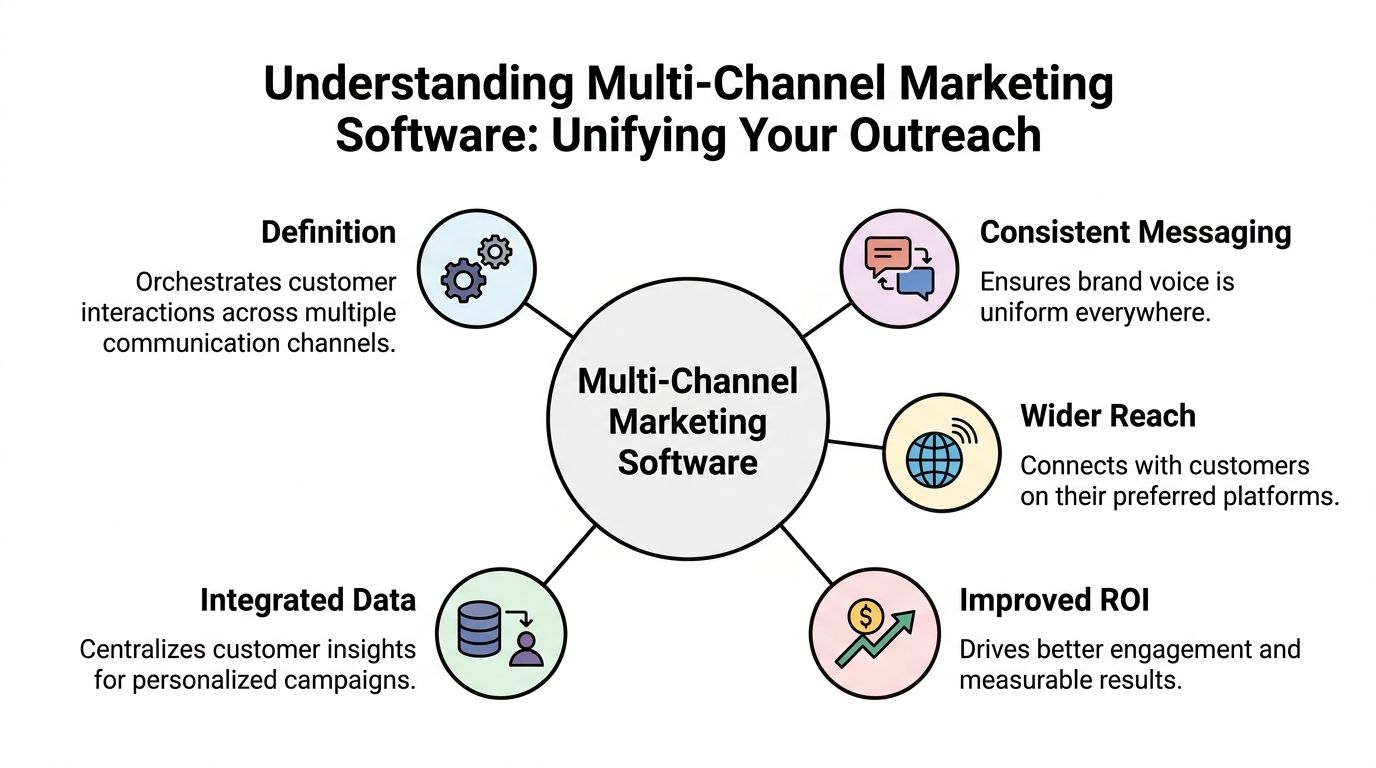
It is a system for:
It is not just “having several channels.”
A company can send emails, post on social, and text customers and still have no multi-channel strategy at all. If each channel runs in a silo, the business is still operating manually. The software matters because it connects the channels operationally.
This is no longer a niche software segment. The global multi-channel marketing hubs market was valued at USD 6 billion in 2024 and is projected to grow at a CAGR of 17.7% from 2025 to 2034, while the software platform segment is projected to grow at a CAGR of 21.5% over the same period, according to GM Insights’ multi-channel marketing hubs market analysis.
That growth makes sense. More businesses now need one place to manage fragmented customer communication, especially when outbound channels carry revenue responsibility.
The biggest shift is not technical. It is operational.
Instead of asking, “Which tool do we use for this message?” teams start asking, “What sequence should this customer receive next?” That is a much better question.
A useful example of that mindset appears in this overview of a multi-channel messaging platform. The important idea is not the label. It is the move from isolated sends to orchestrated communication.
The difference between basic messaging tools and serious multi channel marketing software shows up in the details. Not whether a platform can send a message, but whether it can send the right message, on the right channel, at the right moment, with enough control to keep performance and compliance intact.
SMS remains one of the most useful outbound channels because it is immediate, simple, and easy for customers to act on.
For SMBs, SMS works well when the message has a clear purpose. Appointment reminders. Limited-time offers. Payment reminders. Registration confirmations. Follow-ups after a missed call. If the text asks the customer to do one obvious thing, the channel tends to work.
MMS adds more context when plain text is not enough. A product image, event graphic, coupon, or branded visual can make the message easier to understand quickly.
What does not work is using SMS like a compressed email. Long promotional copy, multiple asks, and vague next steps weaken the channel fast.
Voice broadcasting is useful when hearing a human voice improves clarity or response. This is common in school alerts, event reminders, service interruptions, urgent account notices, and healthcare communication where tone matters.
A recorded message can carry urgency better than text alone. It also helps when the audience is less likely to respond to links or written instructions.
The trade-off is obvious. Voice is more interruptive than text. That means targeting, timing, and list quality matter more. A broad blast with weak segmentation can irritate people quickly.
A good voice workflow includes caller ID control, answer detection, and suppression handling. Without those basics, the channel creates as many problems as it solves.
Ringless voicemail fills a gap many teams overlook. It lets you deliver a voicemail directly to the recipient’s inbox without making the phone ring in the traditional way.
That makes it a practical tool for follow-up when a live call would feel too intrusive but a plain text would not carry enough nuance. Sales teams use it to re-open stalled conversations. Clinics use it for reminders with a more personal tone. Local businesses use it for event announcements or renewal prompts.
The simplest analogy is this: a text is a sticky note, a live call is knocking on the door, and ringless voicemail is leaving a message in the mailbox. It is present, personal, and respectful of timing.
Where teams get this wrong is message length and sequencing. A rambling voicemail sounds scripted and easy to ignore. A short message with a clear callback reason performs better operationally because it respects the listener’s time.
Here, the software starts earning its place.
A drip campaign is not a timed series of messages. In modern outbound programs, it is a rules-based sequence that adapts to what the customer does. One person may get a text, then a voicemail drop, then a call task for a rep. Another may click the text, book the appointment, and exit the sequence automatically.
Best-in-class journey orchestration engines support visual builders, AI-powered channel selection across 6+ channels, and built-in compliance tools that can improve deliverability by 20-30% through features like DNC management and opt-in validation, as described in Blueshift’s guide to cross-channel marketing platforms.
That matters because outbound sequencing breaks down when teams manage timing manually.
Tip: Build your first drip like a staircase, not a fireworks show. Start with a small number of touches, clear spacing, and one decision rule per step.
A practical sequence might look like this:
That is much cleaner than blasting every channel at once.
A dashboard is not useful because it is colorful. The reporting has to help the team make channel decisions.
The metrics that matter most in practice are tied to actions. Which message got the response. Which sequence step causes drop-off. Which list segment never engages. Which campaign drove booked appointments, callbacks, purchases, or pipeline movement.
For outbound-first teams, this is especially important because generic attribution setups often underreport SMS, voice, and ringless voicemail.
If the platform does not integrate with your CRM, contact forms, scheduling stack, or customer database, your team will end up exporting CSV files and creating delays.
The best setup is bi-directional where possible. A CRM stage change should be able to trigger a sequence. A response or completed action should be able to update the CRM record. That is how you avoid duplicate outreach and awkward customer experiences.
For teams evaluating options, the Call Loop features page is one example of an outbound-focused feature set that includes SMS, voice broadcasting, ringless voicemail, drip automation, and integrations.
Compliance is not a side feature for outbound. It is part of the product requirement.
Here, many software comparisons stay too shallow. They talk about templates and analytics, then spend almost no time on opt-in handling, DNC suppression, auditability, or healthcare requirements.
For regulated industries, those details decide whether a platform is usable. A healthcare group may like a channel mix, but if the software does not support the operational pieces needed for HIPAA-conscious communication, the campaign design does not matter.
The practical test is simple. Can your team prove consent status, manage suppression rules, and track what was sent across channels without relying on spreadsheets and memory? If not, the stack is not ready.
The most persuasive argument for multi channel marketing software is not that it feels more organized. It is that coordinated campaigns produce stronger commercial outcomes than one-channel campaigns.
Multi-channel campaigns using coordinated outreach across three or more channels achieve a 287% higher purchase rate compared to single-channel strategies, according to Pangolin Marketing’s KPI analysis. The same source notes one firm improved MQL-to-SQL conversion by 288% after implementation.
Those numbers matter, but the operational lesson matters more. Channels work better when each one does a specific job in sequence.
Consider a healthcare clinic trying to reduce missed appointments.
Email may work for confirmations sent well in advance. SMS is better for a short reminder close to the visit. Voice can help when the appointment is high value or the patient has a history of missing visits. A voicemail drop can add a personal nudge without forcing staff into manual call time.
The return does not come from any one message. It comes from reducing the number of people who slip through because they missed the first touch.
For ecommerce, abandoned cart recovery is a similar case. Email can carry product detail. SMS can create immediacy. Ringless voicemail can be reserved for high-value carts or repeat buyers where a more personal touch is justified.
For sales teams, unified outreach often shortens the dead space between touches. Instead of waiting on a rep to remember the next follow-up, the platform handles the sequence and prompts the rep only when human outreach is the best next move.
That is a common mistake.
If email, SMS, and voicemail all repeat the exact same message in the exact same way, the campaign feels redundant. Better sequencing assigns each channel a role:
| Channel | Best role | Weak use case |
|---|---|---|
| SMS | Fast reminders, confirmations, direct-response prompts | Long explanations |
| Voice | Urgent updates, human tone, important notices | Routine low-priority blasts |
| Ringless voicemail | Personal follow-up without live interruption | Overused promotional messaging |
| Detail, documentation, richer context | Time-sensitive nudges alone |
The hard part in outbound marketing is not sending. It is proving what worked.
Many teams still rely on last-click logic that favors email or web forms and misses the contribution of a voicemail, a call reminder, or a text sent before conversion. That is why documenting campaign structure matters.
If you want a better way to frame the financial side, this guide on how to calculate marketing ROI is useful because it grounds the conversation in revenue and cost, not vanity metrics.
The practical discipline is to define, before launch, what counts as success for each sequence. Booked appointment. Completed purchase. Callback. Demo scheduled. Renewal confirmed. Then track those outcomes against the campaign path.
A more detailed internal read on measuring marketing campaign effectiveness can help teams tie channel activity to business results without turning every report into a spreadsheet project.
Key takeaway: ROI gets easier to defend when each channel has a job, each sequence has an outcome, and each contact can move in or out of automation based on behavior.
Most software shortlists start in the wrong place. Teams compare price, templates, and surface-level ease of use first. Those things matter, but they do not tell you whether the platform fits your business model.
A key gap in software reviews is that they often ignore ROI frameworks for outbound channels like SMS, voice broadcasting, and ringless voicemail, even though those channels are central for outbound-first businesses, as noted in SegmentStream’s discussion of attribution tool gaps.
If your business depends on outbound response, platform evaluation has to start there.
| Evaluation Criteria | What to Look For | Why It Matters for SMBs |
|---|---|---|
| Outbound channel support | Native SMS, voice broadcasting, and ringless voicemail | You do not want to bolt on core channels later |
| Compliance controls | Opt-in handling, DNC tools, consent records, audit visibility | Small teams cannot manage channel rules manually at scale |
| Automation depth | Drips, triggers, delays, exit rules, suppression logic | Manual follow-up breaks once lead volume grows |
| CRM and app integrations | Native integrations or Zapier support | Data should move automatically between systems |
| Reporting quality | Sequence-level and channel-level outcome tracking | You need to justify spend and improve campaigns |
| Ease of administration | User permissions, templates, list hygiene tools | Lean teams need software that reduces work, not adds it |
| Fit for your communication style | Transactional, promotional, reminder-based, sales follow-up | The wrong platform creates friction even if the feature list looks strong |
Ask direct questions. If a vendor cannot answer them without vague language, that is a warning sign.
A broad all-in-one platform can look attractive, especially if it offers many channels. But broad platforms often go deeper on inbound journeys than outbound execution.
An outbound-focused platform may have a narrower surface area and still be the better operational fit if your team relies on reminders, promotions, follow-ups, collections, event attendance, or patient communication.
That is why channel fit beats popularity.
Software decisions also affect content production. If your team is rewriting campaign copy manually for every channel, your workflow is going to drag. For marketers comparing workflow tools around content creation and campaign ops, this overview of marketing content software platforms is a useful companion read.
Tip: Choose for the campaign you run every week, not the demo scenario you might run once a year.
Adoption goes smoothly when the first rollout is narrow, disciplined, and tied to one use case that already matters to the business.
Start with list quality, not message copy.
Remove obvious duplicates. Confirm consent status. Separate active customers from leads, prospects, past customers, and internal contacts. Standardize key fields such as first name, appointment date, account owner, renewal date, or location.
Bad data makes good automation look bad.
A sequence can only be as smart as the trigger fields behind it. If dates are inconsistent or opt-in records are missing, the campaign will misfire.
Connect the platform to the systems that should trigger or update communication.
That may include your CRM, scheduling tool, ecommerce platform, form builder, or Zapier workflows. Set up sending numbers, caller ID, voicemail recordings, templates, and internal notification rules.
Keep the first setup simple. One list source. One primary trigger. One reporting owner.
Most implementation issues are not software failures. They are habit failures.
Front-desk teams need to know when automation is already handling the reminder. Sales reps need to know when to step in personally and when to let the sequence run. Managers need to know who owns suppression checks, template approvals, and exception handling.
A short internal playbook helps. Include:
Start with a use case that has clear business value and low creative complexity.
Good pilot options include appointment reminders, no-show prevention, welcome sequences, webinar attendance reminders, payment follow-up, or post-inquiry sales follow-up.
Avoid launching with a giant nurture architecture. You need one clean win first.
Too many channels at once
Add channels intentionally. More touches do not automatically mean better performance.
No exit conditions
Customers should not keep receiving reminders after they convert, reply, or opt out.
Generic recordings
Voice and ringless voicemail work better when they sound specific and purposeful.
Weak ownership
One person should be responsible for launch QA, even if several teams contribute.
Practical rule: If a pilot campaign cannot be explained on one page, it is too complex for a first launch.
Once the pilot is stable, expand carefully. Add a new segment, a new trigger, or a new channel. Do not redesign the entire program every week.
One issue comes up repeatedly in platform evaluations. Many multi-channel software guides underaddress channel-specific regulations and rarely explain how platforms manage TCPA, DNC handling, or the audit trails needed for HIPAA-conscious communication, according to The CMO’s review gap analysis.
The advantage is not a flashy feature list. It is alignment between what outbound teams do and what the platform is built to support.
SMBs usually do not have separate compliance, RevOps, and campaign ops teams. The same people who launch reminders, promos, and follow-ups often manage the lists too.
That means the software has to reduce operational burden. It should support the channels that drive response, keep records organized, and make routine outreach repeatable without turning every send into a manual project.
For teams that rely on outbound communication, that often means prioritizing SMS, voice broadcasting, and ringless voicemail over broad but shallow channel coverage.
Call Loop is an outbound multi-channel messaging platform built around SMS, voice broadcasting, ringless voicemail, drip campaigns, analytics, CRM integrations, and HIPAA compliance. That makes it relevant for businesses that need coordinated outbound communication without piecing together separate systems for text, voice, and voicemail.
The fit is especially clear in a few scenarios:
The advantage is not a flashy feature list. It is alignment between what outbound teams do and what the platform is built to support.
When software is designed around outbound sequences, ringless voicemail is not an afterthought. Voice is not buried as a niche add-on. Compliance controls are not left for the team to reconstruct with spreadsheets and memory. That is the difference that often determines whether automation becomes a useful operating system or another dashboard.
If your growth depends on timely, compliant outreach across SMS, voice, and ringless voicemail, it makes sense to evaluate a platform built for that workflow instead of forcing an inbound-first system to do a job it was never designed to handle.
If your team is ready to unify SMS, voice broadcasting, and ringless voicemail into one outbound workflow, take a closer look at Call Loop. It gives SMBs, agencies, sales teams, and healthcare organizations a practical way to automate follow-up, manage compliance-sensitive communication, and run multi-channel campaigns without stitching together separate tools.
Chris Brisson
Chris is the co-founder and CEO at Call Loop. He is focused on marketing automation, growth hacker strategies, and creating duplicatable systems for growing a remote and bootstrapped company. Chat with him on X at @chrisbrisson


Trusted by over 45,000 people, organizations, and businesses like


