
See a Demo
You're just one step away from seeing Call Loop in action.
Enter your information below to watch a demo right now.

You're just one step away from seeing Call Loop in action.
Enter your information below to watch a demo right now.

Being able to schedule send text messages isn't just a neat little feature; it's a massive strategic advantage. It lets you move beyond firing off messages whenever you have a free second and start timing your communication for maximum impact. You’re ensuring your texts land exactly when your audience is most likely to read them and, more importantly, act on them.
Timing is everything. I can't stress that enough. When you schedule your texts, you transform your outreach from a hopeful shot in the dark to a precision-guided engagement tool. Instead of sending messages based on your schedule, you can align them with your customers' daily routines, habits, and peak attention windows. It’s a small tweak that delivers huge results.
Let’s get practical. Imagine you run a local gym and want to get more people into your evening fitness classes. Sending a reminder at 10 AM is a waste of time—it’ll get buried in a busy workday. But scheduling that same reminder to hit their phones around 4:45 PM? Now you're catching them just as they’re wrapping up work and thinking about what to do next. That simple, strategic timing can be the difference between an empty class and a full one, directly boosting your revenue and keeping members happy.
The real magic of scheduling is meeting your audience where they are—not just digitally, but mentally. A perfectly timed message feels less like a random interruption and more like a helpful nudge in the right direction.
And the numbers back this up. Texts have an incredible 98% open rate. Think about that for a second. That figure completely dwarfs email's typical 20-30% open rates. This isn't just a minor improvement; it's a fundamental shift in how effectively you can connect with people. By scheduling texts, you get all the immediacy of SMS and add a layer of strategic foresight that other channels just can't compete with.
A quick comparison really drives this point home.
Scheduled SMS clearly pulls ahead by combining high open rates with strategic timing, making it far more impactful than sending a message and just hoping for the best.
The goal isn't just to send a message; it's to start a conversation at the perfect moment. Scheduling makes this possible by ensuring your communication aligns with your recipient’s day, dramatically increasing the odds of a positive response.
This precision also opens the door to more sophisticated communication strategies. For instance, you could schedule a promotional text and then layer in a follow-up ringless voicemail a day later to reinforce the message without being pushy. This kind of multi-channel approach, all orchestrated through careful scheduling, creates a much richer and more effective customer journey. It’s how you set the stage for real growth and build stronger relationships that last.
Sometimes, you don't need a full marketing platform. You just want to schedule a single, personal text—a happy birthday message, maybe, or a quick reminder to a family member. Good news: both iOS and Android have built-in ways to schedule send text messages right from your phone.
These native tools are perfect for those one-off situations. But let's be clear, they're not built for business. They completely lack the features you'd need for bulk sending, analytics, and compliance, which are non-negotiable for professional outreach. If you're wondering how businesses handle this, our guide on how to send texts from a computer is a great place to start.
For iPhone users, the trick is to use the pre-installed Shortcuts app. You're basically creating a mini "automation" that fires off a specific message to a specific person at a set time. It's a bit of a workaround, but it gets the job done for a single send.
Here’s the breakdown:
+ sign if you've done this before).When the time comes, your iPhone will handle the rest. Just don't forget to delete the automation when you're done, or it'll send that same text again at the next scheduled interval.
Android users have it much easier, especially if you're using Google Messages. The scheduling feature is baked right into the app, making it incredibly straightforward.
It's as simple as this:
The big takeaway here is that native phone scheduling is all about personal convenience. It’s fantastic for remembering a birthday but just can't handle business needs like running promotional campaigns, managing opt-outs, or even texting a small group without a major headache.
Look, the built-in scheduling features on your phone are great for a one-off "happy birthday" text. But when you need to communicate professionally with dozens, hundreds, or even thousands of contacts, that's a whole different ball game. You'll quickly hit a wall.
To send timely, relevant information at scale, you need a dedicated messaging platform. This is the leap from sending manual texts to building a real, automated outreach strategy. It’s how you schedule bulk SMS for a flash sale, set up automated sequences to welcome new leads, and use calendar-based triggers for those can't-miss appointment reminders.
Instead of just one message, you can map out a multi-day journey for your customers. And the best part? Once you set it up, it runs on its own.
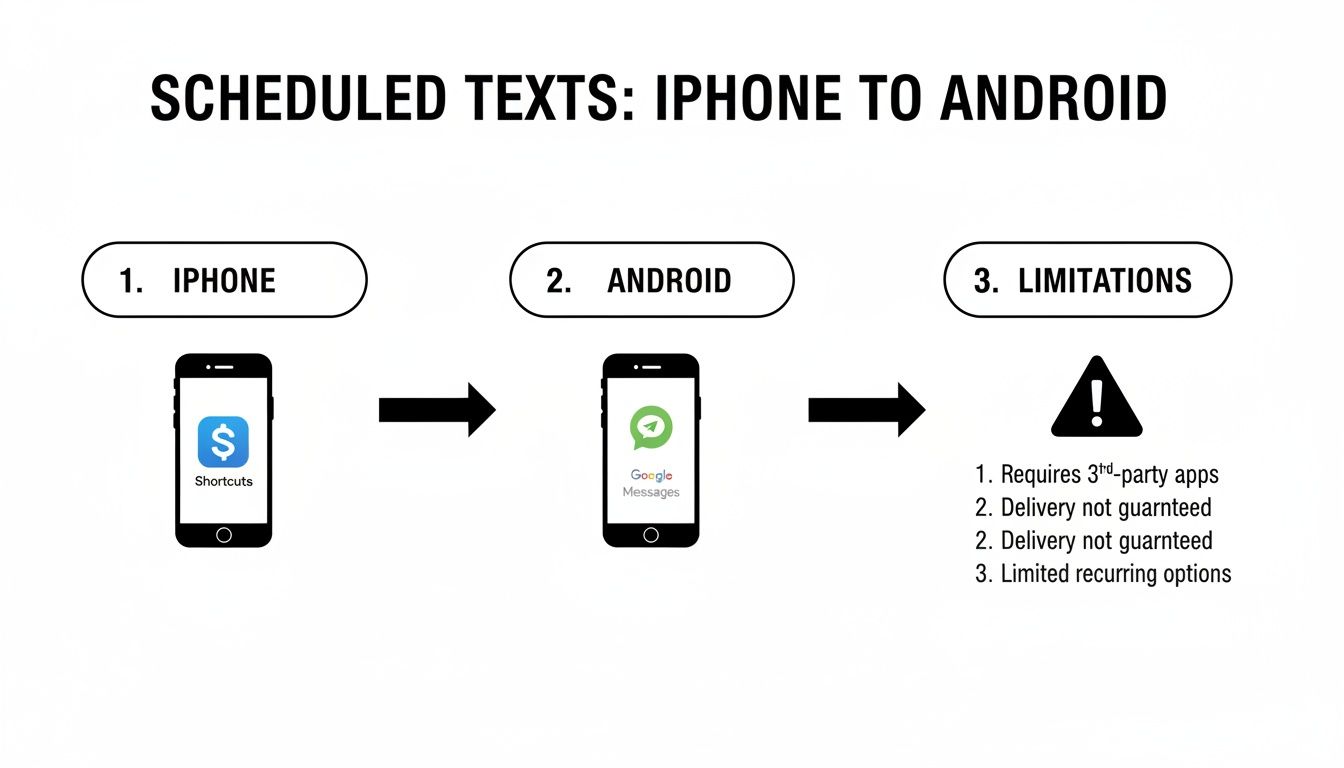
As you can see, both iPhone and Android give you basic scheduling, but they're not built for business. They just can't handle the volume, automation, and compliance that professional communication demands.
Let’s say a new lead signs up on your website. What happens next? Instead of just letting their name sit on a list, you can kick off an automated welcome sequence right away. That's the magic of a drip campaign—a series of pre-written messages that go out automatically over a set period.
Here’s a simple, effective sequence you could build:
This kind of multi-step, multi-channel approach keeps you on their radar and builds the relationship without you lifting a finger. You can learn more about how to schedule SMS for your campaigns and make sure every message lands at just the right time. Trying to juggle that on your personal phone? Impossible.
A true messaging platform isn't just about sending texts; it's about orchestrating entire conversations. When you combine scheduled SMS with tools like voice broadcasts and ringless voicemail, you create a complete outreach strategy that engages people on multiple fronts.
The best platforms don't stop at texting. While SMS is a powerhouse, layering in other communication channels makes your strategy that much stronger.
A ringless voicemail, for example, can deliver a warm, personal message from your company's founder without ever interrupting someone's day with a ringing phone. Also known as a straight-to-voicemail drop, this technology is perfect for adding a human touch to automated campaigns.
Platforms built for this are designed for scale, letting you manage SMS, voice, and ringless campaigns for huge audiences all from one spot.
Then you have voice broadcasts, which can send a pre-recorded audio message to an entire list at once. This is perfect for urgent announcements, event reminders, or last-minute changes. By scheduling these tools alongside your texts, you build a powerful communication engine that gets real results—something far beyond what your smartphone can ever do.
Ever sent a text at 9 AM your time, only to realize it landed at 6 AM for your recipient? It’s a surefire way to get an unsubscribe and a classic mistake many businesses make. A perfectly crafted message sent at the wrong time is worse than no message at all, and trying to manage time zones manually is a logistical nightmare.
The headache really starts when your audience is spread across multiple regions or the entire country. A platform that can schedule send text messages with built-in time zone intelligence isn't a luxury anymore—it’s essential for looking professional and respecting your contacts' personal time.
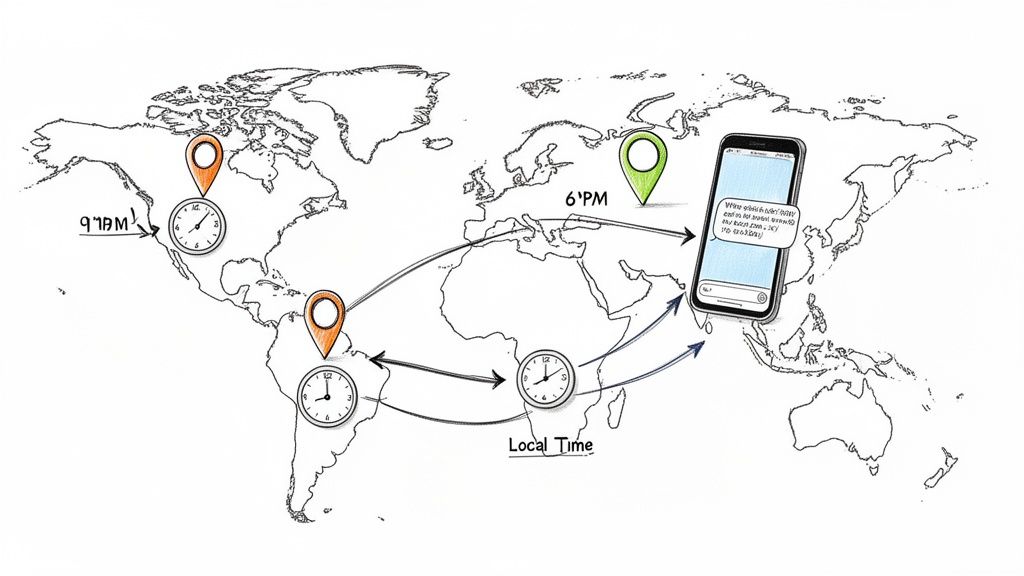
Smart scheduling platforms handle this for you. They automatically adjust send times based on each person's location, making sure your message always shows up at the right local moment. You just set your campaign to go out at 10 AM, and the system does the rest, sending it at 10 AM Pacific, 10 AM Mountain, and so on.
Beyond the technical side, when you send is just as important. While every audience is different, we've seen certain windows consistently get better results for specific goals.
The core idea is simple: send messages when they are most convenient and relevant to the recipient, not to you. This customer-centric approach to scheduling is what separates high-engagement campaigns from those that fall flat.
Just as important as when you send is how often. Bombarding your list is the fastest way to annoy people and drive up your unsubscribe rate. There’s no single magic number, but a good starting point is somewhere between one to four promotional texts per month.
Of course, for transactional messages like reminders or alerts, the frequency is based on what the customer does, and that’s perfectly fine. The key is to deliver real value with every single message.
Ever woken up to a flood of customer questions because your appointment reminders all fired off at midnight? Scheduling SMS fixes that, delivering messages precisely when people are ready to act—like 9 AM confirmations for class sign-ups. This precision is why SMS is so dominant: 98% open rates, with 90% read within 3 minutes, and 45% response rates that leave email in the dust. You can dig into more of these SMS marketing statistics to see the full picture.
Automating your communication is a game-changer, but it comes with some serious legal responsibilities. The moment you schedule a text send for promotions or marketing, you're playing in a regulated space. Laws like the Telephone Consumer Protection Act (TCPA) are the rules of the road, and ignoring them can lead to some eye-watering fines.
The absolute cornerstone of TCPA compliance is getting permission first. For any promotional messages, you need to secure express written consent from every single contact before you send them a thing. This isn't a friendly suggestion—it's a legal must-have. You can dive deeper into what counts as valid express written consent in our detailed guide.
This consent has to be crystal clear. People need to know exactly what they're signing up for. It’s all about building a relationship on trust right from the very first text.
Handling subscriptions properly is just as important as getting that initial "yes." You need a dead-simple way for people to join your list and an equally easy way for them to leave. This is where features like text-to-join keywords are absolute gold.
For instance, a customer can text a keyword like "DEALS" to your number to opt-in. A compliant platform will automatically add them to your list and shoot back a confirmation message. On the flip side, the system has to instantly recognize and process opt-out requests like "STOP," "CANCEL," or "UNSUBSCRIBE." When it does, it should add that number to a Do Not Contact list to prevent any future messages from going out.
Automation should never mean sacrificing control. Your system has to give users an effortless way to manage their preferences, making sure you only talk to the people who actually want to hear from you.
If you're in the healthcare world, the compliance stakes are even higher. The Health Insurance Portability and Accountability Act (HIPAA) adds another critical layer of rules. When you're scheduling patient communications—think appointment reminders or test results—you absolutely must use a platform that is HIPAA-compliant to protect sensitive patient information.
These platforms are built with the necessary security measures, like data encryption and strict access controls, to make sure every communication meets federal privacy standards. Using a compliant tool isn't just about dodging penalties; it's about maintaining patient trust and showing you're committed to keeping their private information safe and secure.
Alright, let's get out of the weeds of theory and into the real world where this stuff actually makes you money. Knowing how to schedule a text is one thing, but seeing it drive actual business results is where the magic happens.
I've pulled together three distinct scenarios that show exactly how scheduled messaging can make a huge impact. Think of these as proven playbooks you can swipe and adapt for your own campaigns. We're talking recovering lost sales, crushing no-show rates, and packing your next webinar.
Picture this: an online clothing store is bleeding sales from abandoned carts. Customers load up, get distracted, and vanish. The standard email follow-up just isn't getting the job done, so they decide to layer in a scheduled SMS and a ringless voicemail drop.
This timed approach works because it creates a little urgency without being annoying. The first text is just a gentle nudge. The ringless voicemail adds a human touch that really stands out, and the final SMS hits them with a solid incentive to pull the trigger.
By scheduling a multi-step, multi-channel follow-up, the brand recaptures revenue that would have otherwise been lost. The combination of an immediate text and a more personal voicemail drop significantly outperforms a standalone email campaign.
Now let's look at a busy dental clinic. Their biggest headache? Costly no-shows. Manually calling every single patient the day before is a massive time-suck for the front desk. The solution is a simple, automated reminder system using a calendar-based trigger.
This two-step automation is beautifully simple and effective. The first message locks in the confirmation, letting the clinic know who's serious. The second text is that final, perfectly timed nudge that makes sure the appointment is top-of-mind right when it needs to be. This strategy alone can dramatically reduce missed appointments, keeping the schedule full and the cash flow steady.
A marketing agency is hosting a big webinar. They got a ton of signups, but they know from experience that getting people to register is only half the battle. To make sure people actually show up, they build a scheduled drip campaign to keep the event on everyone's radar.
Each message here has a clear job. The first one confirms the registration and gets it on their calendar. The second one builds a little hype. And that final text? It's the most important one, delivering the login link at the exact moment they're ready to join. This systematic approach keeps the webinar from being forgotten and drives live attendance through the roof.
Once you start thinking about scheduling texts, a few common questions always seem to come up. Let's tackle them head-on so you can build out your messaging strategy with total confidence.
You absolutely can, but this is where your phone's native features hit their limit. Your smartphone is decent for one-off scheduled messages to an individual, but for sending to a group, you need a real messaging platform.
Platforms like Call Loop are built for this. You can upload an entire contact list, break it down into specific groups like "New Leads" or "VIP Customers," and schedule a single text to go out to thousands of people at once. The best part? The platform sends it as a personal, one-to-one text to each person, not some chaotic and unprofessional group chat.
This is a huge advantage of using a professional service. You get detailed delivery reports for every single campaign you send.
If a text fails to go through, the system will log a reason, like an invalid phone number or a carrier issue. This gives you crystal-clear analytics on your actual delivery rates. It's an level of insight you just don't get from your personal phone, and it helps you keep your contact lists clean and troubleshoot any problems.
For sure. More advanced platforms let you schedule ringless voicemail drops right alongside your text messages. This is an incredibly powerful way to create a multi-channel campaign that really gets noticed.
Imagine this: You could schedule an SMS reminder for an upcoming webinar. Then, you could schedule a ringless voicemail to drop 24 hours later with a more personal, enthusiastic message from the host. It's a fantastic one-two punch.
Setting up recurring or repeating messages is a core feature of any solid automation platform. You can easily create a text that sends out daily, weekly, or monthly without you having to lift a finger after the initial setup.
This is perfect for things like weekly class reminders, monthly billing notifications, or even sending out automated birthday greetings to your customers. You just set it and forget it, and the system handles the rest, ensuring your communication is always consistent.
Ready to take control of your messaging and reach your audience at the perfect moment? Call Loop provides all the tools you need to schedule SMS, ringless voicemail, and automated campaigns with ease. Start your free trial today and see the difference that perfect timing can make.
Chris Brisson
Chris is the co-founder and CEO at Call Loop. He is focused on marketing automation, growth hacker strategies, and creating duplicatable systems for growing a remote and bootstrapped company. Chat with him on X at @chrisbrisson


Trusted by over 45,000 people, organizations, and businesses like


