
See a Demo
You're just one step away from seeing Call Loop in action.
Enter your information below to watch a demo right now.

You're just one step away from seeing Call Loop in action.
Enter your information below to watch a demo right now.


To send texts from your app, CRM, booking system, or ecommerce stack, you're probably already past the point where manual messaging works. A personal phone can't handle reminders, order updates, lead follow-up, opt-outs, support replies, and internal alerts without turning into chaos.
A good send SMS online API setup fixes that, but the part most guides skip is the operational reality. Sending a message is the easy part. The hard part is choosing a provider that can reliably deliver, authenticating safely, handling replies and failures, respecting consent, and fitting SMS into a broader communication workflow that may also include voice or ringless voicemail.
The teams that get value from SMS usually don't treat it like a standalone tool. They connect it to systems they already use, such as scheduling software, CRMs, support platforms, and patient communication workflows. That's where an API becomes useful, because it lets software trigger the message at the right moment instead of relying on someone to remember.
The most common reason to use an API is simple. Manual texting breaks as soon as volume, timing, or accountability matters.
A dental office sending appointment reminders, a karate studio notifying parents about schedule changes, and an online store sending delivery updates all face the same problem. Staff shouldn't have to copy and paste the same message all day, and they definitely shouldn't be sending business texts from personal devices.
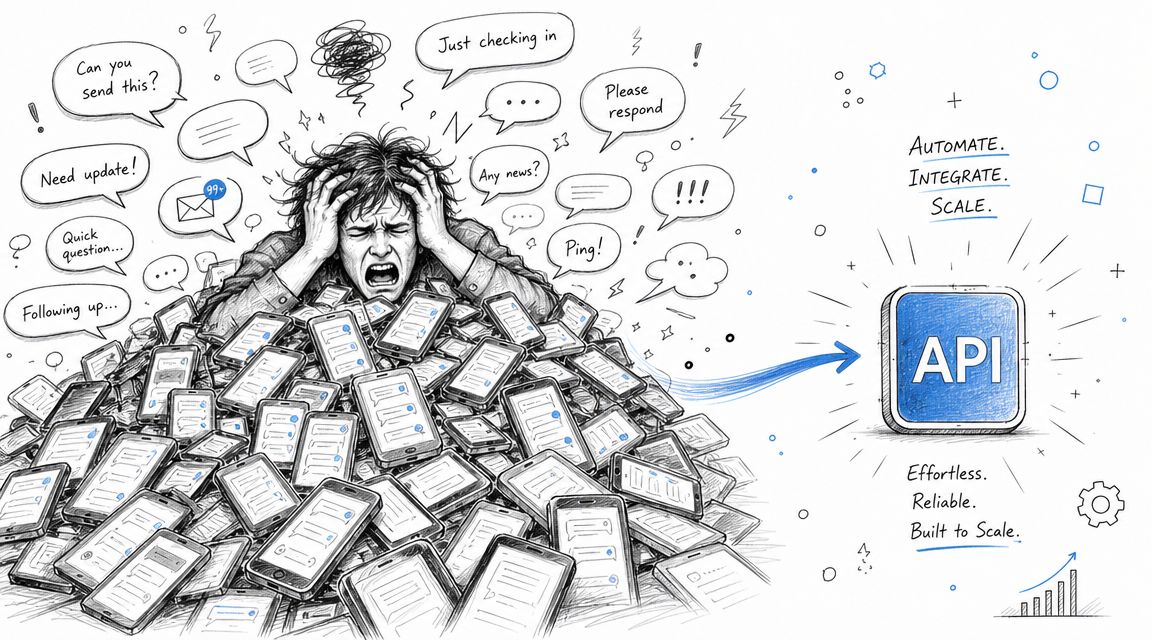
SMS isn't trendy. That's part of why it works.
The first SMS text message was sent on 3 December 1992, and global usage has grown to about 9.1 trillion text messages per year, or roughly 25 billion texts per day, according to SellCell's summary of global text message volume. That kind of volume matters because it shows SMS is already part of normal user behavior. You don't have to teach people how to receive a text.
There's also a practical design constraint that shaped business messaging. Basic SMS has a 160 character limit, which forces clarity. For alerts, reminders, login codes, pickup notices, and simple calls to action, that's often a feature, not a bug.
SMS works well when the message is urgent, specific, and easy to act on from a lock screen.
If you're sending time-sensitive communication, SMS has a very different response pattern than email. Industry summaries cited by TrueDialog's SMS marketing statistics roundup report that SMS can reach an open rate of about 98%, and 90% of messages are opened within three minutes of delivery.
That doesn't mean every business should move every campaign to text. It means SMS is a strong fit when delay creates friction.
Use cases that usually perform well include:
An SMS API connects your software to carrier networks through web requests. Your application sends a request to the provider, the provider handles routing, and your system gets a response back that tells you whether the message was accepted for processing.
That sounds technical, but the business effect is straightforward:
Once SMS becomes event-driven instead of manually sent, teams stop treating messaging like a side task and start treating it like infrastructure.
Most buyers compare providers on pricing, SDKs, and whether the quickstart looks clean. Those matter, but they don't decide whether your messages land.
The bigger issue is whether the provider can help you send legally and reliably in the markets you care about.
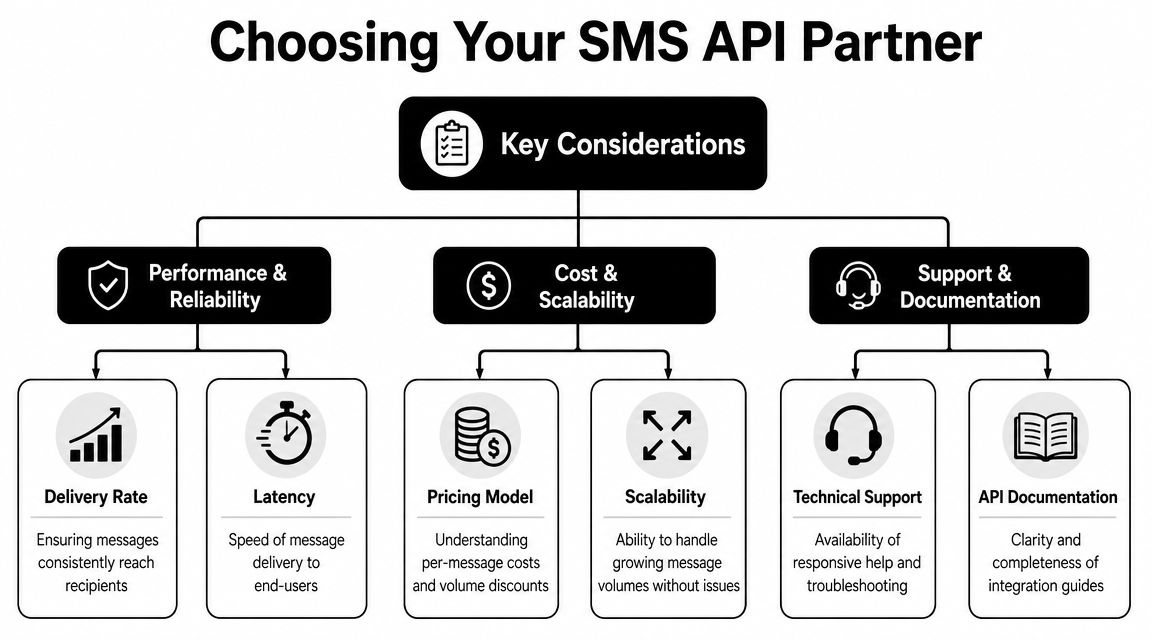
A lot of developers assume that if an API returns success, the hard part is over. It isn't. Providers differ in routing quality, support for local requirements, number type options, and how they handle filtering or registration.
One of the most useful observations in this space is that compliance and deliverability by market are often the underserved part of the conversation. Text Request's API comparison notes point out that implementation success depends on local telecom rules rather than API syntax alone, and that top providers differentiate themselves with built-in compliance and optimized carrier routing.
That's exactly right. The code to post a message is rarely the blocker. The blocker is everything around it.
A practical review usually comes down to six areas.
Businesses often ask for HIPAA support, TCPA guidance, or opt-out automation late in the process. That's backwards. Those requirements should narrow the provider list from the start.
If you're in healthcare, "we can send texts" isn't enough. You need a platform that supports compliant workflows, controlled access, auditability, and the contractual requirements your organization needs. The same goes for consent-heavy marketing use cases, where opt-in records and suppression logic have to be part of the system, not bolted on later.
For businesses comparing tooling, lists like these SMS marketing platforms are useful as a starting point, but the real test is whether the provider matches your traffic type, your compliance obligations, and your operational workflow.
Practical rule: Choose the provider that fits your sending environment, not the one with the shortest quickstart.
Cheap routes can cost more when messages don't deliver. High-throughput options can create trouble if your consent process is weak. A provider built for simple notifications may struggle if you need two-way messaging, CRM sync, MMS, or multi-channel follow-up with voice and ringless voicemail.
One option in this category is Call Loop, which supports SMS, voice broadcasting, ringless voicemail, integrations, and HIPAA-oriented workflows. That's useful when you need messaging tied to broader outreach rather than a bare API endpoint. But even then, the same rule applies. Match the platform to the job.
Once you've picked a provider, the first job isn't writing a message body. It's setting up authentication so your application can send messages without exposing the rest of your account.
The clean pattern is token-based access with narrow permissions. That gives your app the minimum access it needs, and nothing more.
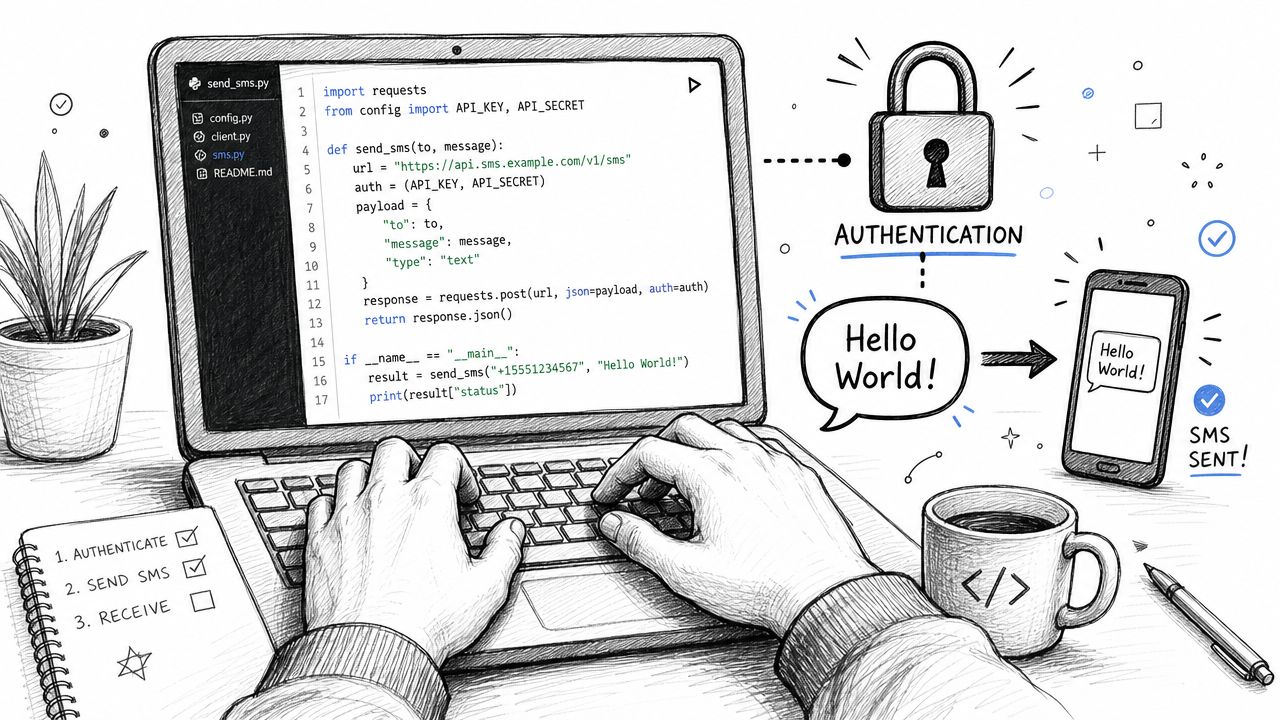
A secure SMS API implementation should use OAuth or token-based authentication with scoped access. The standard flow is to generate an access token, restrict it to SMS-only permissions, and then post to the provider's SMS endpoint. SMSAPI's developer guidance describes this pattern because it reduces risk if credentials leak.
In practice, that means:
If your provider still pushes one master API key for everything, treat that as a warning sign.
Most send SMS online API requests have the same pieces even when vendors use different field names:
PartWhat it doesAuthorization headerProves your app is allowed to call the APIEndpoint URLThe provider route that accepts outbound SMSFrom valueThe approved sender number or identityTo valueThe recipient phone numberMessage bodyThe text content you want sent
A simple JSON payload often looks conceptually like this:
{"from": "+15550001111","to": "+15550002222","message": "Hello from our app"}
Your provider may use body, text, or content instead of message, but the pattern stays familiar.
import osimport requestsAPI_TOKEN = os.getenv("SMS_API_TOKEN")SMS_ENDPOINT = "https://api.your-provider.com/v1/sms"payload = {"from": "+15550001111","to": "+15550002222","message": "Hello from our app"}headers = {"Authorization": f"Bearer {API_TOKEN}","Content-Type": "application/json"}response = requests.post(SMS_ENDPOINT, json=payload, headers=headers, timeout=10)print(response.status_code)print(response.text)
This does three things. It reads the token from the environment, posts JSON to the provider endpoint, and prints the response so you can confirm the message was accepted.
const axios = require("axios");const SMS_ENDPOINT = "https://api.your-provider.com/v1/sms";const API_TOKEN = process.env.SMS_API_TOKEN;async function sendSms() {try {const response = await axios.post(SMS_ENDPOINT,{from: "+15550001111",to: "+15550002222",message: "Hello from our app"},{headers: {Authorization: `Bearer ${API_TOKEN}`,"Content-Type": "application/json"},timeout: 10000});console.log(response.status);console.log(response.data);} catch (error) {if (error.response) {console.log(error.response.status);console.log(error.response.data);} else {console.log(error.message);}}}sendSms();
Node is often the fastest way to wire SMS into web apps, especially if you already run Express, Next.js, or serverless functions. The key part isn't the library. It's capturing both success and failure responses cleanly.
If your app only logs "send failed," you'll spend hours debugging issues that could have been resolved by storing the provider response body.
<?php$apiToken = getenv('SMS_API_TOKEN');$smsEndpoint = 'https://api.your-provider.com/v1/sms';$payload = json_encode(['from' => '+15550001111','to' => '+15550002222','message' => 'Hello from our app']);$ch = curl_init($smsEndpoint);curl_setopt($ch, CURLOPT_RETURNTRANSFER, true);curl_setopt($ch, CURLOPT_POST, true);curl_setopt($ch, CURLOPT_POSTFIELDS, $payload);curl_setopt($ch, CURLOPT_HTTPHEADER, ['Authorization: Bearer ' . $apiToken,'Content-Type: application/json']);$response = curl_exec($ch);$statusCode = curl_getinfo($ch, CURLINFO_HTTP_CODE);echo $statusCode . PHP_EOL;echo $response . PHP_EOL;curl_close($ch);?>
This is enough to test a provider quickly from a legacy PHP app or admin panel.
A common mistake is assuming a successful API response means the recipient got the text. Usually it doesn't. It means the provider accepted the message for processing or queued it for sending.
Look for values such as:
Store the provider's message ID immediately. You'll need it later when delivery receipts or webhook events arrive.
A single outbound text is useful. A messaging workflow is where the value compounds.
The pattern I see work best is event-driven communication tied to a customer journey. One action happens in your system, the API sends a message, the customer responds or clicks, and your app decides what happens next. That's the difference between "we can text people" and "messaging is part of the product."
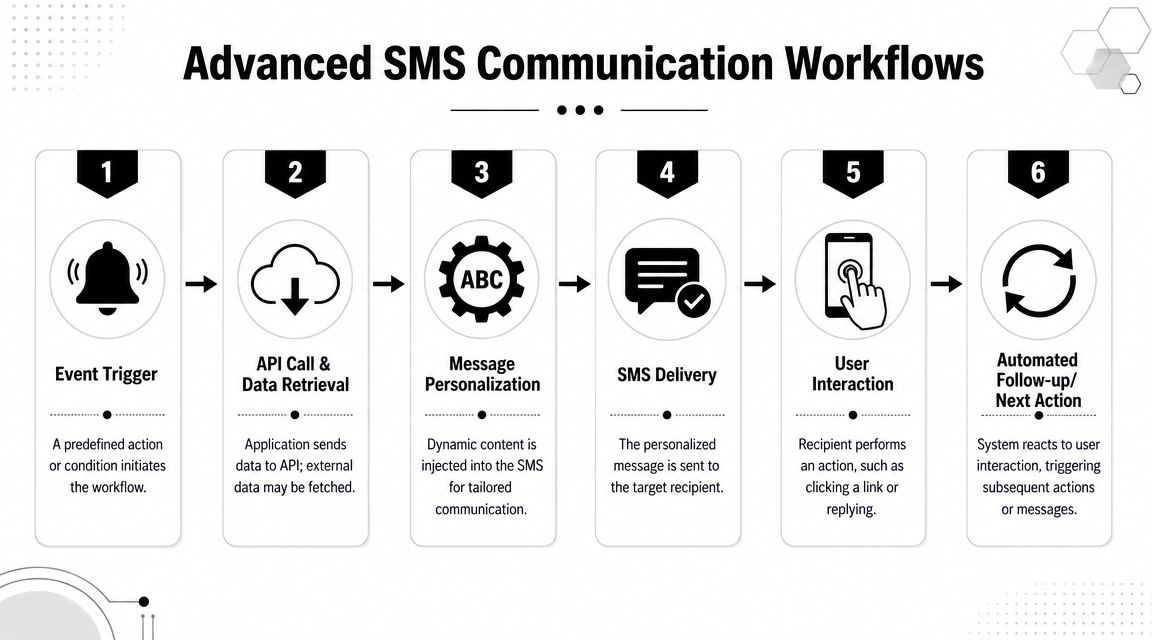
Take a simple ecommerce example.
A customer places an order. Your app sends an order confirmation by SMS. When the warehouse marks the package as shipped, the system sends another message with a tracking link. If the customer replies with a support question, your webhook posts that inbound message into the help desk. If a high-value order sits undelivered, your team can trigger a more personal follow-up through ringless voicemail or a voice call workflow.
That sequence does a few things well:
Ringless voicemail is useful here because it adds a higher-touch follow-up without forcing a live call attempt. It can work well for appointment reminders, missed callbacks, payment follow-up, and post-event outreach when you want a voice presence but don't want to tie up staff in manual dialing.
Most businesses stop at first-name merge tags. Better workflows personalize around context.
A booking app can include the appointment date and staff member. A gym can reference the class time. A school can mention the campus or student group. A sales workflow can route replies by owner instead of dumping everything into one shared inbox.
To make that work, build around webhooks and state changes:
Good SMS automation feels conversational to the recipient, even when the workflow behind it is heavily structured.
Bulk sending is where many integrations get sloppy. Developers often push huge jobs as fast as possible, then wonder why requests are throttled or messages stall in queue.
For throughput planning, some cloud SMS APIs allow up to 500 messages per API call but limit calls to 100 destination numbers and 5 separate message bodies, with platform limits such as 300 messages per minute. Google Cloud's documentation also notes that unprocessed jobs can expire after 2 hours, which is why bulk senders need to batch and throttle deliberately. The details are in Google Cloud's SMS API limits documentation.
That has direct design implications.
Workflow choiceWhat usually happensHuge unthrottled burstRate limits, queue delays, failed jobsControlled batches by recipient setMore stable delivery behaviorMixed message bodies in one job without planningHarder debugging and unexpected capsQueue monitoring with retriesBetter recovery when send volume spikes
SMS shouldn't carry every message type.
Use MMS when the image adds meaning, such as a product photo, coupon graphic, event flyer, or proof-of-delivery image. Use voice broadcasting for urgent alerts that need more than a short text. Use ringless voicemail when a human-sounding follow-up adds context but a live call would feel too aggressive or too labor-intensive.
A practical multi-channel sequence might look like this:
The mistake is sending the same message on every channel. Each channel should do a different job.
The biggest jump in usefulness usually happens when you start accepting replies.
An outbound-only setup is fine for alerts. But once inbound messages hit your CRM, ticketing system, or scheduling workflow, SMS becomes part of service delivery. Support teams can answer questions, sales teams can qualify intent, and healthcare staff can confirm appointments without forcing patients into a phone tree.
That's when the API stops being just a sender and starts acting like a communication layer for the business.
A customer says they never got the reminder. Your dashboard says the request was accepted. Both can be true.
An SMS API confirms only part of the trip. Your application submits the message, the provider queues and routes it, carriers decide whether to pass it, and the receiving device may still be offline, blocked, or unreachable. If you treat "API accepted" as "customer received it," support teams get bad data and automations fire on the wrong assumption.
Store the provider message ID from the initial send response and treat later status updates as the source of truth. That usually means wiring webhooks into your app, then updating the message record as each event arrives.
Common statuses usually map to these stages:
Those stages matter operationally. A queued message during a traffic spike may justify a retry delay. A rejected message often points to content, registration, or policy problems. A delivered message with no customer action is not a transport issue at all. It is a workflow or message design issue.
Providers use different code sets, so build your handling around failure type rather than one vendor's exact numbers.
Error CodeMeaningRecommended ActionAUTH_FAILEDAuthentication token is missing, expired, or invalidRefresh the token, verify scopes, and confirm the request is using the correct environmentINVALID_NUMBERRecipient number format is invalid or unsupportedNormalize numbers before send, validate input at form entry, and suppress obviously bad dataRATE_LIMITEDYour app sent too many requests too quicklyBack off, queue the retry, and reduce burst sizeOPTED_OUTRecipient has withdrawn consentHonor suppression immediately and don't retryFILTEREDCarrier or provider blocked the message content or routeReview message copy, sending pattern, registration status, and number typeUNKNOWN_ERRORProvider returned a non-specific failureLog the full response, retry cautiously if appropriate, and escalate if the failure repeats
In production, the same causes show up again and again.
Bad numbers, stale CRM records, missing opt-in history, unregistered traffic, and message copy that looks risky to carrier filters cause a large share of delivery trouble. Teams also run into avoidable issues when they use the wrong sender type for the volume or use case. A local support number and a campaign sender do not behave the same way under load.
If you are working through repeat failures, this guide to common reasons texts do not deliver is a useful checklist before you start blaming the API.
One more trade-off matters here. Automatic retry logic helps with temporary transport problems such as rate limiting or timeouts. It makes things worse when the underlying issue is consent, carrier filtering, or bad destination data.
Good error handling is mostly classification.
Use automatic retries for short-lived failures such as 429 responses, temporary upstream outages, or connection resets. Suppress sends immediately for opted-out recipients, invalid numbers, and permanent policy failures. Route filtering events and repeated unknown failures into a review queue so someone can inspect the content, registration state, and sending pattern.
I usually separate recovery into three paths:
That structure becomes more important once SMS is part of a larger workflow. If a patient reminder fails, a HIPAA-sensitive follow-up may need a different approved channel. If a sales reminder fails, your CRM should create a task instead of automatically trying the same text five times. Delivery handling is not just messaging hygiene. It affects compliance, customer experience, and what the business does next.
Security and compliance aren't paperwork around an SMS integration. They shape the architecture.
If you're collecting patient data, customer records, or lead information and then sending texts from those systems, the messaging layer inherits the sensitivity of the underlying workflow. That's why credential storage, access control, logging, and consent records belong in the initial build plan.
Healthcare teams need more than message delivery. They need a provider that supports HIPAA-compliant workflows, including the agreements and safeguards their organization requires. If a platform can't support that environment, it doesn't matter how easy the API is.
Consent is just as important for non-healthcare use cases. Marketing and outreach systems need clear opt-in logic, opt-out handling, and durable records of what a contact agreed to receive. For teams tightening those processes, this guide to express written consent is a useful reference point for what your workflow should document.
The strongest setups connect SMS to business events, not staff memory.
Examples that work well include:
Protect the integration points too. Sanitize inbound message content before storing or routing it. Restrict which users can create campaigns or export contact data. Separate production credentials from test environments. Keep suppression lists synchronized across channels so a person who opts out of one workflow doesn't keep getting hit from another.
The businesses that handle this well don't think of SMS as a standalone marketing tool. They treat it as one part of a controlled communication system that may also include voice, MMS, and ringless voicemail.
If you need a platform that supports SMS alongside voice and ringless voicemail, with integrations and HIPAA-oriented workflows, Call Loop is one option to evaluate for building a practical multi-channel outreach stack.
Chris Brisson
Chris is the co-founder and CEO at Call Loop. He is focused on marketing automation, growth hacker strategies, and creating duplicatable systems for growing a remote and bootstrapped company. Chat with him on X at @chrisbrisson


Trusted by over 45,000 people, organizations, and businesses like


