
See a Demo
You're just one step away from seeing Call Loop in action.
Enter your information below to watch a demo right now.

You're just one step away from seeing Call Loop in action.
Enter your information below to watch a demo right now.

An SMS auto responder is pretty straightforward: it’s an automated system that shoots out pre-written text messages when someone takes a specific action, like texting a keyword to your number or filling out a form on your site. It lets you engage with people 24/7, instantly, without having to lift a finger.
We live in a world of instant everything, and your customers expect that same speed from you. When someone signs up for a trial class at your gym or texts a question about their order, radio silence is the absolute worst response.
Waiting hours—or even days—for a real person to reply is a fantastic way to lose a sale or frustrate a potential customer. An SMS auto responder closes that gap, making sure every single person gets an immediate, professional reply.
This isn't just about sending a generic "we got your message." It’s about kicking off powerful, automated conversations that start building a relationship from the very first text. A well-built auto-reply system is like your most reliable employee—it works around the clock to capture leads, confirm appointments, and make your customers feel seen.
The magic behind SMS automation is simple: people actually read their texts. The engagement rates are through the roof, which means your automated messages are almost guaranteed to be seen.
Take a look at the industry stats. SMS open rates are sitting at around 98%, with an incredible 45% response rate. That completely blows email out of the water, where response rates often struggle just to hit 6%. When you send an automated text, you’re not just tossing a message into the void; you’re connecting with your audience on the device they’re glued to.
You can see how this plays out in some pretty powerful ways:
An effective SMS auto responder flips your communication from reactive to proactive. It puts you in control, letting you guide customers on their journey instead of just waiting for them to come to you with a problem.
Let's quickly stack up SMS against its older sibling, email. The difference in engagement is striking.
The numbers don't lie. For immediate, high-impact communication, SMS is in a league of its own.
Beyond making customers happy, an SMS auto responder is a beast when it comes to operational efficiency. It takes all those repetitive communication tasks off your team's plate, freeing them up to handle the complex stuff that actually requires a human brain. Setting one up is a perfect example of how to automate business processes to save time and money.
Think about these real-world scenarios:
These aren't some complicated, expensive initiatives. They're simple, automated workflows that deliver consistent results and a real return on your investment. By setting up these basic sequences, you build a system that works for your business 24/7, making sure you never miss an opportunity.
Alright, let's get our hands dirty and build your first SMS autoresponder workflow. The idea here is to create a simple but powerful sequence that welcomes a new contact, confirms they want to hear from you, and immediately follows up with something valuable. This first touchpoint is critical—it really sets the tone for your entire relationship with a new subscriber.
We'll kick things off with the most common entry point I've seen work time and time again: a text-to-join keyword. This is just a memorable word or phrase people can text to your number to sign up.
Choosing the right keyword is a bigger deal than you might think. It needs to be short, ridiculously easy to spell, and tie directly back to what you're offering. Steer clear of complicated words or anything your phone's autocorrect might mangle. A local pizza joint could use "PIZZA," and a gym could go with "FITNESS." You get the idea—simpler is always better.
The moment someone texts your keyword, your system needs to fire back an automated reply. This isn't just a confirmation; it's your first real handshake. This message has two main jobs: confirm their subscription and tell them what to expect. A great confirmation message feels welcoming and instantly delivers on whatever promise you made to get them to opt-in.
This is also your first shot at making things personal. Using merge tags like [FirstName] lets you pop their name right into the message. Now, you might not have their name from a simple keyword opt-in, but this feature becomes a game-changer when you start capturing leads from web forms where you're asking for more info.
Here's what a solid confirmation text looks like:
"Welcome to the VIP Club, [FirstName]! Thanks for signing up. Get ready for exclusive deals and updates. As a thank you, show this text for 15% off your next purchase! Reply STOP to opt-out."
Let's break down why this works so well:
This simple flow is the foundation of so many successful SMS campaigns. A customer sees a keyword, they text it, and they get an immediate, valuable reply.
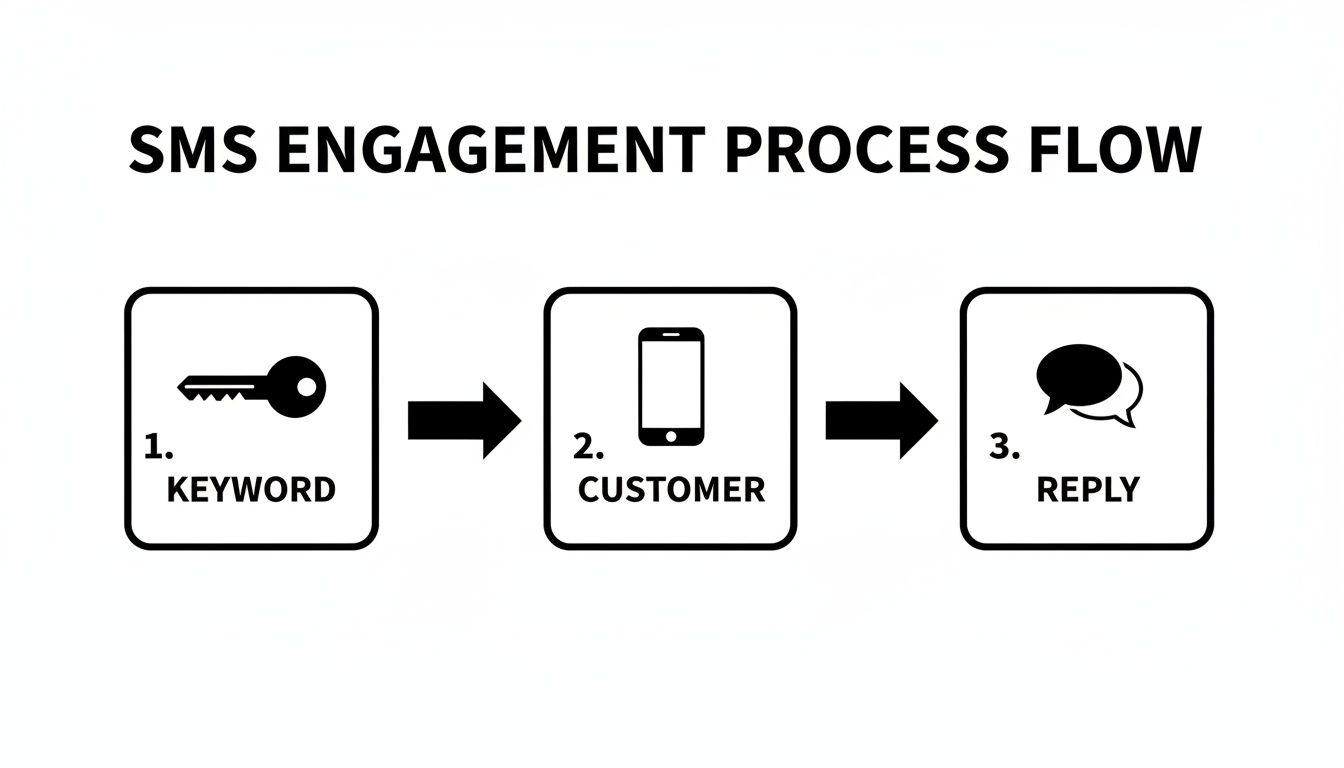
As you can see, it's a straightforward path from the keyword trigger to the customer's action and finally to your automated response. This is the bedrock you'll build on.
A single auto-reply is good, but a scheduled follow-up? That's even better. This is where a simple drip campaign comes into play. A drip campaign is just a series of automated messages sent out over time. For our first campaign, we’ll schedule one follow-up message to go out 24 hours after they initially sign up.
This second text is a fantastic opportunity to reinforce your brand or maybe even present another offer. The contact is still "warm" from their first interaction, so a follow-up like this has a really high chance of being seen and engaged with. The trick is to keep it valuable and avoid being pushy.
For example, our pizza shop could send this the next day:
"Hope you're enjoying the VIP Club! Did you know we have weekly specials? Check them out here: [link to specials page]. Don't forget to use your 15% off coupon!"
You can visually map out these steps in a workflow builder, from the initial keyword trigger to the timed follow-up message. By mapping out these simple steps, you're turning a one-off interaction into an actual conversation, building a much stronger connection with your audience from day one.
If you want to dive deeper into building these sequences, check out our guide on how to send automated texts.
Once you’ve got your basic welcome message dialed in, it’s time to get a bit more sophisticated. This is where you graduate from simple replies and start building a smart communication engine. Your SMS auto responder can become the heart of a multi-channel strategy that actually adapts to what your subscribers do.
This isn’t about just firing off a single text. Think about what happens next. What if a new lead gets your welcome text but doesn’t click the link? Instead of just letting them go cold, you can have a system in place that automatically triggers a different kind of follow-up, giving you more than one shot to connect.
One of the best ways I’ve seen to cut through the noise is to add a human touch with ringless voicemail. If you haven't used it, this tech is pretty cool—it drops a pre-recorded audio message straight into someone’s voicemail box without their phone ringing. It feels way more personal than another text but isn't as intrusive as a cold call. This method is sometimes referred to as a voicemail drop.
Here’s how a simple workflow could play out:
This one-two punch is incredibly effective. It grabs their attention again and adds a human element that text alone just can't match. It shows you’re on top of things without being pushy. Using ringless voicemail drops as part of your automated sequence can significantly boost engagement.
Let's be real: not all subscribers are created equal, so why would you send them all the same message? Smart segmentation is your ticket to delivering content that actually feels relevant. The simplest way to get started is to create different auto-responder flows based on the specific keyword a person texts.
Think of each keyword as a unique front door to a specific customer journey. This lets you tailor the entire sequence—messages, offers, follow-ups—to what that person is actually interested in.
For example, you could set up flows for different intents:
This simple diagram shows how a single opt-in can branch off into completely different, automated paths depending on what the subscriber wants.
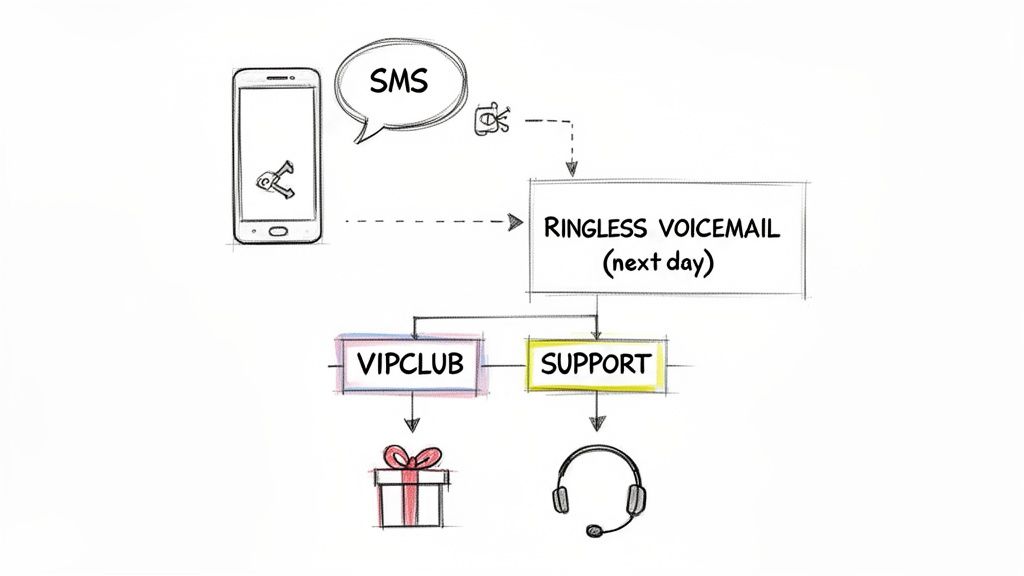
As you can see, based on keywords or actions, you can route people to totally different experiences—from a VIP offer to an immediate support channel.
By segmenting your audience from the very first interaction, you stop blasting generic messages and start having relevant conversations. This simple strategy dramatically boosts engagement and conversion rates because every message feels like it was sent directly to them.
When you start combining multi-channel follow-ups like ringless voicemail with smart, keyword-based segmentation, your SMS auto responder evolves. It’s no longer just a reply tool; it’s a dynamic system that intelligently guides people down the right path, delivering the right message at the right time. And that’s what ultimately drives real business results.
Knowing the theory behind an SMS auto responder is great, but having ready-to-go templates is what saves you a ton of time. A solid template gets straight to the point, delivers immediate value, and always includes a clear call to action.
Let's move from theory to action right now. Here are some copy-and-paste examples you can steal and tweak to match your brand's voice.
For any online store, speed is money. When someone subscribes or leaves items in their cart, an automated message can be the nudge that turns a visitor into a customer.
Welcome Discount:
"Hey [FirstName], welcome to the club! So glad you're here. As a thank you for signing up, use code WELCOME15 for 15% off your first order. Shop now: [short link]"
Abandoned Cart Recovery (Sent 1 Hour Later):
"Hi [FirstName], did you forget something? The items in your cart are waiting for you! Complete your order before they're gone: [short link to cart]"
If your business runs on appointments, no-shows are a killer. They drain resources and mess up your schedule. An automated confirmation and reminder sequence is a simple fix that works wonders.
Appointment Confirmation:
"Hi [FirstName], your appointment with [StaffName] is confirmed for [Date] at [Time]. We look forward to seeing you! Reply YES to confirm or call us to reschedule."
Appointment Reminder (Sent 24 Hours Before):
"Quick reminder! Your appointment with us is tomorrow at [Time]. Please reply with any questions. See you soon!"
Pro-Tip: For confirmations, always ask for a simple reply like "YES." Getting someone to actively acknowledge their commitment is a small psychological trick that significantly reduces no-show rates.
If you want to dive deeper into crafting the perfect booking messages, check out our full guide on the appointment confirmation text message.
Local businesses like gyms, studios, and workshops are all about community. Use your SMS auto responder to nurture leads and keep members engaged.
Trial Class Info Request:
"Thanks for your interest in our trial class! You can view our schedule and book your spot here: [short link]. We can't wait to see you!"
Weekly Tips or Motivation:
"Happy Monday from [YourBusiness]! Here's a quick fitness tip to start your week strong: [Insert Tip Here]. Now go crush your goals!"
Looking for more inspiration? Checking out how other industries build automated response templates can spark some great ideas for your own messaging.
These examples are a jumping-off point. The real magic happens when you inject your own brand's personality into them.
[FirstName]. It makes a text feel like a one-to-one conversation, not a blast.By combining these proven templates with your unique brand, you can build an automated system that feels personal, delivers value, and drives results around the clock.
Setting up a powerful SMS autoresponder is only half the battle. Your messages have to actually hit the inbox and follow the rules to be effective. An automated strategy falls completely flat if your texts get blocked by carriers or, even worse, land you in legal hot water.
This is where you need to get serious about compliance and deliverability.
Navigating these rules isn't as scary as it might sound. The core idea is simple: be respectful, be transparent, and only text people who have explicitly asked you to. This isn’t just about dodging fines; it’s about building a foundation of trust with your audience.
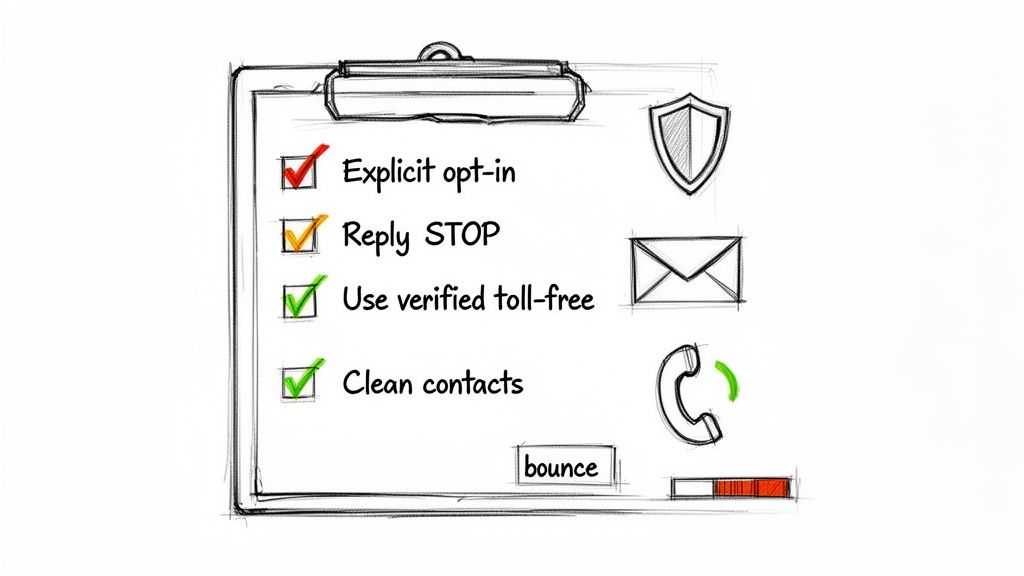
The Telephone Consumer Protection Act (TCPA) is the big one—the main regulation governing text message marketing in the United States. Its primary rule is that you must have express written consent before sending automated marketing texts. This means someone has to knowingly and clearly agree to receive them from you.
So, what does that look like in the real world?
The golden rule is to never assume consent. Getting that permission upfront is the bedrock of a responsible and effective SMS strategy. It protects your business and shows customers you respect their privacy.
Getting past carrier filters and into your customer’s inbox takes more than just following the law. Mobile carriers are always on the lookout for spammy behavior, and if your messages trigger their alarms, they’ll get blocked before they ever arrive.
To keep your deliverability rates sky-high, focus on these key things:
If you start running into issues, it's usually a process of elimination to figure out what's going wrong. For a deeper dive, our article explores common reasons why text messages are not being delivered and how to fix them.
Thankfully, the SMS marketing world has matured. Most platforms now include features like link shorteners with click-tracking, number validation, and opt-in audit trails to help businesses meet these regulatory and carrier demands. By sticking to these best practices, you can run your automated campaigns confidently, knowing your messages are getting where they need to go.
Even with a solid plan, a few questions always pop up when you start digging into SMS autoresponders. It's a powerful tool, and getting the finer points right can be the difference between a good campaign and a great one. I've rounded up some of the most common questions we get, with straightforward answers to help you get the most out of your automated texts.
Absolutely, and you definitely should. Using different keywords for separate campaigns is a foundational strategy for smart segmentation. It’s one of the simplest ways to start personalizing the customer journey right from the first text.
For instance, a restaurant could have one autoresponder triggered by the keyword "DEALS" that sends a weekly coupon, and another for "RESERVE" that replies with a booking link. This way, your automated messages are tailored to what the subscriber actually wants, which is the secret to keeping them engaged.
While they're both killer automation tools, they play different roles. The real magic happens when you use them together.
Think of it as a one-two punch. The SMS can be the immediate touchpoint. If a lead doesn't respond, a follow-up voicemail drop can grab their attention with a more personal message, creating a more robust, multi-channel approach.
Handling compliance keywords like "HELP" and "STOP" is completely non-negotiable and has to be automated. Your messaging platform must be set up to act immediately when it sees these replies.
This isn't just a best practice; it's the law. Failing to honor opt-outs can lead to massive fines and wreck your brand's reputation. Any reliable platform, like Call Loop, handles this for you automatically.
This is a classic hiccup, especially with more complex workflows. If your auto-reply isn't firing when someone texts your keyword, it's almost always a timing or logic issue in your automation.
One of the most frequent culprits is that the workflow checks for the keyword before the contact has even had a chance to reply. The system moves so fast that by the time the user texts "HELP," the workflow is already past the point where it was looking for that word.
Here's what to check:
Shorter is almost always better. People expect texts to be quick and to the point. The standard SMS limit is 160 characters. While you can send longer messages (they just get split into multiple texts), it's best to stick to that limit if you can.
A great auto-reply is concise and direct. It should include:
Keeping your messages tight ensures they get read and understood immediately, respecting the fast-paced nature of SMS. Plus, you avoid overwhelming someone with a wall of text.
Ready to build an intelligent, multi-channel SMS autoresponder that connects with customers and drives results? Call Loop provides all the tools you need—from SMS and ringless voicemail to powerful drip campaigns and compliance features—to automate your outreach effectively. Start your free trial today!
Chris Brisson
Chris is the co-founder and CEO at Call Loop. He is focused on marketing automation, growth hacker strategies, and creating duplicatable systems for growing a remote and bootstrapped company. Chat with him on X at @chrisbrisson


Trusted by over 45,000 people, organizations, and businesses like


