
See a Demo
You're just one step away from seeing Call Loop in action.
Enter your information below to watch a demo right now.

You're just one step away from seeing Call Loop in action.
Enter your information below to watch a demo right now.


Missed appointments usually don't happen because customers don't care. They happen because people get busy, texts get buried, emails sit unread, and a booking that felt clear on Tuesday is forgotten by Friday.
That's why sms to calendar matters. When your reminders, calendar entries, and follow-up touches work together, you stop relying on memory and start using a repeatable system. For a small business, that shift is practical, not fancy. It protects booked time, keeps staff schedules full, and gives customers fewer chances to miss what they already intended to attend.
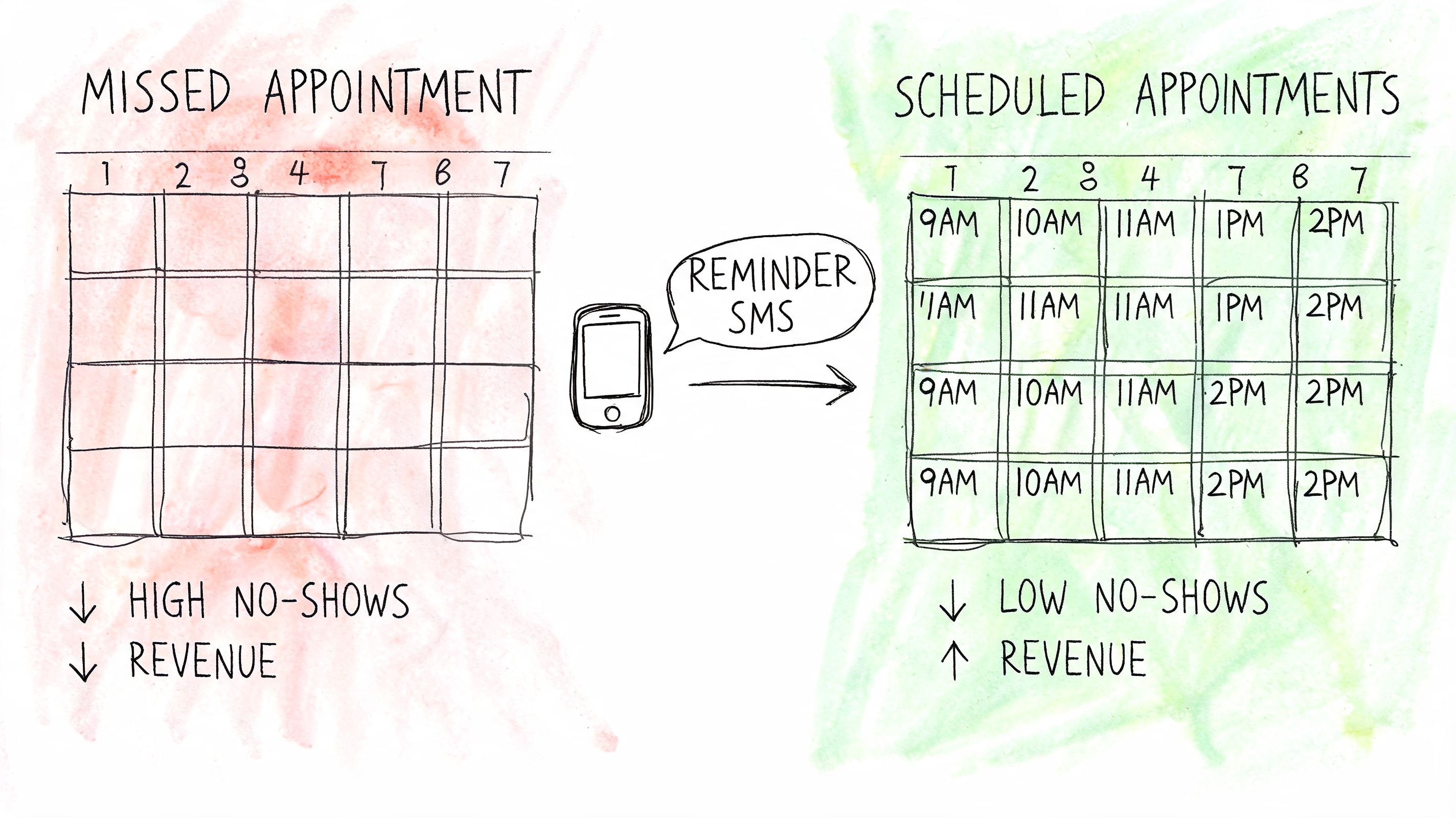
If you run a clinic, salon, karate studio, service business, or any operation built around scheduled time slots, no-shows create a double hit. You lose the revenue from the missed appointment, and you lose the time that could have gone to someone else.
That's why calendar-triggered messaging has moved from a nice add-on to a standard operating tool. The market signal is clear. The SMS Reminder for Google Calendar app alone had been adopted by over 776,000 users as of April 2026 according to the Google Workspace Marketplace listing for SMS Reminder for Google Calendar. That's not a niche workaround. It's proof that appointment-based businesses want reminder automation built into the calendar they already use.
Your calendar already holds the key fields: who's coming, when they're coming, and often where they're going. When SMS is tied to that data, reminders become consistent without your staff copying and pasting details all day.
A good setup does three things well:
Practical rule: If a business books appointments all week, it shouldn't rely on front-desk memory to send reminders.
Teams that want one place to organize scheduling alongside internal coordination often also look at a unified work app calendar, especially when appointments connect to broader staff workflows.
Customers mean well. They still forget. A booking confirmation alone isn't enough, especially when the appointment is several days away or requires travel, preparation, or schedule changes.
SMS to calendar works because it adds structure. The text gets attention. The calendar holds the slot. Together, they reduce the friction between “I booked this” and “I showed up.”

The simplest version of sms to calendar is a plain text message with an Add to Calendar link. It's not elegant, but it works when your appointment volume is still low or when you need a fast fix without building automation first.
This method is useful for businesses that still send reminders manually. If your team is texting from a business inbox or basic SMS tool, a calendar link gives the customer one more action they can take right away instead of saying, “I'll remember.”
For Google Calendar, you can build a link that pre-fills the event details. The structure looks like this:
| Platform | Basic format |
|---|---|
| Google Calendar | https://calendar.google.com/calendar/render?action=TEMPLATE&text=EVENT_TITLE&dates=START/END&details=DESCRIPTION&location=LOCATION |
Replace the placeholders with your actual event info:
A simple reminder text might read like this:
Your appointment is booked for Friday at 3:00 PM. Add it to your calendar here: appointment calendar link
That example also shows the larger point. The message should stay short. The link does the heavy lifting.
Outlook also supports event creation from a URL. The structure is different, but the goal is the same:
| Platform | Basic format |
|---|---|
| Outlook | https://outlook.office.com/calendar/0/deeplink/compose?subject=EVENT_TITLE&startdt=START&enddt=END&body=DESCRIPTION&location=LOCATION |
This is worth using if your customers skew corporate, B2B, or office-based. Many of them live in Outlook all day and are more likely to save the appointment there than in Google Calendar.
Manual calendar links make sense when:
They start breaking when:
Manual links are a good bridge strategy. They are not a strong long-term system for a busy appointment business.
A calendar link is functional. A .ics file feels more polished.
An .ics file is a standard calendar event file that many devices and calendar apps can open directly. When the recipient taps it, their phone usually offers a straightforward way to save the event to their preferred calendar. That reduces friction compared with a browser-based link, especially for people who don't want to fill anything in themselves.
The main advantage is convenience. Instead of sending someone out to a calendar page and asking them to confirm the details there, you send the event itself.
That matters because every extra step gives a customer another chance to stop halfway through. In practice, the easiest reminder systems are the ones that ask for the fewest taps.
A solid .ics event should include:
This approach works well when your appointments are high-value, scheduled in advance, or likely to be added to a personal calendar. Think consultations, medical visits, estimate appointments, onboarding calls, or private lessons.
It's also a good fit when your audience uses different devices. An iPhone user, Android user, and desktop user may all handle the event a little differently, but the .ics format gives you a broadly compatible option.
Here's a practical comparison:
| Method | Best use case | Main downside |
|---|---|---|
| Calendar link | Fast manual texting | More steps for the recipient |
| .ics attachment | Professional booking confirmations | Requires file generation and compatible sending workflow |
You don't need to hand-code .ics files for every appointment. Most businesses use one of three approaches:
Booking software with built-in calendar invites
Many scheduling tools already generate event files automatically.
A no-code workflow that creates an event file
Useful if your calendar, form, and messaging tools are connected.
A template-based internal process
This works for lower volume teams that still want a cleaner customer experience.
If your team handles rostered schedules, coaches, or shared event logistics, this guide to Google Calendar scheduling for teams is a practical reference point for how .ics workflows fit into collaborative scheduling.
A reminder message should do one job well. Help the customer keep the appointment. Anything that shortens the path from text to saved event is usually worth considering.
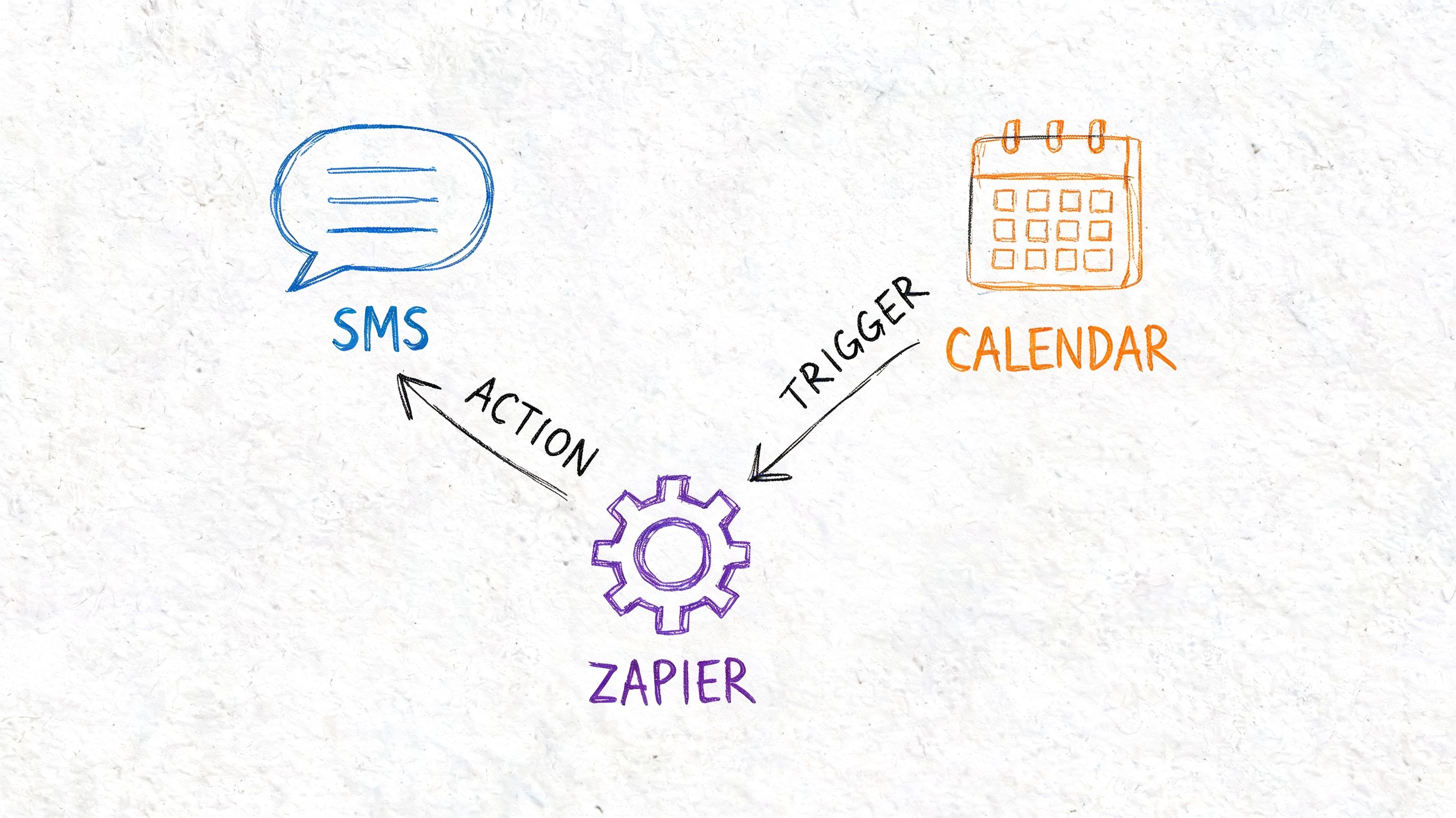
Manual reminders hold up for a while. Then they become a tax on your team. Someone forgets to send one. A date gets copied wrong. A customer reschedules, but the old reminder still goes out.
Automation fixes that by letting the calendar event trigger the message. According to the Vonage guide to sending SMS reminders from Google Calendar events with Zapier, a Google Calendar Event Start trigger can be set to fire 24 to 48 hours before an appointment, and this type of workflow can reduce no-shows by 30 to 50% while achieving 95% delivery rates on US carriers when using compliant toll-free numbers.
At a practical level, the automation is simple:
That's the core. You can make it more advanced later, but that base setup already removes a lot of manual work.
Use this as the starting blueprint:
A basic message template often looks like this:
Hi Sarah, reminder for your appointment tomorrow at 2:00 PM at 125 Main Street. Reply YES to confirm or STOP to opt out.
That format works because it's clear, recognizable, and gives the customer an easy next action.
Zapier is useful because many businesses already have Google Calendar and a messaging platform in place. You don't need a developer to create the connection. You define the trigger, map the fields, and test the send.
If you want a direct starting point for this kind of workflow, Call Loop supports Zapier-based automation through its Zapier integration for messaging workflows.
Most failures don't come from the trigger itself. They come from messy input data.
Common trouble spots include:
The calendar event should be treated like source-of-truth data. If the event is sloppy, the reminder will be sloppy too.
A lot of no-show advice focuses on generic follow-up discipline. For a more operations-focused view, Estimatty's advice on reducing no-shows is helpful because it aligns with the same practical reality. Consistency beats good intentions.
Don't think of this as “sending reminder texts.” Think of it as assigning your system one clear responsibility: every valid appointment gets the right message at the right time.
That mindset changes how you build the workflow. You stop improvising message sends. You start checking for edge cases, like reschedules, duplicate bookings, and confirmation replies. That's where automated sms to calendar stops being a convenience and starts acting like infrastructure.
A single reminder text is useful. It's rarely the whole answer.
Some customers respond immediately to SMS. Others notice a voicemail first. Some need an early reminder so they can plan transportation, childcare, or staff coverage. The opportunity is to coordinate SMS, ringless voicemail, and calendar-driven timing so each touchpoint has a job instead of becoming noise.
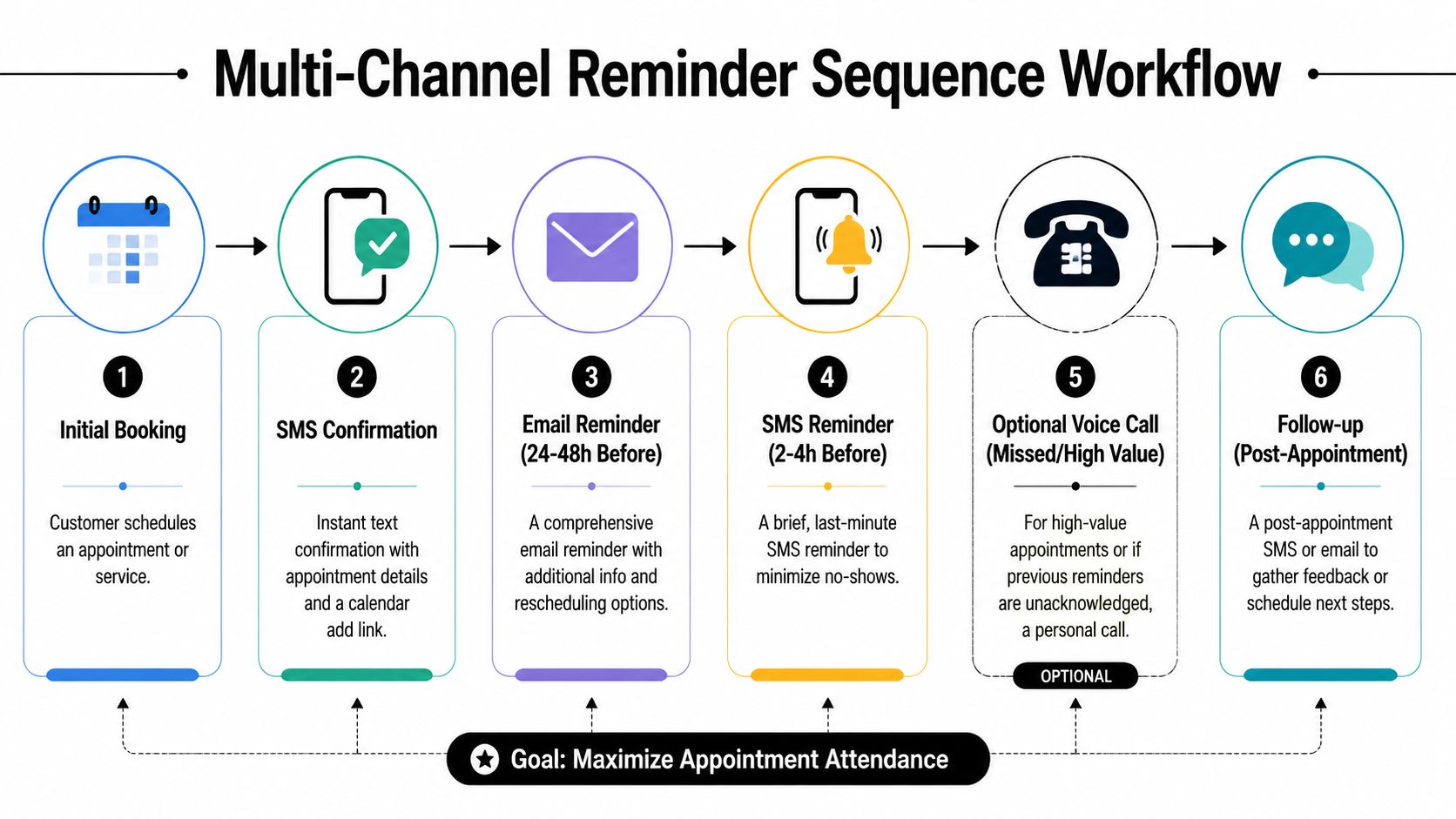
Research summarized by Esendex on missed appointment reminders points to a real gap here. Most advice focuses on a single reminder, while the harder question is sequence design. That matters because properly sequenced reminders can reduce no-shows by 30 to 40%, but the cadence across SMS, voice, and ringless voicemail needs to be managed carefully to avoid fatigue.
Think in roles, not just channels.
| Channel | Best role in the sequence |
|---|---|
| SMS | Fast confirmation, short reminders, reply handling |
| Ringless voicemail | Softer touch for higher-value or less responsive contacts |
| Calendar trigger | Timing engine that decides when reminders should fire |
| Live call | Escalation for critical bookings or unresolved issues |
Ringless voicemail is especially useful when you want presence without demanding an immediate text response. It can work well for consultations, assessments, demos, and other appointments where the value of attendance is high enough to justify an extra touch.
Here's a balanced model for appointment-based businesses:
That sequence works because each step has a different purpose. The first message confirms. The voicemail adds salience. The next text reduces forgetfulness. The final touch cuts day-of drift.
Don't stack channels just because you can. Use each one for a different reason.
A lot of businesses get this wrong in predictable ways:
A useful sequence should feel coordinated, not frantic. If the customer can tell multiple tools are firing independently, the system needs cleanup.
Not every appointment deserves the same cadence. A haircut, a dental exam, a sales demo, and a karate trial class have different stakes, booking windows, and attendance patterns.
The strongest setups adjust based on factors like:
That's the full potential of sms to calendar when you expand it beyond one reminder. The calendar controls timing, but the sequence controls behavior.
Reminder systems fail for two reasons. Either they aren't compliant, or they don't reliably land.
Both are fixable. The key is to treat compliance and deliverability as part of the setup, not as cleanup after messages start getting blocked.
Customers should clearly agree to receive appointment messages. Once they do, every reminder should include a simple opt-out path.
This isn't just a legal checkbox. It also protects deliverability. According to FalkonSMS data on SMS content calendar performance, failing to include opt-out language can lead to a 5 to 10% block rate from US carriers, and using compliant footers plus smart sending rules can reduce blocks to under 2%.
A good reminder footer is plain:
If you need a practical overview of registration and messaging requirements, this guide on 10DLC compliance for business texting is a useful operational reference.
Timezone mistakes make businesses look careless. A reminder that lands too early can be ignored. One that lands too late can annoy the customer.
A clean process should check:
Too many messages in a short window can trigger filtering or customer frustration. FalkonSMS reports that sending messages too frequently can lead to a 30% block rate, which is why “smart sending” logic matters.
Field note: The problem usually isn't one reminder. It's overlapping reminders from multiple systems that don't know about each other.
Review your stack if you have booking software, CRM workflows, and manual staff sends all active at once. One customer might be getting confirmation texts, promotion texts, and reminder texts from separate tools.
When reminder performance slips, check these first:
A reminder system should be quiet, accurate, and predictable. If it feels noisy internally, customers usually feel that too.
If you want to run appointment reminders through one platform that supports SMS, voice, and ringless voicemail with calendar-based timing, Call Loop is built for that kind of outreach workflow. It's a practical fit for teams that need to coordinate reminders, confirmations, and follow-up without juggling separate tools for each channel.
Chris Brisson
Chris is the co-founder and CEO at Call Loop. He is focused on marketing automation, growth hacker strategies, and creating duplicatable systems for growing a remote and bootstrapped company. Chat with him on X at @chrisbrisson


Trusted by over 45,000 people, organizations, and businesses like


