
See a Demo
You're just one step away from seeing Call Loop in action.
Enter your information below to watch a demo right now.

You're just one step away from seeing Call Loop in action.
Enter your information below to watch a demo right now.

You sent the invoice. The due date passed. Then came the familiar routine: check the aging report, send a polite email, wait, call, leave a voicemail, send another email, wonder whether the customer forgot, ignored it, or never saw it. Meanwhile, your team spends time collecting money you've already earned instead of serving customers or closing new business.
That cycle hurts operations. Manual follow-up is inconsistent, staff tone changes from person to person, and customers often get reminders too late or through the wrong channel. A business doesn't need more awkward collection calls. It needs a system that sends the right reminder, at the right time, through the right channel, before an invoice becomes a problem.
The shift is simple in principle. Stop treating collections like a scramble. Treat bill payment reminders like a scheduled customer communication process. Helpful early notices, direct due-date prompts, and measured escalation through SMS, voice, and ringless voicemail create a process that feels professional instead of reactive.
A lot of businesses live in the same pattern.
Monday morning starts with someone opening QuickBooks, Xero, or a spreadsheet and sorting invoices by due date. A few accounts are just late enough to worry about. One customer says they never saw the email. Another says they meant to pay but got busy. A third promises payment “by end of week,” which usually means another reminder next week.
That's not a collections strategy. That's memory-based follow-up.
The better model is automated bill payment reminders that work like a machine. Invoice created. Reminder schedule starts. Paid accounts exit the sequence automatically. Unpaid accounts move to the next touchpoint. The customer gets a clear nudge, your staff stays out of repetitive chasing, and the process runs the same way every time.
For property managers, this same principle applies when they collect rent automatically. The lesson carries over to invoices, copays, service bills, and installment plans. Predictable reminders reduce friction before delinquency turns into a customer service issue.
An effective setup usually has three parts:
If you want a practical starting point for text-based follow-up, this guide to automated text message reminders is a useful baseline. The important point is that reminders work best as a coordinated system, not as random one-off messages.
Practical rule: If your staff has to remember who needs a reminder today, the system is broken.
Timing does more work than most businesses realize. The same message can feel helpful or annoying depending on when it lands. Bill payment reminders should arrive early enough to prevent missed payments, but not so early that customers ignore them.
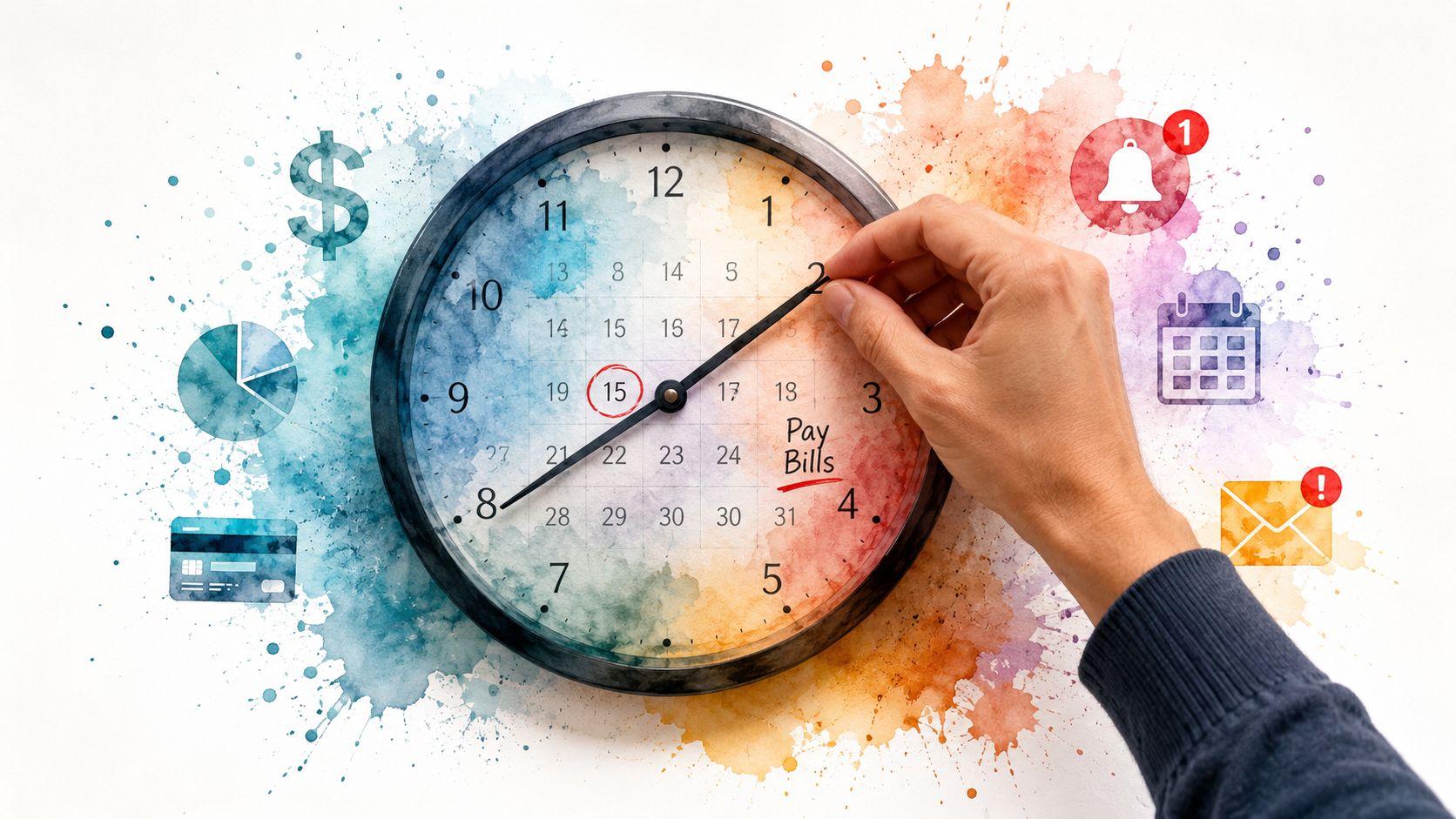
In healthcare, timing has measurable impact. Patients who receive automated payment reminders within 24 to 48 hours of their service are 3 times more likely to settle their balances promptly, and practices using these systems often see average days in Accounts Receivable decrease by 15 to 25% in the first quarter, according to DoctorConnect's write-up on automated payment reminders. Even if you're outside healthcare, the operational lesson holds up: reminders work better when they're tied closely to the payment event.
Most businesses do well with a staged schedule like this:
Initial heads-up
Send a reminder well before the deadline. This is the courtesy notice. Keep the tone light and include the invoice amount, due date, and payment link.
Due-soon reminder
A second message closer to the deadline works as a prompt for customers who saw the first notice but didn't act.
Due-today notice
This message should be direct. Not aggressive, just clear. Today is the due date. Here's the amount. Here's the link.
Post-due follow-up
If payment hasn't posted, begin escalation. Start with a brief reminder, then move to stronger channels such as voice or ringless voicemail for accounts that still sit unpaid.
A good cadence changes both timing and tone.
| Stage | Purpose | Best tone |
|---|---|---|
| Early reminder | Prevent forgetting | Friendly and service-oriented |
| Near-due reminder | Prompt action | Direct and clear |
| Due-date reminder | Trigger payment now | Firm, concise |
| Past-due reminder | Escalate without hostility | Respectful, specific |
Too many teams make every reminder sound identical. That weakens the sequence. If the first, second, and fourth notice all read like the same generic email, customers stop noticing the difference between “coming up” and “overdue.”
Customers respond better when your process feels structured. Random reminders make the business look disorganized. Scheduled reminders create the opposite effect. They tell the customer that payment follow-up is part of normal operations.
A few practical rules keep the cadence effective:
Send-time testing also matters. Different audiences respond at different times of day, and this guide to send time optimization is worth reviewing when you start tuning delivery windows.
Businesses that get paid faster usually aren't writing better collection emails. They're sending reminders on a schedule customers can anticipate.
Most reminder systems fail because they rely on one channel. Usually that channel is email. Email is useful, but it shouldn't carry the whole load. The strongest bill payment reminders use a channel mix based on urgency, account value, and customer behavior.
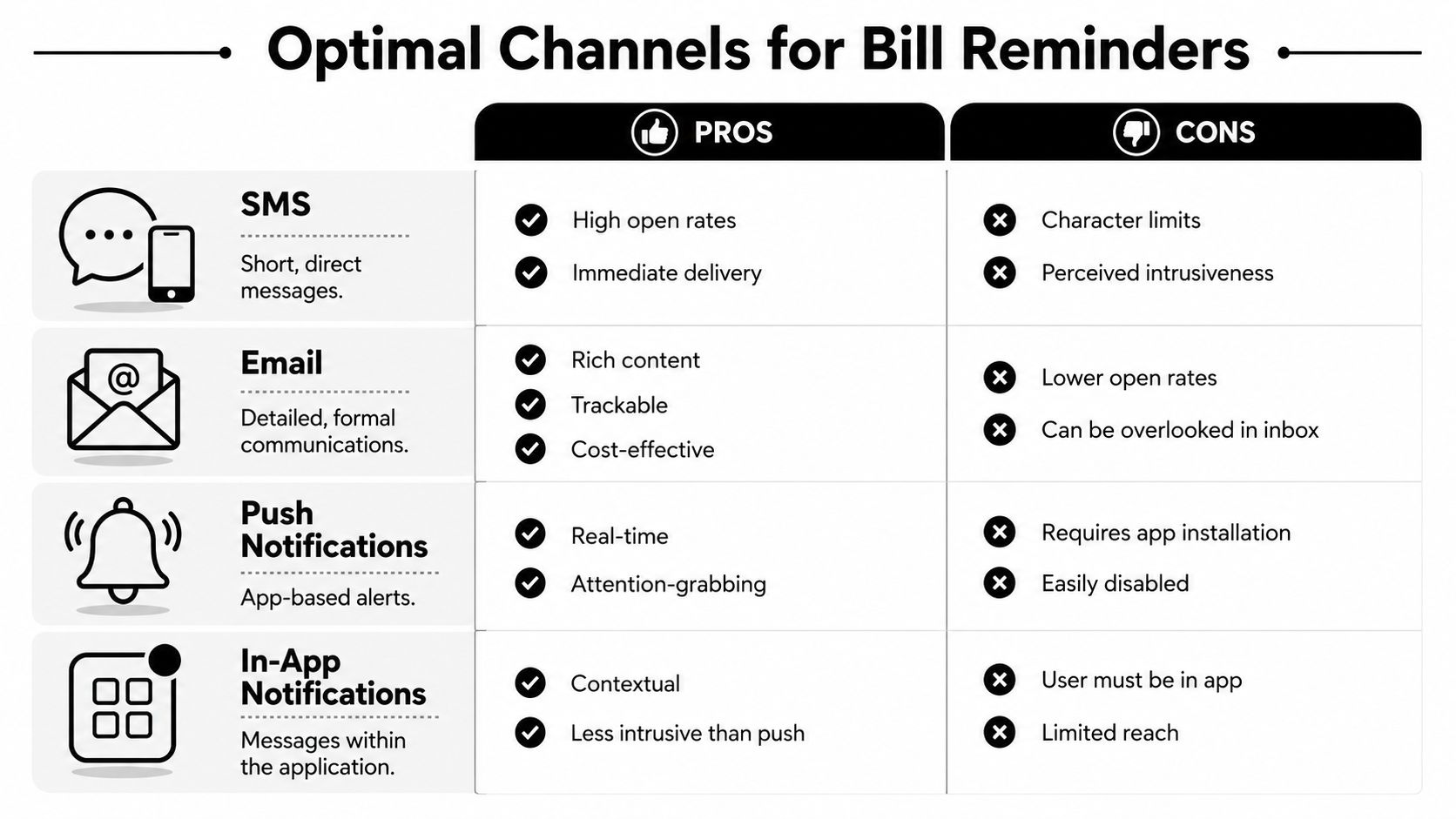
A simple comparison helps.
| Channel | Best use | Main limitation |
|---|---|---|
| SMS | Fast action, payment links, due-date nudges | Short format, can feel abrupt if overused |
| Detailed invoices, receipts, formal records | Easy to ignore | |
| Voice broadcast | Urgent past-due notices, high-value balances | More intrusive than text |
| Ringless voicemail | Personal escalation without a live interruption | Needs a good script and proper consent practices |
Ringless voicemail deserves special attention because many teams still overlook it. Ringless voicemail reaches recipients' voicemail boxes at industry-averaged delivery rates of 87–92%, and healthcare and real estate sectors report listen rates between 75–85%, which outperforms the typical 15–25% open rates seen with email marketing, according to Robotalker's data summary on ringless voicemail performance. That doesn't mean voicemail replaces SMS. It means ringless voicemail is strong when a text has been ignored and a live call would be too disruptive.
For a broader side-by-side view of digital outreach trade-offs, this comparison of SMS vs email marketing is a helpful reference.
SMS should be short, specific, and clickable. Don't turn a text into a mini-letter. Use it when the customer can pay from their phone in seconds.
Pre-due SMS template
Hi [First Name], this is a reminder that your balance of [Amount] is due on [Due Date]. You can pay here: [Payment Link]. Reply if you have any questions.
Due-today SMS template
Hi [First Name], your payment of [Amount] is due today. Pay securely here: [Payment Link].
Past-due SMS template
Hi [First Name], your payment of [Amount] is now past due. Please submit payment here: [Payment Link]. If you've already paid, thank you and please disregard this message.
What works:
What doesn't:
Voice broadcasts can work well for larger balances, recurring missed payments, or accounts where your team historically gets better response by phone. The script should sound like a professional courtesy call, not a collections agency recording.
Voice reminder script
Hello, this is [Business Name] calling for [First Name]. This is a reminder that your payment of [Amount] is due on [Due Date]. You can complete your payment using the link we sent, or contact us at [Phone Number] if you need assistance. If you've already taken care of this, thank you.
Voice is stronger than SMS for urgency, but it also creates more interruption. Use it deliberately.
Ringless voicemail lets you deliver a human-sounding message directly to voicemail without ringing the customer's phone. That makes it a strong tool for overdue accounts where email and text haven't produced action, but you still want to avoid the friction of a live collections call.
Ringless voicemail script for due date
Hi [First Name], this is [Name] from [Business Name]. I'm reaching out because your payment of [Amount] is due today. We've sent you a payment link for convenience. If you need help or want to discuss the balance, call us at [Phone Number]. Thanks.
Ringless voicemail script for overdue accounts
Hi [First Name], this is [Name] from [Business Name]. Your balance of [Amount] is currently overdue. Please use the payment link we sent to complete payment, or call us at [Phone Number] if you need assistance. If payment has already been made, thank you and please disregard this message.
A good ringless voicemail sounds like a real staff member left it on purpose. A bad one sounds like a robocall reading an invoice.
Three elements matter more than clever copy:
Personalization helps, but only when it's useful. First name, invoice amount, service date, and a direct payment link do more than decorative merge tags.
A reminder strategy becomes real when it runs on triggers instead of memory. The workflow should start when an invoice is created, update when payment status changes, and stop the moment the balance is settled.
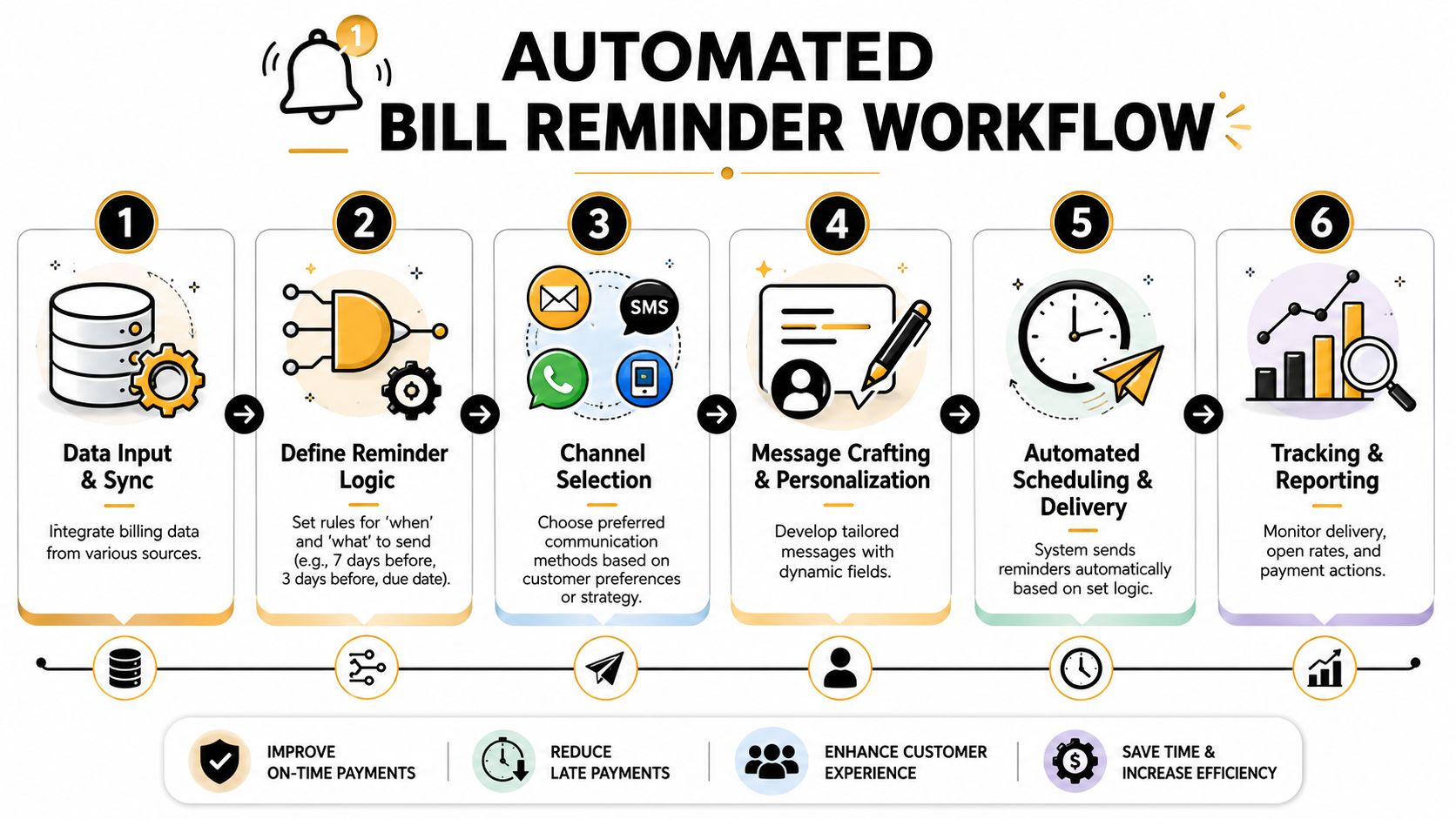
A practical sequence often looks like this:
That logic can sit on top of your billing platform through direct integrations or middleware like Zapier. If QuickBooks, Stripe, a CRM, or a patient billing system changes invoice status, the automation should react without manual intervention.
Not every account should get the same sequence.
A loyal customer with a rare missed payment should get a softer path than a chronically late account. A small balance may only need SMS and email. A high-value overdue invoice may justify ringless voicemail and a live callback task.
Build segments such as:
| Segment | Suggested treatment |
|---|---|
| New customers | More educational reminders, clearer payment instructions |
| Repeat on-time payers | Fewer touches, lighter tone |
| Habitually late accounts | Faster escalation |
| High-balance invoices | Add voice or ringless voicemail earlier |
If the workflow is too rigid, it starts treating good customers like problem accounts. That's where most reminder systems create friction they didn't need.
This is where platform choice matters. You need scheduling, merge fields, suppression when payments post, and channel switching without rebuilding the sequence manually each month. Call Loop is one option that supports SMS, voice, ringless voicemail, drip campaigns, segmentation, and Zapier-based triggers, which is the kind of operational setup a multi-channel reminder system needs.
For households, the same principle applies at a smaller scale when people manage household bills together. Shared visibility and consistent reminders reduce missed due dates. Businesses need the same discipline, just with stronger automation and stricter follow-up logic.
Operational note: The best workflow is the one your staff doesn't have to babysit.
A reminder system only works if messages are both compliant and delivered. Businesses often focus on copy and timing first, then discover their real problems are consent records, opt-out handling, and poor number hygiene.
If you're sending billing texts or voice messages, get clear permission and store it. Make opt-out instructions obvious. Keep your contact records current. If you work in healthcare, route every reminder process through your privacy and security requirements instead of trying to bolt that on later.
This isn't just about avoiding complaints. It also affects response. Customers are more likely to engage when the message arrives through the channel they wanted. Consumers offered customizable reminder frequencies are 21% less likely to face severe 60+ day payment delays, and 68% of patients report frustration when reminders don't honor their preferred delivery channel, according to PayNearMe's discussion of automatic bill pay reminders.
Good deliverability usually comes from boring fundamentals done well.
Customers forgive a reminder. They don't forgive a sloppy reminder system.
Once your workflow is live, measure behavior, not activity. A reminder campaign that sends on time but doesn't produce payment is just organized noise. The primary task is to learn which messages, channels, and sequences move customers from reminder received to invoice paid.
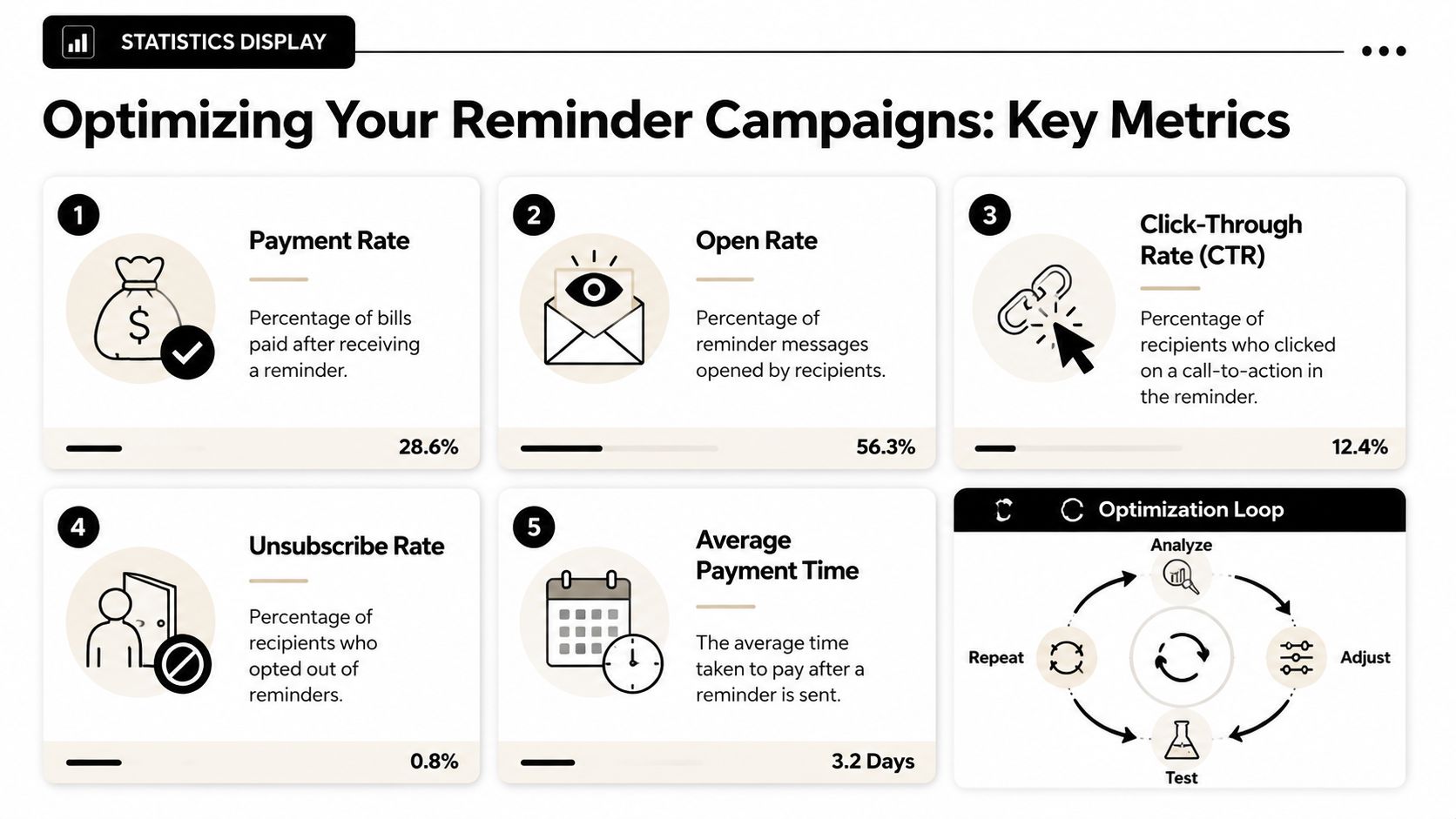
Start with a tight group of operational metrics:
These metrics tell different stories. A high click rate with low completed payment usually means the pay page or billing experience has friction. A low listen or open rate points to channel problems. A rising unsubscribe rate often signals frequency issues, poor targeting, or weak consent handling.
A lot of teams “optimize” by changing everything at once. Then they can't tell what helped.
A cleaner process looks like this:
Good variables to test include:
| Variable | Example test |
|---|---|
| Send time | Morning vs afternoon reminder |
| Channel sequence | SMS then ringless voicemail vs ringless voicemail then SMS |
| Copy style | Short directive vs softer service tone |
| Link placement | Early in message vs end of message |
| Escalation timing | Faster overdue follow-up vs slower pace |
The most useful reminder copy is often the least creative. Experimental evidence shows that reminders with specific information such as the total billed amount, the exact payment date, and the consequences of non-payment can reduce overdue balances, and consumers are substantially more likely to settle promptly when reminders clearly articulate those details, as described in the OECD report on reminder experiments.
That finding lines up with what practitioners see in the field. Ambiguous reminders create extra thinking. Specific reminders create action.
After a few rounds of testing, patterns tend to emerge:
Those patterns are where cash flow improves. The goal isn't to send more reminders. It's to send fewer wasted reminders and more effective ones.
If you're ready to turn scattered follow-up into a structured payment system, Call Loop can support the operational side with SMS, voice broadcasting, ringless voicemail, scheduling, segmentation, and automated workflows that connect to the tools you already use.
Chris Brisson
Chris is the co-founder and CEO at Call Loop. He is focused on marketing automation, growth hacker strategies, and creating duplicatable systems for growing a remote and bootstrapped company. Chat with him on X at @chrisbrisson


Trusted by over 45,000 people, organizations, and businesses like


