
See a Demo
You're just one step away from seeing Call Loop in action.
Enter your information below to watch a demo right now.

You're just one step away from seeing Call Loop in action.
Enter your information below to watch a demo right now.

A lot of people search for call and text divert after something has already gone wrong. A lead called the office line after hours. A customer texted the business number, but the message stayed on one employee's phone. A physician, office manager, contractor, or salon owner switched devices for the day and realized business communication was tied to the wrong person, not the business.
That's why forwarding feels useful at first. It looks like a quick patch. Turn on call forwarding, send texts somewhere else, and keep moving. For personal use, that can be enough. For a business, it usually isn't. The moment more than one person needs visibility, accountability, or a clean customer experience, native forwarding starts to show its limits.
Call and text divert means redirecting incoming communication away from its original endpoint. For calls, that usually means another phone number, device, extension, or voicemail path. For texts, it can mean showing messages on another approved device, relaying them through an app, or using a business messaging system that routes them somewhere more useful than one handset.
The simple version is familiar. Your office phone rings, but you're out, so calls go to your mobile. Your iPhone receives a text, and that same text also appears on another Apple device. That's convenient. It solves a personal availability problem.
The business version is different. It's less about “How do I make this show up somewhere else?” and more about “Who owns this conversation, who can see it, and what happens next?”
Texting matters here because customer behavior has already shifted. One market summary reports that Americans send and receive about 32 texts per day on average, while only about six phone calls are completed daily. The same source says 75% of Millennial and Gen Z Americans prefer texting rather than calling (99Firms texting statistics). If you run a business line, that changes what “reachable” means.
For one person, divert is a convenience feature. For a team, it becomes an operations issue.
A solo professional can often get by with:
A business usually needs more:
Practical rule: If a customer interaction affects revenue, service, scheduling, or compliance, it shouldn't live only on one person's phone.
There's also a numbering issue many owners miss. If you're building a business communication setup, start with the number itself. A dedicated business number gives you much more control than trying to repurpose a personal mobile line. If you need a refresher on that setup, this guide on what a DID number is is useful context.
Customers don't care whether your forwarding setup is clever. They care whether someone answers, replies, and follows through.
That's the fundamental divide in call and text divert. For personal use, native features can work. For anything customer-facing, forwarding is only the first layer. The harder question is whether the communication remains professional, trackable, and easy for the right person to manage.
Call diversion is the easier side of this topic because telecom networks have supported it for a long time. On many systems, unconditional forwarding is activated with a short code such as *72 and deactivated with *73, while conditional forwarding can be configured for busy, no-answer, or unreachable states using separate service codes (call forwarding reference).
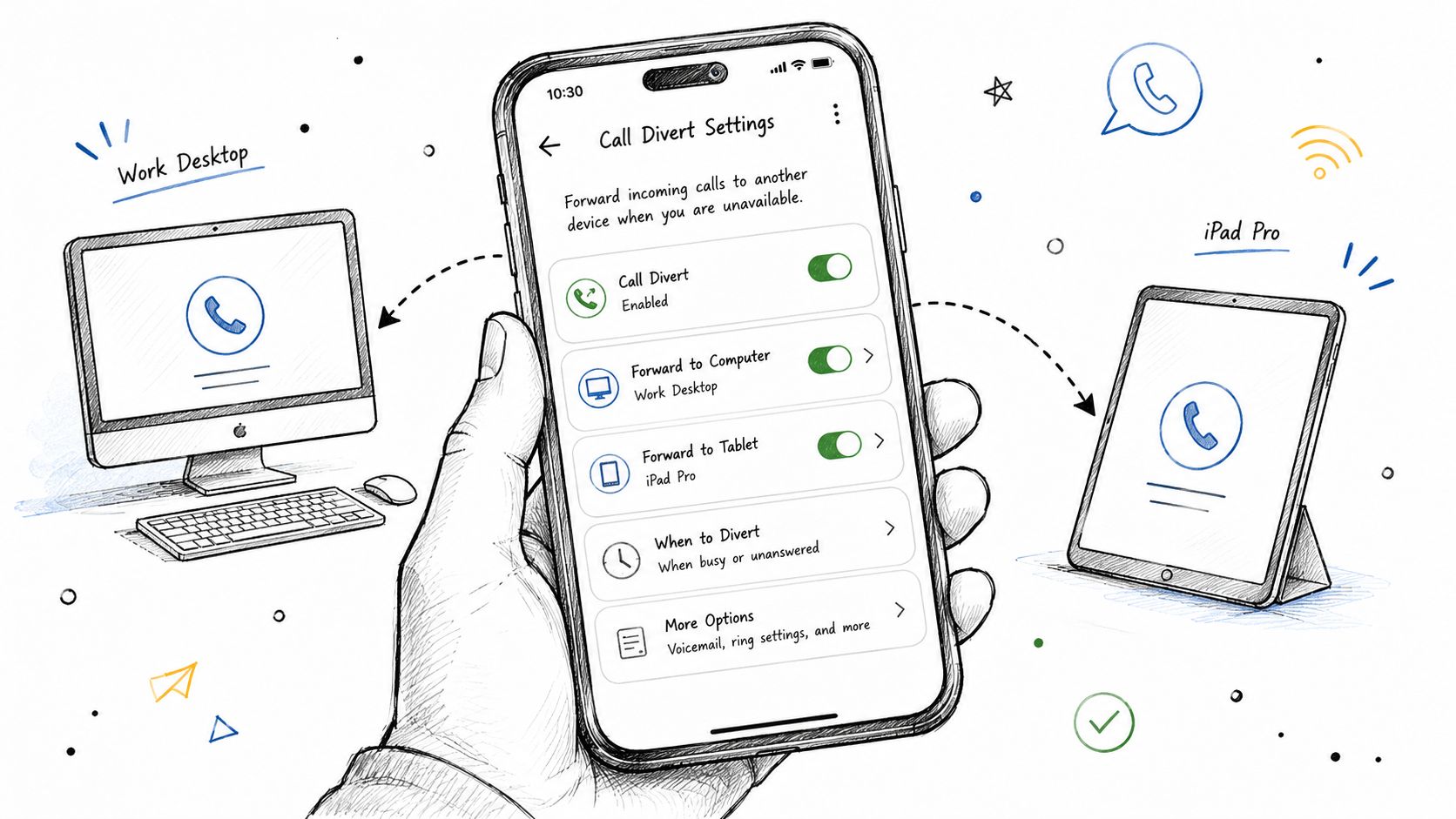
That sounds straightforward, but in practice there are three different layers: carrier feature codes, smartphone settings, and VoIP or virtual number routing.
If your carrier supports standard forwarding codes, they're often the fastest way to reroute calls during travel, outages, or schedule changes.
Example of an unconditional forwarding code
*72 plus the destination number
Example of a deactivation code
*73
What matters is the logic behind the forward:
Don't assume one code works everywhere. Carriers and regions vary, and some services need separate activation by condition. If you want a second reference that walks through business-focused call forwarding basics, SES Computers has a practical business call forwarding guide.
On iPhone and Android, call forwarding may also be available inside phone settings. The exact path differs by device, carrier, and software version, but the general pattern is the same: open the Phone app settings, look for call settings or supplementary services, then enter the forwarding number and choose the conditions.
This method is easier for people who don't want to memorize codes. It also helps when you need to review whether forwarding is still active.
A few checks matter before you trust it:
Once you move beyond a personal handset, call divert becomes call routing. That's a better model for business use because routing can happen in a dashboard instead of on one phone.
A VoIP or hosted number can usually do more than a traditional mobile line:
If you're comparing traditional mobile forwarding with internet-based phone setups, this explanation of what a VoIP number means helps clarify why business routing is usually more flexible than simple carrier forwarding.
Forwarding is a tool. Routing is a system. Personal users need the first. Growing businesses usually need the second.
Text divert is a common source of frustration. Calls are built for rerouting. SMS usually isn't. The biggest mistake is assuming texts can be forwarded with the same consistency as voice.

The platform matters more than anything else. The most robust native method is on iPhone, where Apple supports built-in Text Message Forwarding inside Settings > Messages for trusted Apple devices on the same Apple ID. Android generally doesn't offer a universal native, cross-device SMS divert feature and often depends on third-party forwarding apps or carrier and VoIP workarounds (Airtel overview of text divert methods).
If you use an iPhone with other Apple devices, setup is relatively simple:
That works well for personal continuity. If your iPhone is nearby, powered on, and signed into the same Apple ID, messages can appear where you need them.
The limits show up quickly in business use:
Android users often expect a hidden native setting that doesn't exist across the ecosystem. Some manufacturers, carriers, and apps offer partial forwarding options, but there's no universal Android equivalent to Apple's built-in cross-device text forwarding for all users.
That usually leaves three paths:
Each has trade-offs. Manual forwarding is tedious. Third-party apps can break after OS updates, lose permissions, or get killed by battery optimization. Carrier-based options can be inconsistent and highly region-specific.
If you need dependable text continuity, test after setup and test again after phone updates. SMS forwarding is one of those features that looks stable until a permission change quietly stops it.
The issue isn't only setup difficulty. It's context.
A forwarded or relayed text may arrive without the full conversation history in a format your team can work with. One employee may see a piece of the exchange while another sees the reply later on a different device. Add dual SIM use, device changes, and app-based messaging, and the customer experience gets messy fast.
For personal use, that may be tolerable. For business communication, it creates confusion:
That's why text divert is often the first sign that a business has outgrown phone-level fixes.
A forwarded call can save a sale. A forwarded text can rescue an appointment. But if forwarding becomes your main operating model, the cracks show fast.
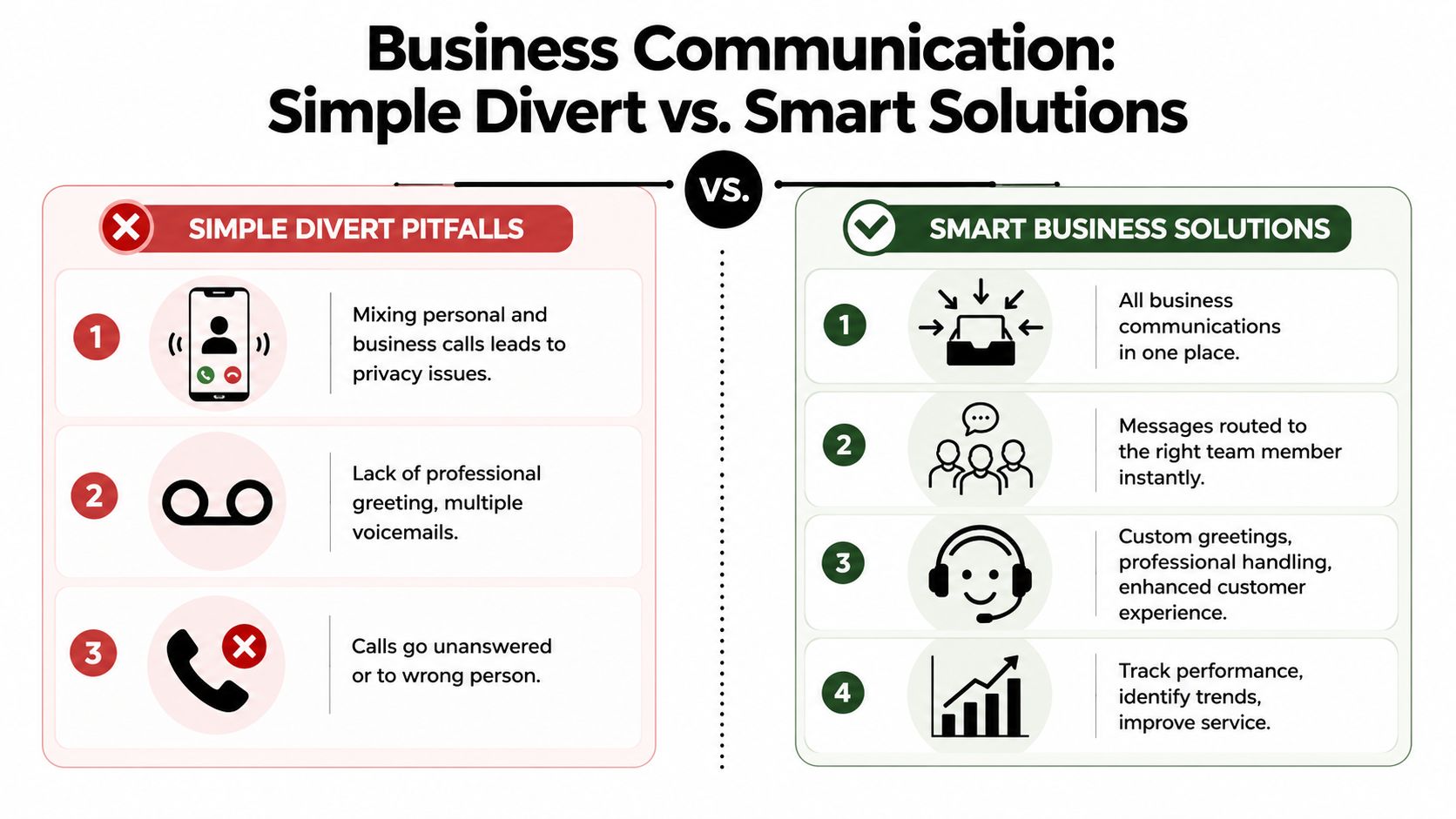
The biggest problem isn't technical. It's organizational. Voice forwarding can bypass call screening and documentation, while SMS divert can create gaps in auditability or message ownership if texts are forwarded to personal devices. That's a major reason businesses are moving toward centralized communication platforms instead of relying on native divert features alone (Numa on call diversion tradeoffs).
If your main number forwards to one employee's mobile, the customer may reach a person, but the business loses control of the conversation.
That creates a chain of problems:
A simple example makes the issue obvious. A customer calls a business line and lands in someone's personal voicemail because they were in a meeting. That customer doesn't hear the company name, doesn't know whether they reached the right place, and may never call back.
SMS looks light and informal, so people underestimate the risk. But texts often contain scheduling changes, support questions, pricing discussions, patient communication, or instructions tied to real work.
When those messages divert to unmanaged devices or personal apps, businesses lose:
The moment a business text affects a customer promise, it needs a system of record, not just a forwarding trick.
This matters even more in regulated environments. Healthcare teams, for example, can't treat message routing casually. Even outside regulated sectors, businesses still need internal control over who saw what and when.
Forwarding works best in one-to-one situations. One number, one fallback number, one person responsible.
Business communication is rarely that simple. You may need:
Native forwarding wasn't built for that level of workflow. It can reroute a signal. It can't manage a communication process.
A centralized platform changes the job from diverting messages to managing them. Instead of chasing calls and texts across devices, the business works from one controlled environment where communication can be logged, routed, assigned, and followed up consistently.
That's where platforms like Call Loop fit. Rather than relying only on device-level forwarding, a platform can support outbound SMS, voice broadcasting, ringless voicemail, workflow automation, and business-level routing from a dedicated system. That's useful when you need a message to trigger an action, not just land on another phone.
Ringless voicemail is especially relevant here. It handles a common gap in call divert strategies: when live answer rates are inconsistent but you still need outreach to continue. Instead of endlessly forwarding unanswered calls or asking staff to retry manually, teams can use voicemail drops for reminders, follow-ups, or post-call contact attempts as part of a broader workflow.
The shift is simple to describe. Diverting moves communication somewhere else. A platform gives communication structure.
Most businesses looking into call and text divert aren't really asking for forwarding. They're asking for continuity. They want calls and texts handled during travel, device loss, schedule gaps, and after-hours coverage. Simple forwarding often fails those use cases, which is why many organizations end up needing a more reliable cross-device system for business-critical communication (AutoForwardText on business continuity use cases).
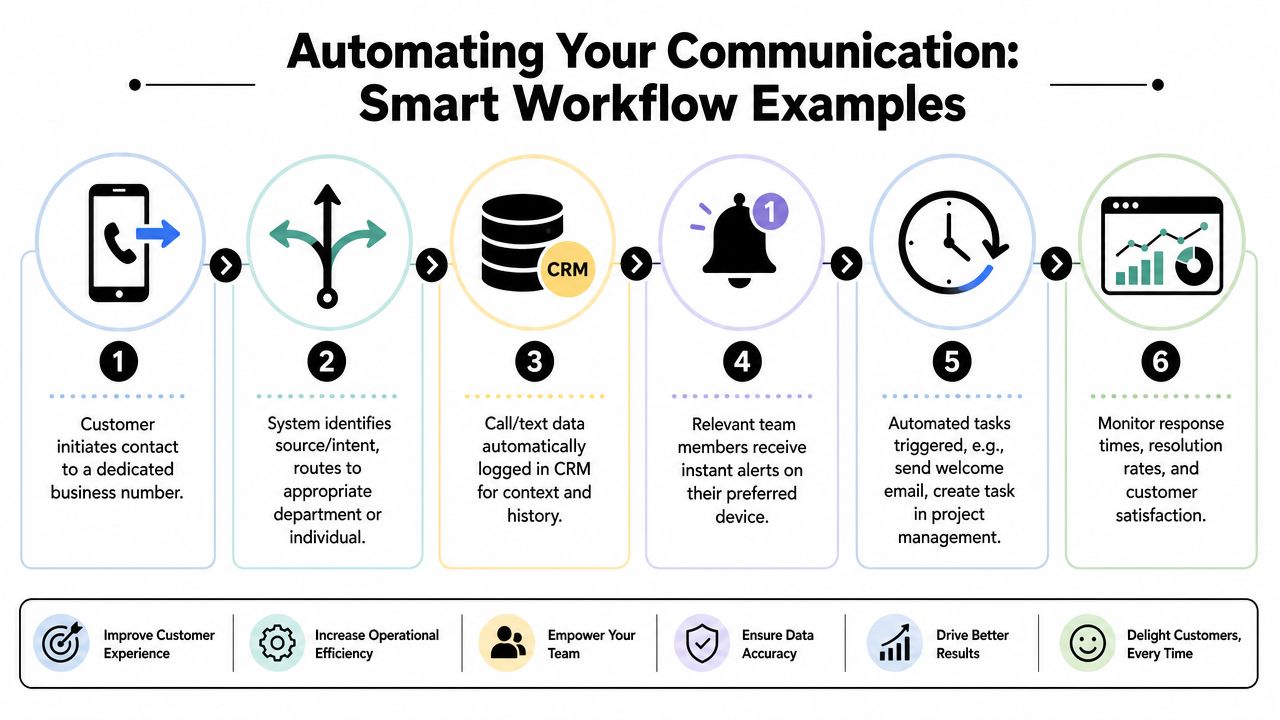
Think in terms of workflow stages, not just destinations.
A practical workflow looks like this:
Use a dedicated business number
Keep the public-facing number separate from personal devices so the business retains control.
Route by intent or availability
Send sales calls one way, service issues another, and after-hours traffic into a controlled queue.
Log the interaction automatically
Calls, texts, and voicemail activity should land in the same system or connected CRM.
Trigger follow-up actions
If no one answers, send an acknowledgment text. If a voicemail lands, notify the right team member. If a lead opts in, add them to the next step.
Use channel mix intentionally
Some contacts answer calls. Others respond to SMS. Some will engage better with ringless voicemail as a low-friction reminder.
Ringless voicemail is often treated as a separate campaign tool, but operationally it belongs in the same conversation. It's useful when a live transfer or direct callback isn't the right next step, yet you still want the contact to hear a clear, controlled message.
Good use cases include:
That's a very different approach from basic divert. You're no longer asking a phone to chase people. You're designing a communication sequence.
A missed call shouldn't be the end of the interaction. It should be the trigger for the next one.
One of the most useful upgrades is replacing generic forwarding with interaction-based routing. A press-1 voice flow, for example, can route a caller to the right person, trigger a callback path, or segment interest before a staff member ever gets involved.
The same principle applies to text and outbound sequences. A business number can receive the initial contact, then automation can take over the repetitive work:
If you're mapping that kind of setup, this resource on marketing automation workflows is a useful reference point for connecting calls, texts, and triggered actions into one operating model.
Call and text divert can expose information to the wrong device, the wrong person, or the wrong workflow. That risk goes up fast when businesses mix personal phones, unmanaged apps, and sensitive customer communication.
Use this checklist before turning anything on.
Warning: If forwarded texts land on a personal device, the business may lose control over message retention, access, and ownership.
Convenience is never a substitute for control. If a message matters to the business, it should be handled in a system the business can supervise.
If simple forwarding is starting to feel brittle, Call Loop is worth a look for teams that need business numbers, outbound SMS, voice broadcasting, ringless voicemail, and automation in one controlled workflow instead of scattered across personal devices.
Chris Brisson
Chris is the co-founder and CEO at Call Loop. He is focused on marketing automation, growth hacker strategies, and creating duplicatable systems for growing a remote and bootstrapped company. Chat with him on X at @chrisbrisson


Trusted by over 45,000 people, organizations, and businesses like


