
See a Demo
You're just one step away from seeing Call Loop in action.
Enter your information below to watch a demo right now.

You're just one step away from seeing Call Loop in action.
Enter your information below to watch a demo right now.

You can usually spot follow-up chaos without running a report.
A lead fills out a form. Someone sends a text two hours later. Another teammate leaves a voicemail the next day without knowing the text already went out. A sales rep calls after that, gets no answer, and the prospect never hears from you again except for a generic newsletter three weeks later. Nothing is coordinated, and every channel acts like it's the only channel.
That's how small businesses lose good opportunities. Not because they lack effort, but because their communication is manual, fragmented, and too slow.
A 2026 CRM automation guide says 57% of the B2B buyer journey is completed before a prospect ever makes sales contact. For an SMB owner, that changes the whole job. If buyers are making decisions before your team gets a live conversation, then your early touchpoints can't rely on memory, sticky notes, or whoever happened to be in the office that day.
Customer journey automation fixes that problem. At its most practical, it means building a system that reacts when a customer does something important. It sends the right follow-up, on the right channel, with the right timing, without forcing your team to rebuild the process every day.
Most SMBs don't need more messages. They need better sequencing.
The failure pattern is familiar. A business uses one tool for email, another for texting, a separate phone system for calls, and some improvised spreadsheet to track what happened. The result isn't just inefficiency. It creates mixed signals for the customer. One person gets an SMS reminder, then a disconnected call, then silence. Another gets three touches in a day. A third gets none.
That kind of operation breaks down fastest in moments that should be simple:
Customer journey automation gives each stage a defined next move. When someone submits a form, requests a quote, misses a call, confirms an appointment, or clicks a link, the system responds based on that behavior instead of relying on manual outreach.
That matters more now because so much evaluation happens before your team gets involved. If your first touch is late or generic, you may never get a second chance.
Practical rule: Automate the first response, the reminder layer, and the no-answer recovery before you automate anything fancy.
For many SMBs, the fastest win is building an automated lead follow-up system that handles the first few contacts consistently. That doesn't remove the human side. It protects it. Your team spends less time remembering who to contact and more time talking to people who are ready.
The point isn't to make communication feel robotic. It's to stop operating like each follow-up starts from zero.
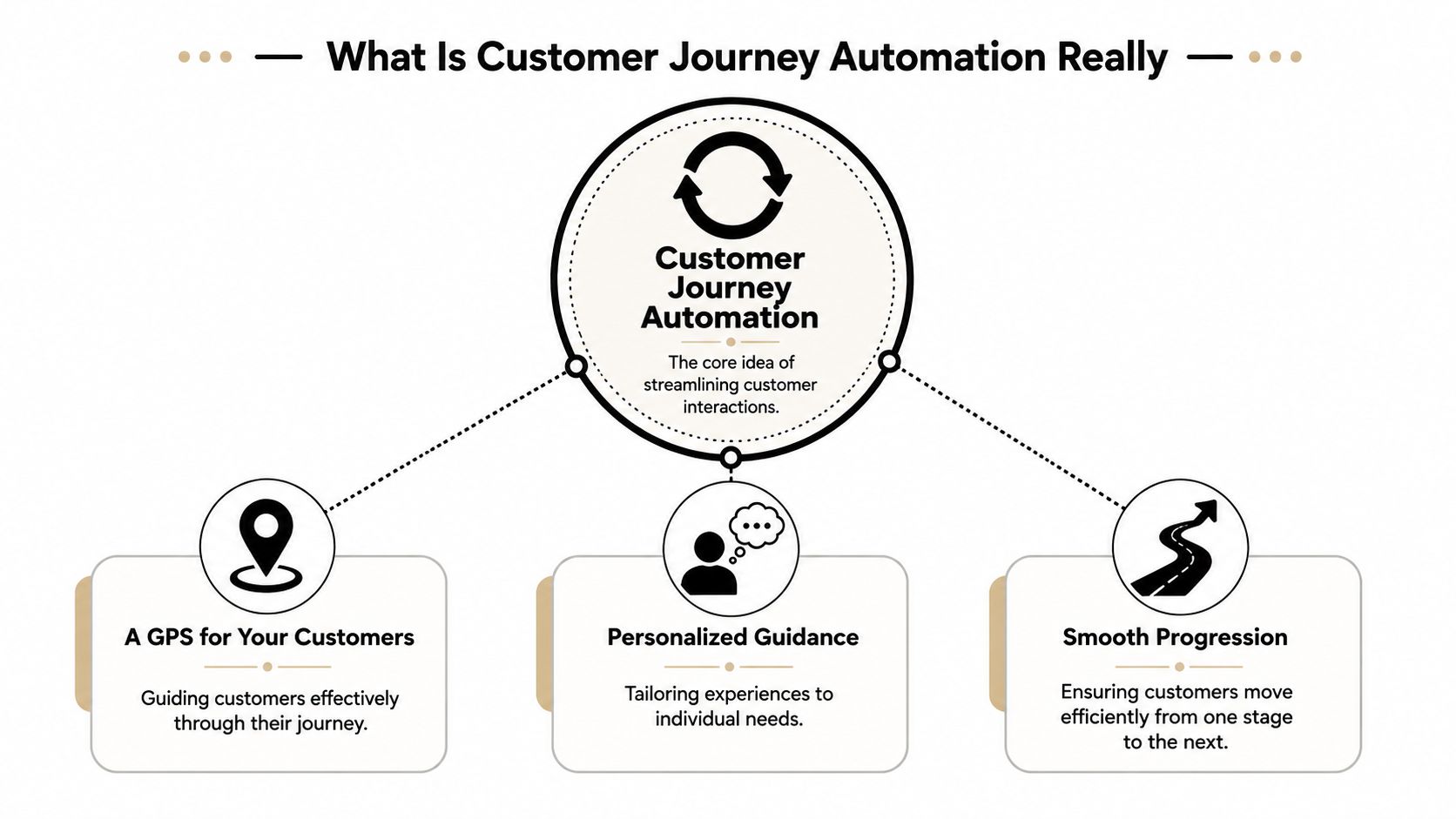
Customer journey automation is a guided system for moving a customer from one stage to the next based on what they do, what they need, and which channel fits that moment.
A simple analogy works better than a technical definition. Think of it as a GPS for customer communication. A GPS doesn't just show one road and hope for the best. It adjusts based on current conditions. If someone turns, stops, or changes direction, the route updates. Good journey automation works the same way.
A lot of businesses think they already have this because they use autoresponders. Usually they don't.
A basic automation sends one message after one event. A customer journey automation system listens across touchpoints and changes the path when the customer gives a new signal. That's the difference between a drip campaign and an actual journey.
| Approach | How it works | Where it breaks |
|---|---|---|
| Single-channel automation | Sends a preset message after a trigger | Ignores what happened on other channels |
| Batch campaign automation | Pushes the same sequence to a segment | Doesn't adapt well to individual behavior |
| Customer journey automation | Coordinates timing, channel, and branching logic based on live behavior | Requires cleaner data and clearer rules |
This isn't a niche idea anymore. An Emarsys roundup on marketing automation says the global marketing automation market was valued at $6.65 billion in 2024 and is projected to reach $15.58 billion by 2030. The same source says 96% of marketers have used or plan to use automation, and notes that 45% of organizations are investing in customer journey analytics.
That tells you two things. First, automation is now standard operating infrastructure, not an experiment. Second, businesses are moving beyond one-off sends toward connected journey orchestration.
The useful question isn't "Should we automate?" It's "Which customer decisions deserve an immediate, coordinated response?"
A real journey might work like this:
That sequence feels coherent to the customer because each step acknowledges the previous one. That's what makes customer journey automation worth doing. It doesn't just send faster. It responds smarter.
Under the hood, every automated journey runs on four parts. Consider it a recipe. You need ingredients, rules, timing, and the final output. If one piece is sloppy, the whole thing feels off.
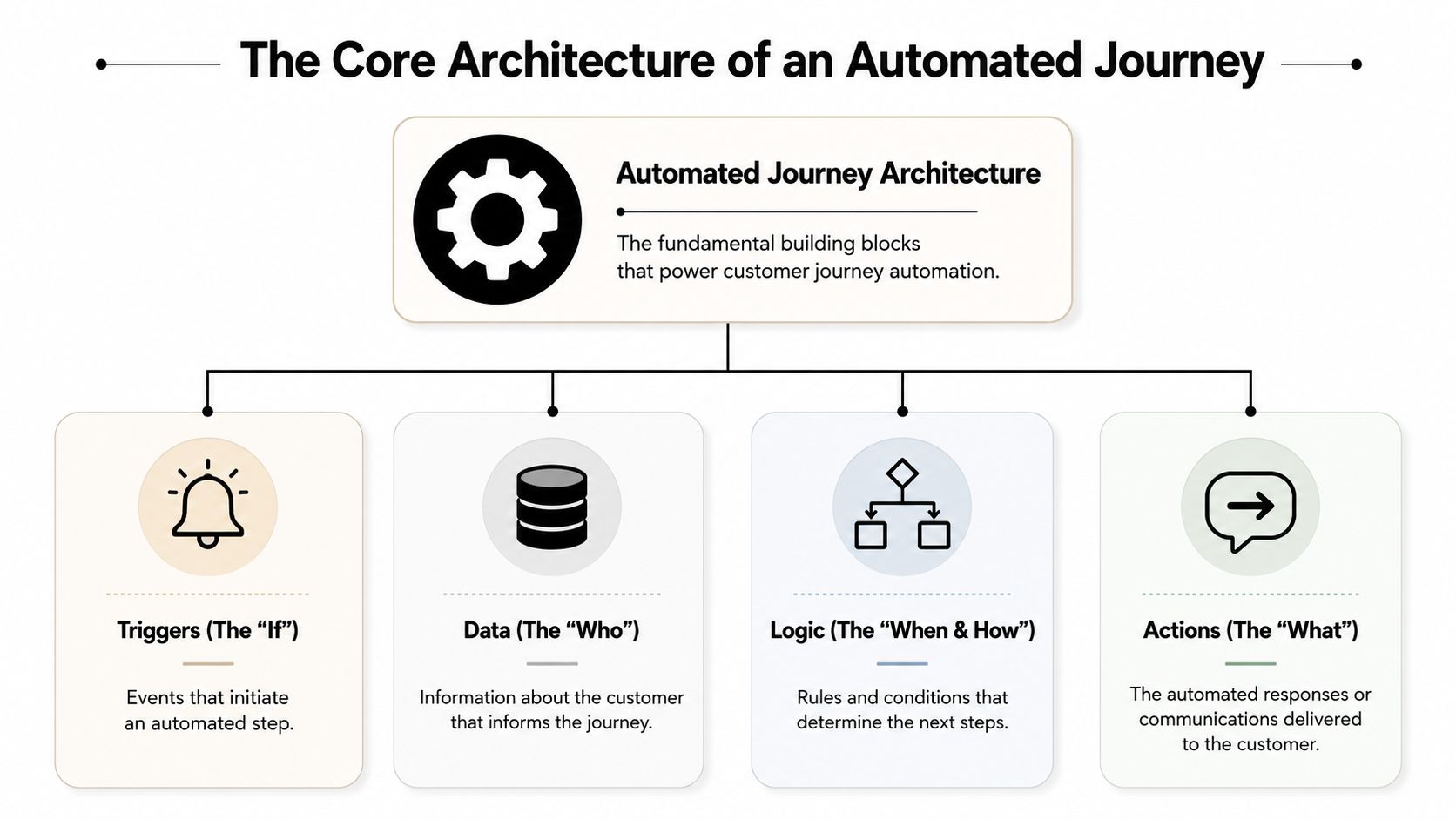
The first ingredient is the trigger. This is the event that starts or changes the journey. Common examples include a form submission, an appointment booking, a missed payment, a clicked link, a support request, or a call that went unanswered.
The second ingredient is data. Not just contact details, but the context around the person. What did they click? Which list are they on? Did they already get a reminder? Have they spoken to sales? Without that context, automation turns into blind blasting.
A guide on customer journey automation notes that an effective system relies on automatic cross-channel data capture and real-time segmentation that updates as behaviors and attributes change. That matters because old segments go stale fast. Someone who was a cold lead yesterday may be an active buyer today.
Once a trigger fires and data is available, the system needs logic. Most workflows succeed or fail based on logic. Logic controls wait times, decision branches, exclusions, priorities, and stop conditions.
For example:
The final part is the action. That's the customer-facing move. Send an SMS. Drop a ringless voicemail. Trigger a voice broadcast. Assign a sales task. Move the contact to another list.
This is the clearest interpretation:
If your workflow can't answer "what happens next if the customer ignores this?", it isn't ready.
For SMB teams building these systems, marketing automation workflows matter because they turn scattered follow-up habits into repeatable operations. The technology isn't the hard part. The hard part is making sure each trigger, branch, and action reflects how customers behave.
Most businesses treat these channels separately. That's a mistake.
SMS, voice, and ringless voicemail do different jobs. When you combine them in a single journey, each one covers the weaknesses of the others. When you run them in silos, you create noise.
SMS is the fast, visible channel. It works well for confirmations, reminders, short links, and quick replies. If someone needs a simple next step, text usually carries it better than a long call script.
Voice calls are strongest when urgency or nuance matters. If a lead is hot, if a service issue needs immediate resolution, or if you want a press-1 transfer to route live interest to a rep, voice is hard to replace.
Ringless voicemail sits in a useful middle position. It adds tone and personality without forcing the interruption of a live call. That's helpful when you want to sound human, acknowledge an event, or re-open a conversation after no answer.
| Channel | Best use | Weak spot |
|---|---|---|
| SMS | Fast alerts, links, confirmations, replies | Easy to overuse |
| Voice | High-intent outreach, transfers, urgent contact | More intrusive if mistimed |
| Ringless voicemail | Personal follow-up without a live interruption | Needs strong scripting to avoid sounding generic |
The key win is orchestration. One channel should set up the next one.
A practical sequence might look like this:
That sequence is stronger than four unrelated touches because it feels like one conversation.
A platform built for multi-channel communication software can coordinate those handoffs so teams aren't manually guessing which channel to use next. That matters most when volume increases. At small scale, channel chaos is annoying. At larger scale, it becomes expensive.
Ringless voicemail works best as a bridge, not a crutch. Use it after a missed connection, not as a substitute for every follow-up.
The same rule applies to SMS. If every stage gets another text, opt-outs rise and attention drops. The point of orchestration isn't more volume. It's better fit.
The easiest way to judge a journey is to ask one question. Does it solve a real operational problem, or does it just add more messages?
A clinic books an appointment days in advance. If the reminder process is weak, staff spend time making manual calls and patients still miss appointments.
A better journey starts with an SMS confirmation right after booking. Closer to the appointment, the patient gets a reminder text with a simple confirm option. If there's no response, a voice reminder can follow. If the appointment requires special preparation, the sequence can deliver those instructions at the right time instead of burying them in one long message.
For healthcare teams, the point isn't just outreach. It's coordinated, secure outreach with clear escalation when a human needs to intervene.
Events often lose people in two places. Before the event, interest fades. After the event, nobody follows up fast enough.
A stronger journey starts with a text-to-join keyword at sign-up. Registrants receive timely SMS updates, then a ringless voicemail from the organizer shortly before the event to add a human touch without forcing a live pickup. After the event, attendees can receive a thank-you text and a segmented follow-up based on whether they attended, clicked resources, or asked for more information.
This logic also works for educators and tutoring businesses. If you're building operational follow-up around attendance, billing, and parent communication, a practical example is this guide on how to automate tutoring invoices, which shows how process automation can remove manual admin from a service business.
An online store usually defaults to email for cart recovery. That misses buyers who saw the product, got distracted, and never came back to the inbox.
A stronger path uses timing and channel mix. A shopper abandons checkout, then gets an SMS reminder while the intent is still fresh. If they click but don't complete the purchase, a ringless voicemail can reinforce the offer or answer the common hesitation point. If they buy, the recovery sequence stops and the post-purchase journey starts.
This doesn't require a huge enterprise stack. It requires clean triggers, channel discipline, and one system that can keep state across the journey.
Most SMBs fail here because they start too big. They try to automate every touchpoint at once, then end up with a half-built system nobody trusts.
Start with one journey that matters. Build it well. Then expand.
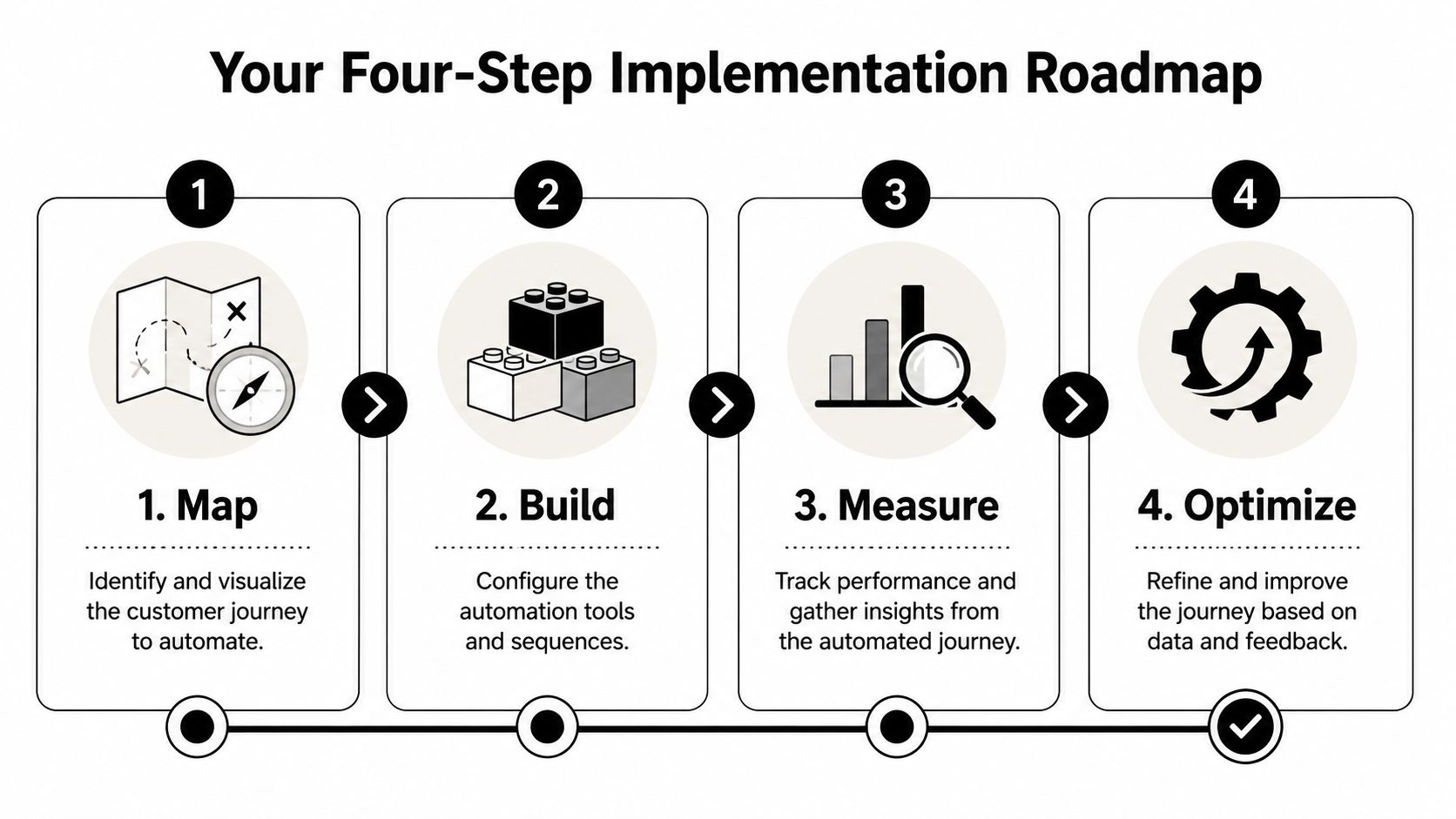
Map the journey first. Pick a high-friction process you already know is costing time or revenue. New lead follow-up, appointment reminders, no-show recovery, quote follow-up, and past-customer reactivation are all good starting points.
Write the path in plain language before you build it in software:
Then build the workflow. Configure the trigger, the delays, the channel order, and the message copy. If you use a platform such as Call Loop, the practical value is that you can orchestrate SMS, voice broadcasting, and ringless voicemail in the same workflow instead of stitching together separate tools.
Measure what the journey is supposed to accomplish. Don't drown yourself in vanity metrics. Track the action that proves the workflow is working. That might be booked appointments, confirmed attendance, completed purchases, replies, or successful transfers to a rep.
Then optimize the bottlenecks. If the first text gets ignored, test the wording or timing. If the call stage stalls, review your routing rule. If people opt out after the second message, check whether the sequence is too aggressive.
A useful outside example comes from operational service businesses. This article on how to create a gym workflow is worth reading because it shows how structured process design reduces inconsistency before you layer in automation.
This is the part most guides skip.
A customer journey article focused on automation gaps points out that a frequently missed question is deciding which parts of the journey should remain human and defining clear escalation rules so experiences don't become fragmented. That's exactly right.
Use rules like these:
The goal isn't maximum automation. It's reliable progression with a human step at the moments that matter most.
Once a journey goes live, treat it like an operating system, not a one-time campaign.
The best metrics depend on the journey, but the pattern stays the same. Track whether people advance to the next stage, how long that takes, and which channel is doing useful work versus just adding volume.
Focus on signals like:
Low engagement usually points to one of three issues. The message is weak, the timing is off, or the audience shouldn't have been in that path at all.
If a workflow stalls, check the trigger and branch logic first. Most broken journeys fail because a condition never fired, a segment didn't refresh, or a stop rule blocked the next action.
If opt-outs rise, reduce pressure. Tighten targeting, remove redundant touches, and make sure each message clearly relates to the customer's last action.
A healthy journey feels timely to the customer and boring to your team. It runs predictably, escalates cleanly, and doesn't need daily rescue work.
If your follow-up still depends on manual texts, disconnected calls, and one person's memory, it's time to tighten the system. Call Loop is one option for building automated outreach across SMS, voice, and ringless voicemail so your customer journey runs as a coordinated sequence instead of a pile of separate tasks.
Chris Brisson
Chris is the co-founder and CEO at Call Loop. He is focused on marketing automation, growth hacker strategies, and creating duplicatable systems for growing a remote and bootstrapped company. Chat with him on X at @chrisbrisson


Trusted by over 45,000 people, organizations, and businesses like


