
See a Demo
You're just one step away from seeing Call Loop in action.
Enter your information below to watch a demo right now.

You're just one step away from seeing Call Loop in action.
Enter your information below to watch a demo right now.

A lot of businesses think they have a lead generation problem when they really have a customer journey touchpoints problem.
The prospect sees an ad, visits the site, leaves, gets an email two days later, calls your office, waits on hold, books an appointment, misses the reminder, and then vanishes. Nothing in that chain looks catastrophic on its own. Together, it creates friction that slows deals, lowers show rates, and makes follow-up feel harder than it should.
That's why touchpoint work matters. It turns scattered interactions into a system you can manage. When you map the journey, you stop guessing where customers lose confidence and start seeing which moments deserve tighter messaging, faster follow-up, and better channel coordination.
A prospect clicks your Google ad during lunch, scans your reviews on their phone, leaves your site, gets an SMS reminder about the estimate they requested, misses your agent's call, listens to a ringless voicemail that evening, and books two days later after a second visit. That is one buying path. It is common now, and it shows why touchpoints deserve more than a loose definition.
A customer journey touchpoint is any single interaction that influences the next decision. Some touchpoints create momentum. Others create hesitation, drop-off, or silence. The difference usually comes down to timing, message fit, and channel choice.
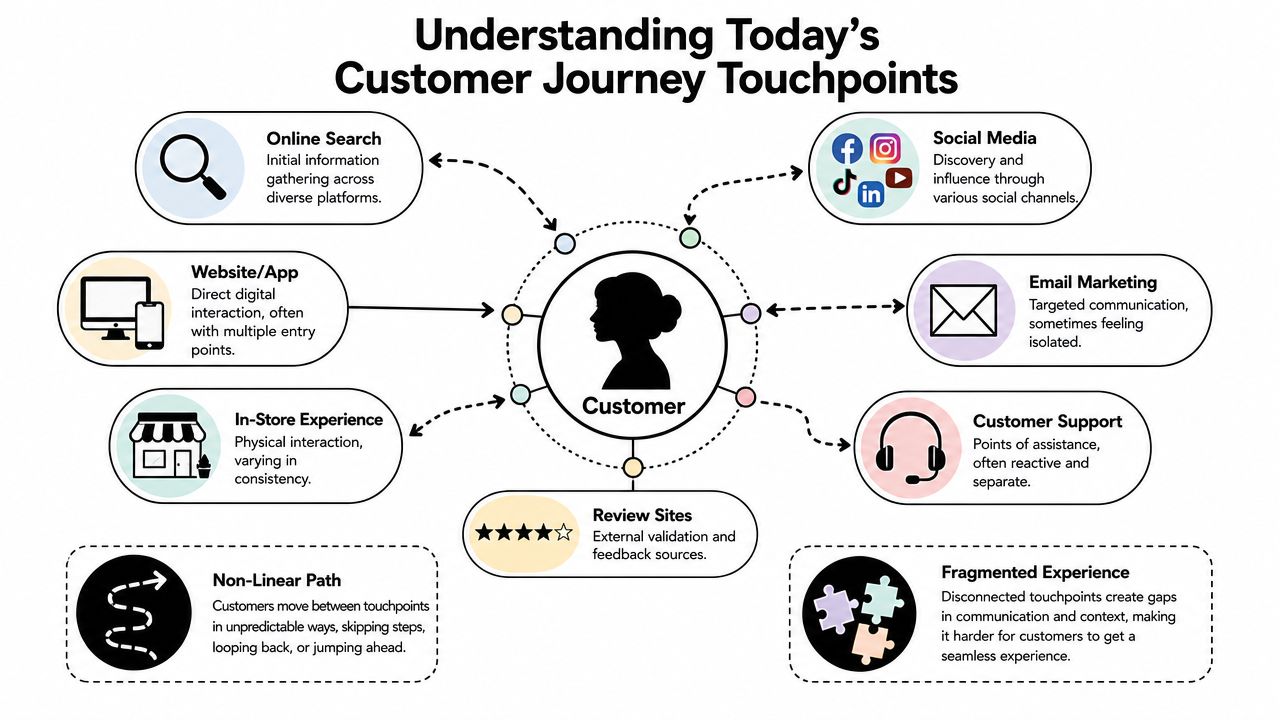
A touchpoint is one interaction with your business. An ad impression is a touchpoint. A pricing page visit is a touchpoint. A confirmation text, a live call, a voicemail drop, a missed call text-back, and a post-service review request are all touchpoints too.
A channel is how that interaction gets delivered. Email is a channel. SMS is a channel. Voice and ringless voicemail are channels. Website chat, paid search, direct mail, and in-person conversations are channels as well.
That distinction matters in practice. A business owner might say, “We use SMS.” That does not reveal much. A better operating view is: “We send a booking confirmation by text within one minute, a reminder 24 hours before the appointment, and a missed-appointment follow-up by SMS and voicemail within two hours.” Now the team can measure what each touchpoint does to show rates, response rates, and revenue.
A simple rule helps. If you can place the interaction on a timeline and tie it to customer behavior, it is a touchpoint worth managing.
For most businesses, touchpoints fit into five working stages:
The mistake is treating these stages as digital-only. Customers move across devices and channels without caring how your team is organized. They may discover you through search, ask a question by SMS, confirm details on a voice call, and respond to a ringless voicemail after business hours. If those touchpoints feel disconnected, conversion drops even when lead volume looks healthy.
That is why strong journey design is operational, not theoretical. A good customer communication strategy for SMS, calls, and follow-up timing assigns the right message to the right moment and uses each channel where it performs best. SMS works well for speed and reminders. Voice helps when the decision is complex or urgent. Ringless voicemail can revive leads who ignore email but still listen to messages. Used together, those touchpoints stop competing with each other and start moving prospects toward a sale.
A lead clicks your ad at lunch, fills out a form, misses your first call, reads your text at 6:15, hears a ringless voicemail after dinner, and books the next morning. Inside your company, that path sits in four different systems and three different teams. To the customer, it is one experience. If you want to improve conversion, start by finding the full path before you try to improve any single channel.
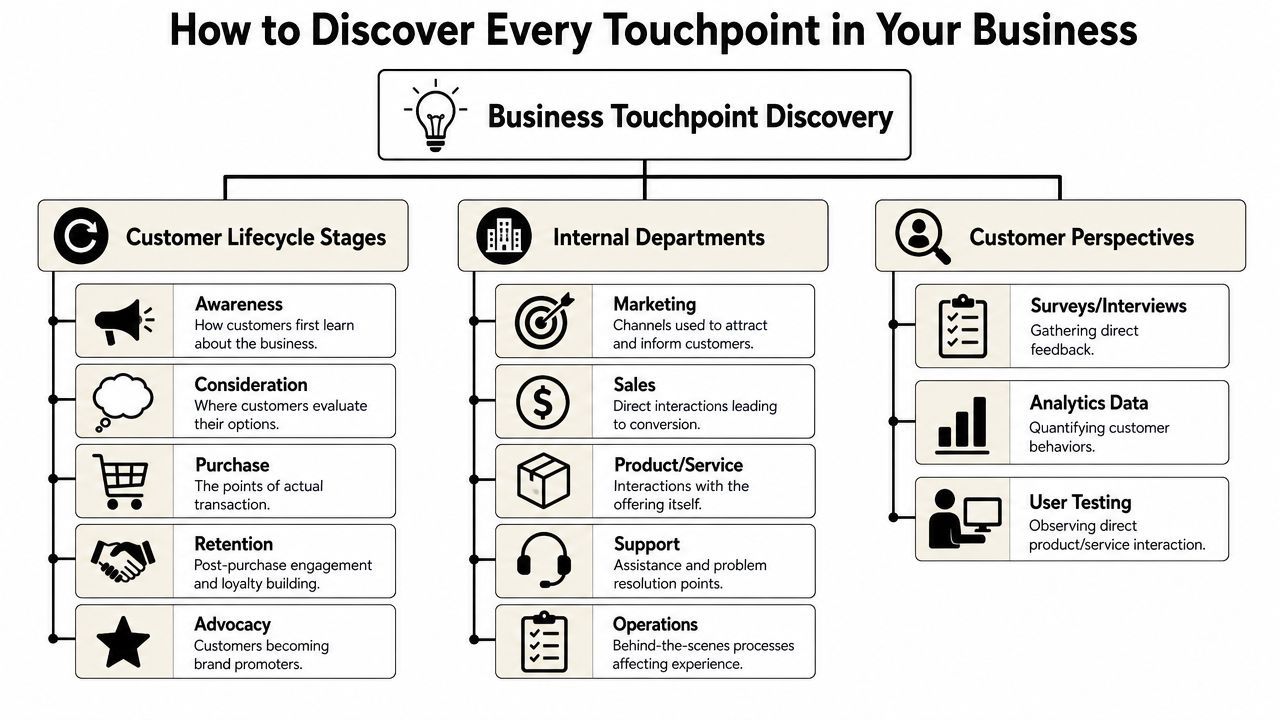
Define the journey from the buyer's point of view. List what happens before the first inquiry, what happens during the decision process, and what happens after the sale or booking. That keeps the exercise grounded in customer behavior instead of your org chart.
Use three simple buckets to get the first draft on paper:
This first pass gives you the visible touchpoints. The missed revenue usually sits in the handoffs, delays, and follow-up gaps between them.
Next, run the same journey through each internal team. It often uncovers hidden touchpoints. It also reveals ownership problems, especially when one team triggers a message and another team handles the consequence.
Marketing shapes discovery and early trust. That includes more than campaigns.
Examples include:
Sales controls momentum. Slow response, weak follow-up, or inconsistent outreach can stall a qualified lead even when demand is strong.
Look for:
Service and operations often decide whether a customer completes the journey and comes back.
List items like:
Map these with one question in mind: who owns the next step if the customer does nothing? That question exposes a lot of leakage.
Revenue drops when teams map only promotional messages and ignore the operational touchpoints that determine whether the customer shows up, completes, or returns.
These channels deserve a specific review because they often perform best in time-sensitive moments. Email is easy to send, but it is rarely the strongest option for every stage. SMS is strong when speed matters. Voice works well when the decision carries risk, confusion, or urgency. Ringless voicemail fits follow-up moments where tone helps but a live conversation is not required.
A few examples:
StageOften-missed touchpointWhy it mattersConsiderationFollow-up SMS after an inquiryCuts response lag while intent is still highPurchaseConfirmation call or textReinforces commitment after bookingServiceAppointment reminder voice callReduces preventable no-showsRetentionRingless voicemail reactivation messageRe-engages inactive customers without requiring a live answerAdvocacyPost-service text asking for feedbackCaptures sentiment while the experience is still fresh
Ringless voicemail belongs on the map when the goal is continuity, not conversation. It works well for appointment reminders, renewal nudges, event reminders, and personal follow-up after a missed callback. It will not rescue a weak offer or fix poor timing. It can, however, recover attention in parts of the journey where email gets ignored and a live call would create too much friction.
A practical test helps here. Pull the last 20 closed deals, no-shows, cancellations, and reactivated customers. Then trace every message and conversation across email, SMS, phone, voicemail, and ringless voicemail. You will see which touchpoints push people forward, which ones create delay, and which ones are missing entirely. That is the foundation for a journey map your team can use to improve revenue, not just document process.
A usable map doesn't need design polish. It needs accuracy. If your team can look at it and immediately spot where customers hesitate, drop off, or get mixed messages, it's doing its job.
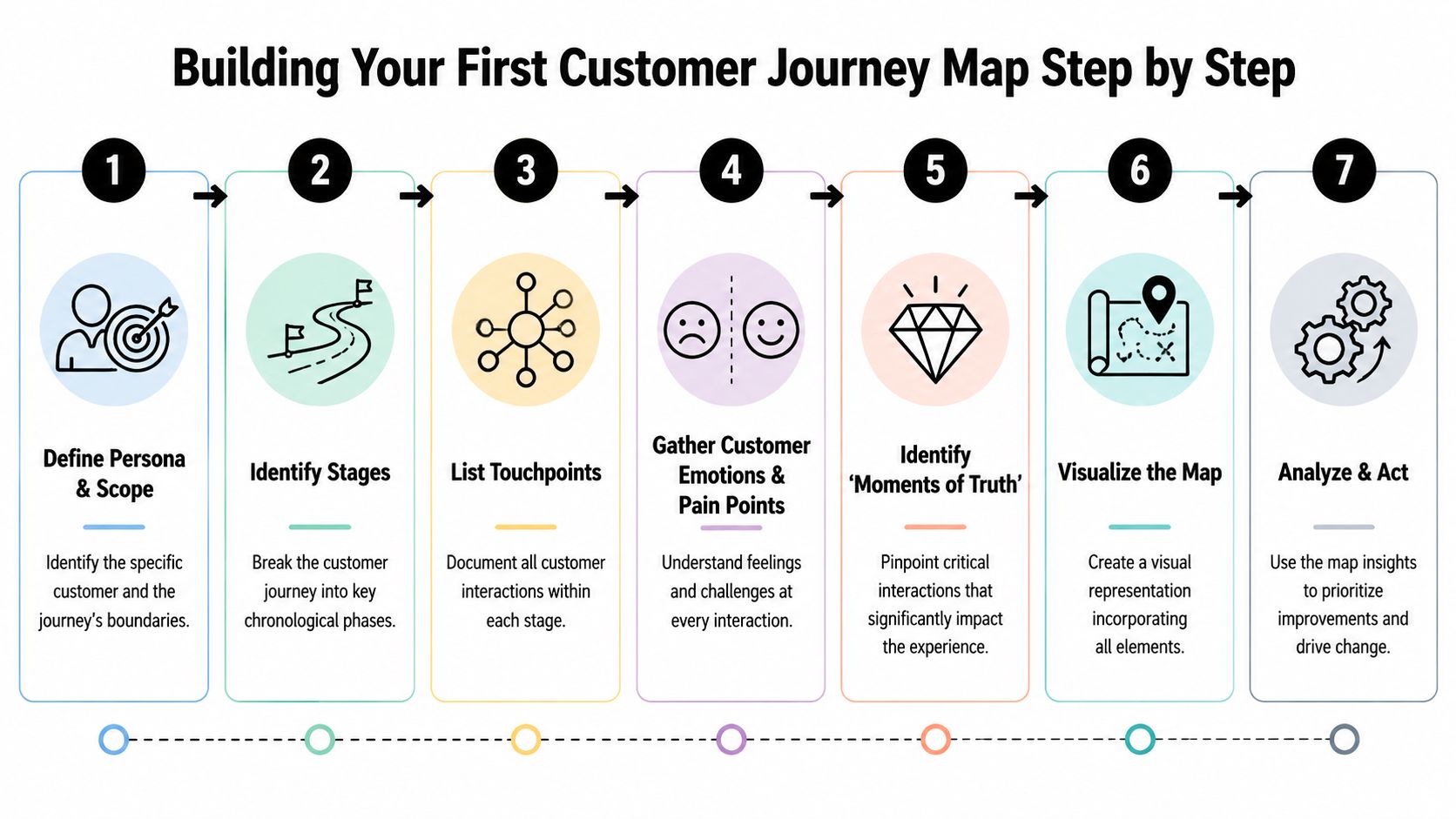
Don't map “all customers.” That creates vague diagrams nobody uses. Pick one customer type and one goal.
Examples:
Then define the journey boundary. Start at first awareness or first inquiry. End at purchase, attendance, renewal, or referral. Tight scope makes the map useful.
Once the scope is clear, build the timeline. Use plain stages your team already understands.
A simple layout looks like this:
Now place touchpoints under each stage. Don't worry about perfection yet. Just get the sequence onto the page.
At this point, most maps gain their value.
For each touchpoint, capture:
A booking reminder, for example, looks very different depending on context. If the customer already feels confident, the reminder keeps them on track. If they're unsure what to expect, that same reminder should also answer basic questions and reduce anxiety.
The best journey maps don't just show where your messages go. They show what the customer needs at that exact moment.
This is the part teams skip when they build maps from internal assumptions alone. Effective journey mapping combines qualitative evidence like interviews and support transcripts with quantitative data like analytics and conversion funnels, so you can locate where touchpoints break the journey instead of optimizing channels one by one, as described by Smaply's guide to journey mapping.
In practice, that means pulling from multiple sources:
Put both types on the same map. If analytics shows drop-off after a booking step and support transcripts show customers asking what happens next, the issue probably isn't traffic quality. It's expectation-setting.
Not every touchpoint matters equally. Some are routine. Some decide whether the customer continues.
Use simple labels:
For an appointment-based business, the confirmation and reminder sequence is often a moment of truth. For ecommerce, it might be the cart abandonment window. For service businesses, missed-call follow-up can make the difference between a booked job and a lost lead.
A spreadsheet, whiteboard, Miro board, or slide works fine. The trap is spending too much time on formatting and not enough on diagnosis.
A practical map should answer four questions:
If your map answers those questions, your team can act on it immediately.
A completed journey map gives you visibility. It doesn't give you priorities. That's where many teams stall.
They identify fifteen weak spots, try to fix all of them, and end up changing nothing with enough force to matter.
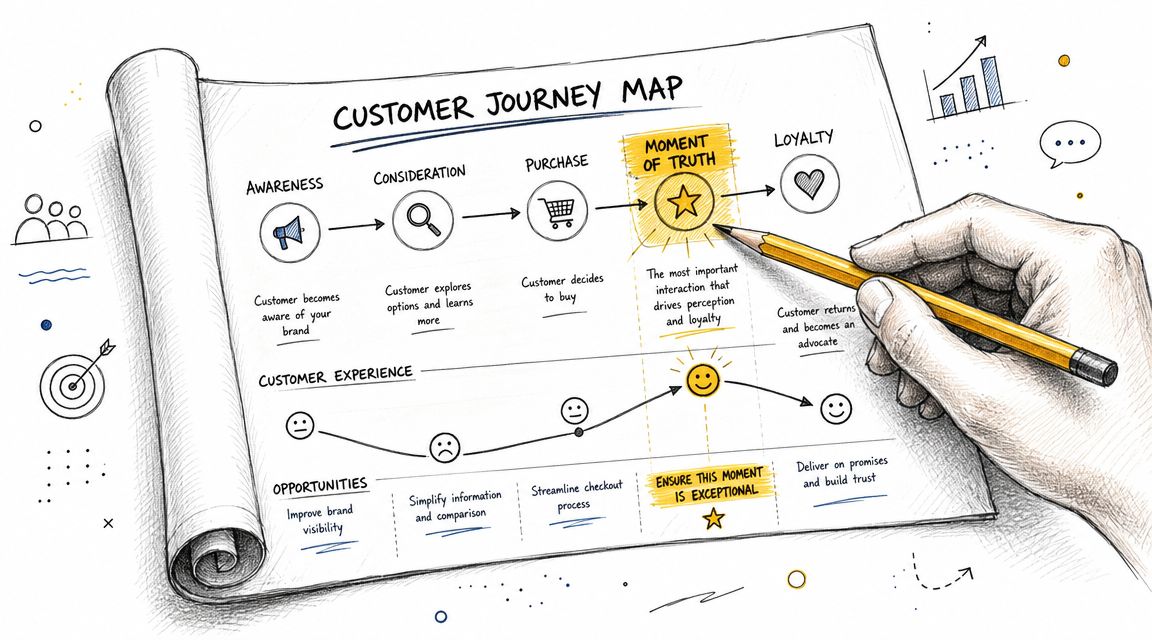
UXPressia notes that the touchpoint with the least favorable experience often defines the customer's overall satisfaction, which is why one weak handoff, such as a delayed reminder, can outweigh stronger moments elsewhere in the journey, as explained in their touchpoints and channels guide.
That matches what happens in practice. Customers rarely remember your internal org chart. They remember the point where momentum broke.
A few common examples:
Not every issue deserves immediate work. Score each friction point on two dimensions:
Priority testHigh-impact exampleLower-priority exampleRevenue effectMissed inquiry follow-upBlog CTA wordingOperational strainManual reminder process causing errorsMinor footer inconsistencyCustomer perceptionConfusing post-purchase silenceSocial profile bio mismatchFix complexityRewrite and automate key sequenceFull platform migration
Focus first on problems that affect conversion, attendance, retention, or customer confidence and can be fixed without heavy technical rebuilds.
Fix the touchpoint that blocks the next step. Don't start with the one that's easiest to redesign.
The understanding of touchpoints sharpens strategy. A broken touchpoint can be a messaging issue, but it can also be a process issue underneath.
If reminders are inconsistent, the visible problem is the reminder itself. The root cause might be weak trigger logic, poor CRM hygiene, unclear ownership, or disconnected systems. McKinsey warns that companies often overfocus on isolated touchpoints and miss the need to redesign the end-to-end journey and fix the process behind the interaction.
That distinction changes where you invest effort.
A delayed reminder, for example, isn't just a copy problem. It may signal that your booking tool, CRM, and messaging workflow aren't connected well enough to support the customer journey you want.
The fastest way to improve customer journey touchpoints is to fix one broken sequence that already matters to revenue. Don't begin with a full-company overhaul. Start where the customer intent is high and the handoffs are weak.
A shopper adds products to cart, reaches checkout, and leaves. Many teams respond with a single email and call it a recovery strategy. That's a channel tactic, not a journey fix.
A better sequence coordinates intent, timing, and message format:
This works when each message does a different job. Email carries detail. SMS creates immediacy. Ringless voicemail adds human presence without requiring a live pickup.
If your email performance is unstable, fix deliverability before judging the sequence. A resource like email warmup is useful when your cart recovery emails aren't consistently reaching the inbox.
For teams building these sequences across multiple channels, multi-channel communication strategy guidance helps frame timing, segmentation, and message roles more clearly. Tools such as Call Loop support coordinated SMS, voice, and ringless voicemail workflows, which is useful when the journey depends on more than one follow-up channel.
Service businesses often lose margin after the conversion, not before it. The prospect books successfully, then the experience goes quiet until the appointment date. That silence creates uncertainty.
A stronger appointment sequence usually looks like this:
Journey momentChannelPurposeRight after bookingSMS or emailConfirm the appointment and set expectationsBefore the appointmentVoice or SMS reminderReduce forgetfulness and prompt rescheduling if neededIf there's no confirmation or responseRingless voicemailRe-establish contact with a more personal cueAfter the appointmentFollow-up text or emailContinue service, request feedback, or guide the next step
This approach solves more than attendance. It also exposes root-cause issues. If customers routinely ignore reminders, the problem may be unclear scheduling, weak intake instructions, or too many disconnected messages from different systems. That's the McKinsey point in action. Don't just add another touchpoint. Fix the journey logic behind it.
Ringless voicemail fits especially well when the message benefits from voice tone, such as prep reminders, event reminders, missed appointment follow-up, or reactivation outreach to inactive customers.
Measurement gets messy when teams look only at channel metrics. Open rates, clicks, answer rates, and replies are useful, but they don't tell you whether the journey is improving.
Track touchpoints in two layers.
At the touchpoint level, monitor things like:
At the journey level, focus on movement between stages:
If you're trying to clean up attribution across these moments, Up North Media explains marketing attribution in a way that helps connect campaign activity to actual business outcomes instead of vanity reporting.
A practical dashboard should answer:
For teams that need a framework for tying channel performance back to outcomes, this guide to measuring marketing campaign effectiveness is a useful starting point. Keep the dashboard small. If your team won't review it weekly, it's too complex.
Update it whenever the journey changes in a meaningful way. That usually means after a new offer, a pricing change, a new booking or checkout flow, a change in follow-up process, or a noticeable drop in conversion or attendance. If your business is stable, a regular review cadence still helps keep the map useful instead of historical.
A channel is the medium, such as email, SMS, voice, or ringless voicemail. A touchpoint is the individual interaction that happens through that medium. A booking reminder text is a touchpoint delivered through the SMS channel. A post-quote voicemail is a touchpoint delivered through voice.
That distinction matters because businesses don't optimize channels in the abstract. They optimize the specific moments inside them.
Yes, if you keep the scope tight. Start with one customer type and one business-critical journey, such as inquiry to appointment or cart to purchase. Map the touchpoints, identify the weakest handoff, and improve that sequence first.
You don't need a full CX department to do this well. You need a clear timeline, honest customer feedback, and a way to automate the follow-up that people currently forget, delay, or send inconsistently.
If you want to turn scattered outreach into a coordinated system, Call Loop gives teams a way to automate SMS, voice, and ringless voicemail touchpoints around reminders, follow-ups, and re-engagement. That makes it easier to build customer journeys that feel connected instead of improvised.
Chris Brisson
Chris is the co-founder and CEO at Call Loop. He is focused on marketing automation, growth hacker strategies, and creating duplicatable systems for growing a remote and bootstrapped company. Chat with him on X at @chrisbrisson


Trusted by over 45,000 people, organizations, and businesses like


