
See a Demo
You're just one step away from seeing Call Loop in action.
Enter your information below to watch a demo right now.

You're just one step away from seeing Call Loop in action.
Enter your information below to watch a demo right now.


Your team is probably already sending messages. The problem is that those messages live in separate systems, follow different rules, and rarely work together.
Email handles newsletters, nurture sequences, and receipts. Text messaging gets used for reminders, urgent follow-up, and last-minute promotions. Voice often sits off to the side, even when a recorded message or ringless voicemail would be the clearest way to get attention. The result is familiar. A customer ignores the email, misses the text, and never hears the update that was important.
That's why choosing an email and SMS service isn't really about buying another channel. It's about building a communication system. For a small or mid-sized business, that system has to do three things well. It has to reach people reliably, keep records clean, and make channel decisions on purpose instead of by habit.
A good setup doesn't blast every message everywhere. It uses email for depth, SMS for speed, and voice or ringless voicemail for moments where a human tone matters more than another block of text. When those channels share contact data, consent status, and automation rules, outreach gets simpler to manage and easier for customers to understand.
Most communication problems don't start with bad copy. They start with fragmentation.
A service business might send appointment confirmations from one app, promotions from another, and manual follow-ups from a salesperson's inbox. An ecommerce brand may run email campaigns through its store platform, then send texts through a separate tool with a different audience list. A clinic might rely on email reminders even when the appointment is tomorrow and the patient is unlikely to check inboxes in time.
A real email and SMS service should act like a control layer across outreach. That means one place to manage contacts, suppression lists, message history, automation triggers, and engagement signals.
When that's missing, teams run into the same issues over and over:
A unified setup reduces those mistakes because channel choice becomes part of the workflow, not a last-minute decision.
Practical rule: If your team has to export contacts between tools just to send a follow-up, your messaging stack is already costing you time and creating compliance risk.
The goal isn't to replace email with SMS. It's to assign each channel a job.
Email is where you explain. SMS is where you prompt action. Voice, including ringless voicemail, is where tone and clarity can do more than a short text ever will. For example, a missed estimate follow-up from a contractor often lands better as a brief voicemail drop than as a third reminder email. A school or studio update may also be easier to absorb when heard instead of skimmed.
A practical orchestration model usually follows this pattern:
You don't need to rebuild everything at once. Start by centralizing the pieces that create the most operational drag.
A good first pass includes:
Once those are under one roof, your email and SMS service becomes more than a sender. It becomes the operating system for outbound communication.
A customer gets your promotional email in the morning, ignores your text in the afternoon, then listens to a short voicemail from the owner on the drive home and finally books. That is how multi-channel outreach works in practice. Different channels move people at different moments.
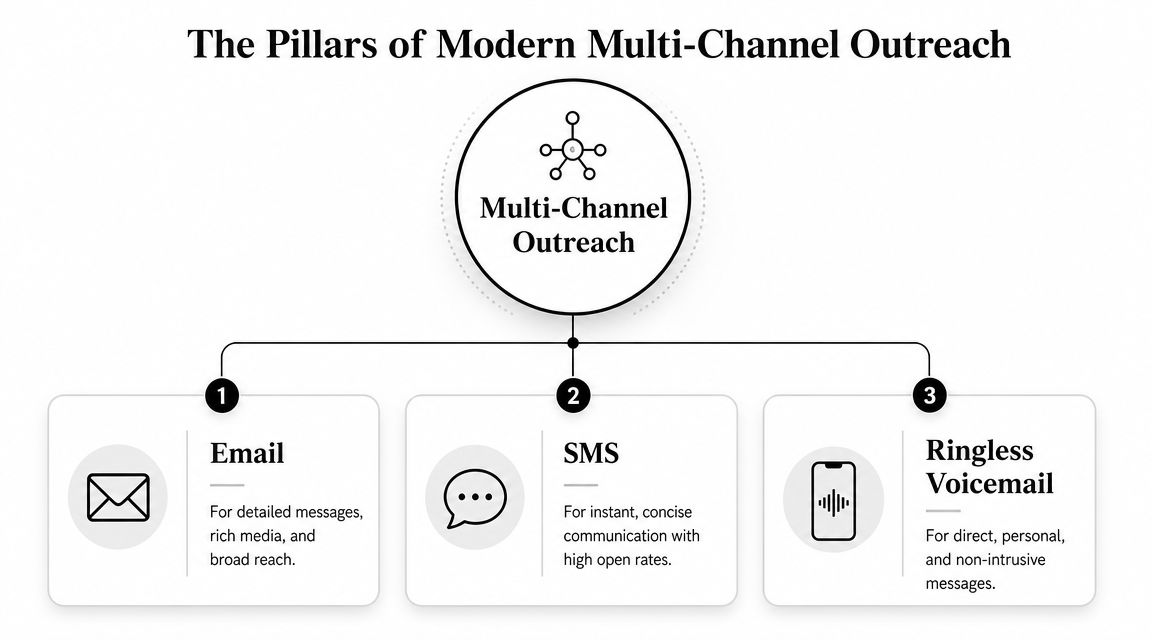
The core pillars are email, SMS, and ringless voicemail. Each one carries a different type of message well. The mistake is treating them as substitutes instead of assigning each one a clear role in the system.
Email works best when the recipient needs detail before acting. It gives you room for explanation, links, branding, and structured content. That makes it a strong fit for onboarding, offers with terms, service updates, invoices, newsletters, and post-purchase education.
It also gives teams more control over message depth. A contractor can explain financing options. A clinic can send prep instructions. A retailer can package a promotion with product images and FAQs.
The trade-off is pace. Email often gets read later, sorted into folders, or buried under other messages. It supports consideration well. It is weaker when the window to act is short.
SMS is built for immediacy. It fits reminders, confirmations, limited-time offers, shipping alerts, payment prompts, and quick back-and-forth replies.
Analysts at Drips note in their SMS usage statistics that text messaging has broad mobile reach, which helps explain why it remains effective for urgent communication. That reach is the reason many SMBs use SMS as the action channel after email has already provided the details.
Short messages force discipline. That is a benefit and a limitation. SMS gets attention quickly, but it does not give you much space to explain price, policy, or nuance. Teams deciding between the two should review the practical trade-offs in this comparison of SMS vs email marketing.
Ringless voicemail is the third pillar that many guides skip. It sends a recorded voice message directly to voicemail without requiring a live call, which gives you something text channels cannot provide well. Tone.
That matters more than many SMBs expect. A short voicemail from a practice manager about a missed appointment feels different from a generic reminder text. A roofing company following up on an estimate can sound helpful instead of repetitive. An owner announcing a reopening or seasonal event can sound local and real in a way email and SMS rarely match.
Used poorly, voicemail becomes noise. Used with restraint, it fills the gap between a text prompt and a live conversation.
The practical model is simple. Email explains. SMS prompts. Ringless voicemail reinforces, reassures, or escalates when hearing a human voice improves the odds of a response.
That mix is especially useful for businesses with longer buying cycles or higher-consideration decisions. Home services, healthcare, education, automotive, and local franchise operators often need more than one touch and more than one format. Teams evaluating channel mix alongside vendor fit may also benefit from comparing sales outreach platforms, especially if they are deciding how messaging, follow-up, and rep workflows should work together.
| Channel | Best use | Main limitation |
|---|---|---|
| Education, offers with detail, onboarding, updates | Slower response for urgent actions | |
| SMS | Reminders, confirmations, alerts, fast calls to action | Limited space and higher interruption |
| Ringless voicemail | Personal follow-up, reassurance, owner messages, sensitive reminders | Less suitable for frequent broad campaigns |
The point is not to send more messages. It is to send the right message in the right format. When email, SMS, and ringless voicemail work as one outreach system, each channel does the job it is built to do.
Most platforms look similar on a pricing page. The differences show up after launch, when you're trying to build segments, route replies, sync consent, and figure out why one campaign worked while another didn't.
An email and SMS service should be judged by how well it supports execution, not by how many features it lists. A bloated platform with weak automation logic is harder to use than a focused one with strong workflow design.
Start with the capabilities that affect daily operations.
Those are the essentials. Without them, you're buying a sender, not a system.
Once the basics are covered, the next layer determines whether the platform can support actual campaigns at scale.
A strong platform should also support:
If you're also reviewing outbound sales tooling, it can help to look at resources on comparing sales outreach platforms to understand how workflow design, reply handling, and sequence logic differ across categories.
Vendor demos often focus on message builders. That's useful, but it's not where most problems happen. Ask deeper questions.
| Question | Why it matters |
|---|---|
| How are consent records stored and updated? | Prevents channel mistakes and compliance issues |
| Can one workflow use email, SMS, and voice steps together? | Determines whether orchestration is practical |
| How are replies routed? | Affects sales follow-up and support responsiveness |
| Can we segment by engagement and source? | Helps send fewer, better-timed messages |
| What happens when data changes in the CRM? | Keeps lists clean and automations accurate |
If voice is part of your process, don't treat ringless voicemail as an add-on you'll figure out later. Ask how recordings are stored, how drops are scheduled, whether landline and mobile delivery are supported, and how voicemail activity fits into reporting.
That matters for practical reasons. A ringless voicemail campaign only becomes useful when it can sit inside a larger sequence. For example, an estimate request could trigger an email immediately, an SMS reminder later, and a voicemail drop if the lead stays unresponsive.
One platform that supports SMS, voice broadcasting, ringless voicemail, drip campaigns, and integrations with tools like HubSpot, ActiveCampaign, and Zapier is Call Loop. That kind of setup is useful when you want all three channels managed inside the same workflow instead of split across disconnected apps.
Buy for orchestration. Most teams outgrow one-channel tools long before they outgrow their audience.
A missed cart, an empty chair, and an unreturned estimate request look like different problems. Operationally, they are the same problem. Interest was there, then follow-up lost momentum.
The businesses that recover more revenue usually do one thing well. They match the channel to the moment. Email handles detail. SMS handles speed. Ringless voicemail adds a human voice when a plain text reminder is easy to ignore.

Cart recovery is a timing problem first and a creative problem second.
Email is still the right first step because shoppers may need product images, shipping details, financing information, or a direct link back to their saved cart. SMS works better after that if the purchase window is short or the offer has a real deadline. Ringless voicemail fits a narrower set of cases, but it can be effective for higher-ticket products, quote-based ecommerce, or local sellers where a personal follow-up raises trust.
A practical sequence looks like this:
That third step is what many SMBs miss. If a shopper abandoned a $25 accessory, voicemail is overkill. If they left a custom furniture order, a large equipment quote, or a service bundle in progress, a short voice message can recover deals that email and SMS alone leave behind.
Healthcare, dental, wellness, and therapy practices usually care less about click rates than attendance rates. Revenue depends on filled schedules, and staff time disappears fast when reminders are handled manually.
Email works well for intake instructions, preparation steps, office policies, and post-visit follow-up. SMS is better for short confirmations, reminder prompts, and reschedule replies. Ringless voicemail is useful for higher-value appointments, missed confirmations, or patients who respond better to a more personal reminder.
The return shows up in operations as much as marketing. Fewer no-shows. Less front-desk call volume. Better use of staff time.
Patients do not need every message on every channel. They need the next useful prompt, sent early enough to act on it.
This is also the point where channel rules matter. A reminder workflow for texts needs consent records and proper registration, especially if the practice is using application-to-person messaging. Teams sending text reminders should review 10DLC compliance requirements for business texting before scaling volume.
Agencies need more than campaign sends. They need separation between client accounts, clean reporting, and repeatable workflows that junior staff can run without creating list or branding mistakes.
A three-channel system gives agencies a practical way to standardize outreach by campaign type:
That model works especially well for studios, clinics, schools, gyms, real estate teams, and home service brands. A karate studio might use email for monthly schedules, SMS for class reminders, and ringless voicemail for tournament deadlines or weather-related changes. The same framework can be reused across clients without forcing every campaign into one channel.
The ROI for agencies is not just better campaign response. It is faster production, clearer attribution, and fewer hand-built one-off follow-ups.
Service businesses lose revenue in the gap between inquiry and decision. The lead asked for help. Then life got busy, the estimate sat in an inbox, and the job went to whoever followed up better.
A simple multi-step sequence usually outperforms repeated email nudges:
| Step | Channel | Purpose |
|---|---|---|
| Initial response | Send estimate details, scope, or next steps | |
| Short reminder | SMS | Prompt a reply, inspection booking, or call back |
| Second follow-up | Ringless voicemail | Add a personal prompt without tying up staff on outbound calls |
| Final touch | Recap the offer and keep the lead warm |
This approach fits plumbers, roofers, contractors, med spas, HVAC companies, repair shops, and other businesses with quote-based selling. Ringless voicemail is the differentiator because it adds voice without requiring a rep to place every follow-up call manually. For local operators with small teams, that trade-off matters. They get more persistence without adding hours of admin work.
Used well, the return is straightforward. More booked jobs, fewer forgotten quotes, and less revenue leaking out after the first inquiry.
A common failure point looks like this. A prospect fills out a form, gets the quote by email, ignores it, then receives a text and a ringless voicemail from the same business. The outreach feels coordinated. The records behind it often are not.
That gap is where risk shows up. A unified messaging system only works when consent, suppression, and sender reputation are managed across all three channels, not handled as separate tasks by separate tools.
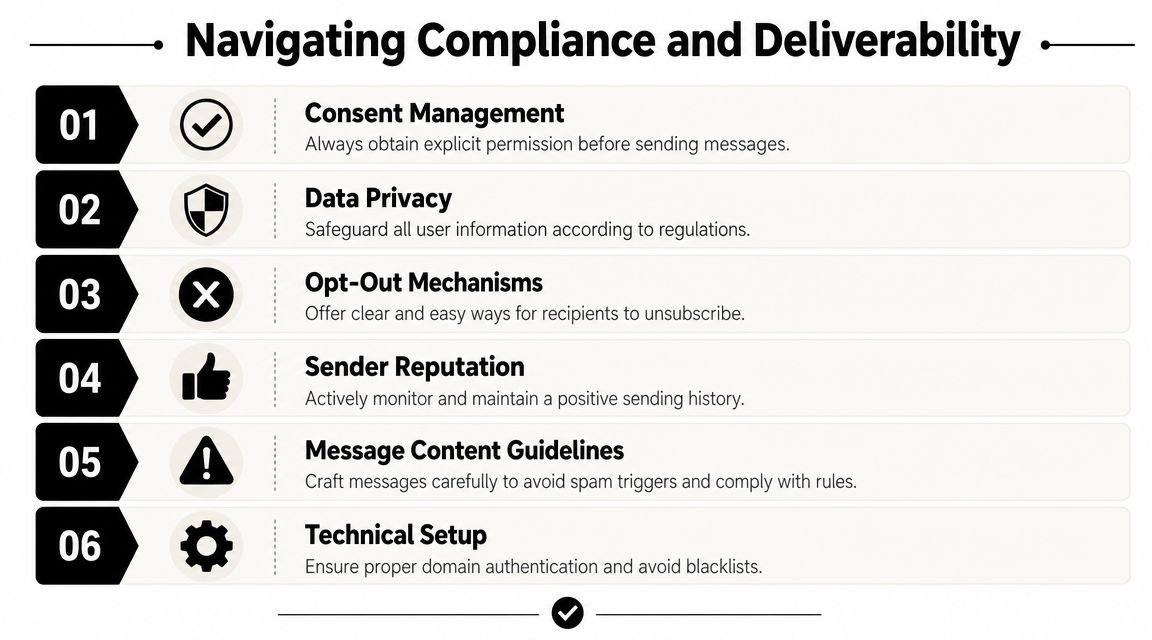
Compliance starts at collection, not at send time. If the form language is vague, the opt-in source is missing, or the brand name is unclear, the problem carries into every follow-up that uses email, SMS, or voicemail.
AmericanEagle.com's overview of email and SMS marketing compliance explains the basics clearly: marketing texts require prior express written consent, opt-out instructions need to be clear, and revocation requests need to be honored. It also points to the FCC's tighter one-to-one consent standard, which matters for franchises, agencies, and multi-brand operators that share lead sources.
That has a direct operational impact. Permission collected for one seller does not automatically carry over to another location, brand, or client account. If your system routes leads between teams, each handoff needs the consent trail attached to the record.
For teams setting up registration and carrier review for texting, this guide to 10DLC compliance requirements for business texting belongs in the same playbook as your intake forms and suppression rules.
Clean compliance work is repetitive by design. The goal is to make the safe path the default path.
Strong compliance comes from recordkeeping, channel rules, and disciplined campaign setup.
Deliverability problems rarely come from one mistake. They usually come from a stack of smaller ones. Old lists, inconsistent sender identity, weak segmentation, and message timing all reduce performance.
Email has its own reputation signals. SMS has carrier filtering. Ringless voicemail has a different challenge. If the message sounds generic, arrives at the wrong moment, or follows a text the recipient never agreed to receive, response rates drop and complaints rise.
Multi-channel strategy needs restraint. Sending the same pitch by email, text, and voicemail in a short window does not make the offer stronger. It makes the business look careless. Better systems adjust the channel to the context. Email handles detail, SMS handles urgency, and ringless voicemail adds a human prompt when a voice touch will help move the conversation.
List quality upstream matters too. Teams using paid acquisition or social campaigns should examine whether the lead source is producing contacts with clear, channel-specific consent. Some of the top social media lead generation tools can increase lead volume quickly, but lead volume without clean permission data creates downstream delivery and compliance problems.
Healthcare, dental, legal, and financial businesses need tighter controls because the content itself can create risk. The safest approach is to keep sensitive details out of promotional messages, limit personal data in voicemail drops, and route detailed information back to secure channels.
In practice, that means using each channel for the job it handles best. Email can carry the formal follow-up. SMS can confirm an action or prompt a reply. Ringless voicemail can add a personal nudge without putting private account or health information into a recording.
Compliance does not slow down growth. Poor list discipline, weak consent capture, and channel misuse do that.
Automation is where an email and SMS service stops being a sending tool and starts acting like infrastructure. The point isn't to automate more messages. It's to automate better decisions.
That only happens when the messaging platform connects to the systems where customer activity already lives. CRM updates, form submissions, purchases, support tickets, event registrations, and appointment changes should all be able to trigger the next action without manual exports.
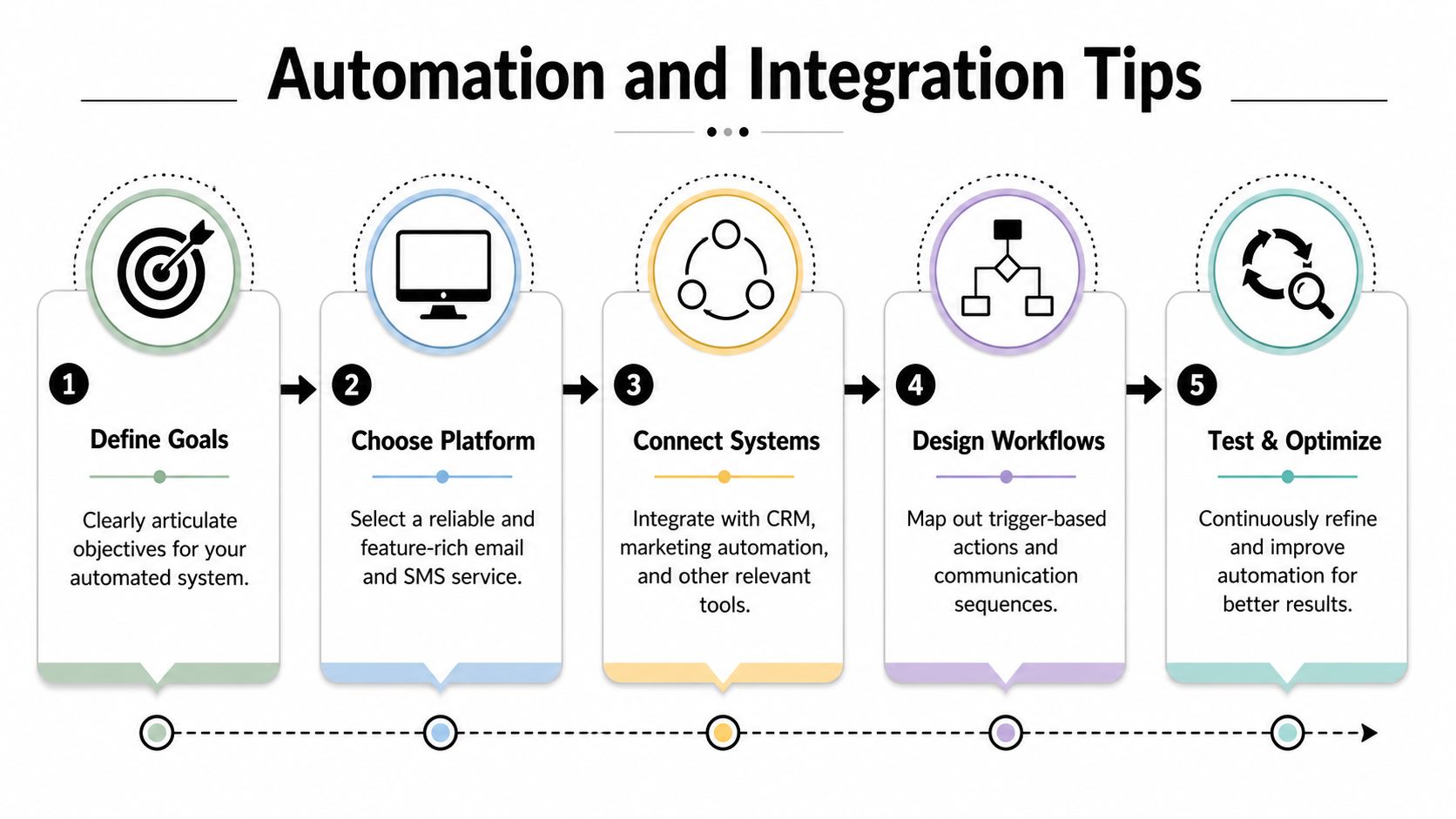
Most automation projects go sideways because teams begin with the message they want to send. Start with the event instead.
Examples of useful trigger events:
Once the trigger is clear, then choose the sequence. Email may be enough for one event. Another may need an SMS reminder and later a ringless voicemail if there's still no response.
Textbolt's article on choosing the best email-to-SMS service makes an important point here: effective orchestration means using the right channel at the right time, such as escalating from email to SMS after an email goes unopened for 24 hours.
The best workflows are usually straightforward.
| Trigger | If this happens | Then do this |
|---|---|---|
| New inquiry | lead submits form | send welcome email, then SMS follow-up |
| No reply | no engagement after initial outreach | drop ringless voicemail with a human intro |
| Appointment tomorrow | patient or customer hasn't confirmed | send SMS reminder |
| Event registration | attendee hasn't opened prep email | send text with key details |
| Customer purchase | buyer becomes inactive later | start re-engagement email series |
Tools like HubSpot, ActiveCampaign, Keap, and Zapier are particularly useful. They let the messaging platform react to customer behavior instead of waiting for a team member to remember the next step.
If lead generation starts on social platforms, it's smart to review top social media lead generation tools and map how those sources should feed directly into your CRM and outbound sequences.
The strongest automation doesn't send all three channels by default. It branches.
A practical approach looks like this:
That model respects attention better than blasting every touchpoint at once. It also gives your team cleaner reporting because each escalation has a reason.
For businesses building cross-channel workflows, this guide on text and email strategy offers a useful framework for coordinating those paths.
Automation should reduce guesswork. If a workflow can't explain why it sent an SMS instead of an email, it needs redesign.
A connected stack is only useful if data stays consistent. Before you automate heavily, confirm these basics:
Good automation doesn't feel busy. It feels timely.
A typical SMB has this problem by month two. Email is going out from one tool, texts from another, missed leads sit in the CRM, and no one is fully sure when a reminder should become a follow-up call or voicemail drop. The fix is not more sending. The fix is a cleaner system with clear channel rules.
Use this checklist to set up email, SMS, and ringless voicemail as one operating system instead of three disconnected tactics.
Start with contact quality. Bad records create bad automation.
Clean the database
Remove duplicates, inactive contacts, and records missing core fields. Every usable contact should have an email, mobile number if available, source, owner, and current stage.
Separate consent by channel
Keep email permission, SMS consent, and voicemail eligibility distinct in your records. A contact who asked for your newsletter did not automatically ask for texts.
Assign each channel a job
Email handles explanation, detail, and nurture. SMS handles urgency, reminders, and quick confirmations. Ringless voicemail works well when a voice message can revive stalled outreach or reinforce an important follow-up without creating a live call interruption.
Build the segments you will use
Start with practical groups such as new leads, active customers, inactive customers, appointment contacts, event registrants, and overdue follow-up lists.
Launch a small automation set first
Begin with workflows tied to real business outcomes: welcome sequences, appointment reminders, abandoned inquiry follow-up, missed-response recovery, and post-purchase check-ins.
Set up list growth points
Add forms, landing pages, QR codes, keywords, and in-store or service-based signup prompts where they fit. If you need to tighten acquisition before scaling campaigns, this digital marketing email list guide gives a useful framework for building cleaner signup paths.
Channel fit matters more than creative flair.
SMS should stay short enough to read fast and act on fast. Long blocks of text, email signatures, disclaimers copied from newsletters, and stacked links make texts harder to follow and easier to ignore. Standard SMS also has strict length constraints, so bloated copy can split into multiple messages and hurt clarity.
Use a few operating rules:
After setup, the primary task is adjustment.
Review where each channel helps and where it adds noise. If email gets opens but no action, the offer or CTA may be the issue. If SMS gets opt-outs, the timing or frequency is probably off. If ringless voicemail lifts response rates in one campaign but not another, check whether it is being used for high-intent contacts or dumped into broad outreach where it has less context.
A practical review cadence looks like this:
| Cadence | What to review |
|---|---|
| Weekly | delivery problems, replies, opt-outs, failed triggers, unanswered inbound messages |
| Monthly | segment accuracy, workflow performance, channel escalation rules, stale sequences |
| Quarterly | consent records, CRM sync quality, staffing for follow-up, campaign priorities by channel |
SMBs rarely need a complicated testing program. Results usually improve when teams tighten four areas:
The best-performing setups are usually the simplest ones with discipline behind them. They use email for depth, SMS for speed, and ringless voicemail for selective voice follow-up that adds context without forcing a live call.
If you want one platform to coordinate SMS, voice broadcasting, and ringless voicemail alongside broader outreach workflows, Call Loop is worth a look. It supports bulk messaging, drip campaigns, text-to-join, CRM integrations, and workflow management for SMB teams running multi-channel communication from one place.
Chris Brisson
Chris is the co-founder and CEO at Call Loop. He is focused on marketing automation, growth hacker strategies, and creating duplicatable systems for growing a remote and bootstrapped company. Chat with him on X at @chrisbrisson


Trusted by over 45,000 people, organizations, and businesses like


