
See a Demo
You're just one step away from seeing Call Loop in action.
Enter your information below to watch a demo right now.

You're just one step away from seeing Call Loop in action.
Enter your information below to watch a demo right now.

A storm warning goes out, the phones light up, and the room still goes quiet because half the people never got the message. That's the test of an emergency notification system, not whether it can send something, but whether it can reach the right people fast enough, through the right channel, with instructions they can use.
In the field, the failures usually look ordinary before they look dangerous. A contact list is stale. A single SMS route gets congested. A voicemail never gets listened to because the recipient's phone is set to silence unknown callers. Then the clock starts working against you, and the alert that should have bought time becomes background noise.
A lot of teams think they have coverage because they have a send button. Then the weather turns, the building loses power, or a campus issue starts spreading, and the gap shows up immediately. One channel is never enough, because people don't all carry the same devices, keep the same settings, or stay connected in the same way.
The historical pattern is clear. The FCC describes the U.S. Emergency Alert System (EAS) as the national public warning framework used by broadcasters, cable systems, wireless carriers, and other participating entities, while FEMA says the President must be able to address the American people within 10 minutes during a national emergency through the system. That requirement alone shows why speed and redundancy matter, because a message that arrives late isn't a warning anymore, it's documentation. FCC overview of the Emergency Alert System, FEMA Emergency Alert System requirements
Practical rule: if one delivery path can fail, assume it eventually will.
A single SMS blast looks efficient right up until mobile congestion, battery failure, or poor reception gets in the way. The European Public Warning guidance summarized by EENA is blunt about the need for channel diversity and failover, with distribution paths that include mobile phones, fixed phones, TV and radio, sirens, variable-message signs, public address systems, internet, email, and social media. That breadth isn't decorative, it's how you avoid putting the entire warning chain on one weak link. EENA public warning document
A reliable emergency notification system treats every alert as a routing problem, not just a broadcasting task. It has to pre-map message types to multiple channels, keep manual override paths available, and make sure a bad connection on one side doesn't block the rest of the send.
High-urgency warning guidance from 3GPP says delivery should be as short as possible, seconds rather than minutes. That's the standard worth working from, because every extra click in your workflow raises the chance that somebody misses the alert while the hazard is still unfolding. 3GPP guidance on urgent warning delivery
That means the question isn't whether your team can send a message. It's whether the message can be triggered quickly, routed cleanly, and received in time for anyone to act. If you can't answer that confidently, your current setup is a liability, not a safeguard.
A working emergency notification system has four jobs. It has to build the message, know who should receive it, push it through more than one channel, and show you what happened after the send. Anything less starts to look like a set of disconnected tools instead of an operating system for safety communications.
The message engine should do the hard work before the crisis starts. That means preconfigured templates, merge fields for names or locations, and simple approval paths so an authorized user can trigger the right version in seconds. The ARIB guidance on urgent warning delivery makes the underlying point well, because speed depends on reducing friction before activation, not during the emergency itself. ARIB guidance
A good workflow also supports geographic targeting. The same storm does not affect every building, campus, or neighborhood in the same way, so the alert engine needs to let operators send only to the right audience instead of forcing a one-size-fits-all blast.
Your contact database is only useful if it is clean enough to trust. In practice, that means validation, segmentation, and regular upkeep, because stale numbers and duplicate records waste precious delivery attempts. Segmentation also matters for language, role, building access, and communication preference, especially when the same institution serves employees, patients, students, or tenants.
If the contact list is not current, the platform becomes a very fast way to notify the wrong people.
The delivery layer should support SMS, voice broadcasting, ringless voicemail, and email at minimum, with failover paths when a channel drops or a segment does not respond. Ringless voicemail is particularly useful for people who miss calls, keep phones on silent, or live with weak reception, because it places the message in the voicemail inbox without ringing the device.
Latency matters more than many organizations plan for. A platform can look complete on paper and still fail in practice if delivery stalls, if acknowledgments arrive too late to matter, or if one channel depends on a user action that never happens. this mass notification systems guide is useful here because it ties platform features to the way real alert workflows break under pressure.
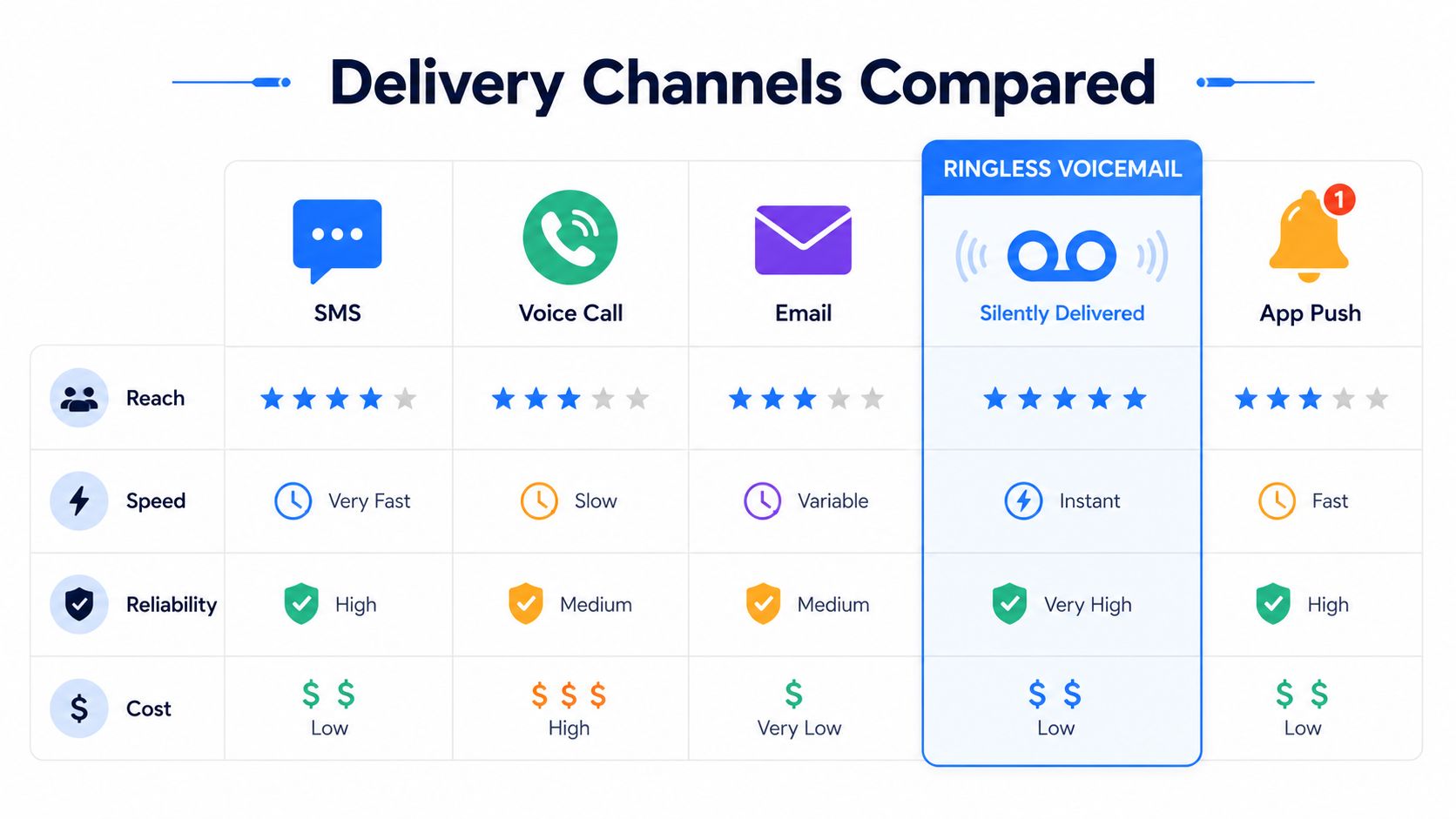
Analytics close the loop. Delivery status, message completion, and response timing tell you where the system is working and where it is not. That visibility matters when you are comparing channels, because reach, speed, reliability, and cost do not line up the same way across every audience.
Different channels solve different problems, and that's where a lot of teams get it wrong. They pick a favorite channel, then expect it to do every job, from urgent evacuation to routine follow-up. Emergency communication works better when each channel has a defined role and a known failure mode.
SMS remains the fastest default for many alerts because it lands on the device people check most often. It's also concise by nature, which is useful when the first line has to say what happened, where it happened, and what to do next. The limit is obvious, though, because SMS still depends on mobile connectivity, device availability, and a contact record that reaches the intended person.
SMS works best for short, actionable instructions. If the message needs maps, policy references, or layered context, SMS should point to a longer follow-up channel rather than trying to carry everything itself.
Voice broadcasting still matters because some people respond to spoken language faster than text, especially in homes, senior living, or mixed-language environments. Live and machine answer detection help separate a real pickup from a voicemail path, which makes the delivery more purposeful than a blind call dump.
Call Loop is one option in this category, with voice broadcasts and ringless voicemail available alongside SMS. That mix is useful when you need one platform to support both immediate alerts and stored voice delivery without forcing every recipient into the same channel.
Ringless voicemail is valuable because it reaches a different behavior pattern. Many people ignore calls from unknown numbers, silence their devices during work or class, or miss live calls while they're in poor coverage. A ringless drop puts the message where they're likely to find it later, without interrupting them at the moment of the send.
That doesn't replace SMS for urgent action. It complements it, especially for follow-up instructions, reminders, and secondary alerting when you want persistence without a live ring. If your audience includes staff in transit, contractors, or members who don't reliably answer calls, ringless voicemail closes a practical hole that text alone often leaves open.
Email is useful when the message needs longer instructions, attachments, or a written record. It's not the right first channel for anything time-sensitive, because it's easy to bury and slower to act on. The best use is often as the second layer, after a faster alert has already gone out through SMS, voice, or voicemail.
For teams comparing use cases, the most sensible channel choice is simple. Use SMS for immediate action, voice for urgent spoken delivery, ringless voicemail for silent persistence, and email for details that can wait a little longer. Call Loop's ringless voicemail overview is a useful reference if you're evaluating how voicemail-based delivery fits into a layered alert strategy.
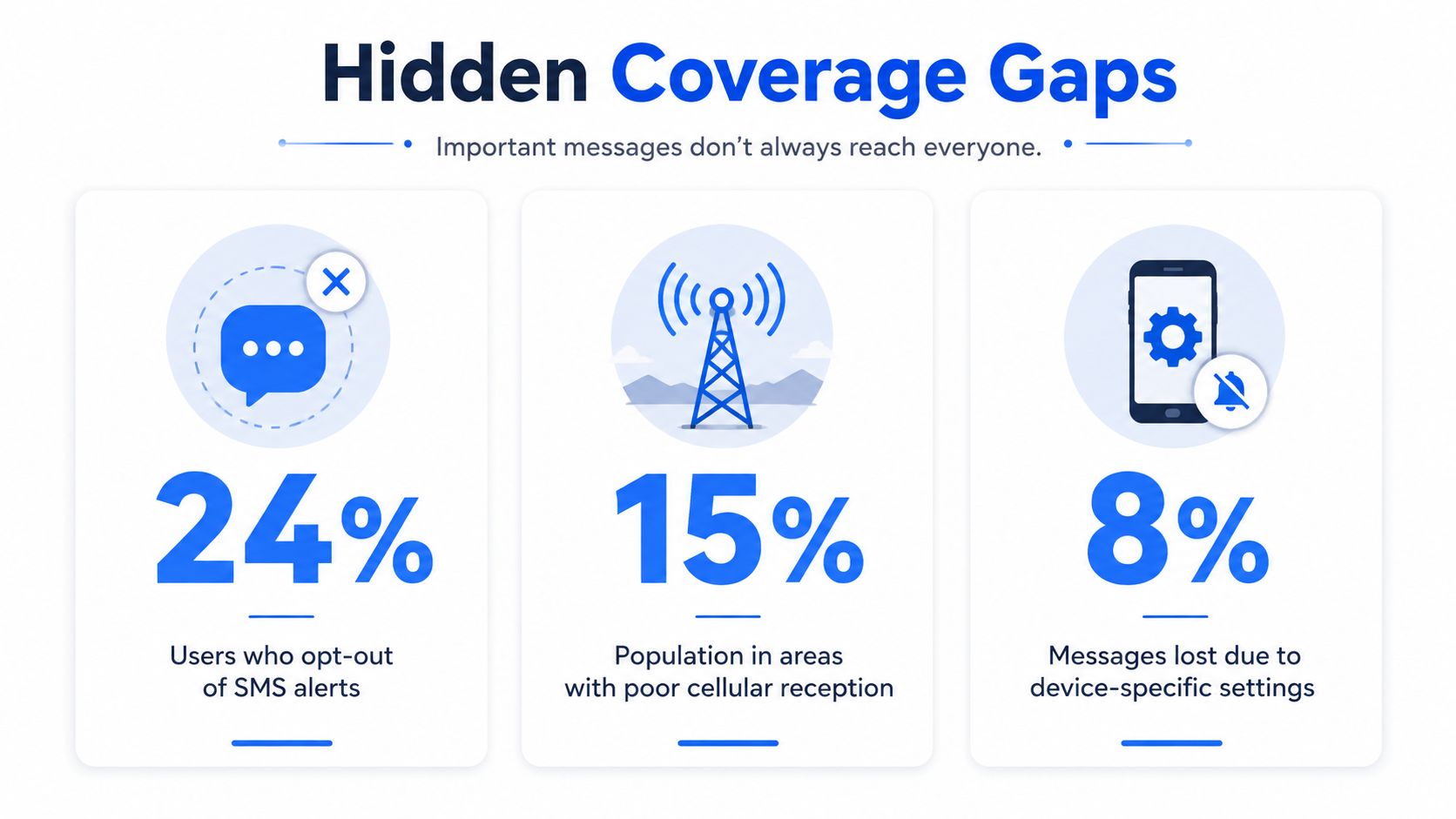
The biggest mistake in emergency messaging is assuming that more channels automatically means broader coverage. In practice, coverage depends on who's enrolled, who can receive the message, and who can understand it in the moment. A platform can be technically multi-channel and still leave large parts of the population outside the alert net.
The blind spots show up most clearly in opt-in systems. Independent reporting cited in the brief notes that these systems often reach only a minority of residents, with typical reach around 40% when agencies rely on imported databases and voluntary enrollment, and a Colorado-focused report found most localities below 40% opt-in. That's not a minor optimization issue, it's a structural coverage problem. Coverage gaps in opt-in alert systems
A 2025 review found recurring failures for people with language access needs and disabilities, including delayed or missing translations, inaccessible channels, erroneous translations, lack of trust in authorities, and community unfamiliarity with hazards. It also recommends multilingual language-access plans, plain language, trusted community partners, and multi-channel delivery. 2025 review on inclusive alerting
That matters because an alert that can't be read, heard, or trusted isn't really delivered. The problem isn't just software, it's whether the organization has thought through how a person with limited English, hearing loss, low vision, or low familiarity with the hazard will experience the warning.
Transient workers, older adults, rural residents, and people with weak connectivity are the hardest groups to reach with a single opt-in path. They're also the groups most likely to be missed when the message depends on self-enrollment, stable phone access, or perfect subscriber data. The practical answer is to combine enrollment-based systems with broader broadcast mechanisms where policy allows, and to keep the wording plain enough that a first-time recipient can understand it immediately.
A useful external resource for organizations thinking about vulnerable populations is the Velma cognitive support program, especially if you're designing communication paths for seniors who may need repeated, simple, human-readable follow-up. The larger lesson is that coverage isn't just a transport issue, it's an accessibility issue.
Compliance is part of deliverability, not a separate legal box. If people don't trust your sender identity, if your lists are messy, or if your consent model is weak, your message performance drops long before you face a formal complaint. That's especially true in healthcare, where HIPAA considerations shape how patient-facing communications are handled.
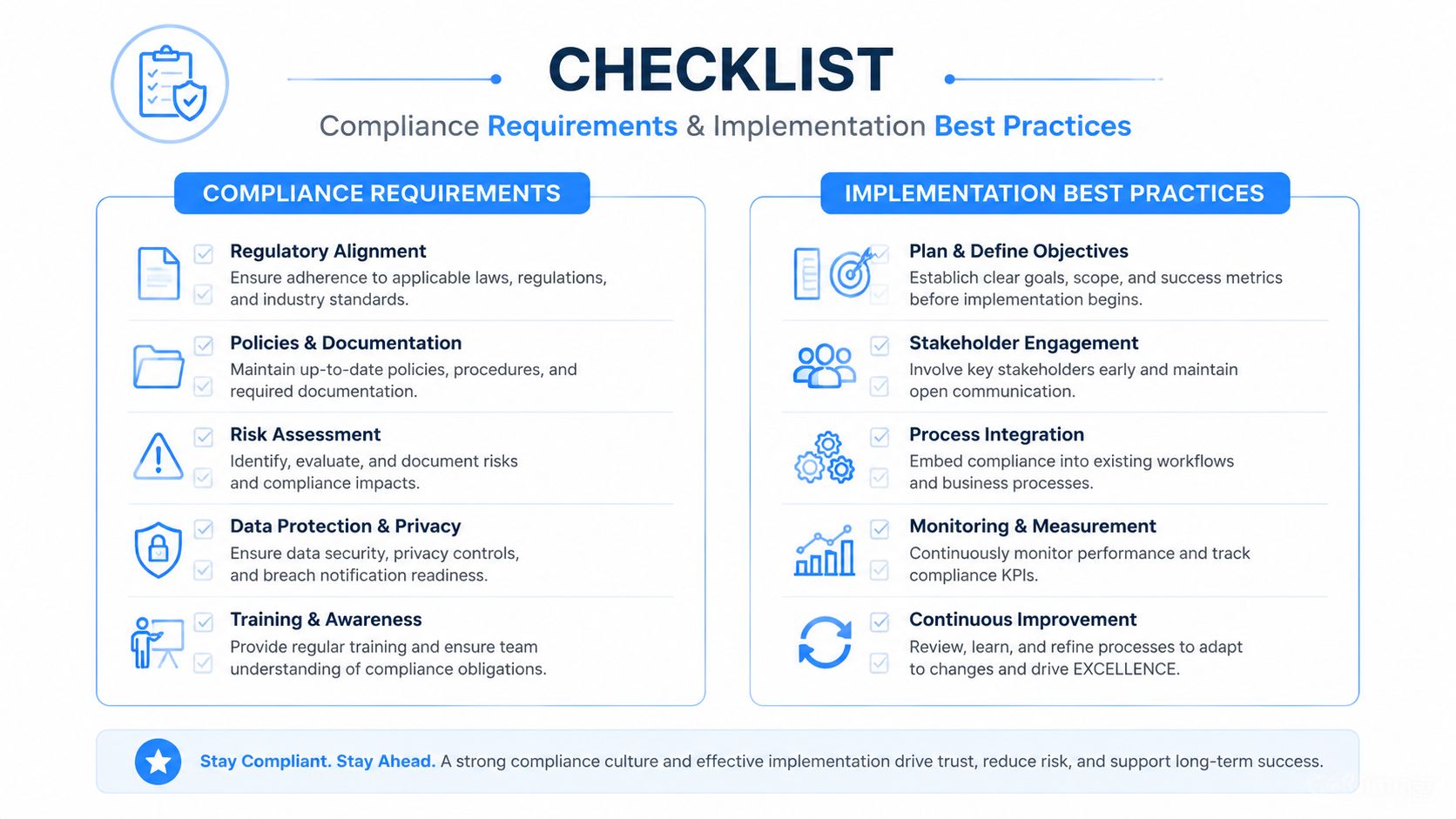
Start with explicit permission. For SMS and voice programs, a double opt-in flow reduces disputes and improves the quality of your list because people who confirm usually expect the message stream that follows. If your organization uses join keywords, make the first confirmation message clear, short, and specific about what kind of alerts the person will receive.
For a practical checklist on the consent side, this TCPA compliance guide is worth reviewing before you launch any large-scale program.
Number validation cuts down on failed sends and avoids wasting attempts on dead records. Toll-free sender compliance and custom caller ID also matter because recipients are more likely to recognize and trust a message that looks consistent over time. On the voice side, DNC management protects your campaigns from crossing into unnecessary outbound calling noise.
In healthcare environments, secure handling matters just as much as message reach. Platforms built with HIPAA compliance in mind are a better fit when patient information, appointment reminders, or facility alerts may involve protected data.
Implementation rule: if a message could trigger questions from legal, security, or privacy teams later, design the workflow now instead of cleaning it up after the send.
Built-in link shortening and click tracking help you see whether people followed the alert through to the next step. That's useful not only for emergencies, but for drills, closures, and operational notices that need a verifiable response. The point isn't to turn every alert into a marketing event, it's to confirm that the communication chain is functional when it matters.
The value of an emergency notification system shows up in fewer missed messages, faster acknowledgement, and smoother escalation, but you only see that value if you measure the right things. Delivery rate by channel is useful. So are open and click behavior for tracked SMS links, voicemail drop success, and the time between alert send and first response.
Those metrics tell different stories. A high delivery rate with low response often means the message was too vague. Good response on one channel with poor delivery on another usually means your fallback path is carrying more weight than the primary route. A healthy program learns from both.
Run drills with the same approval path and channel mix you'd use in a real event. If a sender can't activate a template quickly during a test, that problem will only get worse under stress. Drills also expose list hygiene issues, especially when people have changed departments, phone numbers, or preferred contact methods.
Don't judge the system by the first send alone. Judge it by whether the second, third, and fallback messages arrive cleanly too.
An emergency notification system works better when it fits into existing workflows instead of living as a separate island. Call Loop connects with ActiveCampaign, HubSpot, Keap, and 4,000+ apps via Zapier, which makes it easier to trigger reminders, escalations, and follow-ups from systems teams already trust. That same orchestration approach is useful for non-emergency sequences too, including appointment reminders and staged follow-up through SMS, voice, and ringless voicemail.
Sample templates help teams move faster when a real issue hits:
The practical payoff is consistency. People recognize the format, staff spend less time drafting from scratch, and your organization sends clearer messages under pressure.
Start by choosing a platform that can send across SMS, voice broadcasting, and ringless voicemail without forcing every alert into one path. Then clean the contact list, set up consent, and prebuild the message templates for the situations you already know will happen, because they will happen sooner or later.
Get the basics in place. Confirm sender identity, validate numbers, define who can approve and launch alerts, and build the first round of templates for weather, closure, and security events. Run one internal test through every channel you plan to use.
Add segmentation, drill schedules, and fallback routing. Review how messages behave by audience group, then tighten the language and shorten anything that's too dense for a stressed reader. If your organization serves healthcare, education, or enterprise teams, align the workflow with privacy and compliance requirements before expanding usage.
Measure performance, close the gaps, and make testing routine. Contact data will drift, channels will age differently, and message quality will improve only if someone owns the process. Emergency notification is operational discipline, not a one-time deployment.
Call Loop gives teams a practical way to combine compliant SMS, voice broadcasts, and ringless voicemail in one workflow, which makes it easier to reach people when timing matters. If you want to tighten your alerting process and keep it measurable, visit Call Loop and see how it fits your communication stack.
Chris Brisson
Chris is the co-founder and CEO at Call Loop. He is focused on marketing automation, growth hacker strategies, and creating duplicatable systems for growing a remote and bootstrapped company. Chat with him on X at @chrisbrisson


Trusted by over 45,000 people, organizations, and businesses like


