
See a Demo
You're just one step away from seeing Call Loop in action.
Enter your information below to watch a demo right now.

You're just one step away from seeing Call Loop in action.
Enter your information below to watch a demo right now.

You’ve probably been in this spot before. The event details are set, the venue is booked, and now the challenges begin. You need to invite people, track replies, answer questions, remind the late responders, and avoid spending the next week chasing everyone one by one.
That’s where Evite still earns its place. It takes the old paper-invite workflow and turns it into a single event page with invitations, guest tracking, and messaging in one place. For casual parties, family gatherings, showers, and many small business events, that’s enough to get the job done.
But if you’re asking how does Evite work, the useful answer isn’t just “you send an online invite and people RSVP.” The useful answer is how the system behaves in practice, where it helps, and where its communication gaps start to show. That matters a lot when attendance counts.
Event planning used to break down in the same places every time. Someone copied the wrong address. A guest said they “never got the invite.” Half the list replied by text, three people called, and someone’s spouse got left off because the spreadsheet wasn’t current.
Digital invitations fixed a lot of that. Evite, launched in 1998, pioneered digital invitations and helped make online RSVP tracking normal instead of novel. After its 2020 acquisition by David Yeom and George Ruan, the company shifted its model toward affiliate marketing and premium subscriptions, which led to its first profitable year in a decade in fiscal 2021 and five consecutive profitable quarters by early 2022, according to Evite’s historical overview.

The biggest improvement wasn’t just saving paper. It was centralizing the event conversation.
Instead of scattering details across texts, emails, and handwritten notes, Evite gives hosts one place to manage:
That’s why it became such a default choice. For a birthday party, school event, office gathering, or reunion, it reduces the admin work immediately.
Practical rule: If your event has more than a handful of guests, a shared event page beats a text thread almost every time.
Evite works best when the invitation itself is only part of the job. Most hosts don’t just need a pretty design. They need a workable system for collecting responses and keeping guests aligned.
That said, not every event has the same communication demands. A backyard party can survive with a simple email invite. A workshop, fundraiser, community event, or business open house often needs stronger follow-up than Evite handles by itself.
This is the pertinent observation. Evite is strong at organizing invitations. It’s less complete at driving attendance through structured, multi-channel follow-up.
At its core, Evite runs on a centralized event page. You create one invitation, attach the event details, add guests, and send access through channels like email, SMS, or shareable social links. That setup is what makes the platform simple for hosts and familiar for guests, as described in this analysis of Evite’s event page workflow.
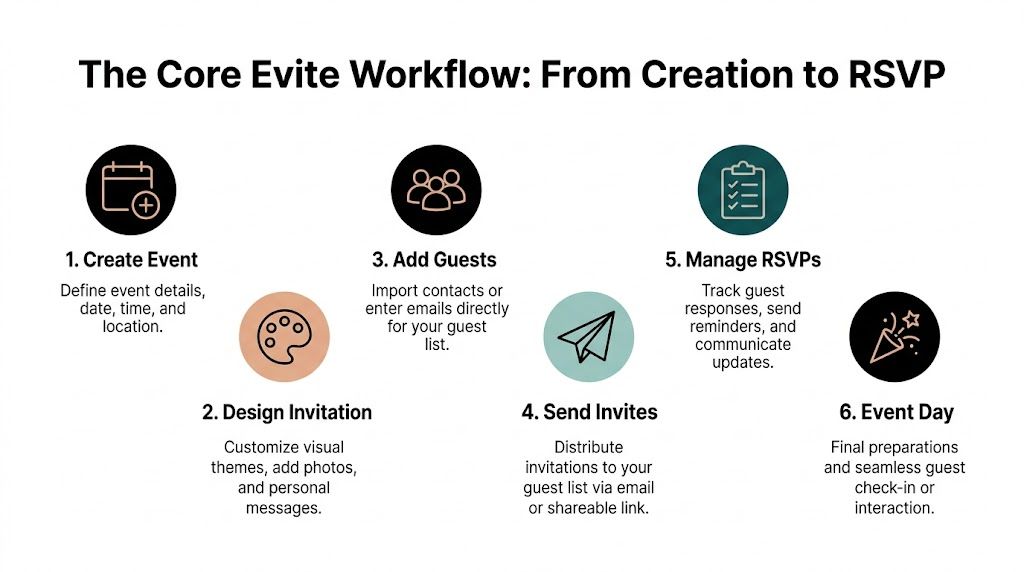
The process usually starts with a template. Evite offers free and premium invitation designs, and from there you fill in the practical details:
Choose the occasion
Birthday, holiday party, baby shower, dinner, graduation, corporate gathering, or something custom.
Enter the basics
Add the event title, time, date, location, and any short instructions guests need.
Customize the page
Depending on the event, you may add maps, polls, supply lists, or a message from the host.
If you’re coordinating a more complex event, it helps to map logistics before you build the invite. A solid event planning checklist template can keep your timeline, vendors, and guest communication from drifting apart.
Evite lets hosts enter guests in a format like “Name Lastname email@domain.com”, which makes the guest list look cleaner and more human than a raw username display. That sounds minor, but it does matter. People are more likely to engage with an invite that feels personal and recognizable.
You can distribute the invitation in a few ways:
| Delivery method | Best use | Limitation |
|---|---|---|
| Standard guest lists and formal invites | Can be overlooked or filtered | |
| SMS | Fast outreach and mobile-heavy audiences | Needs more care around consent in business use |
| Shareable link | Flexible distribution through text, chat, or social | Easier to forward beyond the intended list |
If you need a more direct mobile-first approach, this guide on how to RSVP by text message is useful for thinking beyond email-only response collection.
From the guest side, Evite is intentionally simple. They click the invite, land on the event page, read the details, and respond with Yes, Maybe, or No. After that, they can often return to the same page to review updates, check event history, or change their response without creating unnecessary friction.
That simplicity is one of Evite’s strengths. It lowers the chance that guests abandon the process because they had to dig through a long email or hunt for details.
Short invitations tend to perform better than overloaded ones. If guests need to scroll through a wall of text before they can respond, some won’t bother.
The reason Evite still holds up is that it removes the fragmented parts of hosting. The invite, the response, and the event details all live in one place.
For practical use, that means:
It’s a strong base system. The next question is what happens after the invitation goes out, because that’s where event management becomes less about setup and more about guest behavior.
Sending the invitation is the easy part. The actual work starts when replies come in slowly, some guests open the event but don’t respond, and a few stay parked on “Maybe” until the last minute.
Evite gives hosts a dashboard-style view of guest activity, and that’s more useful than many people realize. You’re not just looking at a final RSVP count. You’re watching behavior unfold while the event is still salvageable.
A good host doesn’t treat every non-response the same. Inside Evite, you can usually separate guests into practical groups:
Opened but didn’t reply
These people saw the invite. They may just need a short nudge.
Marked Maybe
They’re engaged, but uncertain. A reminder closer to the event often matters more than an early follow-up.
Replied Yes
This group needs confirmation details, not repeated invitation prompts.
No visible engagement
These guests may have missed the invite entirely or ignored the channel you used.
That distinction helps you avoid the classic mistake of blasting the same message to everyone.
Evite’s built-in messages work best for event-specific updates. Use them for short, useful communication:
If you’re planning seating for a wedding or formal dinner, pairing your RSVP list with a wedding seating chart creator can save a lot of reshuffling once replies settle.
For text-based delivery ideas, this walkthrough on how to send an Evite via text message is a practical extension of the standard Evite flow.
Guests who view an invite but don’t reply aren’t always uninterested. Often they mean to respond later and forget.
Evite is good at managing conversation inside the event page. It’s weaker when you need structured follow-up outside that environment.
Three problems come up often:
| Situation | Evite handles it well | Evite struggles |
|---|---|---|
| Basic reminders | Yes, for normal event messaging | Less so when timing must be tightly managed |
| Segmented outreach | Somewhat, at the event level | Limited for deeper communication logic |
| Cross-system workflows | Minimal | Hard if your team uses CRM or marketing automation |
For personal events, that may not matter. For professional events, lead nurturing, community programs, or attendance-sensitive workshops, it matters a lot. You may know who hasn’t responded, but getting that data to trigger the right reminder is a different challenge.
Free Evite is enough for many casual events. If you’re inviting friends to a cookout or planning a simple birthday, the core workflow usually covers what you need. The upgrade becomes worth discussing when presentation, guest experience, or event complexity starts to matter more.
If the event is informal, guests usually won’t care about a lightly commercialized invite experience. But some events lose credibility fast when the invitation feels cluttered or salesy.
Premium starts to make more sense for:
The free version gets the logistics across. The paid version does a better job supporting a polished first impression.
Not every premium feature is equally useful. The ones that change real hosting outcomes are usually these:
This is the clearest upgrade for professional use. If you’re sending a business invite, sponsor event invitation, or formal celebration, an ad-free page looks more intentional and less transactional.
Premium templates are useful when the invitation is part of the event’s tone. A retirement dinner, fundraiser, or formal reception benefits from cleaner visual framing than a generic casual template.
These tools are underrated. Polls help when guests need to choose between options such as meal preferences or preferred times. “What to Bring” lists are practical for potlucks, team celebrations, and shared-host events where everyone contributes something.
The best advanced feature is the one that cuts down follow-up messages. If a poll or list prevents ten separate guest questions, it’s doing real work.
A simple way to decide is to judge the event on three criteria:
| Question | If the answer is yes | Premium value |
|---|---|---|
| Does appearance affect credibility? | Business, wedding, formal event | High |
| Do guests need to coordinate choices or supplies? | Potluck, catered event, group outing | Moderate to high |
| Would ads feel out of place? | Client or professional audience | High |
If all three are no, free Evite is usually enough.
If one or more are yes, upgrading can remove friction you’d otherwise try to solve manually. The mistake is assuming premium turns Evite into a complete communication system. It doesn’t. It improves the invitation experience. It doesn’t solve every attendance and follow-up problem on its own.
Experienced organizers stop treating the invite as the whole system.
Evite is effective at creating an event page and collecting responses, but it lacks deep integration and automation features like Zapier connections or API access for CRM syncs. That creates a real workflow gap when your team needs RSVP activity to trigger follow-up messages in other systems. One source tied poor follow-up to a 70% event no-show rate, highlighting the kind of attendance problem automated SMS and voice drips are designed to address in tools Evite doesn’t natively provide, as described in this review of Evite’s automation limitations.

Email is fine for the first invitation. It’s often weak for reminders.
People miss inbox messages for ordinary reasons. The invite lands in promotions, gets buried, or is opened at the wrong moment and forgotten. That doesn’t mean the guest wasn’t interested. It means your communication relied on a single channel.
For attendance-sensitive events, a better approach is layered communication:
That approach doesn’t replace Evite. It supports it.
Ringless voicemail is especially useful when you want a more human touch without forcing a live phone call. Instead of ringing the guest’s phone, the message is delivered directly to voicemail. That makes it practical for reminder campaigns, event confirmations, and last-mile attendance nudges.
It works well for situations like:
| Event type | Best message style | Why it works |
|---|---|---|
| Private events | Friendly host reminder | Feels personal without pressure |
| Workshops or classes | Brief reminder with start time | Easy to hear and act on |
| Community events | Encouraging attendance message | Reaches people who ignore email |
| Last-minute changes | Fast voice update | Clearer than a long text |
A voice message can do something email often can’t. It carries tone. That matters when you want guests to feel personally expected, not mechanically reminded.
For professional-level attendance management, the workflow usually looks more like this:
Send the Evite first
Let the event page handle the invitation and RSVP collection.
Identify non-responders and maybes
These are your follow-up segments.
Send a short text reminder
Keep it focused on action. Confirm, decline, or review details.
Use ringless voicemail for key attendees
Good for VIPs, registrants, prospects, members, or community participants.
Reserve voice broadcasting for urgent updates
Venue changes, weather issues, schedule shifts, or same-day notices.
If you’re actively trying to improve turnout, this guide on how to increase event attendance is a strong companion to the basic Evite workflow.
Email collects RSVPs. Multi-channel follow-up drives actual attendance.
The practical lesson is simple. Evite helps people say they’re coming. Strong messaging systems help them show up.
Most Evite problems aren’t technical disasters. They’re communication failures in disguise. The fix is usually less about clicking the right button and more about choosing the right backup method.
If guests say they never received the invitation, don’t keep resending the same way and hope for a different outcome.
What to do instead:
For important events, always have a second channel ready.
Some guests won’t engage well with email-based invitations. That may be because they’re less tech-savvy, they check email rarely, or they respond faster to text and voice.
Practical workaround:
This keeps the event page as the system of record while adapting the communication channel to the guest.
Business users need to be careful. Evite doesn’t explicitly mention compliance standards like HIPAA or GDPR, and its SMS functionality doesn’t include features like double opt-in or DNC management. That matters if you’re contacting patients, leads, or large business audiences. The same source notes that TCPA violations for unsolicited texts can exceed $1,500 per message, which makes casual invite workflows risky for regulated or high-volume outreach, based on this discussion of Evite compliance limitations.
Evite is fine for invitation management. It’s not built like a full outbound communication system.
If attendance really matters, the solution is usually to:
That split keeps your invitation experience simple without forcing Evite to do jobs it wasn’t built to handle.
That depends on the event settings and how the host configures visibility. For practical planning, don’t assume privacy is automatic. If guest privacy matters, review the event options before sending.
It can work for lightweight business events where the main need is a clean invite and RSVP page. It’s less suitable when you need compliant texting, automation, deeper segmentation, or CRM-connected follow-up.
The free version is good for straightforward hosting. Premium is more useful when you want a cleaner presentation, access to upgraded designs, and tools like polls or contribution lists that reduce manual coordination.
Use Evite as the central event page, then deliver the link through the channel that fits the person. For some guests that’s email. For others it’s a text message or a quick call. If needed, collect their response manually and update your planning records from there.
For many personal events, yes. For professional events or attendance-critical campaigns, not usually. The platform handles invitations well. It doesn’t fully handle the follow-up system around them.
If you want the simplicity of Evite plus stronger reminder and follow-up tools, Call Loop helps you add SMS, voice broadcasting, and ringless voicemail to your event communication. That’s useful when you need better attendance, cleaner automation, or compliant outreach for business and healthcare use cases.
Chris Brisson
Chris is the co-founder and CEO at Call Loop. He is focused on marketing automation, growth hacker strategies, and creating duplicatable systems for growing a remote and bootstrapped company. Chat with him on X at @chrisbrisson


Trusted by over 45,000 people, organizations, and businesses like


