
See a Demo
You're just one step away from seeing Call Loop in action.
Enter your information below to watch a demo right now.

You're just one step away from seeing Call Loop in action.
Enter your information below to watch a demo right now.


You sent the invite. Replies start coming in from everywhere. A few guests text “yes,” one sends a thumbs-up emoji, someone emails their meal choice, and another leaves a voicemail without saying whether they’re attending.
That’s where event planning gets messy fast.
If you want a clean headcount, fewer follow-ups, and a process that doesn’t eat your afternoon, you need a structured way to handle how to RSVP by text message. For guests, that means replying in a format the host can use. For organizers, it means building a system that captures replies, sorts them, and triggers the right follow-up without manual work.
Text works because people see it quickly and respond with less friction than email or phone. The best setups keep the guest experience simple and keep the organizer out of spreadsheet chaos.
Text RSVPs shorten the gap between invitation and answer. A guest gets the message, taps a reply, and you have a usable response instead of a loose promise buried in email, DMs, or voicemail.

That speed matters on both sides. Guests get a low-effort way to respond from the device they already use all day. Organizers get replies in a format that can be tracked, sorted, and followed up automatically.
SMS works best when the goal is fast confirmation and less manual cleanup. Instead of reading through varied replies and updating a spreadsheet by hand, you can ask for a simple keyword such as YES, NO, or MAYBE and let your system do the sorting.
The operational benefit is straightforward:
I have seen this make the biggest difference on mid-size and large guest lists. Once replies start coming in from multiple places, the admin work grows fast. Text keeps the intake process tighter.
Guests usually do not want extra steps. They do not want to open a form, remember a password, or guess what details the host needs. A short text reply removes that friction.
That is the advantage.
A well-written RSVP text tells the guest exactly what to do and gives them the easiest possible action. Reply YES. Reply NO. Reply with your total count. Clear instructions raise response quality, not just response speed.
Sending RSVP texts from a personal phone can work for a small dinner. It breaks down quickly for business events, fundraisers, school functions, and any event with follow-ups, reminders, or segmented messaging. A proper two-way SMS setup gives organizers message history, keyword handling, contact organization, and automation rules. If you need a quick primer, this overview of how SMS messaging works covers the basics.
There is also a compliance side that gets ignored too often. If you are collecting RSVPs by text for organized outreach, especially at scale, consent and TCPA rules need to be part of the setup from day one. The fastest RSVP system is not very useful if it creates legal risk.
If you’re the guest, the job is easy. Reply clearly enough that the host or their system can record your answer without guessing.
The safest format is: your name, your answer, and your guest count.
Before replying, check whether the text asks for:
If the text says “Reply YES,” send exactly that unless it also asks for more detail. Automated systems often look for a specific keyword first.
If the invitation is casual and not automated, a little extra context helps. If it’s automated, keep your first response clean and direct.
Here’s a practical cheat sheet:
| Scenario | Example Reply | Why It Works |
|---|---|---|
| Attending solo | Hi, this is Alex. YES. Just me. | Includes identity, answer, and headcount |
| Attending with guest | Hi, this is Alex. YES, 2 total. | Gives the full total, not just “+1” |
| Declining | Hi, this is Alex. NO, but thanks for inviting me. | Clear answer, still polite |
| Maybe | Hi, this is Alex. MAYBE. I’ll confirm tomorrow. | Gives the host a timeline |
| Needs detail first | Hi, this is Alex. Is there parking on-site? I can confirm after that. | Keeps the question specific |
| Late response | Hi, this is Alex. Sorry for the delay. YES if there’s still room, just me. | Acknowledges timing and avoids assumptions |
Some replies create work for the organizer:
If the invite gives you a keyword, send the keyword first. Ask your follow-up question after the system records your RSVP.
You can use these as-is:
For guests, good RSVP etiquette isn’t about sounding formal. It’s about being easy to count.
Manual RSVP tracking breaks down quickly. Once replies start landing, you need structure. The strongest setup uses a dedicated text-enabled number, a simple keyword, and automations that sort contacts the moment they reply.
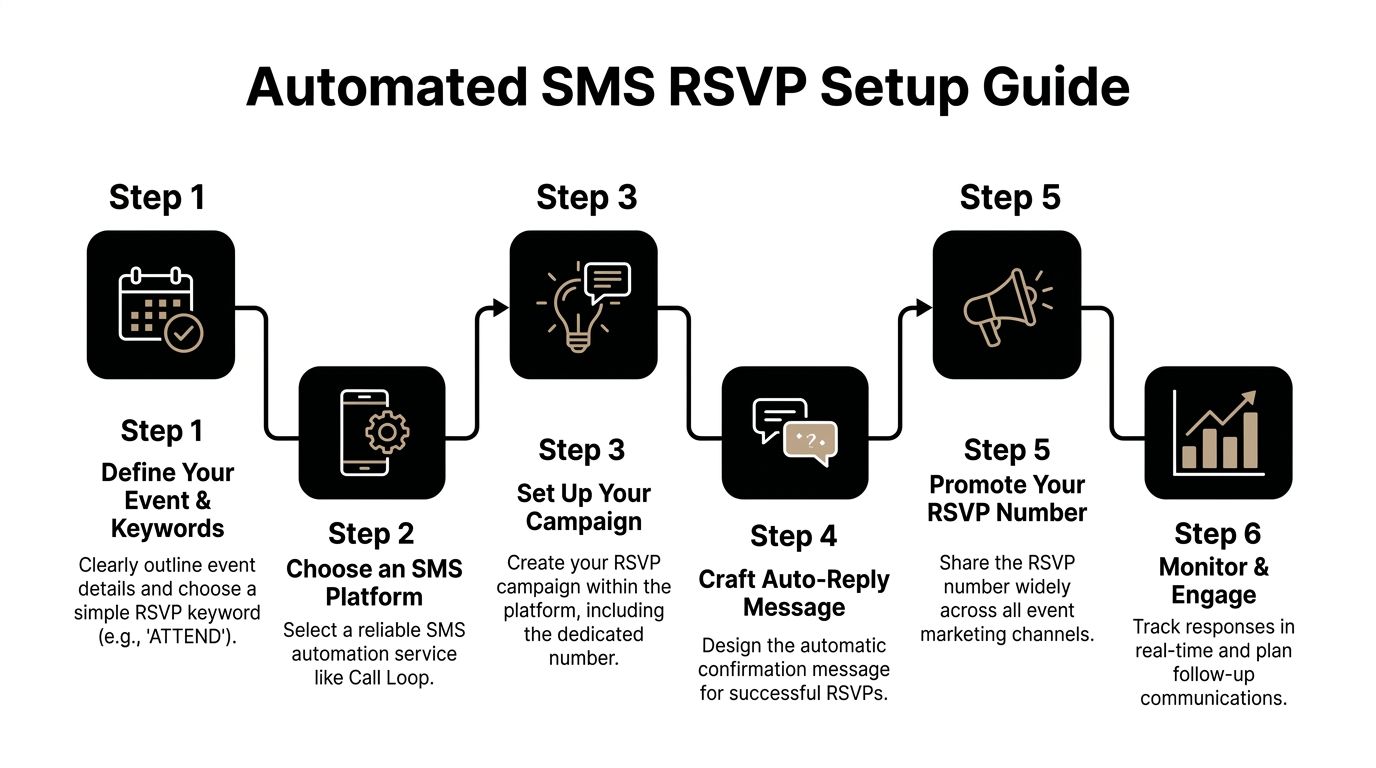
Text-based RSVP automation can produce 45-60% higher response rates than email RSVPs, and teams use integrations such as Zapier or HubSpot to scale that process to large contact lists while using number validation for 99% deliverability, according to Voxie’s write-up on text-driven attendance improvement.
Before you write a single invite, decide what you need the guest to do.
For most events, the cleanest workflow is:
That sounds basic, but it solves the biggest operational problem. You’re not reading and interpreting free-form replies one by one.
Custom keywords work best when they’re short, memorable, and tied to the event. A wedding might use a branded phrase, while a nonprofit dinner might use the event name.
A few practical rules help:
If you’re planning a wedding or another guest-heavy event, a dedicated planning tool can help keep household details, meal choices, and attendance notes organized. A tool like this wedding guest list app is useful when your RSVP workflow needs more than a plain spreadsheet.
The best automation doesn’t stop at “attending” and “not attending.” It routes people based on what happens next.
Send a confirmation immediately. Include the event name, date, time, and any next step. If you need meal choices or plus-one details, ask after the initial confirmation so you don’t clog the first reply.
Acknowledge the decline politely. If appropriate, move that contact into a future-invites segment so you don’t keep texting them about the same event.
Here, automation earns its keep. Schedule a reminder closer to the RSVP deadline. MAYBE contacts are often recoverable if the follow-up is timely and specific.
A maybe list should never sit untouched. It’s the segment most likely to convert with a well-timed reminder.
Use merge tags for the guest’s first name, event date, or location. Keep the personalized fields limited to details you know are accurate. Broken personalization damages trust fast.
A practical invite might include:
If you’re also sending digital invites, this guide on how to send an evite via text message is a useful companion to your RSVP workflow.
A strong organizer view should show:
| Need | What to track |
|---|---|
| Attendance status | YES, NO, MAYBE |
| Party size | Total guests attending |
| Follow-up status | Confirmed, reminded, unresolved |
| Special notes | Dietary needs, accessibility, questions |
| Message history | Invite sent, reply received, reminder sent |
If your system can’t quickly show those fields, you’ll end up rebuilding the data manually.
What works
What doesn’t
The cleanest RSVP systems feel simple to the guest because the organizer did the setup work early.
The effectiveness of your RSVP system depends heavily on the clarity of your message. A solid workflow still stalls if the first text makes people stop and think about how to respond.
Fast replies usually come from copy that does three things well. It identifies the event, gives one clear action, and removes small points of friction that cause delay. That matters for both sides. Guests want a low-effort reply. Organizers need responses that map cleanly into automation, reminders, and follow-up.
The first RSVP text should collect the RSVP. Save parking instructions, meal choices, guest count, and schedule details for the confirmation flow or the next message.
That trade-off matters. A fuller message can reduce follow-up questions, but it also lowers the odds of an immediate reply. For attendance campaigns, I would rather get a clean YES or NO first and automate the rest than send one crowded text that creates hesitation.
The first RSVP text should earn the reply, not explain the whole event.
A strong invite usually includes:
Hi Alex, you’re invited to our client dinner this Thursday at 6 PM. Reply YES or NO.
Clear and usable. For informal events, this is often enough.
Hi Alex, you’re invited to our client dinner on Thursday at 6 PM at River House. Reply YES or NO by Tuesday.
This version adds two useful details. The location helps guests decide faster, and the deadline helps organizers close the list sooner.
Hi Alex, join us for our client dinner Thursday at 6 PM at River House. Reply YES or NO by Tuesday. We’ll text details after your reply.
This version does more than ask for a response. It tells the guest what happens next, which cuts uncertainty and supports an automated follow-up sequence.
Some wording patterns hold up well in real RSVP campaigns:
That last point gets missed a lot. If your automation depends on keyword triggers, free-form copy creates cleanup work. If guests text back “I think so,” “probably,” or “sounds good,” someone has to interpret that manually or build extra logic to catch variations.
A long invite makes the RSVP instruction easier to miss. It also raises the effort required to answer.
“Respond if interested” sounds polite, but it produces messy replies. “Reply YES or NO by Friday” gives guests a clear path and gives the organizer structured data.
Formal wording often slows people down because they have to translate the request before replying. Plain language performs better in text.
A text can read well and still fail operationally. If the guest replies in a format your system cannot tag, route, or trigger, the copy is doing half the job.
For more short, practical templates, this collection of text message examples is useful when you’re refining RSVP copy.
Use this structure:
[Name] + [event] + [time/date] + [reply keyword] + [deadline]
Example:
Hi Jamie, we’d love to see you at our fundraising breakfast on May 14 at 8 AM. Reply YES or NO by Monday.
That format works because it respects how people text back. It also gives organizers a clean input for segmentation, confirmation messages, and compliant follow-up later in the campaign.
A YES reply is not the finish line. It’s the handoff point into attendance management.
People forget. Schedules shift. Good organizers keep confirmed guests engaged without over-texting them. The smartest campaigns use a sequence that changes by RSVP status and uses more than one channel when needed.
After someone replies YES, send messages that reduce uncertainty and keep the event top of mind.
A practical sequence often includes:
For MAYBE contacts, the sequence should be different. They need a deadline reminder or one concise nudge, not the same stream as confirmed attendees.
Ringless voicemail works well when another text would feel repetitive but a more personal touch would help. It can be especially useful for high-value events, executive briefings, donor gatherings, school functions, and healthcare outreach where tone matters.
A few strong use cases:
Related terms you’ll hear include voicemail drops, RVM, direct-to-voicemail, and ringless voicemail campaigns. The core idea is the same. The message lands in voicemail without interrupting the recipient with a live ringing call.
Use ringless voicemail when voice adds warmth or importance. Don’t use it as a substitute for a badly written RSVP text.
Organizers get sloppy here. They copy the same message into text, email, and voicemail. That creates fatigue.
A better division of labor looks like this:
| Channel | Best job |
|---|---|
| SMS | Fast response, reminders, urgent logistics |
| Full agenda, maps, attachments, formal details | |
| Ringless voicemail | Personal reminder, host message, VIP touch |
| Voice call | Escalation for exceptions or high-priority attendance |
The key trade-off is attention versus detail. SMS gets seen fast. Email carries more context. Ringless voicemail adds personality without creating a live interruption. Used together, they support attendance instead of competing with each other.
Beyond convenience, sending RSVP texts involves legal compliance and etiquette that protect your organization.
Here’s the practical rule: if a contact did not clearly agree to receive your event texts, do not send them a promotional invitation by SMS. In the U.S., that means building your RSVP workflow around TCPA consent, clear disclosures, and fast opt-out handling. Organizers who skip this step create legal exposure, hurt deliverability, and train guests to ignore future messages.
I treat compliance as part of attendance strategy, not just a legal review item. A clean consent record gives you a usable list, better response quality, and fewer support issues when reminders go out across SMS, email, and ringless voicemail.
Strong RSVP systems usually follow the same operating rules:
If you need a model for how to present disclosures and consent language clearly, reviewing sample SMS Terms helps.
A text can be legally compliant and still poorly handled.
Guests respond faster when the message feels expected, identifiable, and easy to act on. That means using a recognizable sender name, sending during reasonable local hours, and keeping the ask simple. It also means not stacking too many reminders across channels in a short window. If SMS already did its job, another text an hour later usually adds friction, not attendance.
One more trade-off matters here. Automation speeds up RSVP collection, but aggressive automation can make the experience feel careless. Set rules that protect the guest experience: cap reminder frequency, suppress opted-out numbers across all workflows, and avoid sending a promotional text after someone already declined.
Respect scales well. So does good process.
Build fallback handling for common variations. People will send “yes!”, “y,” or “I’ll be there.” Review unmatched replies regularly and map obvious variants into your attendance buckets when possible.
Don’t ask for too much in the first reply if speed matters most. Confirm the RSVP first, then send a follow-up asking for total guest count if needed. That keeps the initial action simple and the record cleaner.
Yes, but international texting adds formatting, local compliance, and deliverability considerations. Test by country before launch and keep reply instructions as simple as possible.
Use it when a message needs human tone, not just information. A host reminder, donor note, executive invitation, or warm follow-up for key attendees can work better as voicemail than as one more text.
Keep your SMS disclosures easy to access and easy to understand. If you need a reference point for structure and language, reviewing sample SMS Terms can help you shape a cleaner consent and disclosure process.
If you want to automate RSVP texts, segment replies, send follow-ups, and add voice or ringless voicemail into the same workflow, Call Loop gives you one place to run the whole process. It’s built for teams that want faster response handling without the manual cleanup.
Chris Brisson
Chris is the co-founder and CEO at Call Loop. He is focused on marketing automation, growth hacker strategies, and creating duplicatable systems for growing a remote and bootstrapped company. Chat with him on X at @chrisbrisson


Trusted by over 45,000 people, organizations, and businesses like


