
See a Demo
You're just one step away from seeing Call Loop in action.
Enter your information below to watch a demo right now.

You're just one step away from seeing Call Loop in action.
Enter your information below to watch a demo right now.


A customer says your company promised a refund. An employee insists the delivery instructions were confirmed by text. A healthcare office needs to document a patient communication. You reach for the phone, search the conversation, and discover that the thread is incomplete, buried on an old device, or gone entirely.
That's the practical problem behind how to save text messages for business and legal use. A screenshot may preserve what you can see, but it usually doesn't preserve the complete thread, original metadata, or a documented history of how the record was collected. For routine reference, that may be enough. For legal, HR, or compliance purposes, it often isn't.
A small business owner may treat texting as informal communication until a disagreement turns the conversation into a business record. A customer's “yes, that works” could confirm an appointment. A technician's update could establish when access instructions changed. A manager's messages could become relevant to an HR investigation. When the conversation matters, finding one visible message isn't the same as preserving the record.
Businesses also communicate across more than traditional SMS. Customer outreach may include SMS, MMS, voice broadcasting, automated follow-ups, and ringless voicemail, where a recorded message is delivered directly to a recipient's voicemail inbox. Each channel can create a useful operational history, but each can also leave records fragmented across phones, apps, campaign platforms, and individual employee accounts.

A screenshot can show a sender name, visible text, and part of a conversation. It may not show earlier messages, deleted replies, attachments, device details, or whether the displayed contact identity is accurate. Cropping and manual selection also make it easy for another party to argue that the record is incomplete.
That doesn't make screenshots useless. They're helpful for quick internal reference and can capture a message before it disappears. They're a weak foundation for a formal archive when the issue could involve litigation, employment decisions, patient privacy, or regulatory review.
The practical distinction is important: saving a message for convenience means keeping something readable, while preserving a message as evidence means protecting completeness, authenticity, metadata, and handling history. A useful overview of the admissibility issues appears in this guide to whether text messages are admissible in court.
Once a message is deleted, the recovery options depend on whether it still exists on the original device or in a backup. Carriers generally aren't a dependable long-term source for message content, so waiting until a dispute begins can leave a business searching in the wrong place.
A retention policy works better than emergency collection. It tells staff which devices and platforms count as business communication channels, how often records are exported, where archives are stored, and who can access them. That approach also reduces the chance that a single employee's phone becomes the only copy of an important customer or workplace conversation.
Before choosing an export application, check what the phone already retains. Native backups are useful for restoration, but they aren't automatically the same as a readable, searchable business archive. A device backup may help recover a phone after loss, while still making it difficult to hand a complete conversation to a lawyer, investigator, or compliance officer.
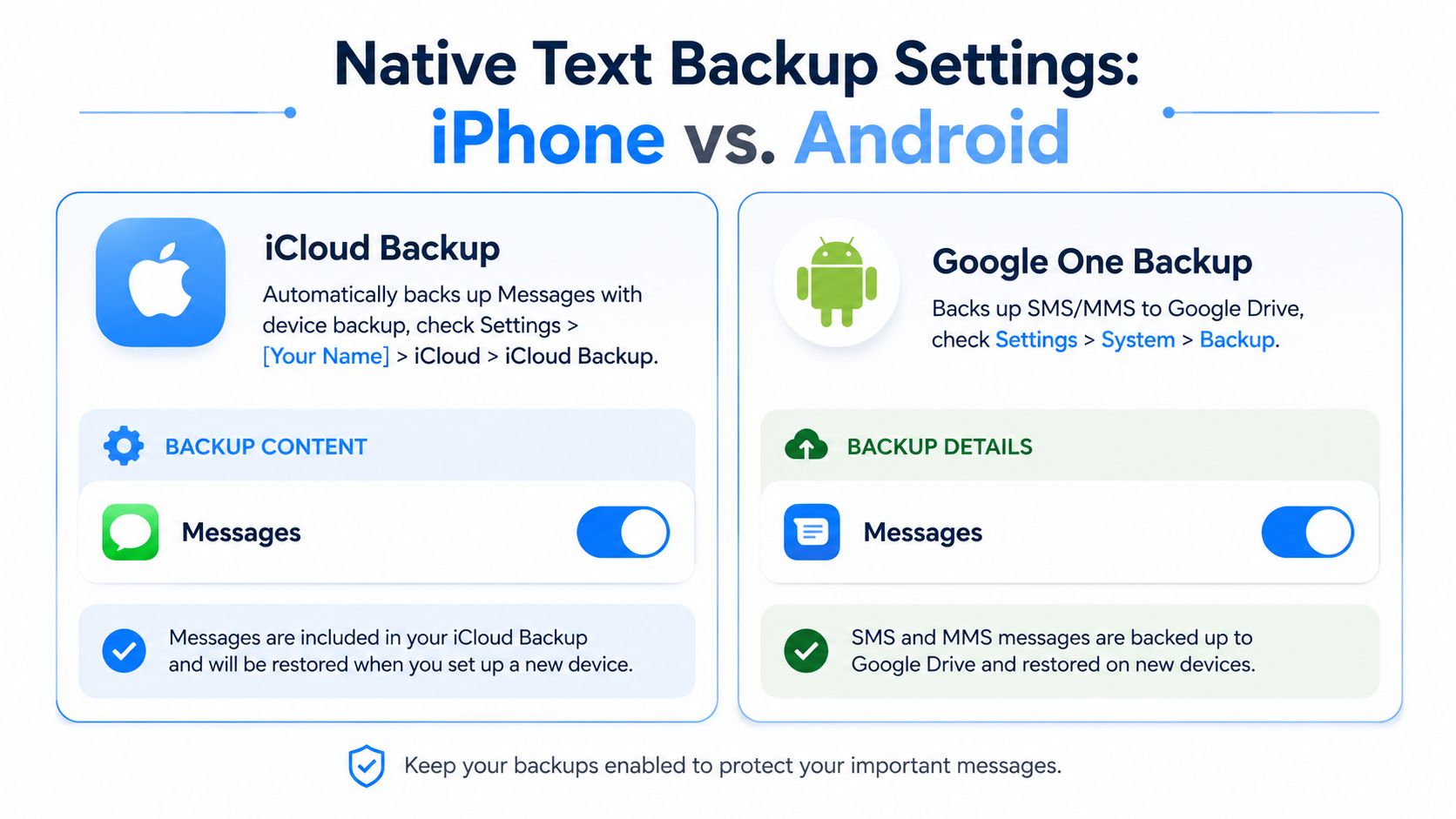
On iPhone, message retention has long been configurable at the system level. A common default is to keep messages indefinitely, while the user can change automatic deletion to one year or 30 days. Check the Messages settings for the message history or message retention option, and select the setting that prevents automatic deletion for business devices.
Then verify the backup arrangement under your Apple account's iCloud settings. If Messages in iCloud is enabled, messages can synchronize across supported Apple devices. iCloud Backup is a separate device-backup function, so don't assume that seeing a conversation on one Apple device means the business has created an independent archive.
For a company phone, record the device owner, Apple account used for business communication, and the date the settings were checked. If a preservation request arrives, don't delete messages, reset the phone, or sign out of the account before the collection plan is documented.
Android phones generally retain messages according to storage limits or conversation counts rather than a simple age-based timer. That means Android users shouldn't rely on an age setting alone. Open the device's backup settings, review the Google backup configuration, and confirm that SMS coverage is enabled where the device and account provide that option.
Google's built-in backup may retain SMS copies for only 57 days and doesn't cover MMS by default, as described in the documentation for the SMS Backup & Restore Android workflow. Treat that backup as a recovery aid, not as the company's only long-term record.
Use this quick check on every company phone:
Practical rule: A backup that can restore a phone isn't automatically an archive that can explain a conversation.
Native backups help with recovery, but professional recordkeeping usually requires an export that people can open, search, review, and store outside the phone ecosystem. Android tools such as SMS Backup & Restore can back up and restore SMS, MMS, and call logs, while export workflows can create formats including XML, PDF, CSV, or HTML. On iPhone, a computer backup or a platform-specific export tool may be necessary when the goal is a portable conversation record rather than full-device restoration.
The format should match the job. A PDF is easy to share with counsel and straightforward for a manager to review. CSV is useful for filtering and analysis, but it can separate messages from the visual thread. XML and JSON are better suited to structured processing, while HTML can preserve a readable conversation layout without tying the archive to a messaging app.
| Format | Preserves Metadata | Best For | Limitations |
|---|---|---|---|
| Can preserve visible sender names, timestamps, thread order, and included attachments when the export tool supports them | Legal review, management review, and a readable fixed record | May be difficult to process automatically and may not contain every underlying field | |
| CSV | Can preserve structured fields such as sender, recipient, timestamp, and message body when mapped by the tool | Searching, sorting, reporting, and data analysis | Thread context and attachments may be less intuitive |
| XML | Can preserve structured message records and fields supported by the backup application | Restoration workflows and machine-readable archives | Often requires a compatible application or parser for comfortable review |
| JSON | Can preserve structured records and application-supported metadata | Integrations, custom systems, and controlled data processing | Display depends on the software used to open it |
| HTML | Can present a readable conversation with supported timestamps and media references | Browser-based review and internal archives | Layout and attachment handling vary by export tool |
For a lawyer or HR investigator, export the complete thread, not only the messages that support your position. For migration, prioritize a format accepted by the destination system or backup application. For a searchable archive, retain both a human-readable version and a structured export when the tool supports both.
A dedicated export is also more useful than a screenshot when a business needs to consult a historical text message history. The export should identify who sent each message, when it was sent, which conversation it belongs to, and when the file was collected.
Third-party tools have trade-offs. Some can create readable files but won't restore messages to a new phone. Some preserve message text while handling media separately. Others create a complete device backup that can be restored but can't be browsed as individual conversations. Test the workflow with a non-sensitive thread first, then document the exact tool, version, account, device, and export settings used.
A screenshot can be authentic and still be inadequate. The central question isn't only whether an image appears genuine. It's whether the business can explain where the message came from, whether the thread is complete, whether the sender identity is reliable, and whether anyone could have altered the record after collection.
For legally defensible preservation, keep the original device available, collect the complete thread, and retain sender identity, timestamps, and collection date. A text-message evidence guide specifically warns that cherry-picked screenshots are vulnerable because they omit context and metadata. If the matter is high stakes, forensic extraction is stronger than a manual copy because it's designed to collect information from the source while documenting the process.
A sound archive should let another person understand the record without relying on the employee's memory. Preserve:
That handling history is the practical side of chain of custody. It doesn't require elaborate legal language. It requires consistent documentation and restricted access. Store an untouched original export separately from any working copy used for review, and don't edit the original file to improve readability.
HR teams often need to investigate messages involving scheduling, conduct, performance, or workplace disputes. A partial screenshot can create an incomplete picture and expose the organization to claims that it selected evidence unfairly. Legal teams face similar concerns during discovery, especially when the business communicates with customers or vendors through personal devices.
Healthcare organizations have another layer of responsibility. Texts may contain protected health information, so the organization needs a controlled process for collection, access, storage, and disposal. A platform or archive workflow described as HIPAA compliant still needs to be configured and operated according to the organization's policies and agreements.
For a broader operational checklist, this digital evidence preservation guide is useful when a team needs to connect collection, documentation, storage, and review. The source and method matter more than a polished screenshot. If authenticity or completeness could be challenged, involve qualified legal or forensic professionals before employees continue using or altering the device.
Manual exports become difficult when a company sends customer communications from several channels. A sales representative may text from a phone, a support agent may reply through a web inbox, and a campaign team may send automated SMS, voice broadcasts, or ringless voicemail. If those records remain scattered, reconstructing the customer journey takes unnecessary effort.
An outbound messaging platform can centralize the operational history created by campaigns. Call Loop, for example, handles outbound SMS and MMS, receives replies online, and supports campaign features such as text-to-join keywords, segmentation, scheduling, merge fields, and drip sequences. Its message handling and reporting can give a team a platform-level record of outreach and responses, while integrations can connect activity to a CRM timeline.
That doesn't eliminate the need for retention controls. A platform record still needs an owner, a defined retention period, access restrictions, and an export or backup plan appropriate to the business. It also shouldn't be confused with a forensic collection from a personal phone when a dispute concerns messages sent outside the platform.
Ringless voicemail adds a different kind of evidence. The business needs to know which contact received the drop, what recording was used, when the delivery was scheduled, and whether the activity belongs to a broader SMS or voice sequence. Automated drip campaigns create the same requirement across timed messages and appointment reminders.
A practical CRM integration should preserve more than a campaign name. Map the contact identity, message content or recording reference, send event, response, consent status, and related notes. Tools such as Zapier can connect outbound activity with systems including HubSpot, ActiveCampaign, and Keap, creating a more unified customer record.
A campaign log shows what the system sent. A defensible customer record also explains who received it, how the contact entered the workflow, and what happened afterward.
Businesses that need customers to receive a copy of their correspondence can review options such as sending messages to email. Keep the archive separate from day-to-day campaign editing, and limit deletion rights so a routine cleanup doesn't remove records needed for an investigation.
The strongest process is simple enough for staff to follow and specific enough for an auditor to understand. Start by identifying every device, messaging app, shared inbox, CRM, and outbound platform that can contain business communication. Include personal devices used for work, because fragmented storage is one of the easiest ways to lose the complete record.
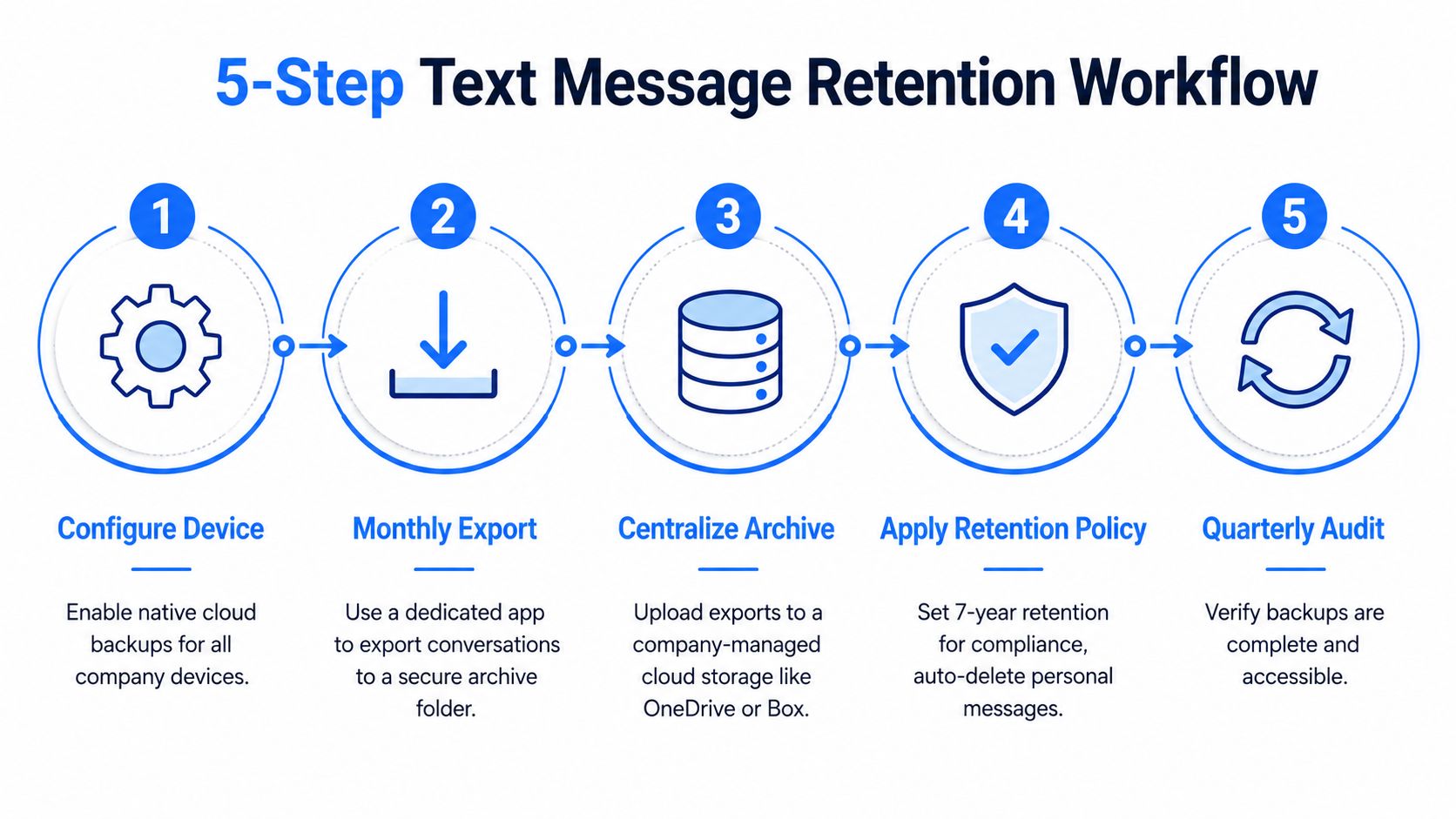
Use this operating sequence:
Document the collector, collection date, source device, software used, export format, and storage destination. For sensitive records, keep copies in separate secure locations. Carriers generally don't retain message content for long, so preservation should happen while the conversation remains available on the original device or in an accessible backup.
Retention doesn't mean keeping everything forever. Define what belongs in the business archive, how long it should remain available, and when authorized staff may destroy it. For the disposal stage, follow documented secure destruction steps that address both digital files and retired devices.
Train employees to report potentially relevant messages before deleting, replacing, or resetting a phone. Run regular checks to confirm backups are complete and accessible, then revise the workflow whenever the company adds a messaging app, CRM, device type, or outbound channel.
Call Loop gives businesses a way to manage SMS, MMS, voice broadcasting, ringless voicemail, and automated follow-up activity from a centralized outbound messaging platform. If your team needs clearer records of customer outreach and replies, visit Call Loop and evaluate how its message handling and integrations can fit your retention workflow.
Chris Brisson
Chris is the co-founder and CEO at Call Loop. He is focused on marketing automation, growth hacker strategies, and creating duplicatable systems for growing a remote and bootstrapped company. Chat with him on X at @chrisbrisson


Trusted by over 45,000 people, organizations, and businesses like


