
See a Demo
You're just one step away from seeing Call Loop in action.
Enter your information below to watch a demo right now.

You're just one step away from seeing Call Loop in action.
Enter your information below to watch a demo right now.

Sending a picture by text should be simple. Just tap the paperclip icon, pick a photo, and hit send, right? For a quick message to a friend, that’s usually all it takes.
But when you're sending images for your business—and quality and reliability are on the line—things get surprisingly tricky. The real issue boils down to the hidden technology your phone uses to send that photo.
Ever sent a gorgeous, high-resolution photo from your phone, only to have it arrive on the other end looking like a blurry, pixelated mess? It’s a common frustration, and it points to the two very different ways phones handle pictures sent via text.
Figuring out which method your phone is using is the key to solving just about every quality and delivery problem you'll encounter.
The two players here are traditional MMS (Multimedia Messaging Service) and modern IP-based messaging. That second category includes services you probably use every day, like iMessage, WhatsApp, and RCS (the tech behind Google's and Samsung's newer messaging apps). The path your picture takes—MMS or IP—determines everything from how it looks to whether it even gets delivered.
Traditional MMS messaging is the old-school method. It basically piggybacks on the cellular network’s text message (SMS) infrastructure, a system designed decades ago when data was slow and phone storage was tiny.
To make it work, mobile carriers have to aggressively compress any image you send. We're talking about shrinking a multi-megabyte photo down to just a few hundred kilobytes. This brutal compression is the culprit behind those blurry, low-quality images.
On the other hand, IP-based messaging apps use your phone's internet connection (Wi-Fi or mobile data) to send pictures. This approach is a game-changer because it allows for much, much larger file transfers, keeping your photo's original quality and detail intact.
This shift from carrier-limited MMS to internet-based apps is why you can send crystal-clear videos on WhatsApp but a simple photo might get butchered in a standard text. Apps that use mobile data have become the main way people share media, bypassing the old carrier limits that historically capped files at a measly 300–600 KB. You can see just how massive this shift has been by looking at the user numbers for messaging apps on Statista.
Key Takeaway: The "blurry photo" problem isn't your phone's fault. It's a direct result of ancient, carrier-imposed MMS file size limitations. On an iPhone, if your message turns into a green bubble, it's a good sign it’s using MMS and your image is getting compressed.
This table breaks down the key differences at a glance:
For a business, these limitations are more than just a minor annoyance. A pixelated product photo or a blurry event flyer completely undermines your professionalism and brand image.
That's why companies trying to use visuals in their outreach need to get a handle on the difference between SMS and MMS. It’s the foundational first step. From there, more advanced strategies might even bring in other channels, like ringless voicemail drops, which deliver an audio message right to someone's voicemail without their phone ever ringing. It just adds another powerful layer to your communication toolkit.
Knowing how to text a picture is one thing, but making sure it arrives looking sharp is a whole different ballgame. The method you use, even inside your phone's default messaging app, can make or break the quality of your photo.
For iPhone users, it all comes down to the color of your message bubbles. A blue bubble means you're sending through iMessage, which uses the internet to send photos in high resolution. If you see a green bubble, your phone has defaulted to the old MMS standard, which crushes your image quality and leads to that classic blurry look. This usually happens when you're texting someone who doesn't have an Apple device.
Android folks have a similar setup with Google Messages. When RCS (Rich Communication Services) is on, your phone zips crisp, clear photos over Wi-Fi or data, just like iMessage. But if the person on the other end doesn't have RCS, you're back to MMS, and your photo will get compressed into a pixelated mess.
The technology you use directly dictates how clear your image will be on the other end.
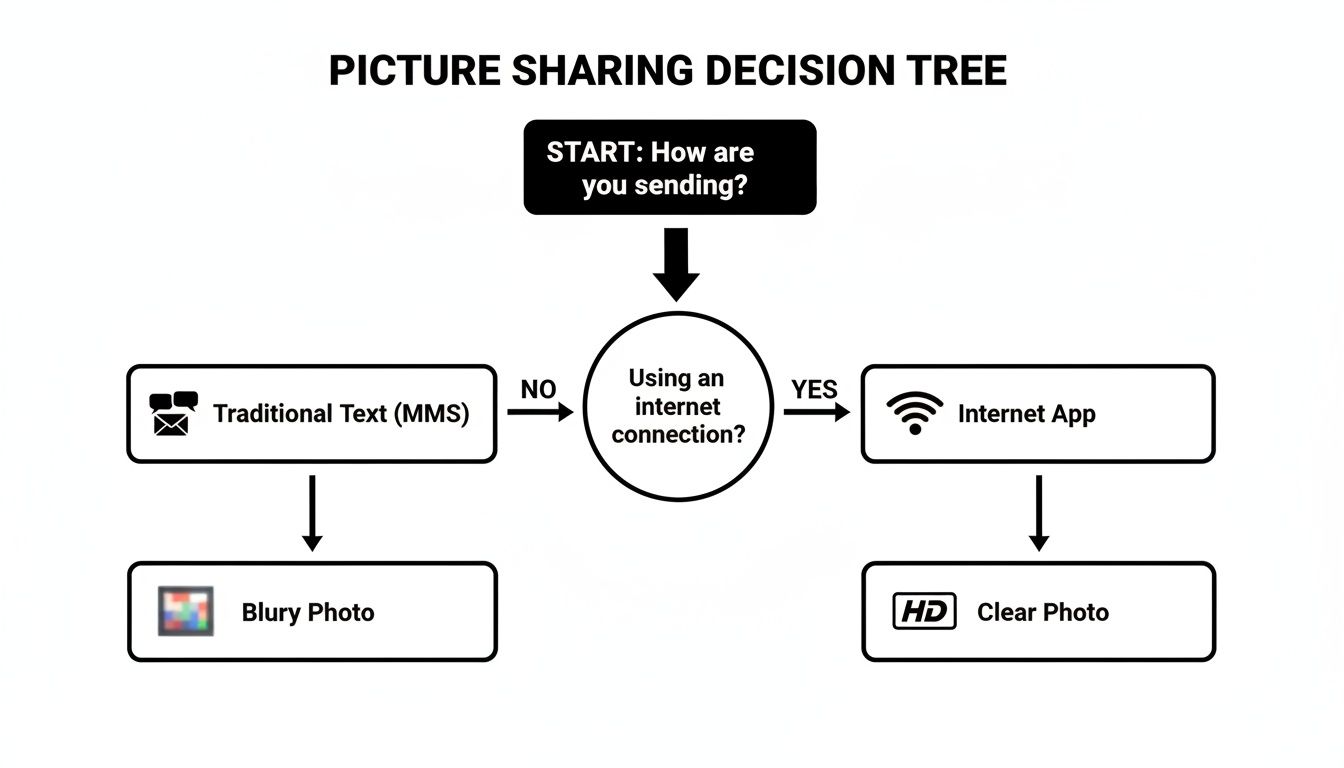
As you can see, if you want to reliably send a clear, high-definition photo, you need an internet-based method. No way around it.
Think for a second about what you're sending. If it's just a quick screenshot where the fine details don't matter, a standard MMS message is probably fine. But if it's a beautiful vacation photo or a critical graphic for your business, you need to preserve that quality.
Here are a few tips I've picked up to keep images looking sharp:
If you want to make sure your pictures are truly top-notch before you even send them, you can dive into some more advanced techniques. A great starting point is this helpful guide to noise reduction in images, which can make a huge difference.
Sending from a computer often gives you more control over image quality and file types. While your phone is handy, some platforms give you way more power to manage messaging campaigns right from your desktop. For businesses, learning how to send texts from your computer unlocks a ton of possibilities for sending visuals. It helps you bypass many of the limitations you run into on personal devices, especially when you’re talking to customers.
When you’re texting a picture on behalf of your business, the game is totally different than just sending a photo to a friend. Every image is a piece of your brand. A blurry photo or a message that fails to deliver looks sloppy and wastes a golden opportunity to connect with a customer.
It all comes down to a careful balancing act: visual quality versus file size.
Unlike personal messaging apps that do the heavy lifting for you, business campaigns sent via MMS run into strict carrier limitations. The goal is to shrink your image’s file size (in kilobytes, or KB) as much as possible without turning it into a pixelated mess. If a file is too large, carriers will either compress it into oblivion or, even worse, just won't deliver it.
This is exactly why so many professional platforms are moving away from traditional MMS attachments. Carriers have historically capped MMS files at around 300–600 KB. Anything bigger gets automatically squashed, destroying the image’s resolution. For a business, sending a link to a hosted image is almost always more reliable. The data backs this up, too—massive studies of mobile interactions show that dependable delivery is what matters most. You can dig into more mobile marketing statistics on ElectroIQ.
Before an image ever goes out in a campaign, it needs to be optimized. This just means reducing its file size while keeping it looking sharp. For nearly everything you’ll do, you’ll be working with JPEG and PNG files.
For something like a promotional flyer or a product photo, aim for a JPEG compressed to under 500 KB. That’s a safe and effective target. You can use free online tools or dive into software like Photoshop and use its "Save for Web" feature to tweak the quality and see the file size change in real time.
While you can embed an image directly with MMS, using a shortened link to your image is often a much better move for businesses. Instead of attaching the actual file, you upload it somewhere and text a trackable short link (from a service like bit.ly or one built into your messaging platform).
This approach has some huge advantages:
By shifting from sending a file to sending a link, you move from hoping your image arrives correctly to knowing how many people saw it. It’s a fundamental change from a passive send to an active, measurable marketing action. You can even pair this with other outbound tactics, like a ringless voicemail drop, for a powerful multi-channel follow-up.
Sending a single photo from your phone is one thing. But what happens when you need to reach hundreds, or even thousands, of customers at once? That’s a whole different ballgame, and it’s where a dedicated mass texting platform becomes non-negotiable. These systems are built from the ground up to handle the messy parts of large-scale visual campaigns, from delivery and formatting to tracking and analysis.
They take the guesswork out of sending MMS and RCS messages, making sure your visuals actually land in your audience's inbox. More importantly, any decent platform will have intelligent fallbacks built right in. If someone’s phone can't handle an MMS message, the system automatically pivots and sends a short link to the image instead. This guarantees everyone sees your content exactly as you planned.
This kind of automated management is crucial. It keeps your brand looking professional and ensures you aren't just throwing your marketing budget into a black hole. You’re no longer crossing your fingers and hoping the message got through; the system just handles it.
To really get your money's worth from visual texting, you need more than just a big "send" button. The best platforms offer a whole suite of features designed to boost engagement and give you a clear picture of what’s actually working.
You should be looking for tools that let you:
By combining scheduling, segmentation, and tracking, you transform a simple picture message into a targeted, measurable marketing campaign. It’s the difference between shouting into the void and having a strategic conversation with your customers.
While a picture text is powerful on its own, it gets even better when you layer it with other communication channels. A multi-channel approach helps your message cut through the noise and grab attention from a few different angles. This is where you can get really creative.
For instance, let's say you send a text with a picture of a limited-time offer. What next? A day later, you could follow up with a ringless voicemail drop. This strategy delivers a pre-recorded audio message directly to their voicemail without ever making their phone ring. It’s a personal, non-intrusive way to remind them about the awesome deal they saw in the picture.
This combination of a visual cue (the picture) and an audio reminder (the voicemail) creates a much stickier, more memorable experience. It shows you’re thinking about the entire customer journey, not just firing off a single message. By layering your communication like this, you dramatically increase the chances of getting a response.
Sending promotional images to your customers isn’t just about getting creative; it comes with a strict set of rules. For any business, understanding these guidelines is non-negotiable. Any text message sent for marketing, especially one with a picture, falls under regulations like the Telephone Consumer Protection Act (TCPA).
The absolute cornerstone of all messaging compliance is explicit opt-in consent. I can't stress this enough: you must have a person's direct permission before you send them promotional content. Just having their phone number from a past purchase doesn't count. They need to knowingly agree to receive marketing texts from you.
This means keeping a clear record of when and how they gave you that permission. It’s a foundational step that keeps your campaigns lawful and, frankly, more effective.
Valid consent has to be crystal clear. Customers need to know exactly what they’re signing up for. Any vague language could land you in hot water.
Here’s what solid consent looks like in the real world:
Just as critical is how you handle opt-out requests. You must provide a simple way for people to stop receiving messages, like texting "STOP." Honoring these requests immediately isn't just good practice—it's mandatory. For a deeper dive into the security of these messages, check out our guide on whether SMS is encrypted.
Getting this right is a big deal, especially when you look at the numbers. With US SMS marketing spend projected to hit $12.6 billion, proper opt-in management is vital. And it pays off—recent surveys show that 54–84% of consumers prefer or have opted into receiving business messages, making it a powerful channel when handled correctly. You can discover more insights about SMS marketing trends.
Beyond the legal stuff, your technical choices have a huge impact on whether your images actually get delivered. Carrier filtering systems are always on the lookout for spammy behavior, and sending mass messages from a standard personal number is a giant red flag.
Using a verified toll-free number or a dedicated short code signals to carriers that you are a legitimate business sender. This dramatically improves your deliverability rates and helps you avoid having your messages blocked before they ever reach your audience.
On top of that, you can layer your communications to boost engagement without being intrusive. For example, a text with a great image can be followed up with a ringless voicemail. This tactic delivers an audio message directly to their voicemail box, reinforcing the visual message in a compliant and effective way. It's a smart strategy to make sure your message is heard, not just seen.
Even with the best game plan, you're bound to run into a few snags when sending pictures via text. Whether you're just sending a photo to a friend or running a full-blown marketing campaign, getting straight answers to common roadblocks can save a ton of time and headaches.
We've pulled together some of the questions we hear most often to give you clear, no-fluff solutions. It's all about moving from just sending a picture to strategically delivering a high-quality visual message that actually works, every single time.
This one almost always comes down to MMS compression. The old-school Multimedia Messaging Service (MMS) that carriers use has some seriously strict file size limits, usually well under 600 KB.
To get your beautiful, high-res photo under that limit, your phone carrier has to automatically and aggressively shrink it down. This process strips out a ton of the image data, leaving you with that blurry, pixelated mess on the other end.
The fix? You've got to sidestep MMS entirely and use a data-based service instead.
These services send the full-quality image over the internet, keeping it crisp and clear. This is a common hurdle, especially for businesses trying to blend different outreach methods like MMS and ringless voicemail, where consistent quality across all channels is key.
For the vast majority of your marketing texts, a well-optimized JPEG is your go-to. It hits that perfect balance between solid image quality and a small file size, which means your messages send faster and more reliably. For photos and most complex graphics, JPEG is the winner.
PNGs have their place, especially for images that need a transparent background (like your logo), but they tend to create much larger files. GIFs are fun for simple animations, but they can also be bulky and slow to load, which isn't great for a mobile experience.
When you're sending a static promotional image, aim for a compressed JPEG under 500 KB. That's the sweet spot for maximum reliability and compatibility across different carriers.
The short answer is no—not directly. Standard MMS technology just doesn't have a built-in feedback loop to tell you if an image was "opened."
But there's a simple and effective workaround that has become the industry standard: instead of embedding the image directly in the text, send a short link to the image hosted online.
When a contact clicks that link to view your picture, your business texting platform can track the click. This gives you incredibly valuable engagement metrics, like click-through rates, showing you exactly who is interacting with your content. It’s hands-down the best way to measure how well your visual campaigns are performing and gather the data you need to fine-tune your strategy.
Ready to send high-quality images, track engagement, and automate your follow-up with powerful SMS and ringless voicemail campaigns? Call Loop provides the tools you need to create professional, multi-channel messaging that gets results. See how our platform can transform your customer communication at https://www.callloop.com.
Chris Brisson
Chris is the co-founder and CEO at Call Loop. He is focused on marketing automation, growth hacker strategies, and creating duplicatable systems for growing a remote and bootstrapped company. Chat with him on X at @chrisbrisson


Trusted by over 45,000 people, organizations, and businesses like


