
See a Demo
You're just one step away from seeing Call Loop in action.
Enter your information below to watch a demo right now.

You're just one step away from seeing Call Loop in action.
Enter your information below to watch a demo right now.

Figuring out how to send a video through text is pretty simple once you know your two main options. For short, quick clips, you can send the video file directly as an MMS (Multimedia Messaging Service) message. But for anything longer or higher quality, you'll want to upload it and just share a link.
Let's break down why this matters.
Sending a video isn't just for sharing clips of your dog doing something funny anymore. It's become a seriously powerful tool for business. Plain text can feel a bit flat, but a video? It can show emotion, demo a product, or deliver a personal message that really lands.
But here's where most people get stuck. They hit "send" on a video and run into a frustrating roadblock: the send fails, or the video arrives looking like a pixelated mess from 1998.
This happens because mobile carriers put strict limits on MMS file sizes, usually capping them at just 1 MB. Anything bigger gets squashed down so much it's unwatchable, or it just won't go through at all.
The trick is to match your sending method to your video. Got a quick, 10-second "hello" video? MMS will probably handle that just fine. Trying to send a detailed, 2-minute product demo? A link is the only way to make sure your recipient sees it in full, crystal-clear quality.
This decision tree breaks it down for you.
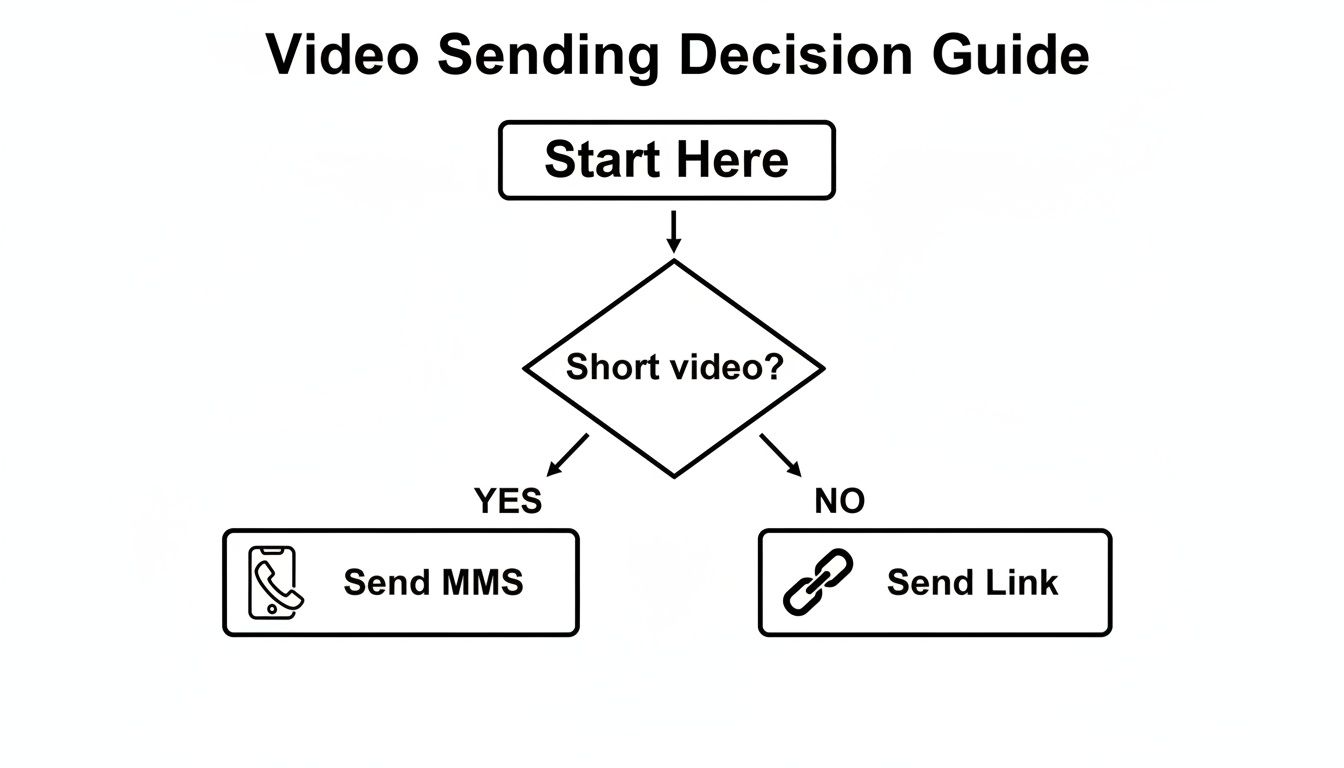
As you can see, it really boils down to the length and quality of your video. For anything substantial, sending a link is the way to go.
Here's a quick table to make the choice even clearer.
This table offers a side-by-side look at the two main methods for sending videos via text, helping you decide which is best for your specific situation.
| Feature | MMS (Direct Send) | Link to Video (Cloud Host) |
|---|---|---|
| Best For | Very short clips (under 15-20 seconds), informal chats | Longer videos, high-quality demos, marketing campaigns |
| File Size Limit | Very strict (around 1 MB), carrier dependent | Virtually unlimited, depends on hosting service |
| Video Quality | Heavily compressed, often pixelated or blurry | Preserves original HD quality |
| User Experience | Plays directly in the messaging app | Requires one click to open in a browser or app |
| Tracking/Analytics | None | Can track views, engagement, and click-through rates |
| Delivery Issues | High risk of failure with larger files | Very reliable, as only a small text link is sent |
Ultimately, for personal use, MMS is convenient for tiny clips. For any professional or marketing purpose where quality and analytics matter, sending a link is the clear winner.
For any kind of business communication, sending a tracked link is almost always the better play. It guarantees deliverability, maintains perfect video quality, and gives you valuable data on who's actually watching your content.
And if you're sending a lot of messages for your business, you should check out how you can send texts from your computer to make the whole process way more efficient.
This guide will walk you through all the steps, from simple personal sharing to advanced business strategies using these methods.
Before we dive into the how, let's talk about the why. In a world where everyone is shouting for attention online, video cuts through the noise like nothing else. It’s a direct, personal, and seriously engaging way to connect with your audience right on the device they’re glued to all day.
Plain text gets the job done, sure. But video? Video adds a human touch that builds trust and grabs attention in a split second. A quick thank-you message, a product demo, or a special announcement just feels more authentic and sticks in your memory when it’s a short video, not just a block of text.
The real magic happens when you blend the instant delivery of a text with the rich experience of video. This is where MMS (Multimedia Messaging Service) comes in, letting you drop dynamic content right into your customers' text inboxes—a space that’s way less cluttered than their email.
This direct line of communication pays off, big time. Recent data shows MMS messages rack up 300% more engagement than a standard SMS. On top of that, brands using MMS in their marketing see 52% higher click-through rates compared to text-only campaigns. The numbers don't lie; video gets people to act. You can dig deeper into these MMS messaging statistics yourself.
The bottom line is this: if you're not using video in your text campaigns, you're leaving a massive amount of engagement and potential revenue on the table. It’s a simple change that can produce dramatic results.
This isn't just about chasing clicks. It's about building a better customer experience that drives real business outcomes.
Think about it from a customer's perspective. Let's say you're a real estate agent. Instead of a boring text that says "New listing available," you send a 15-second video walkthrough of the home's stunning kitchen. The impact is immediate and way more compelling. The same goes for an ecommerce store sending a quick video of a new product in action.
Video messaging is perfect for scenarios like these:
This flexibility makes video a powerhouse tool across the entire customer journey.
But what if a standard MMS isn't quite enough? For more advanced campaigns, you can pair your video texts with a ringless voicemail drop. This one-two punch delivers your video and a personal voicemail at the same time, creating a powerful combination that’s hard for customers to ignore and reinforces your message without being intrusive.
Ever sent a video to a friend, only to have them text back, "Why is this so blurry?" You're not alone. The secret to sending crystal-clear videos through text all comes down to the phone in your hand—and the phone in theirs.
The divide between iPhone and Android creates a few hurdles, but once you know the rules of the road, you can make sure your video arrives looking just as good as it did when you recorded it.
For anyone in the Apple ecosystem, sending a video from one iPhone to another is incredibly smooth. This is all thanks to iMessage. When you see that blue bubble, your video is traveling over the internet, not the old-school cellular network. This means iMessage can handle much larger files, preserving the high quality you expect.
But what happens when you send that same video to a friend on Android? That's when things get tricky.
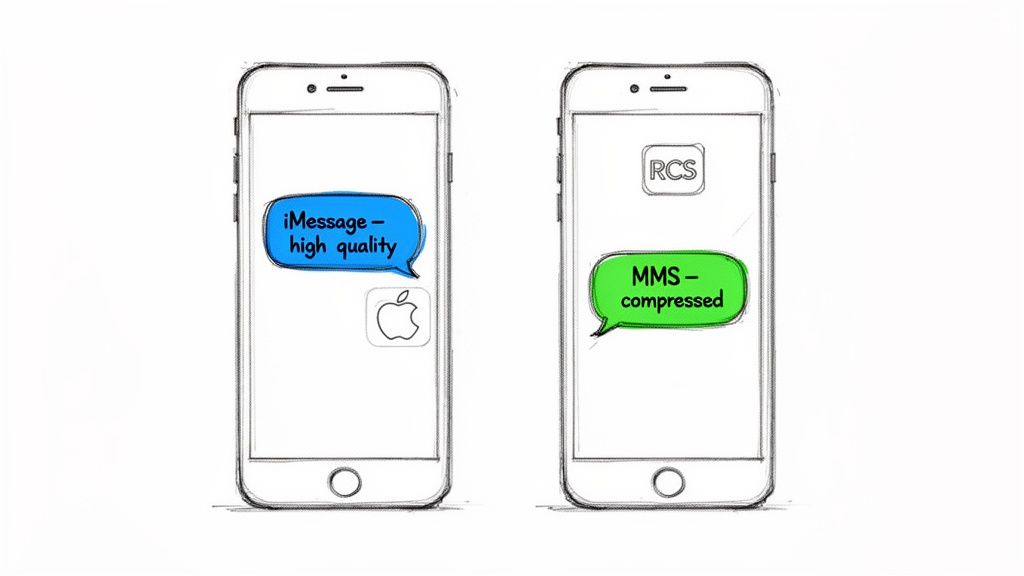
The moment your iPhone detects it's messaging a non-Apple device, it switches gears. The blue bubble vanishes, replaced by a green one, signaling that you're now using standard MMS.
This is where the trouble starts. MMS messages are shackled by your mobile carrier's tiny file size limits, which are often a measly 1 MB. To meet that limit, your iPhone has no choice but to aggressively compress your video. A beautiful, sharp HD recording gets squashed into a pixelated smudge.
Pro Tip: If you see the "green bubble" pop up when sending a video from your iPhone, just know that heavy compression is about to happen. For any video where quality is a priority, sending a link is a much safer bet than relying on MMS.
Android users have been dealing with this MMS headache for years, especially when texting friends with iPhones. For a long time, any video sent from an Android phone was destined for the same low-quality fate.
Thankfully, that's changing. The rollout of Rich Communication Services (RCS)—which Google often just calls "Chat"—is the answer to iMessage for the Android world. When you're texting another Android user who also has RCS enabled, your messages (and videos) are sent over Wi-Fi or mobile data. This blows past the old MMS limits, allowing for a high-quality sharing experience that's on par with iMessage.
Want to make sure you're set up for the best possible experience? It only takes a minute to double-check your settings.
Settings > Messages. You'll want to see that iMessage, Send as SMS, and MMS Messaging are all toggled on. This gives your phone the flexibility to use the best option available for every conversation.Settings > RCS chats (sometimes called "Chat features"). Look for a "Connected" status. If you see it, you're all set to use the enhanced features with other Android users who are also on board.For businesses, this opens up some powerful new plays. Imagine sending a prospect a video text followed by a ringless voicemail. You can deliver a visual message and then reinforce it with a personal, non-intrusive audio drop. Strategies like ringless voicemail drops are perfect for this, letting you land your message right in their voicemail inbox without ever making their phone ring. It’s a powerful one-two punch to make sure your message is both seen and heard.
Ever tried to text a video, only to have it fail? Or worse, it sends, but arrives looking like a blurry, pixelated mess? You're not alone.
This is the most common roadblock when sending video through text. The culprit? Mobile carriers. They put strict limits on the size of MMS messages, usually capping them at a tiny 1-3 MB. For the crisp HD video on your phone, that's next to nothing.
To even have a chance of sending, your phone has to aggressively compress the video on the fly. It strips out a ton of data, which is exactly why that beautiful video you shot ends up looking terrible on your friend's screen. Quality gets sacrificed to play by the carrier's rules.
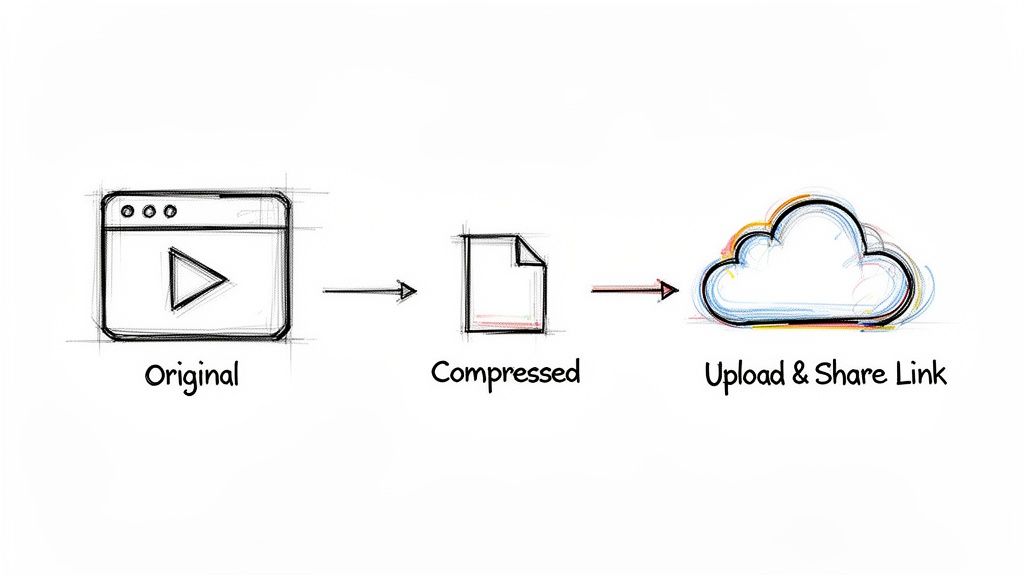
So, how do you get around this? You really have two choices: try to compress the video yourself, or just bypass the problem entirely by sending a link.
Compressing it yourself—maybe by trimming the length or lowering the resolution in your phone’s editor—gives you a bit more control over the final quality than letting the carrier butcher it for you. It's a decent option for a quick, personal video.
But for anyone serious about quality, especially businesses, the best strategy is to upload your video somewhere else and just text a link. This completely sidesteps MMS file size limits and guarantees your video is seen exactly as you intended. Frankly, for businesses, it's the only reliable way to go.
Sending a link ensures your message actually gets delivered and your video looks professional. It protects your brand and gives your audience a much better experience.
This is where it gets powerful for businesses. When you send a link using a messaging platform like Call Loop, you unlock a whole other level of functionality.
Instead of a long, clunky URL, the platform automatically generates a short, clean link. This not only looks more professional but also saves you precious character space in your text message.
Even better, these links are trackable. You get access to a goldmine of data, including:
This kind of data is absolutely crucial for dialing in your marketing strategy. For brands that want richer customer engagement and real performance analytics, the technical advantages of sending video links via MMS make it a clear winner over SMS. If you're looking to create high-quality videos for texting, it's invaluable to master real estate video editing.
With the flexibility of MMS, you can include text, video, audio, and more, all while breaking free from the 160-character limit of SMS. This lets you pair your video with a much more detailed message. To learn more about this, check out this great resource on the power of MMS for marketing on insiderone.com.
For a deeper dive into the nuts and bolts of sending media through text, you might also find our guide on the difference between SMS and MMS messages helpful.
Alright, you’ve mastered sending a quick video to a customer. Now what? It’s time to move beyond one-off messages and turn video texting into a real engine for your business.
This is where you shift from just sending a video to strategically using it in bigger campaigns. You’ll need a professional platform for this part, but it's what lets you scale up your efforts without losing that personal, one-on-one feel.
One of the most powerful tactics is personalized bulk MMS. Instead of blasting a generic video to your entire contact list, you can use merge tags to tailor the text for each person. A message like, "Hi [First Name], here's that demo you asked for!" feels incredibly direct and personal, and you'll see your engagement rates jump because of it.
Of course, this only works if you’ve segmented your audience. By grouping your contacts based on their interests, what they've bought, or where they are in your sales funnel, you can send video content that actually resonates and pushes them to act.
The real magic happens with automation. Imagine a new lead signs up on your website. Instead of just dumping them into a list, you can trigger an automated drip campaign that instantly sends them a welcome video via MMS.
From there, the follow-up is all hands-off. A sequence could look something like this:
These automated sequences handle all the follow-up for you, ensuring it’s consistent and perfectly timed. With a platform like Call Loop, you can orchestrate these entire campaigns, mixing SMS, MMS, and other channels for a full-court press.
If you really want to make your video campaigns pop, try pairing MMS with another channel. One combination I’ve seen work wonders is MMS and ringless voicemail.
Here's the play: you send a text with your video link. A few minutes later, you drop a pre-recorded voicemail that reinforces the same message. It's an incredibly effective one-two punch. They see the visual in their texts and hear your voice in their voicemail—all without the annoyance of a live call. For high-value leads or big announcements, this ringless voicemail drop strategy can seriously crank up your response rates.
The numbers don't lie. Customers are ready and waiting to hear from brands via text. With a staggering 98% read rate and 45% response rate, text messaging absolutely crushes email. What’s more, over 75% of customers are open to getting texts from brands after they've opted in, making video MMS a goldmine for engagement.
As you start sending more video texts, two things become non-negotiable: compliance and analytics.
First, compliance. Professional platforms are critical here because they manage your opt-in and opt-out lists, making sure you only message people who have given you explicit permission. This isn't just about following the rules; it's about building trust and protecting your business. You can learn more about the rules of the road in our guide to SMS and MMS messaging.
Just as important are your analytics. Every video link you send should be trackable. You need to know your click-through rates and see how people are engaging with the video itself. This data is what separates guessing from knowing. It tells you which videos are hitting the mark and which contacts are truly engaged, letting you fine-tune your strategy for the best possible results. For a deeper dive into strategy, a good plan for video marketing for small business can be a game-changer for growth.
Still have a few questions floating around about sending videos through text? No problem. Let's tackle some of the most common ones I hear so you can send your next video without a hitch.
If you want to play it safe, .MP4 is the undisputed champion of compatibility.
It hits that sweet spot between decent quality and a manageable file size. This makes it the most dependable format, whether you're zipping a video over MMS on Android or through iMessage on an iPhone.
Honestly, when in doubt, just stick with .MP4. It's the best way to make sure your recipient doesn't run into any weird playback issues, and most phones and editing apps default to it anyway.
Yep, you absolutely can. On your phone, you'd just create a group message and add everyone you want.
But here's the catch: remember those limitations we talked about? If even one person in that group chat uses a different phone platform (like an Android user in a group of iPhones), the video gets sent to everyone as a heavily compressed MMS. The quality takes a nosedive.
For businesses trying to send a video to a big list, a professional platform is really the only way to do it right. You can send a high-quality video link using a bulk MMS service to a specific list of contacts, guaranteeing everyone gets a perfect viewing experience every single time.
Nine times out of ten, this comes down to one thing: file size.
If your video file is bigger than your mobile carrier's tiny MMS size limit (which is usually around a measly 1MB), the send will just fail. This happens all the time with longer videos or anything shot in high definition.
A few other culprits could be:
Absolutely. This is where you can get really creative with your outreach. A killer strategy is to pair a video MMS with a ringless voicemail.
Think about it: you can send a text with a link to your video and then, a little while later, follow up with a non-intrusive ringless voicemail drop to add a personal touch. This one-two punch is fantastic for engagement because it ensures your message is both seen and heard, without ever being disruptive.
Ready to turn your video messaging into a growth engine? With Call Loop, you can send personalized, trackable video campaigns at scale, integrate with the tools you already use, and pair your texts with powerful ringless voicemail drops. See how it works at https://www.callloop.com.
Chris Brisson
Chris is the co-founder and CEO at Call Loop. He is focused on marketing automation, growth hacker strategies, and creating duplicatable systems for growing a remote and bootstrapped company. Chat with him on X at @chrisbrisson


Trusted by over 45,000 people, organizations, and businesses like


