
See a Demo
You're just one step away from seeing Call Loop in action.
Enter your information below to watch a demo right now.

You're just one step away from seeing Call Loop in action.
Enter your information below to watch a demo right now.


The queue looks manageable until it isn't. A few customers are waiting, then a billing surge lands, then three callers repeat the same issue because nobody closed the loop yesterday, and suddenly the team is doing damage control instead of running a contact center. In that moment, improving call center efficiency stops being a staffing problem and starts being a demand problem, a flow problem, and a follow-up problem.
The operators who get this right don't obsess over one metric or buy one more tool and hope for the best. They reduce avoidable calls before they start, cut wasted time inside the call, and stop revenue, retention, and trust from leaking after the call ends. That's the game.

I've watched managers blame the queue when the leak was sitting upstream. The line crawls past two minutes, agents keep apologizing, and the same customer calls back because the first contact never got a clean resolution. The dashboard says “high volume,” but the operation is paying for repeated mistakes, weak self-service, and slow follow-up.
Some calls should never hit a live agent. Appointment reminders, shipping updates, outage notices, and payment nudges can be handled before the customer reaches for the phone, especially in SMB environments where one missed reminder can create a burst of avoidable inbound traffic. Nextiva's guidance on proactive outbound communication and Cresta's point about knowledge access both point to the same truth, fewer unnecessary calls means less pressure on the queue and less waste across the whole system.
Once the customer is on the line, the minutes disappear quickly. Average handle time, or AHT, only becomes useful when you split it into talk time, hold time, and after-call work, because that's where the friction lives. If agents are searching for context, repeating verification steps, or waiting on another system, the operation is losing time even when the call sounds “productive.”
Missed follow-up is where a lot of teams sabotage their own efficiency. A call that ends without a clear next step becomes a repeat contact, and repeat contacts erase the appearance of speed. That's why the cleanest operations treat outbound reminders, resolution follow-up, and escalation management as part of the same workflow, not as separate departments with separate incentives.
Practical rule: If you can't name which of those three leaks is largest, you're probably fixing the wrong thing.

Start with the numbers you already trust, not the features a vendor wants to demo. The strongest optimization programs begin by pinning down a KPI baseline, then walking through contact drivers, bottlenecks, routing, workforce tools, and feedback. That sequence matters because tool-first projects usually automate chaos instead of reducing it.
Pull the current view from your ACD, CRM, and quality logs. Use a short list of metrics, not a scatterplot of everything available, and anchor them against practical ranges such as service level of 80% to 90%, abandonment under 5%, and first-call resolution in the 70% to 85% band from the benchmark set in the brief. The point is to define normal before trying to redefine efficient.
Look at the top reasons customers call, then compare them with what agents think customers call about. That gap is often bigger than leadership expects. If the top issue is order status, password reset, or billing clarification, the answer is rarely “more training,” it's usually better self-service, clearer outbound messaging, or cleaner routing.
Sample recordings around peak periods and listen for the repeated stall points. Are agents holding for another system, transferring because they lack context, or re-asking questions the IVR should have captured? Once the stall is visible, the fix usually gets a lot simpler.
Don't try to solve every failure mode at once. Tackle the issue that causes the most repeat contacts or the most queue pressure, then move down the list. This is the part many teams skip, and it's why they end up with dashboards full of activity and no change in throughput.
Feed what you learn back into routing rules, coaching notes, staffing plans, and self-service design. TDSGS explicitly recommends treating this as a continuous feedback loop, not a static report, and that's the right mental model for a live operation. If the team doesn't see the metric change after the coaching change, the process isn't closed.
| KPI | Typical Range | What It Tells You |
|---|---|---|
| AHT | 6 to 8 minutes | Whether calls are being handled efficiently without rushing resolution |
| Agent utilization | 75% to 85% | How much logged-in time is being used productively |
| Occupancy | 75% to 85% | How busy agents are during staffed time |
| FCR | 70% to 85% | Whether issues are getting resolved on the first contact |
| Average speed of answer | under 20 seconds | How quickly customers reach a live agent |
| Call abandonment | under 5% | Whether customers are giving up before reaching support |
| Service level | 80% to 90% answered within target time | Whether staffing and queue design are holding up |
For operators who want a deeper analytics layer, the internal breakdown in call tracking and analytics is worth keeping handy, but the bigger point is simpler. A clean baseline beats a fancy dashboard every time.
A useful KPI set has to tell a story about flow. AHT tells you how long each interaction takes, FCR tells you whether the first contact solved the issue, and service level and abandonment show what customers experience while they wait. If those numbers disagree with one another, the queue is hiding a problem instead of solving one.
AHT is the sum of talk time, hold time, and after-call work divided by handled calls, and that definition matters because each component needs a different fix. Talk time drops when agents have context and better scripts. Hold time drops when knowledge is easy to find. After-call work drops when disposition codes, summaries, and CRM updates are structured instead of improvised, a point reinforced by the benchmark source in the brief from SCI Tech Today on AHT and its formula.
Leaders often use those terms as if they're interchangeable, but they're not. Utilization reflects productive logged-in time, while occupancy reflects how much of staffed time is spent actively handling work. If occupancy is high and quality is falling, the team is probably running too hot.
A healthy queue doesn't just look good from inside the team. A widely used benchmark is 80% of calls answered within 20 seconds, and some centers push toward 90% within 15 seconds according to Sprinklr's call center statistics. Abandonment is the other side of that coin, because when callers give up, staffing and routing have already failed them.
If the team can't review the number in a weekly standup and make a staffing or coaching decision, it probably doesn't belong on the main dashboard. The most workable operating set is a short list that captures speed, resolution, queue pressure, and agent load. That's enough to drive action without turning the floor into a reporting factory.
The biggest efficiency move for many SMB teams isn't shaving seconds off a call, it's preventing the call altogether. Appointment reminders, shipping updates, payment prompts, and event confirmations can be handled through SMS, voice broadcasting, and ringless voicemail, which reduces inbound demand before it reaches the queue. For teams that live and die by staffing flexibility, that shift matters more than a small gain in talk time.
Outbound has to feel coordinated or it turns into noise. A reminder should go out once, through the right channel, at the right time, then stop. If a customer gets an SMS, a follow-up voicemail, and another reminder an hour later, you've created friction instead of suppression.
SMS is best when the customer needs a quick nudge, link, or confirmation. Voice broadcasting works when the message needs to be heard, especially for urgent service notices or broad announcements. Ringless voicemail is different, it places a message directly into the voicemail inbox without a live call, so it's less intrusive and works well for routine follow-up where you want the customer to hear the message on their own time.
Don't blast everyone at once. Segment by appointment type, delivery status, or customer history, then schedule by local time so the message lands when the customer can act on it. If you're using link tracking, you can see which messages prompt action and which ones just add clutter.
Double opt-in, toll-free compliance, and clean contact data aren't side issues. They protect deliverability, reduce wasted sends, and make sure outreach stays useful instead of getting ignored. On the operations side, that translates into fewer calls from confused customers and fewer repeat contacts from missed reminders.
The mechanics matter here. Call Loop supports automated calls, send texts, and ringless voicemail drops, which makes it a practical option when the goal is to move predictable demand out of live handling and into managed outbound workflows. If appointment reminders are a recurring pain point, the structure in automated appointment reminders is a useful pattern to study.
Once avoidable demand is suppressed, the next win is getting the right information to the right agent on the first attempt. Skill-based routing, CRM context, and AI assist work best when they're treated as one flow. Split them apart, and you just buy three tools that don't talk to each other.
A customer with a technical issue shouldn't bounce through general support first if a technical specialist is available. Routing precision improves first-call resolution and trims the transfer chain, which is where a lot of hidden time goes to die. RingCentral's guidance in the brief is blunt about this, route to the right agent on the first attempt and resist the urge to over-optimize handle time at the expense of resolution.
CRM integration should show prior tickets, order details, account notes, and recent outbound activity before the agent greets the caller. That's what shortens calls without making them feel rushed. It also keeps the customer from repeating the same explanation, which is one of the fastest ways to kill confidence in the team.
Operational rule: If the agent has to hunt for the customer's history, the routing and CRM stack isn't finished.
AI should recommend the next best answer, relevant knowledge base content, or a likely disposition, then get out of the way. If it overwhelms the agent with irrelevant prompts, it slows the call and adds cognitive drag. The win comes from reducing search time and after-call work, not from making every interaction look automated.
Templates help. So do tight disposition codes and clean CRM updates. Every extra click after the conversation ends adds friction to the next one, and that friction shows up later as weaker throughput, higher fatigue, and less consistent coaching data.
For teams automating the surrounding workflow, CRM workflow automation is a natural companion topic. The practical point is simple, routing, context, and assist should feel like one system that helps agents resolve issues faster, not a pile of disconnected features.
A faster call isn't a better call if the customer still has the problem when they hang up. That's the trap behind pure AHT worship, and it's why some operations look efficient on paper while repeat contacts keep climbing. The scorecard improves, the customer experience doesn't.
Automation that keeps people out of the queue can be good, but it can also become a wall. If callers are deflected without a clean path to resolution, they come back through another channel or escalate later. That creates a false win, because the queue shrinks while effort rises elsewhere.
Cresta's guidance in the brief is clear, measure containment rates and resolution quality, not just deflection volume. That's the right filter. A well-designed self-service flow should contain simple issues and route complicated ones to a human without making the customer repeat themselves or lose context.
Some interactions should stay with agents from the start. Sales calls with complex fit questions, sensitive support cases, and escalations with emotional friction usually benefit from a person who can adapt in real time. Other interactions are better converted into outbound reminders or asynchronous messages, especially when the goal is to inform rather than to negotiate.
The brief's strongest caution is also the most useful one. Establish baseline visibility across 100% of interactions before automating. That keeps leaders from automating around the wrong behavior and lets them decide which conversations should be live, which should be contained, and which should be moved into proactive outbound or asynchronous channels instead.
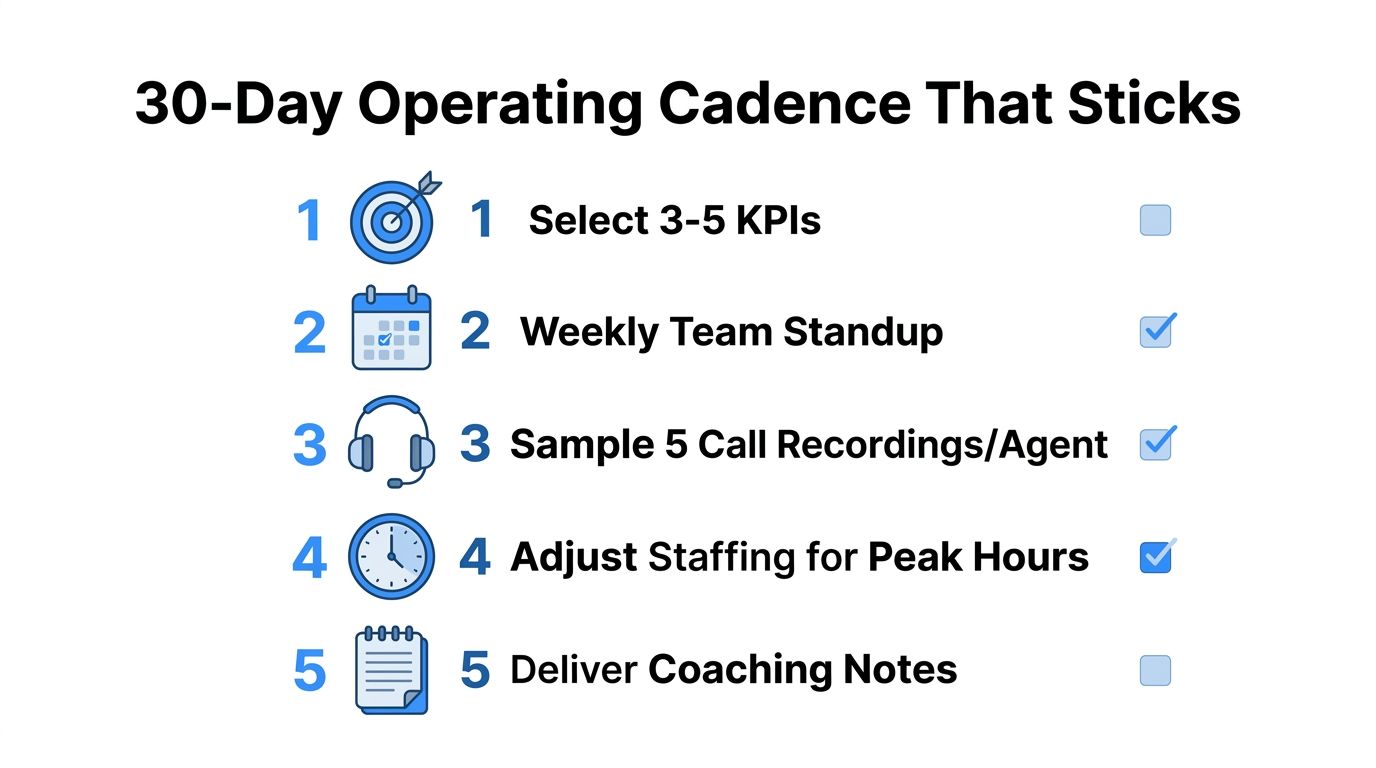
Pick 3 to 5 KPIs and run the same review every week. Sample five call recordings per agent, adjust staffing around peak hours, and feed coaching notes back into routing rules so the process learns instead of resets. That cadence is what turns a dashboard into an operating system.
Hold a standup with the floor lead, the QA owner, and whoever owns staffing. Review service level, abandonment, FCR, AHT, and one demand-suppression signal from outbound. If turnover is high, treat retention as an efficiency issue, because industry benchmarks in the brief show annual attrition can sit in the 30% to 45% range, which means every lost rep also takes knowledge, ramp time, and consistency with them.
If the same issues keep resurfacing, the fix is usually not more reporting. It's tighter feedback between the metrics, the coaching, and the routing rules. That's the loop that compounds.
Call Loop helps teams automate SMS, voice broadcasting, and ringless voicemail so routine reminders and follow-ups don't clog the queue. If you're trying to reduce avoidable demand, tighten outbound cadence, and keep live agents focused on the conversations that need a human, visit Call Loop and map those workflows to your own operation.
Chris Brisson
Chris is the co-founder and CEO at Call Loop. He is focused on marketing automation, growth hacker strategies, and creating duplicatable systems for growing a remote and bootstrapped company. Chat with him on X at @chrisbrisson


Trusted by over 45,000 people, organizations, and businesses like


