
See a Demo
You're just one step away from seeing Call Loop in action.
Enter your information below to watch a demo right now.

You're just one step away from seeing Call Loop in action.
Enter your information below to watch a demo right now.

You send an important reminder by email. It looks fine in your outbox. Your customer never sees it, or sees it hours later under a pile of promotions, internal threads, and spam-folder clutter.
That’s the moment a mail to sms service stops being a nice-to-have and becomes operational infrastructure.
A lot of businesses still treat text messaging like a separate channel that requires a separate team, separate workflow, or a developer-heavy rebuild. In practice, the fastest path is usually simpler. You keep the email-driven process your team already knows, then route those messages into SMS for the moments when speed, visibility, and response matter most. Once that bridge is in place, you can build from simple text alerts into a broader outreach system that includes ringless voicemail and automated voice follow-up.
A mail to sms service converts an email into a text message and delivers it to a mobile phone. That sounds basic, but the business impact is not.
The usual pattern is easy to spot. A clinic sends appointment reminders by email. A sales team emails a hot lead after a demo. An event organizer pushes a last-minute update to attendees. The message is important, time-sensitive, and completely at the mercy of the inbox.
SMS changes that math. SMS marketing achieves a 98% open rate, while email typically lands around 20-28% open rates, and 90% of SMS messages are read within three minutes according to Infobip’s SMS marketing statistics. If your process depends on someone seeing the message quickly, email alone is often the wrong delivery layer.
Email still has a place. It’s good for long-form content, receipts, contracts, onboarding material, and anything that needs more room. It’s weak when timing matters.
Common failure points include:
Practical rule: If the message matters today, not someday, route it to text.
Most companies don’t need to replace email. They need to bridge email into SMS for specific workflows.
That’s why a mail to sms service is useful. It lets you preserve familiar triggers, inbox habits, and simple team processes while shifting the actual delivery to a channel people read fast. For a small business, that can mean fewer missed appointments. For a marketing team, it can mean faster response on flash offers. For a service business, it can mean fewer “I never saw the email” conversations.
The bigger opportunity is what comes next. Once email can trigger text reliably, you can treat that trigger as the first move in a multi-channel sequence instead of the entire strategy.
The easiest way to think about an email-to-SMS gateway is as a translator and dispatcher. Your team sends an ordinary email. The gateway reformats it into SMS-friendly text, then routes it through mobile carrier networks.
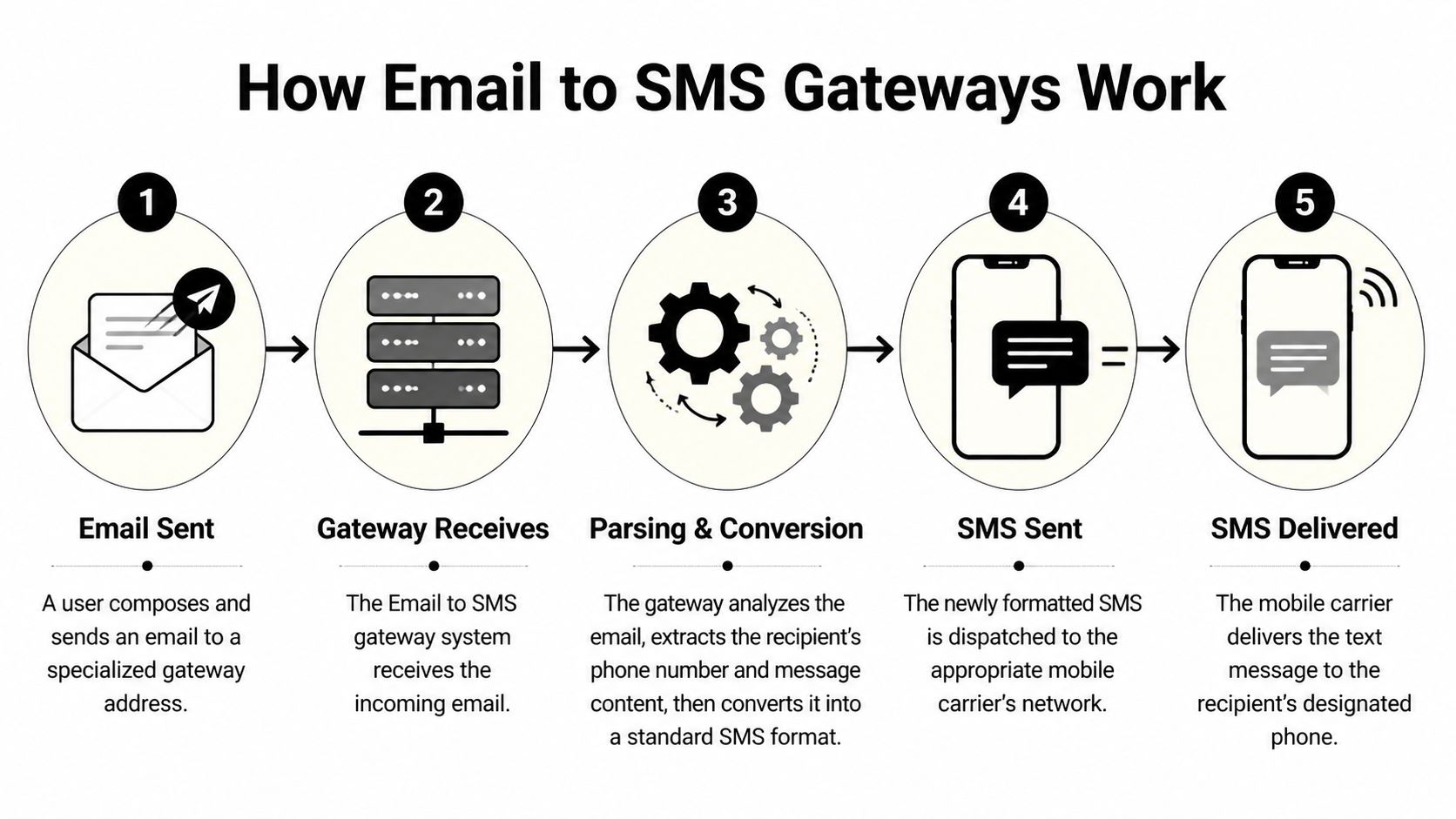
The message usually starts in a normal inbox or application that can send email. Instead of going to a person’s standard email address, it goes to a special gateway address connected to the recipient’s mobile destination.
From there, the platform processes the message. The gateway strips out signatures, disclaimers, and formatting that don’t belong in a text. It also converts characters so the content fits SMS encoding rules. Retarus explains that the conversion process routes an email through an SMTP gateway where the platform strips signatures and converts content using smart character replacement, including GSM-7 encoding.
That cleanup work matters more than most buyers realize. A text message isn’t a mini email. If you dump a full email footer, legal signature, and formatting into SMS, you waste characters, create broken messages, and increase the chance of poor delivery outcomes.
A serious mail to sms service also handles registration and compliance requirements that old carrier workarounds never handled well. Business-grade services use 10DLC registration to secure up to 98% delivery rates, compared with 60-70% for non-compliant gateways, as described in this email to SMS gateway overview and the underlying technical explanation from Retarus.
Here’s the practical flow:
Keep the body short and intentional. The cleaner the original email, the cleaner the resulting text.
A few implementation habits consistently work well:
| Approach | What happens |
|---|---|
| Short email body | The SMS arrives clean and readable |
| Clear sender workflow | Staff can use it without retraining |
| Registered business messaging | Delivery is more reliable |
| Dumping full email templates into SMS | Messages become messy, fragmented, or filtered |
The gateway is only the transport layer. The quality of the message design still matters.
Not every mail to sms service is worth using. Some tools only convert messages. Better ones protect deliverability, support conversation, and fit into the rest of your outreach stack.
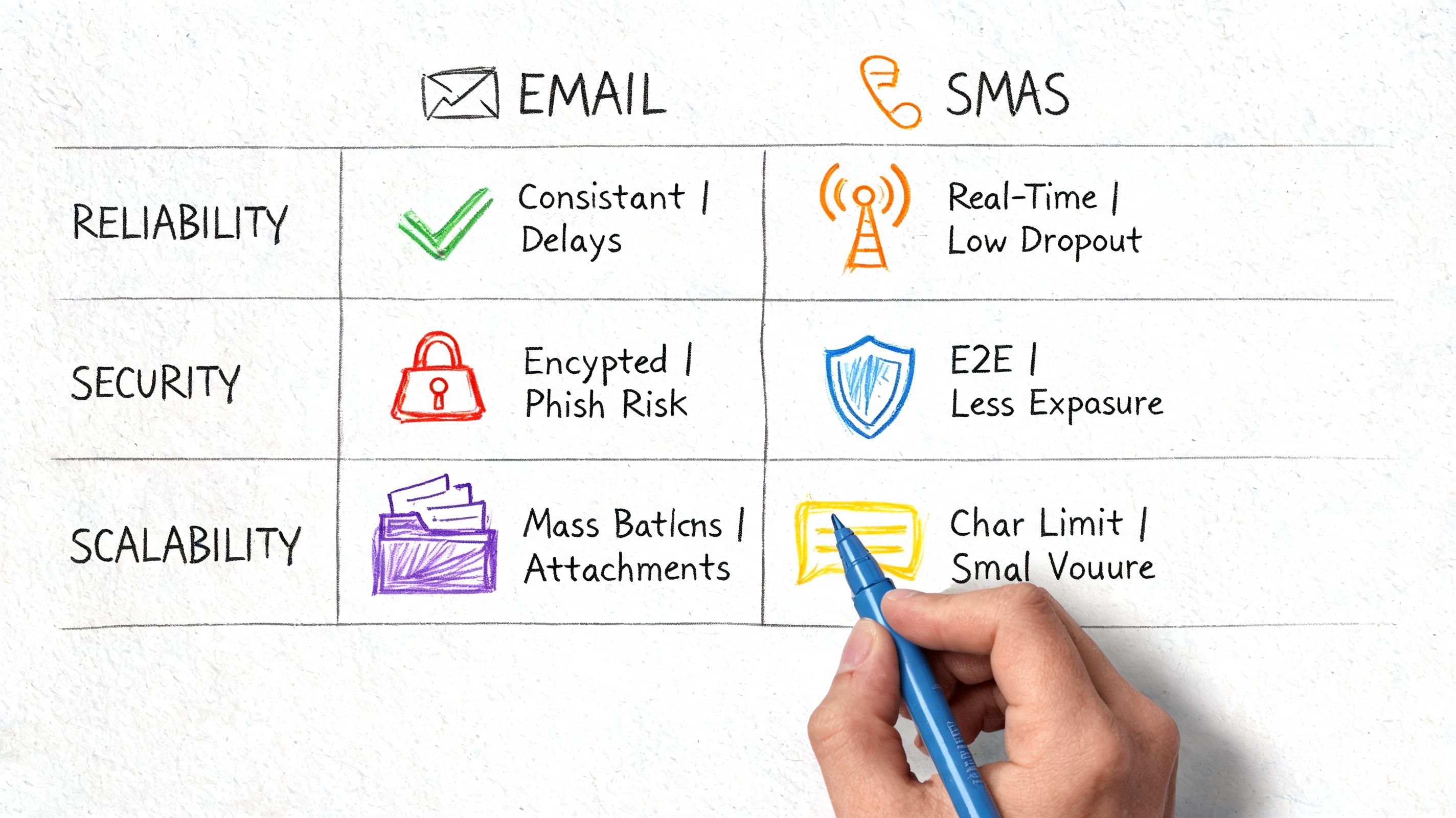
This is the first filter. If a provider can’t help you send compliant traffic, the rest of the feature list doesn’t matter.
Advanced implementations support bi-directional SMPP protocols and reply matching, but the bigger buyer concern is registration. Without proper registration like 10DLC, messages can face 30-40% spam blocks in major markets like the US, according to the Apply to Supply service listing.
That means your checklist should include:
One-way alerts are useful. Two-way messaging is where operations improve.
When recipients can reply and the system can match that reply back to the originating thread, your team can turn reminders into confirmations, promotions into conversations, and support messages into resolved issues. That’s especially useful for healthcare, field services, and sales follow-up.
A reminder that can’t capture a reply often creates another manual task for your staff.
Some businesses only need simple text. Others need richer messaging and clearer measurement.
Look for these capabilities:
A decent tool sends messages. A strong platform helps you run outreach without duct-taping together separate apps.
Ask simple questions during evaluation:
| Feature area | What to ask |
|---|---|
| Compliance | Can this service support registered business traffic? |
| Replies | Will inbound responses route cleanly to my team? |
| Automation | Can email triggers launch ongoing sequences? |
| Measurement | Can I see delivery, clicks, and response behavior? |
| Channel expansion | Can I add voice or voicemail later without switching systems? |
That last question matters more than it used to. Mail to SMS is often the entry point, not the final architecture.
The best way to judge a mail to sms service is to look at the situations where email keeps failing and text closes the gap.
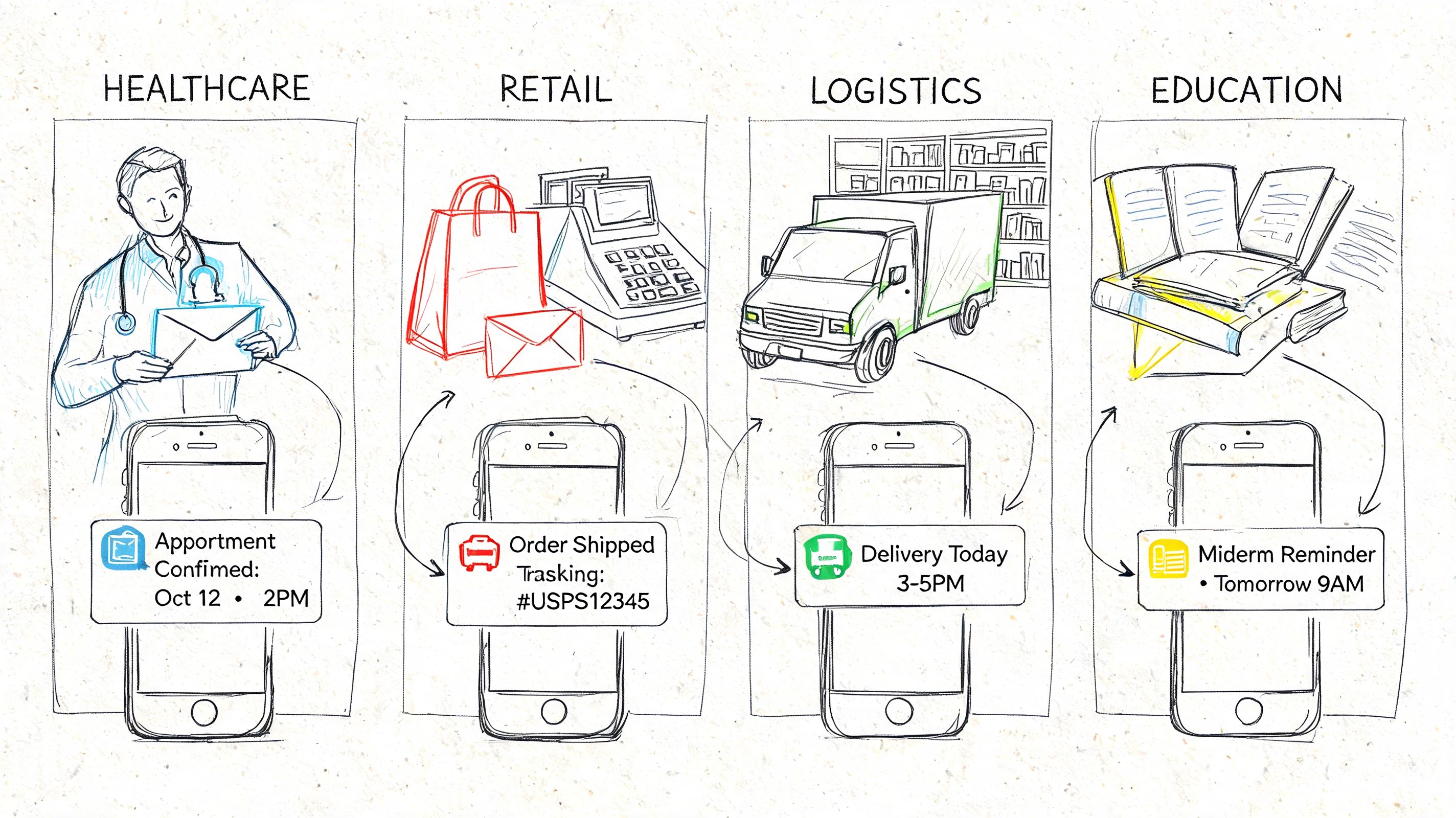
A practice manager doesn’t need a flashy campaign. They need a patient to see a reminder, confirm, and show up.
Email alone is shaky for that job. A mail to sms service lets staff keep using familiar scheduling workflows while routing reminders into text. If the system supports compliant handling, two-way replies, and delivery tracking, the office gets fewer phone tag loops and fewer preventable no-shows.
For billing and follow-up communication, teams often pair reminders with payment messaging. If you need examples of how to structure those conversations clearly, this payment text message guide is useful because it focuses on the wording and customer experience side, not just the send itself.
A retail marketer usually knows which messages deserve SMS. Flash sale alerts, back-in-stock notices, pickup updates, and abandoned cart follow-up all depend on timing.
A common setup is simple: the ecommerce system or help desk sends an email trigger, and the mail to sms service turns that into a customer text. The marketing team doesn’t have to rebuild every workflow from scratch. They just decide which events should leave the inbox and hit the phone instead.
That approach also works well for agencies managing several clients. They can preserve existing account processes while tightening delivery speed.
Compared with email, mail to SMS feels almost unfair.
An event organizer changes a venue room. A karate studio cancels a class because an instructor is sick. A webinar host wants registrants to join on time. Those aren’t messages people should discover hours later.
Short operational messages belong in SMS. Long explanations can stay in email.
Not every use case is customer-facing. Companies also use this setup for internal alerts, dispatch notices, service updates, and team coordination.
That’s especially helpful when staff members don’t live in their inbox all day. Field teams, mobile workers, and part-time staff usually respond faster to text than to email because text fits the way they already work. A mail to sms service gives operations teams a simple bridge without forcing everyone into a new app.
A lot of teams stop at text. That’s a missed opportunity.
Mail to SMS works best when you treat it as the trigger layer inside a wider communication system. The email arrives. The platform decides what happens next. That could be an SMS first, a ringless voicemail later, and an automated voice call if the contact still doesn’t respond.
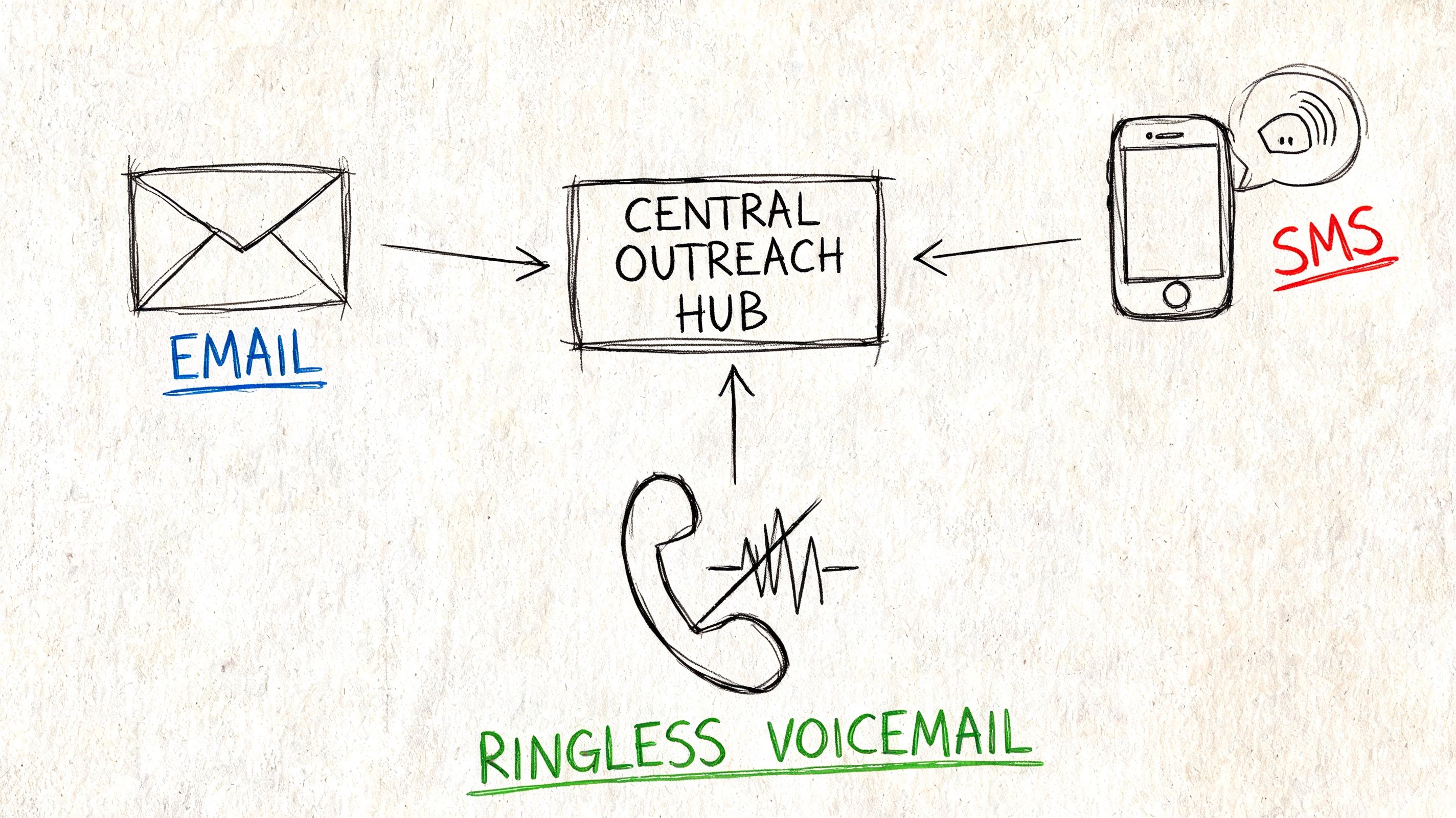
Different contacts respond to different formats. Some people answer a text immediately. Others ignore SMS but will listen to a voicemail. Some need a voice touchpoint before they act.
A strong outreach workflow uses that reality instead of fighting it. For example:
This is also where old public carrier gateways fall apart. As major carriers like AT&T, Verizon, and T-Mobile terminated their free public SMS gateways through 2024 and 2025, businesses relying on them face silent delivery failures and significant compliance liabilities, especially in regulated sectors, according to TextBolt’s discussion of email-to-SMS service changes.
The best multi-channel sequences are not loud. They’re paced.
A sensible system usually includes:
For a practical example of where ringless voicemail fits in the mix, see this overview of ringless voicemail marketing strategies.
Ringless voicemail works best as reinforcement, not as the first and only touch.
The mistake isn’t using multiple channels. The mistake is blasting all of them at once.
If every missed email immediately triggers a text, voicemail, and call in the same hour, the contact experience gets sloppy fast. Better systems use sequencing, business rules, and response-based exits. The point is to create more chances to connect, not more noise.
Most businesses don’t need a complicated rollout. They need a reliable process, a compliant provider, and a few rules that keep messages clean.
Free carrier workarounds are fading out, and they were never a strong operational foundation anyway. The provider you choose should support compliant business messaging, clear delivery tracking, and the ability to expand beyond SMS if your needs grow.
Cost matters, but sticker price is the wrong first question. When evaluating costs, businesses must consider total cost of ownership, including lost revenue from missed incidents, operational overhead, and client attrition, as discussed in this breakdown of SMS alternative TCO.
That’s the critical understanding. A cheap tool that drops messages or creates manual cleanup is expensive in practice.
You don’t need to automate everything on day one. A phased setup works better.
Pick one high-value use case
Start with appointment reminders, hot lead follow-up, event notifications, or payment reminders. Choose a workflow where timing already hurts you.
Create a clean sending pattern
Keep email bodies short when they’re meant to become texts. Remove extra signatures and avoid stuffing the message with branding clutter.
Set up opt-in collection
Use web forms, keywords, checkout flows, intake forms, or existing permission-based lists. Keep consent records organized.
Run internal tests
Test message formatting, timing, delivery behavior, and reply handling before you push anything customer-facing.
Connect related tools
Tie the workflow into your CRM, forms, help desk, scheduling system, or automation layer. If you’re comparing channels, this guide on text and email marketing workflows is a helpful reference point.
A few issues show up repeatedly during implementation:
That’s good advice for almost every messaging rollout.
Don’t begin with advanced branching, giant campaigns, or layered personalization rules. Start with one workflow that your team can understand and support. Once that performs reliably, add more triggers, additional channels, and more precise segmentation.
A mail to sms service is at its best when it disappears into the background. Your staff sends or triggers the message. The recipient gets it fast. The system records what happened. Nobody has to chase delivery mysteries.
You shouldn’t build around them. Public carrier gateways have been shut down or deprecated across major carriers, and businesses that still rely on them risk silent failures, inconsistent delivery, and avoidable compliance problems. If the message matters, use a professional mail to sms service with business-grade routing and tracking.
It can be, but only if you handle consent and compliance correctly. That means using proper opt-in collection, maintaining suppression controls, and choosing a provider that supports compliant business messaging. For operational alerts and reminders, the rules may look different than promotional traffic, so your internal policies need to reflect the actual message type.
A mail to sms service is usually the easier starting point. It lets teams use email-based triggers and familiar workflows without asking a developer to rebuild everything. An SMS API gives you more custom control, but it usually requires deeper technical work. If your goal is to bridge existing systems into text quickly, mail to SMS is often the practical choice.
Yes, if the provider supports two-way messaging and reply matching. That’s an important feature because one-way texting often creates extra manual work. If customers are likely to confirm, ask questions, or need support, don’t settle for a send-only setup.
If you’re ready to move beyond unreliable email-only outreach, Call Loop gives you a practical way to automate SMS, voice broadcasting, and ringless voicemail in one place. It’s a strong fit for businesses that want compliant, multi-channel follow-up without stitching together separate tools.
Chris Brisson
Chris is the co-founder and CEO at Call Loop. He is focused on marketing automation, growth hacker strategies, and creating duplicatable systems for growing a remote and bootstrapped company. Chat with him on X at @chrisbrisson


Trusted by over 45,000 people, organizations, and businesses like


