
See a Demo
You're just one step away from seeing Call Loop in action.
Enter your information below to watch a demo right now.

You're just one step away from seeing Call Loop in action.
Enter your information below to watch a demo right now.

You're probably dealing with the same pattern most small businesses hit. A new lead comes in. You mean to follow up right away. Then the phone rings, a customer needs help, a job runs long, and that lead sits in your inbox until tomorrow.
Tomorrow is where a lot of revenue goes to die.
Marketing automation for small business works when you treat it like an operating system for follow-up, not a fancy add-on. It handles the repeatable parts with perfect timing so you can spend your time where it matters most: real conversations, sales calls, booked appointments, and customer service. Done right, it doesn't make your business feel robotic. It makes your responses faster, more consistent, and more relevant.
Most small business guides stop at email. That's too narrow for many real businesses. If you run a local service company, clinic, agency, gym, dealership, home services business, or appointment-based operation, your customers don't all respond the same way. Some answer email. Some reply to text in minutes. Some ignore both but listen to a voicemail. Some need a ringless voicemail reminder because they won't pick up an unknown number during the day.
That's why the first useful automation system usually isn't single-channel. It's multi-channel, with email, SMS, voice, and ringless voicemail working together around one clear goal.
Manual follow-up breaks in predictable places. The first response goes out late. The second touch never happens. Past customers don't hear from you again until you remember to run a promotion. No-show reminders get skipped on busy days. None of that usually happens because the business owner is careless. It happens because manual systems don't survive real workloads.
Automation fixes that by taking the repetitive actions off your plate.
The best starting point is simple work that repeats often and follows clear rules:
Practical rule: If a task happens often, follows the same timing, and doesn't require judgment, automate it first.
A blast is not a system. Sending one email to everyone on your list might create activity for a day. A system creates repeatable movement from inquiry to sale to repeat business.
That system usually includes:
Small businesses often worry automation will sound cold. The opposite is usually true. A well-written text sent at the right time feels more helpful than a delayed personal follow-up that arrives three days late. A ringless voicemail can feel more considerate than repeated live call attempts. A short confirmation email can reduce confusion before your staff even touches the account.
The point isn't to automate everything. The point is to automate the parts that should never rely on memory.
A small business usually gets into trouble here for a simple reason. It buys software, turns on every channel, and starts sending messages before deciding what success should look like.
Set the goal first. Then choose the channel mix that gives you the best chance of hitting it without creating compliance problems for your team.
Start with one business outcome tied to one workflow. For a first build, that usually means reducing no-shows, replying to new leads faster, following up on estimates, bringing inactive customers back, or driving repeat bookings. Those goals are specific enough to shape timing, copy, opt-in rules, and handoff steps.
Avoid vague targets like improve marketing or be more consistent. They sound reasonable, but they do not tell you what to trigger, what to send, or when to stop.
There is a financial case for staying focused. In Oracle's marketing automation statistics, 63% of organizations said they expected marketing automation benefits within six months. Oracle also reports that 44% saw a return on investment, and the average return reached $5.44 for every $1 spent over the first three years. The same source says payback typically happened in under six months. Small businesses should read that as a reminder to pick a workflow that produces a visible result early.
A useful goal shows up in operations, not just in a report.
If missed appointments are the problem, measure reminder delivery, confirmations, and no-show rate. If slow lead follow-up is costing deals, measure time to first response, booked calls, and reply rate. If quote follow-up is inconsistent, track how many estimates receive every required touch across email, SMS, and voicemail.
That level of specificity matters because channel choice changes the result. A detailed email may help a prospect compare options. It will not always get a fast response from someone who asked for pricing ten minutes ago.
If you need a planning model before building the sequence, map the goal to a simple customer journey automation workflow so each message has a job.
Small businesses usually overuse email and underuse the channels that create action faster. In compliance-heavy categories such as home services, healthcare-adjacent businesses, financial services, legal, and multi-location franchises, that mistake costs leads and can create risk.
Use each channel for what it does best.
| Channel | Best For | What to Watch | Tone |
|---|---|---|---|
| Education, onboarding, estimates, offers, post-purchase follow-up | Slower response on urgent items, inbox competition | Detailed, branded, informational | |
| SMS | Reminders, confirmations, short follow-ups, simple calls to action | Consent, quiet hours, message length, opt-out handling | Short, direct, conversational |
| Voice Broadcasts | Service notices, schedule changes, announcements, opted-in outreach | Calling rules, list quality, call frequency | Clear, direct, human |
| Ringless Voicemail | Callback prompts, estimate follow-up, local service outreach, gentle reminders | Consent standards, message relevance, vendor delivery quality | Personal, concise, low-pressure |
Email carries detail well. Use it when the customer needs context, links, pricing information, FAQs, or a sequence that builds trust over several touches.
The trade-off is speed. Email is rarely the strongest first response channel for a hot lead.
SMS gets attention fast and works best when the next step is simple. Confirm a booking. Reply with a question. Tap a link to choose a time.
The trade-off is compliance and message discipline. Consent has to be clear. Opt-out language has to be handled correctly. Long promotional texts usually perform worse and create more complaints.
Voice broadcasts help when hearing a real voice makes the update clearer. They are useful for weather closures, appointment changes, payment reminders, and time-sensitive announcements to customers who agreed to receive them.
The trade-off is that bad dialing practices damage trust quickly. Frequency, list hygiene, calling windows, and suppression rules need to be set before the first campaign goes out.
Ringless voicemail fills a gap that many automation guides ignore. It gives you a human touch without forcing a live conversation, which makes it useful for estimate follow-up, callbacks, and local service campaigns where prospects often ignore email and text after the first inquiry.
The trade-off is fit. It should support your sequence, not replace it. Used too often, it feels repetitive. Used at the right moment, it can recover leads that would have gone cold.
Choose channels based on urgency, customer behavior, and permission status. That is how small businesses build an automation system that gets responses without creating avoidable compliance problems.
Most first automations fail because the business starts inside the software. Start with the customer instead. Map one path from their point of view.
A strong first journey is the path from website inquiry to booked conversation. It's common, easy to visualize, and valuable in almost every small business.
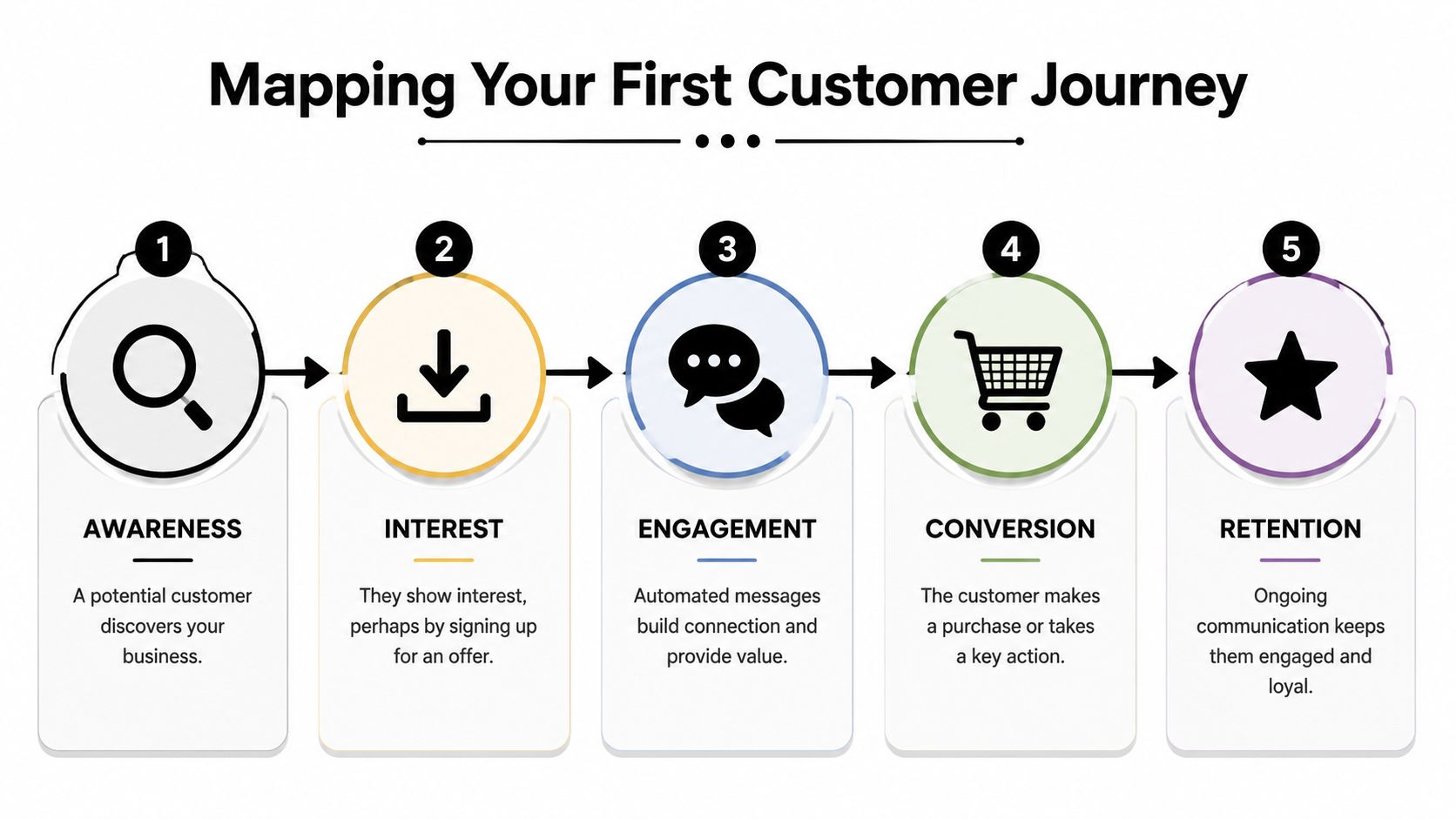
If you want a broader framework before building the sequence, this guide to customer journey automation is a useful reference point.
Here's a practical example for a lead who submits a form asking about your service:
The first message should lower uncertainty. The prospect wants to know their request didn't disappear. Keep it short and useful.
The next touch should add context. Email is good here because you can include service details, common questions, or a booking link without cramming it into a text.
Then comes the decision point. If the lead still hasn't responded, that's where many businesses either over-message or give up. A better approach is one more nudge, then a different channel. Ringless voicemail often works here because it feels more personal without demanding that the person answer live.
Map these three elements before you open any platform:
A customer journey should feel like a helpful conversation. If a message doesn't move the person to a sensible next step, remove it.
Small teams gain control. Once the path is clear, software setup becomes mechanical. Without the map, every automation feels random.
A drip sequence is just your journey map turned into rules. One event happens. The system waits. A message goes out. Another event changes the path.
The core idea is simple. Timing matters more than volume.
Salesgenie's roundup reports that 75% of email revenue comes from triggered personalized campaigns, which is why triggered follow-up consistently outperforms batch-and-blast messaging in practical use, as noted in these marketing automation statistics from Salesgenie.

For sequence structure and timing ideas, review these drip campaign best practices.
Here's a workable first sequence for new inbound leads:
Trigger
New contact added from website form.
Step one
Immediate SMS confirmation.
Step two
Wait one day, then send a short email with service details and a booking link.
Step three
Wait two more days. If no reply or booking, send a ringless voicemail.
Step four
Wait another short interval. Send a final text asking if they still want help.
Stop logic
End the sequence if the contact replies, books, or is marked closed by your team.
Use short, plain language. One action per message.
Hi {{first_name}}, thanks for reaching out to {{business_name}}. We got your request and can help with {{service_interest}}. Reply here with a good time to talk, or book here: {{booking_link}}
Why this works:
Ringless voicemail should sound natural, not theatrical. Keep it under control. The purpose is a callback, not a speech.
Hi {{first_name}}, this is {{agent_name}} from {{business_name}}. I'm following up on your request about {{service_interest}}. We've got your information and can help when you're ready. Call us back at {{phone_number}}, or reply to the text we sent and we'll get you scheduled. Again, this is {{agent_name}} at {{business_name}}. Thanks.
If your business already runs on HubSpot, ActiveCampaign, or another CRM, build the sequence there if it supports the channels you need. If you need outbound automation across SMS, voice broadcasting, and ringless voicemail in one workflow, Call Loop is one option because it supports drip campaigns, segmentation, scheduling, merge tags, compliance controls, and integrations with tools like HubSpot, Keap, and Zapier.
What doesn't work is overbuilding the first version. Don't start with ten branches, five segments, and three offers. Start with one path that solves one recurring problem.
Automation gets expensive when you send irrelevant messages. Segmentation is what keeps that from happening.
Most small businesses don't need complex data science. They need clean buckets and a few useful fields. That alone makes a major difference. According to Dynares on marketing automation for small business, SMBs using marketing automation see a 34% average revenue increase, while other reports show marketers can achieve up to a 77% increase in conversion rates. Those gains are tied to segmentation and personalization rather than generic broadcast messaging.
Use segments that reflect actual business behavior:
This is enough for most first systems.
Good personalization is about relevance, not gimmicks. A first name field is useful, but behavioral context matters more.
Use custom fields and tags for things like:
That lets you turn a generic message into a useful one. “Hi John” is fine. “Hi John, your HVAC estimate is ready” is better. “Hi John, your HVAC estimate for the Elm Street property is ready” is better still, if your team can support that data quality.
Segmentation is not a reporting exercise. It's how you decide who should hear what, and who should be left alone.
The first mistake is creating too many segments. If your team can't maintain them, they'll decay fast.
The second mistake is personalizing copy while ignoring timing. A perfectly personalized message sent after the customer already booked is still bad automation.
The third mistake is failing to suppress contacts from the wrong campaigns. A customer shouldn't receive a new lead nurture sequence after they've already purchased. That sounds obvious, but it happens all the time when tags, lists, and stop rules are messy.
Keep your segmentation model simple enough to survive real business use. A smaller set of accurate segments beats a complicated system no one trusts.
Compliance is not a box to check after launch. In SMS, voice, and ringless voicemail, it is part of the customer experience.
Many articles talk about automation as if it's just emails and social posts. That misses a real operational need. Small businesses often use messaging for reminders, follow-ups, and time-sensitive communication across channels. LeadsBridge notes that most guides overlook this compliance-heavy, multi-channel automation gap, even though small businesses often need operational communication like appointment reminders via SMS and voice where consent and deliverability matter most, as discussed in LeadsBridge's small business automation overview.
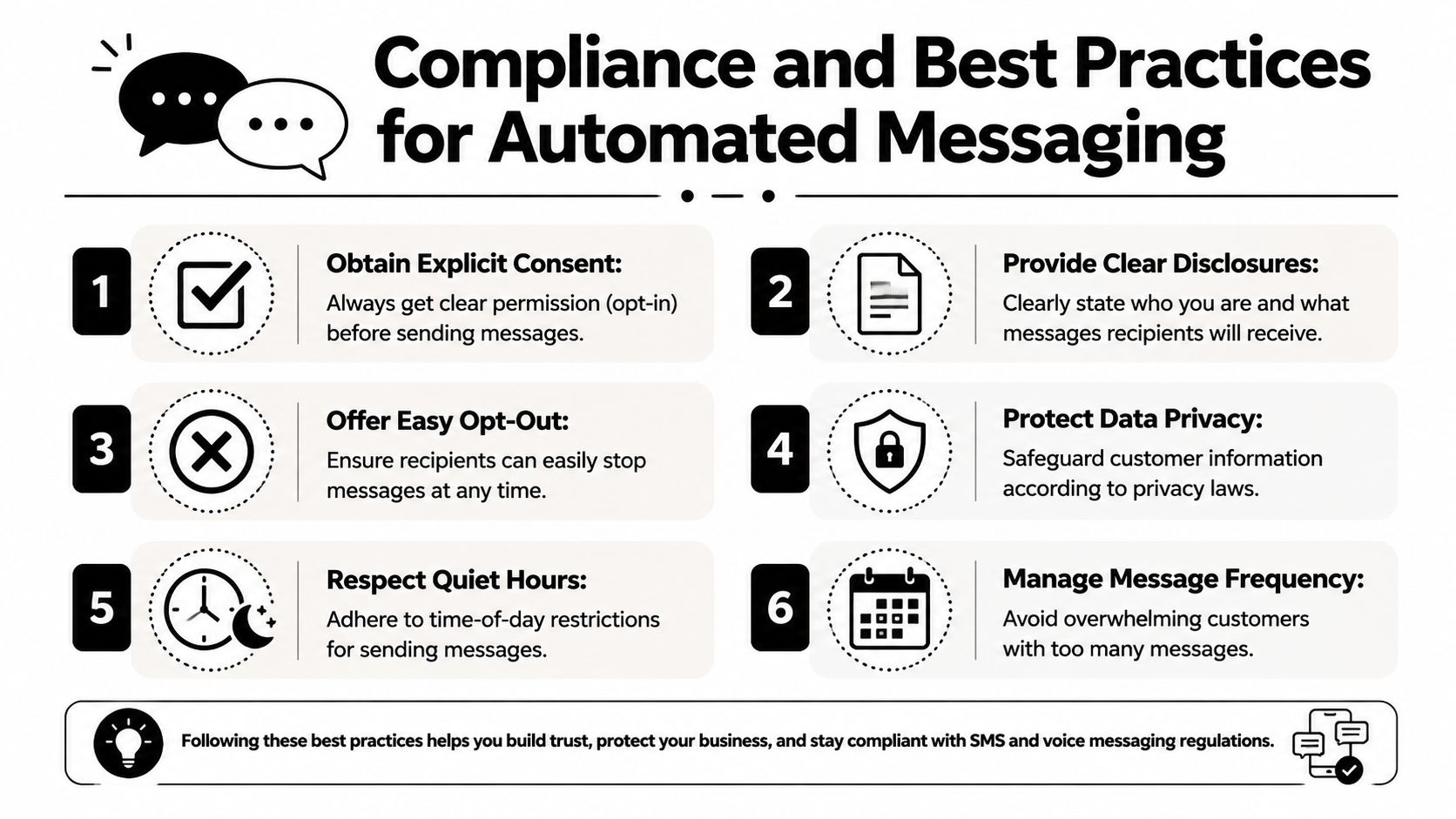
If you send promotional texts or automated voice messages, this article on express written consent requirements is worth reviewing with your team.
You don't need to become a telecom lawyer to avoid obvious mistakes. You do need operating discipline.
TCPA rules matter because they shape how businesses contact consumers by phone and text. The practical takeaway is straightforward: don't send automated promotional messages without appropriate consent, and don't treat list volume as more important than permission.
DNC management matters for voice campaigns because suppression failures create both compliance and trust problems. If a person asked not to be called, your system should prevent future voice outreach automatically.
HIPAA enters the picture when healthcare providers automate patient communication. In that context, the platform and workflow both matter. Teams need secure handling, controlled access, and message content that respects privacy.
Ringless voicemail gets attention because it can feel less intrusive than repeated live calls. That doesn't make it exempt from responsible use. It still requires consent-aware practices, sensible frequency, clear identification, and accurate list management.
Good compliance usually looks like good manners at scale.
Businesses that treat compliance as part of customer respect tend to write better messages, segment better, suppress better, and maintain cleaner data. That improves performance anyway.
A campaign can look active all week and still produce weak results. A small business owner may see text replies, voicemail callbacks, and email opens, then realize booked appointments and closed revenue barely changed. Measurement has to answer a harder question: did the automation create more qualified conversations, more sales, or less manual work?
Start with business outcomes, then work backward to channel metrics. For a local service business, that usually means booked jobs, estimate requests, inbound callbacks, and cost per booked lead. For a clinic or practice, it may mean confirmed appointments, fewer no-shows, and less front-desk time spent chasing responses. For a sales-driven team, pipeline contribution matters more than email open rate.
Track a short list first:
Multi-channel systems need one extra layer of discipline. Do not judge channels in isolation. SMS may drive the reply, ringless voicemail may create familiarity, and email may carry the booking link that gets the conversion. If you only credit the last click, you will underuse the channels doing the early persuasion.
Change one variable at a time and leave the rest of the sequence alone. That keeps the result usable.
Good first tests include:
I usually tell small businesses to test timing and calls to action before rewriting every message. Those two changes often produce the fastest lift because they affect response behavior across every channel.
Patterns usually show up fast.
If SMS gets replies but few bookings, the problem is often the next step. The message got attention, but the CTA asked for too much effort or pointed to a weak booking page.
If email gets opens but no clicks, tighten the copy and reduce the number of choices. One action beats three.
If ringless voicemail produces callbacks from older leads but underperforms with fresh web leads, keep it in the reactivation flow and stop forcing it into the new-lead sequence. Channel fit matters. Voice and voicemail often work best where trust, reminder value, or local recognition play a role.
Watch the downside metrics too. Rising opt-outs, complaint rates, low answer quality, and repeat contacts to the same unresponsive segment are signs that frequency, targeting, or message relevance needs work. In compliance-heavy systems, a campaign that creates more opt-outs or suppression events is not a winner, even if raw response volume looks decent.
Small gains compound. A better SMS CTA, a better voicemail day, and cleaner segmentation can turn the same lead volume into more booked conversations without adding staff.
If you want to build a first multi-channel automation system without stitching together separate tools for texting, voice, and ringless voicemail, Call Loop gives small businesses one place to automate outbound messaging, set up drip campaigns, personalize outreach with merge tags and segmentation, manage consent-aware workflows, and connect messaging to the rest of their stack through integrations.
Chris Brisson
Chris is the co-founder and CEO at Call Loop. He is focused on marketing automation, growth hacker strategies, and creating duplicatable systems for growing a remote and bootstrapped company. Chat with him on X at @chrisbrisson


Trusted by over 45,000 people, organizations, and businesses like


