
See a Demo
You're just one step away from seeing Call Loop in action.
Enter your information below to watch a demo right now.

You're just one step away from seeing Call Loop in action.
Enter your information below to watch a demo right now.

98% of text messages are opened, while email sits around 20% to 25%, and 81% of consumers check texts within five minutes of receipt (Upflow). For collections teams, that difference changes everything. A payment notice that lands in a text inbox gets seen fast, gets acted on fast, and is far more likely to move cash before a due date slips.
That's why payment reminder SMS has moved from a convenience to a core accounts receivable tool. Email still has a place for statements, attachments, and formal records, but it's slow for the moments that matter most. SMS fits the job of a short, urgent, action-oriented nudge, especially when the message contains the business name, amount due, deadline, payment method, and opt-out language.
Email still matters for statements and records, but it is a poor first move for overdue balances because it depends on the recipient opening a crowded inbox at the right time. SMS reaches the person where they already look throughout the day, on the device that stays in hand. For collections teams, that changes the workflow. The reminder gets seen first, the invoice detail can follow in email, and the account is less likely to drift past the due date while someone sorts through messages later.
The operational difference is just as important as the response speed. Industry sources report 98% open rates for text messages versus roughly 20% to 25% for email, and 81% of consumers check texts within five minutes. That speed matters because payment behavior is usually shaped by friction, not intent. A reminder that appears in a text thread can interrupt the “I'll handle it later” pattern before the invoice ages into a larger problem, while the email can still carry the formal record and attachments the customer may need.
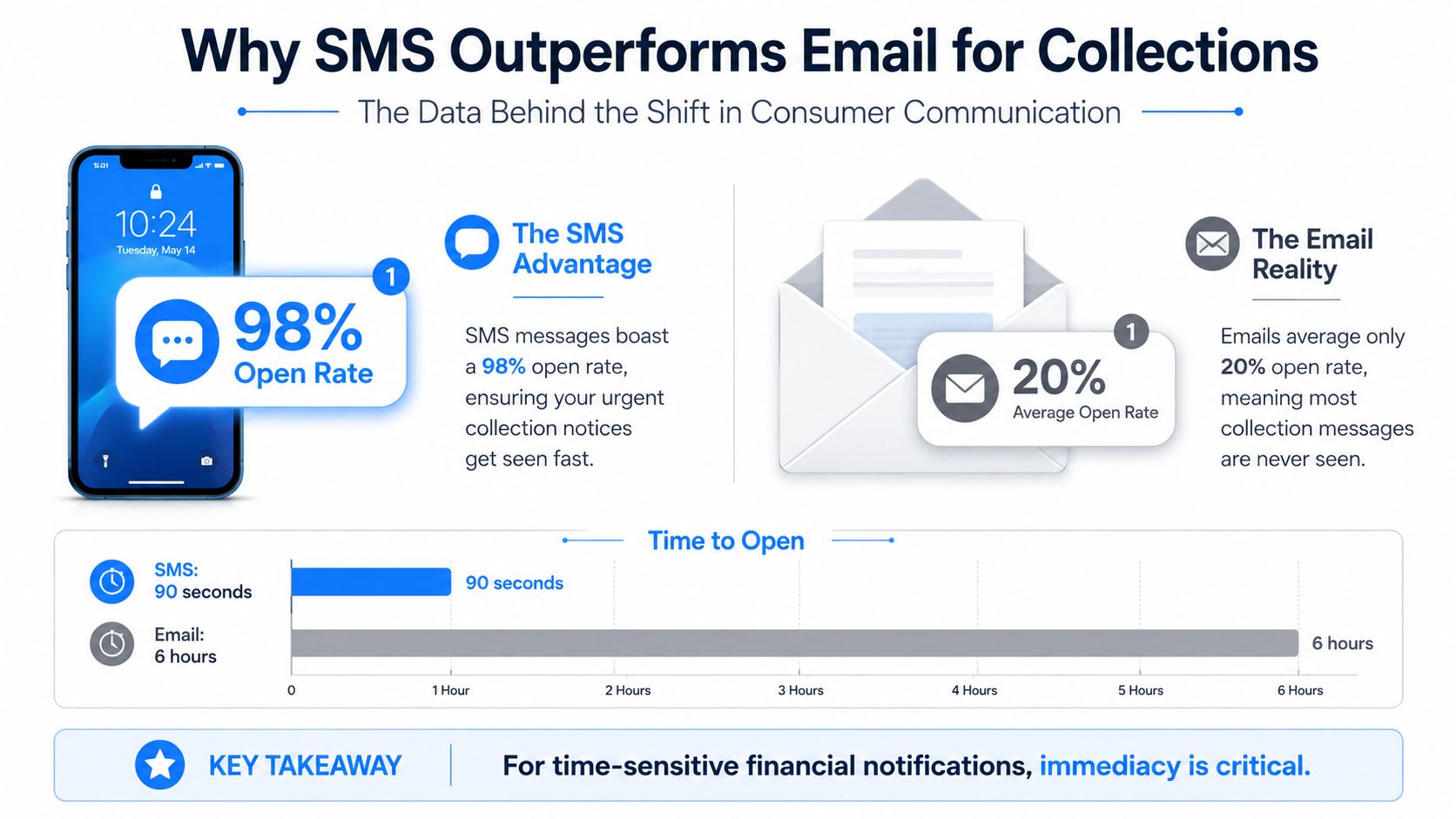
The shift is in how collections work day to day. With email-only chasing, staff spend time sending, resending, and waiting for a reply that may not come until much later. With SMS in the mix, the reminder becomes the first visible prompt and the email becomes the backup trail. That is the practical reason teams get better follow-through without adding more manual work to every account.
A well-run workflow also needs the reminder to fit into CRM activity, not sit outside it. When SMS is tied to invoice status, account owner, and follow-up rules, collectors are not starting from scratch each time an account turns late. The message can be triggered from the same record that holds the invoice notes, then handed off to email or a call task if the customer still does not pay. For a useful comparison of channel behavior, the SMS versus email marketing guide explains why text usually wins on immediacy while email still carries more detail.
Practical rule: Use SMS for urgency and email for documentation. If you reverse that order, response times usually slow down.
The same structure works in other recurring-balance settings too. A solid guide to stopping late rent shows the same pattern in a different context, reminders work better when they are timed, specific, and tied to a process rather than sent as isolated pings.
That is why SMS has become a standard collections tool instead of a nice-to-have. It shortens the time between invoice visibility and action, reduces manual follow-up, and gives operations teams a cleaner path from reminder to payment without forcing them to chase every account by hand.
A single “just checking in” text usually underperforms because it gives the customer too little structure. A better payment reminder SMS program follows a timed cadence that matches the invoice lifecycle, then adjusts tone as the account ages. The goal is to stay useful early, clear at the due date, and firmer only when the account needs pressure.
The standard pattern works because each touch has a different job. A reminder about a week before due date gives the customer a chance to schedule payment without feeling chased. A due-date text acts as the final nudge while the invoice is still current. Later messages, especially after a missed payment, should move from helpful to specific, then to explicit next steps if the balance remains unpaid (Sinch).
A clean sequence usually looks like this:
The point is not to sound harsher for its own sake. It's to make the payment status unmistakable at each stage. When a customer has lost track of the invoice, a polite prompt is enough. When the balance is several days late, the message has to remove ambiguity.
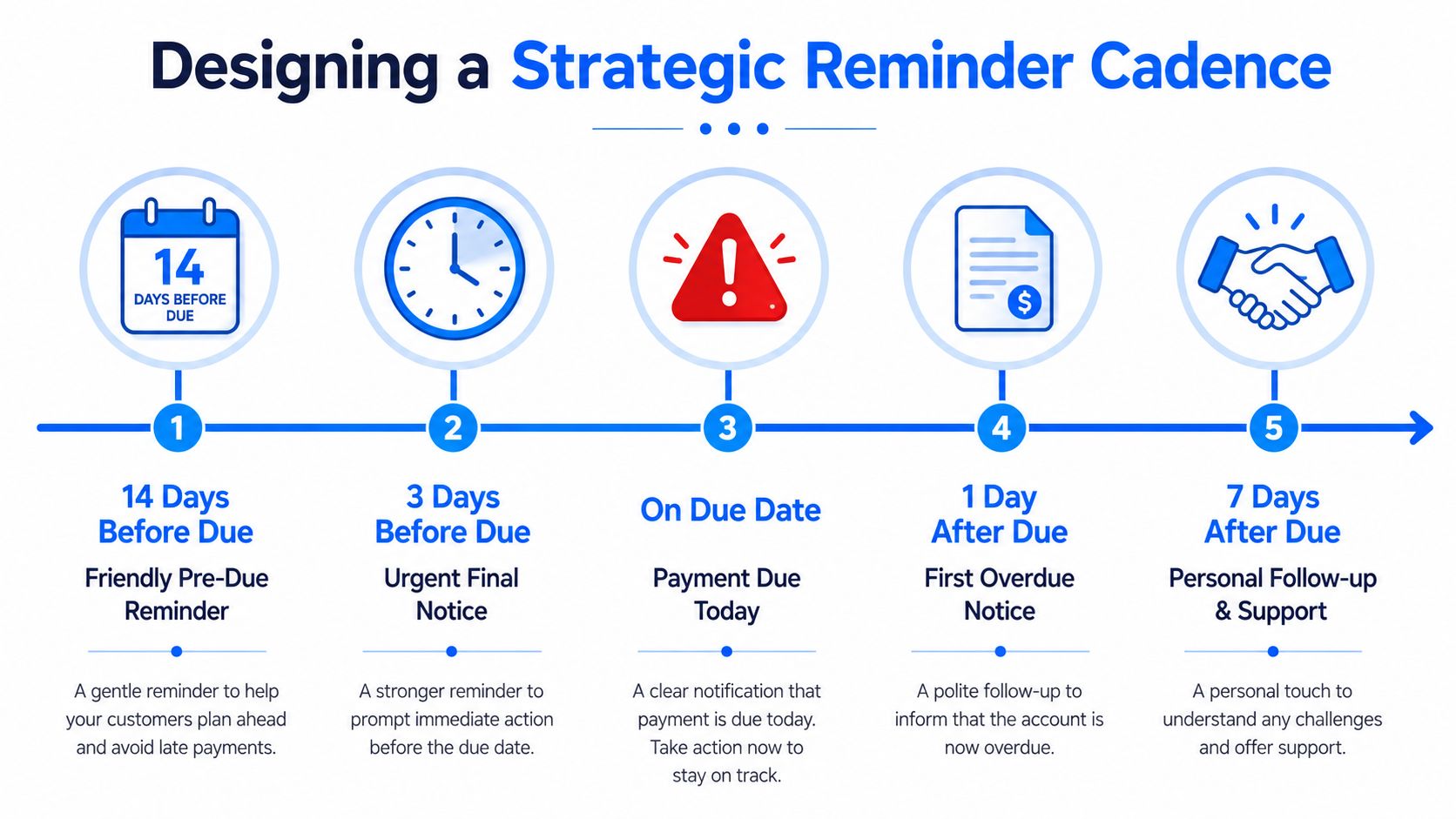
Tone matters as much as timing. A friendly reminder before due date can assume the invoice was overlooked. Once the payment is overdue, the message should state the amount, date, and next action without apology or drama. By the final notice, the customer should know exactly what happens next if they still don't pay.
Keep the language factual. If you can't back up a threat with a real follow-through step, don't include it.
That's also where automation helps. A good workflow sends the right reminder based on the invoice date, then stops automatically once payment comes in. That avoids the common mistake of sending a “please pay” text after the customer has already settled the bill.
The strongest payment reminder SMS templates are short enough to read instantly and specific enough to let the customer act without hunting for context. In practice, that means the message should carry the sender name, invoice number, amount due, due date or overdue status, and a direct payment link. If you keep it inside a single GSM segment of 160 characters, you avoid split messages and keep the text clean; certain emoji or special characters can reduce the usable length to roughly 70 characters per segment (PaidNice).
Here's the shape I've seen work best across different billing situations:
Those examples work because they give the recipient one clear action. They also stay close to the way collections teams write. Mailchimp recommends including the amount owed, a reference or invoice number, and a direct link to the payment processor, which is the difference between a reminder and a usable payment prompt (Mailchimp).
The direct link matters more than people expect. If the recipient has to search for the invoice, log in somewhere obscure, or call someone for a portal code, conversion drops in practice. A text should shorten the path to payment, not add another task.
Practical note: If the message needs three explanations, it probably belongs in email, not SMS.
For recurring billing or higher-value accounts, personalization can go beyond first name. You can tailor the tone by customer history, open balance, or relationship value, which is where segmented workflows beat copy-and-paste templates. Generic reminders often feel interchangeable, and interchangeable messages are easier to ignore.
Manual chasing breaks down the moment a billing team has more than a handful of invoices in flight. The workflow that scales is simple, invoice status enters the system, a rule selects the right reminder, and the message goes out automatically unless payment has already been posted. That's the kind of setup that keeps accounts receivable from turning into a daily spreadsheet exercise.
The cleanest build starts with custom fields for invoice number, amount due, due date, and payment status. From there, you can route invoice events from your CRM or billing stack through tools like Zapier, then trigger the right SMS sequence based on calendar date or unpaid status. If payment arrives, the automation should suppress the next reminder and send a confirmation instead. That simple stop condition prevents awkward follow-ups and protects the customer experience.
A workflow automation agency can help when the billing logic is tied to multiple systems, but the underlying principle stays the same, the text should always reflect the current invoice state. For teams looking to build this in-house, automated text message reminders are most effective when they are tied to real data, not manually copied contact lists.
Call Loop is one platform that supports this kind of multi-channel sequence, with SMS, voice broadcasting, and ringless voicemail available in the same outbound workflow. That matters when billing teams want reminders to move from text to voice without rebuilding the entire sequence.
Automation should also reduce friction on the customer side. Text-to-join keywords let recipients manage preferences without emailing support, and merge tags keep each reminder specific without adding manual work. If the platform also validates numbers and manages opt-outs, you cut the odds of wasted sends and confused recipients.
The biggest win is consistency. The same reminder goes out at the same point in the billing cycle every time, and the team doesn't have to remember who got what. That's where automation starts to show up as cleaner cash collection instead of just fewer administrative tasks.
A payment reminder SMS only works if the consent trail is clean. Teams that move from manual email chasing to automated text sequences need to track permission, keep opt-out handling tight, and control what appears in each message. If the reminder includes sensitive details, the issue moves beyond tone and into compliance risk.
Keep proof of opt-in, honor STOP requests automatically, and avoid exposing confidential information in the message body. If a healthcare provider is sending reminders, patient details should stay out of plain text and move through secure portals or another protected channel whenever the message touches PHI.
For teams building the consent side correctly, SMS opt-in for businesses is a useful reference because it shows how permission should be collected and managed in practice. A good internal process also makes room for a full SMS compliance checklist, so the billing team can confirm consent records, unsubscribe handling, and message content before anything goes out.
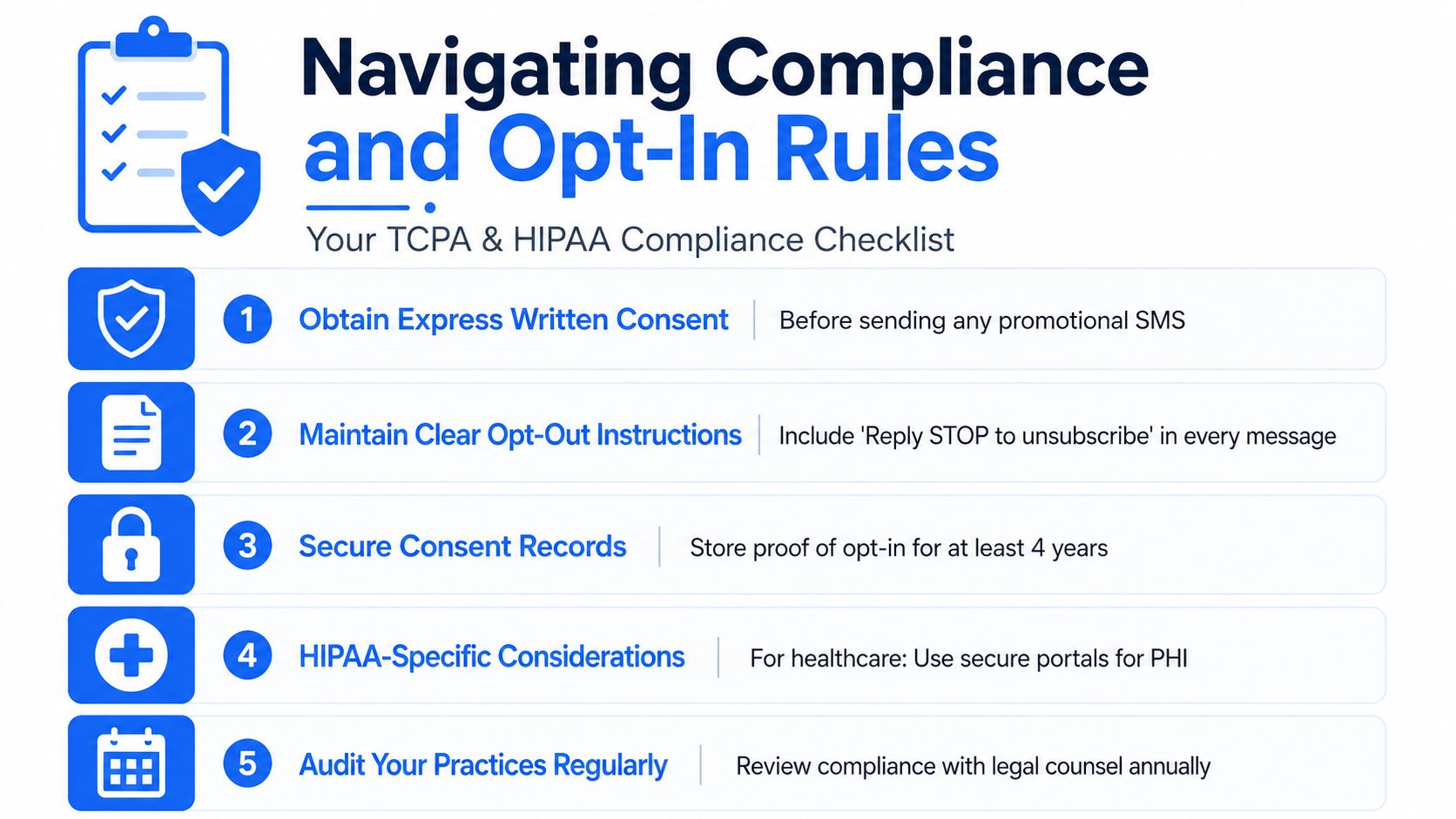
The operational habit matters as much as the policy. Store proof of consent, then make sure every reminder carries clear unsubscribe language and only the information the recipient is allowed to see.
Compliance affects delivery, not just legal exposure. Verification, consent records, and clean sender practices support deliverability, especially when a team is sending recurring notices at scale through CRM-driven workflows. If messages trigger complaints or carrier filtering, collections slow down even when the reminder timing is solid.
Review the process regularly and keep the message short, specific, and non-sensitive. Finance teams want speed, legal teams want restraint, and the workflow has to satisfy both. The practical answer is to keep the text lean, then route anything sensitive to a safer channel before it creates avoidable risk.
Some late payers ignore texts even when the timing and copy are solid. That's when ringless voicemail and live voice outreach become useful, not as a replacement for SMS, but as the next layer in the sequence. A voice message can add gravity, and a press-1 transfer can connect the customer directly to billing without forcing a long back-and-forth.
Ringless voicemail is especially useful when the account needs a more human touch without triggering a live call. It drops a message straight into voicemail, which keeps the contact less intrusive than a ringing call while still signaling that the account has moved to a more serious stage. Voice broadcasting works similarly when you need to reach multiple customers with a recorded update and then route interested callers into a live billing queue.
The best use case is stubborn delinquency. Text handles the early reminders, voicemail reinforces the message when silence continues, and live voice closes the loop when the account needs immediate attention. Used together, those channels create a cleaner escalation path than email alone ever can.
Call Loop gives you a way to automate payment reminder SMS, voice broadcasting, and ringless voicemail in one workflow, so billing teams can move from manual chasing to timed outreach without rebuilding their process. If you want to connect reminders to CRM data, segment by invoice status, and keep opt-outs and follow-ups organized, visit Call Loop and see how it fits your collections workflow.
Chris Brisson
Chris is the co-founder and CEO at Call Loop. He is focused on marketing automation, growth hacker strategies, and creating duplicatable systems for growing a remote and bootstrapped company. Chat with him on X at @chrisbrisson


Trusted by over 45,000 people, organizations, and businesses like


