
See a Demo
You're just one step away from seeing Call Loop in action.
Enter your information below to watch a demo right now.

You're just one step away from seeing Call Loop in action.
Enter your information below to watch a demo right now.

A customer update needs to go out now. Maybe bad weather just forced you to cancel classes. Maybe a speaker dropped out before your event starts. Maybe your sales team wants to push a same-day offer while people are still paying attention.
This is the moment where email feels too slow and manual calling falls apart. Spreadsheets don't route anything. Group texts get messy. Someone forgets to follow up, someone else calls the wrong list, and the whole thing turns into a scramble.
A solid phone tree template fixes that, but most templates online still solve the wrong problem. They focus on inbound IVR menus or old-school manual call-down lists. That leaves a real gap for teams that need outbound campaigns, not just inbound call routing. Existing guides still miss outbound automated phone trees even as outbound voice campaigns grew 28% YoY, and 62% of businesses reported higher engagement from automated sequences while struggling with DIY scripting because they lacked templates, according to TemplateLab's phone tree overview.
For modern outreach, the useful version of a phone tree isn't just "press 1 for sales." It's a planned sequence across voice, SMS, and ringless voicemail, built for reminders, promotions, alerts, and follow-up. That's where a template stops being an admin file and starts becoming an operating system for communication.
The fastest outreach systems are the ones you can launch without rethinking your process every time. That's why a phone tree template matters. It gives you a repeatable structure for urgent notices, routine reminders, lead follow-up, and after-hours campaigns.
For small and mid-sized businesses, the core problem usually isn't sending one message. It's sending the right message to the right segment in the right order. A team may need one message for active customers, another for missed appointments, and another for warm leads who asked for a callback. If all of that still lives in one spreadsheet and a few saved scripts, you're relying on memory when you should be relying on workflow.
Most phone tree content still assumes the caller is coming to you. That's useful for reception desks and support lines. It doesn't help much when you're the one initiating the outreach.
Outbound phone trees work differently. They need:
Practical rule: If your outreach requires more than one person to remember who gets called next, you need a template.
That doesn't mean every campaign needs a complicated build. In practice, the best outbound phone tree template is usually the simplest one that still handles segmentation, escalation, and message handoff cleanly.
A good template also reduces rewriting. Once you have a structure for reminders, promos, and urgent alerts, you stop building every campaign from scratch. You edit the message, update the list, test the flow, and send.
A phone tree started as a manual calling network. One person called a few people, who each called a few more. That basic idea later evolved with IVR technology in the 1970s, and by 1980, over 60% of Fortune 500 companies had adopted basic phone tree systems, reducing live agent interactions by an average of 40%, according to the Rotary District 6440 phone tree history summary.
Today, you can think about phone trees in two versions. The first is manual. The second is automated. Both still matter.
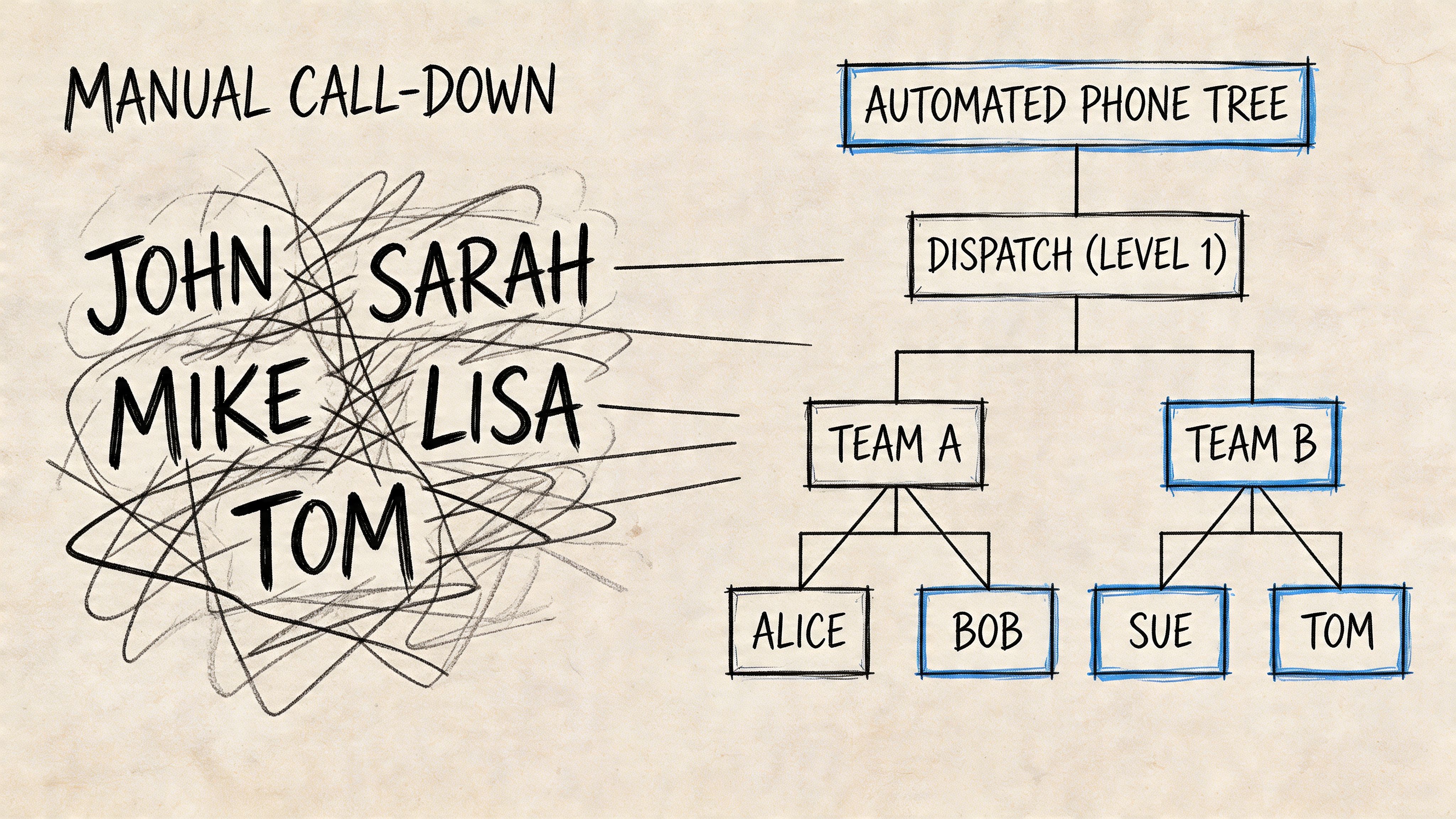
A manual phone tree is still useful when a team wants human confirmation. A school, nonprofit, church, or neighborhood group may prefer person-to-person calls for sensitive updates.
An automated phone tree handles scale better. It can deliver a pre-recorded message, trigger a transfer, send a follow-up text, or drop a voicemail without forcing staff to spend the next hour dialing.
The difference shows up fast in real use:
| Situation | Manual tree makes sense | Automated tree makes sense |
|---|---|---|
| Staff emergency alert | Yes, especially if confirmation matters | Yes, for immediate broad reach |
| Event reminder | Usually not ideal | Yes |
| Promotional campaign | Rarely | Yes |
| Appointment reminder | Sometimes for high-touch cases | Yes |
| After-hours update | Limited | Yes |
A karate studio may need to cancel evening classes because weather turns bad mid-afternoon. A recorded voice message gets attention faster than an email, and a follow-up text gives parents a written record.
A healthcare clinic might prefer ringless voicemail for appointment reminders because it feels less disruptive than a live call. That's especially useful when patients don't answer unknown numbers but still check voicemail.
An ecommerce brand may run a time-sensitive promotion with a voice announcement first, then an SMS reminder later that day. That kind of sequence works well when the offer expires quickly and the team wants a channel mix, not just a single send.
The best use case is usually time-sensitive, action-oriented, and too important to leave to inbox luck.
Don't use a phone tree when the message is vague, non-urgent, or better handled by a simple email. If the update doesn't require attention soon, voice can feel heavier than it needs to be.
Also don't force long menus into outbound campaigns. Outbound works best when the listener has one clear path. Listen, press a key, request a callback, confirm, or opt out. Anything more starts to feel like inbound support trapped inside a sales campaign.
Instead of a blank page, a starting structure that can be adapted quickly is often sought. A useful phone tree template should match the message type, the size of the audience, and whether the campaign is manual, automated, or hybrid.
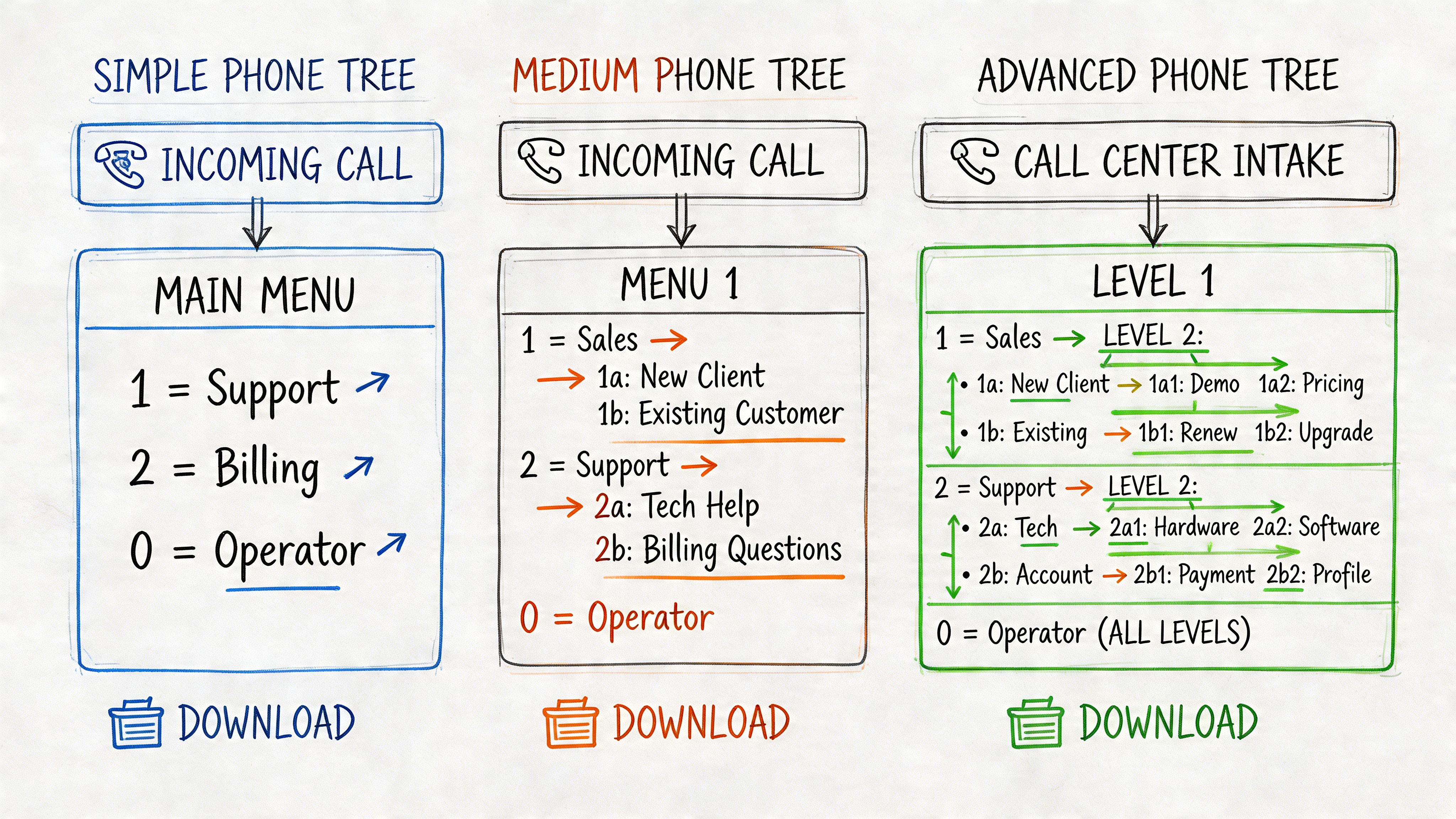
Simple emergency contact list
Use this for a small team that needs fast clarity more than automation. Keep names, roles, primary number, backup number, and who owns each follow-up call. This is the template for weather alerts, office closures, and last-minute staffing changes.
Tiered communication tree
This works when messages need to flow through supervisors, department heads, or location leads. It's a better fit for distributed teams, field staff, agencies, and organizations with multiple groups that shouldn't all receive the same script.
Outbound campaign script template
This is the one most guides skip. Build it for voice broadcasting, ringless voicemail, and SMS follow-up. Include placeholders for:
Use formats your team will maintain:
Keep one master version and one campaign version. The master stores clean contact data. The campaign version stores the message logic.
That split prevents a common problem. Teams often edit the contact file and the live script in the same document, then nobody knows which version is current.
A template only becomes useful when it matches how your organization communicates. The build should reflect urgency, audience, fallback rules, and what action you want after the message lands.
When mapping a phone tree, each caller should handle 2 to 4 contacts, and automated IVR trees should stay at 5 or fewer options per level to avoid overwhelming people, according to My AI Front Desk's telephone tree guide. That same guide notes that a well-designed manual tree can achieve 80% first-try success.
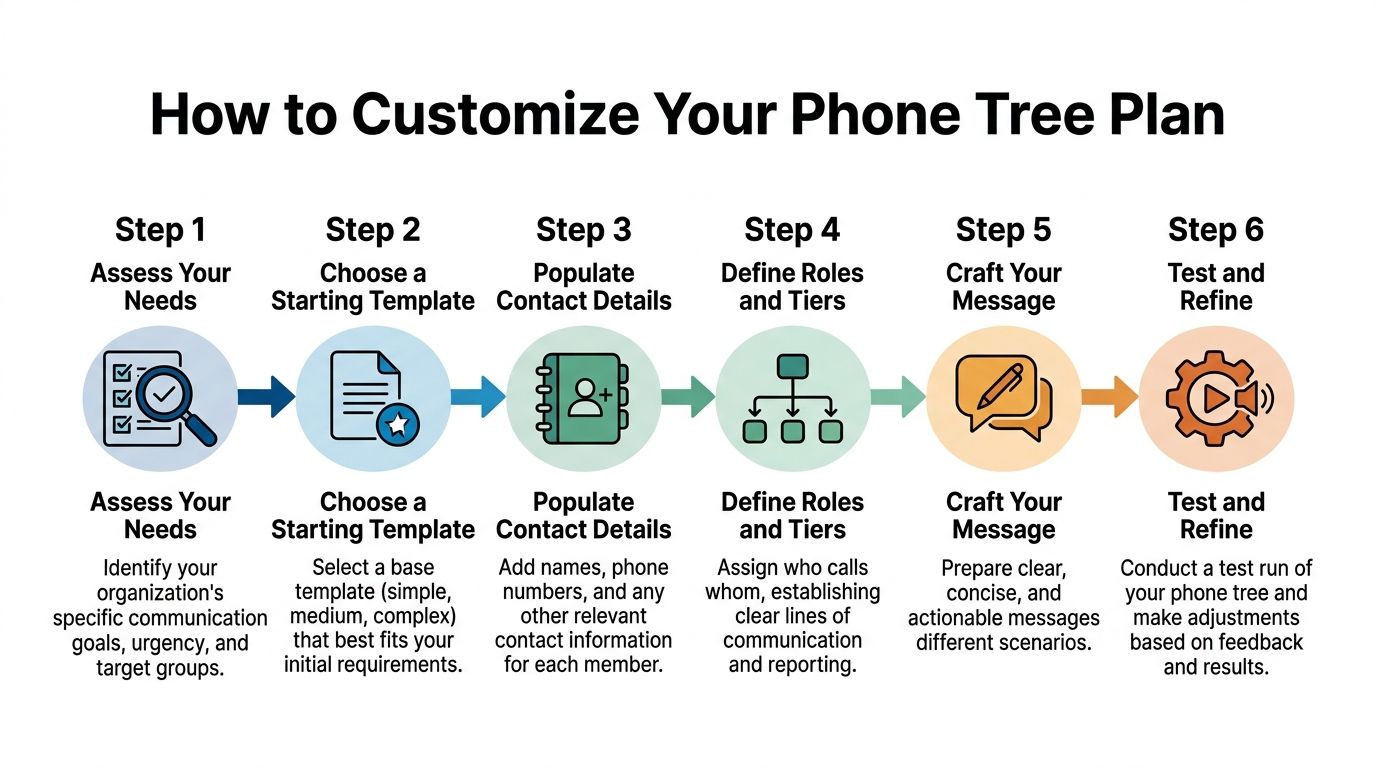
A reminder campaign and an emergency alert should not use the same logic.
If the goal is urgent notification, shorten everything. Keep the message direct. Remove optional branches. Focus on delivery and confirmation.
If the goal is marketing or re-engagement, you have more room to shape the experience. You can lead with a voice message, route interested recipients with a keypress, and follow with SMS or ringless voicemail depending on behavior.
Ask these questions before you build:
Most poor phone trees fail before the first call goes out. The audience list is too broad, outdated, or mixed together in ways that create irrelevant messaging.
Segment by something operational, not just demographic labels. That may be:
For outbound campaigns, your contact system should make those segments easy to maintain. A clean contact manager for grouped and editable audience data is what keeps your template usable over time, instead of turning it into another stale spreadsheet.
Traditional tree diagrams can look neat and still fail in practice. What matters is whether the next action is obvious.
For a manual structure, assign each person a small set of follow-ups. Two to four contacts per caller is manageable. More than that creates delays and missed handoffs.
For automated outbound trees, think in layers:
A practical outbound flow might look like this:
| Stage | Action | Why it works |
|---|---|---|
| Initial touch | Voice broadcast | Gets attention fast |
| Response path | Press 1 to connect | Captures intent immediately |
| No answer | Ringless voicemail | Less intrusive than repeated live calls |
| Follow-up | SMS confirmation | Gives written context and next step |
Lengthy explanations are counterproductive. They hurt response.
A phone script should answer three questions quickly:
Try this structure:
Hi [First Name], this is [Business Name]. We're calling about [reason]. To [take action], press 1 now. If you'd rather get details by text, stay on the line for a follow-up message.
That works better than loading the recording with every policy, every date, and every option. Save the details for the text message or the transferred rep.
The tree isn't finished until you define failure handling. That means deciding what happens when someone doesn't answer, when a transfer can't connect, or when the wrong segment gets included.
Use plain rules:
If nobody knows what happens after a missed call, the tree isn't a system yet. It's just a recording.
That one distinction saves a lot of wasted outreach.
A phone tree can be efficient and still create problems if the outreach is sloppy. The messages may be clear, but if the list is outdated, the opt-in trail is weak, or the routing logic traps people, you'll frustrate the audience and create avoidable risk.
The fixes are practical. Test the flow, document consent, respect opt-outs, and track the right metrics.
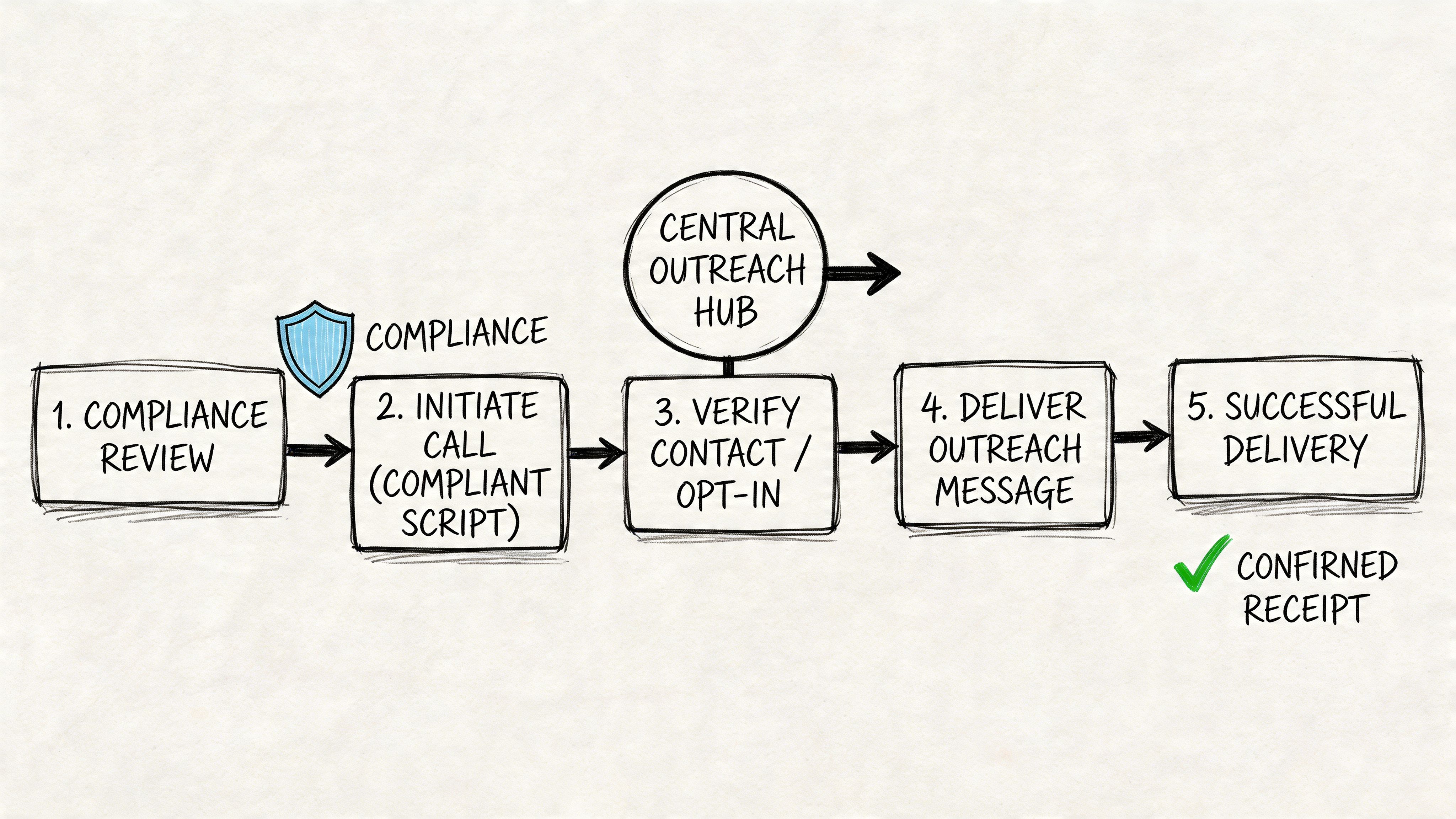
According to the Smith.ai guide to phone tree optimization, teams should aim for abandonment rates under 5% and First Call Resolution above 80%. That same guide notes that having more than 4 to 5 menu options can increase abandonment by 15% to 20%, and failing to provide a human option can cause frustration spikes of up to 40%.
Those numbers line up with what teams see in practice. Overbuilt trees underperform. Too many options create hesitation. No clear escape route creates annoyance.
A better standard is simple:
For outbound voice, ringless voicemail, and SMS, consent handling needs to be built into the campaign process, not bolted on later. Every team sending automated outreach should know exactly when and how permission was captured.
If your process around consent still feels fuzzy, review express written consent requirements for automated outreach. It helps clarify what teams need to document before launching automated campaigns.
Healthcare teams need to go one step further. They shouldn't only ask whether a patient can be contacted. They should also define what content belongs in a voicemail, what should move to a secure message, and which campaigns require tighter review because of HIPAA obligations.
A message can be technically delivered and still fail.
Run test sends with actual internal users before launch. Confirm whether the caller ID looks trustworthy, the audio sounds clean, the transfer path works, and the text follow-up arrives in the right order. For urgent or sensitive campaigns, it's also smart to align your outreach process with broader crisis communication best practices so your team doesn't improvise under pressure.
Use a simple review checklist:
| Checkpoint | What to verify |
|---|---|
| Audience | Right segment, no stale contacts |
| Script | Clear reason and action |
| Compliance | Opt-in, opt-out, DNC rules covered |
| Routing | Transfers, callbacks, fallback path |
| Follow-up | SMS or voicemail sequence lands correctly |
A compliant campaign isn't the one with the longest legal note. It's the one with a clean permission trail and a clear opt-out.
Once the campaign runs, the work isn't done. Look at where people dropped off, where they pressed through, and where they asked for a human.
If abandonment is high, shorten the message or reduce choices. If the wrong people are engaging, tighten segmentation. If staff are fielding confusion calls, the script probably needs to be simpler.
The strongest phone tree templates are living documents. Teams revise them as lists change, offers change, hours change, and audience behavior changes.
Planning matters, but the value shows up when the template turns into a live campaign. That's where outbound systems need to do more than just call a list. They need to coordinate channels, route responses, and support different audience behaviors without creating extra manual work.
This is especially true for businesses sending reminders, follow-ups, promotions, and operational notices at scale.
A strong outbound setup usually starts with a segmented list and one primary message. From there, the system should react based on what the recipient does.
Someone who answers live may hear a short recorded message and choose to press 1. Someone who doesn't answer may get a ringless voicemail. Someone who needs written details may receive an SMS follow-up.
That kind of orchestration is why a modern phone tree template works better when it's designed for campaigns, not just call routing.
If you're comparing setups, this overview of a voice broadcasting service for business outreach is a useful reference point for how recorded voice campaigns fit into broader outbound workflows.
The most effective outreach doesn't force one channel to do everything.
Voice broadcasting works well when immediacy matters. It gets attention, delivers tone, and can push a quick action like a transfer request.
Ringless voicemail works well when you want less interruption. For many reminders, event updates, and reactivation campaigns, that format feels lighter while still delivering a voice message.
SMS works well as reinforcement. It gives recipients a written reminder, a callback number, a confirmation link, or a short summary after the voice touch.
According to Quo's phone tree template analysis, businesses using phone tree templates saw 50% to 70% reductions in call handling times, and systems integrated with SMS and ringless voicemail can achieve 90% delivery success rates while boosting after-hours response rates by 35%.
Here are three outbound formats that tend to hold up well in day-to-day use:
Reminder sequence
Voice or ringless voicemail first, SMS second. This works well for appointments, event attendance, and schedule changes.
Lead follow-up sequence
Short voice message with a press-1 option, then a text if there's no response. Good for sales teams that want to capture intent while it's fresh.
Promotion sequence
Ringless voicemail for the initial offer, then SMS for urgency and details. Useful when you want reach without forcing a live answer.
Don't stack every feature into one campaign. Too many touches, too many branches, or too many messages in a short window can make the outreach feel chaotic.
Keep the sequence tied to one outcome. Confirm the appointment. Claim the offer. Call back the rep. Attend the event. If the message asks for too many things, response drops because recipients don't know which action matters most.
The cleanest phone tree campaigns sound simple to the recipient, even when the backend logic is doing a lot of work.
That's the standard worth aiming for.
A good phone tree template gives your team more than organization. It gives you speed, consistency, and a cleaner path from message to action. The best setups stay simple, segment carefully, respect consent, and use voice, SMS, and ringless voicemail where each channel fits best.
If you work with churches or ministry teams, it's also worth reviewing tools beyond voice. This roundup of Email Marketing Automation Tools for Your Church is a helpful complement for organizations balancing announcements across multiple channels.
The important part is to stop treating outreach like a one-off task. Build the template once. Refine it. Use it repeatedly.
If you're ready to turn your phone tree template into real outbound campaigns, Call Loop makes it easy to send voice broadcasts, ringless voicemail, and SMS from one platform while keeping your outreach organized, scalable, and compliant.
Chris Brisson
Chris is the co-founder and CEO at Call Loop. He is focused on marketing automation, growth hacker strategies, and creating duplicatable systems for growing a remote and bootstrapped company. Chat with him on X at @chrisbrisson


Trusted by over 45,000 people, organizations, and businesses like


