
See a Demo
You're just one step away from seeing Call Loop in action.
Enter your information below to watch a demo right now.

You're just one step away from seeing Call Loop in action.
Enter your information below to watch a demo right now.

At 5:07 a.m., the decision may already be made. Roads are slick, transportation is waiting, principals are checking conditions, and your front office knows what's coming next. Parents don't care how complicated the decision tree was. They want one thing fast. A clear, trustworthy message that tells them whether school is open, delayed, or closed.
That's why school closings text systems matter so much. This isn't just a convenience feature. It's an operational process that touches attendance, transportation, meal service, after-school programs, staff scheduling, and family trust. When the message is late, vague, or inconsistent across channels, the phones light up and confusion spreads faster than the update.
The schools that handle closure mornings well usually aren't improvising. They've already built an opt-in list, written message templates, decided who approves what, and set up backup channels like voice broadcasting and ringless voicemail for families who won't reliably get a text.
A closure morning feels like a communications problem, but it starts as an instructional time problem. Every delayed decision compresses the window families need to adjust work schedules, childcare, transportation, and breakfast routines. That operational stress turns into missed class time, late arrivals, and preventable frustration.
The academic stakes are real. In a study of Maryland student assessment data, researchers found that in academic years with an average of 5 unscheduled closures, the share of 3rd graders performing satisfactorily on statewide reading and math assessments was nearly 3% lower than in years with no school closings, according to the Maryland school closure study. That doesn't mean a text alert fixes learning loss by itself. It does mean closure communication belongs in the same conversation as continuity planning.
A late message causes a chain reaction:
Practical rule: If your first official message creates follow-up questions, it was incomplete.
The best school closings text workflow treats speed and clarity as a single standard. Fast but vague isn't good enough. Detailed but late isn't good enough either.
Experienced school leaders know the closure decision isn't finished when the superintendent approves it. It's finished when a parent can read one message and know exactly what to do next.
That means your notification system has to answer real family questions immediately. Is this a full closure or just a delayed opening? Are after-school activities canceled? Will buses run? Are childcare programs affected? If you don't answer those in the first wave, your district will answer them one by one on the phone.
Your alert system is only as good as the contact data behind it. Most failures don't start on closure day. They start months earlier when schools import old numbers, skip consent language, or assume every family can receive SMS the same way.
If you're building a school closings text program, collect consent deliberately. Don't bury it in a long packet and assume that's enough. Put opt-in language on enrollment forms, registration updates, open house materials, and family portal pages. If you use text-to-join keywords, make the purpose obvious so families know they're signing up for operational alerts, not general marketing.
Good list-building usually includes:
Enrollment capture
Add mobile number fields for parent, guardian, and emergency contacts. Give families a clean way to choose text, voice, or both.
Annual verification
Contact records drift fast. Families change carriers, lose access to devices, or switch numbers between school years.
Keyword signups
Text-to-join works well at back-to-school nights, orientation events, and printed handouts because it gives families a simple action to complete on their own phone.
Website forms
If you need a simple way to collect and route submissions from your site, an open source contact form integration tutorial can help your team set up a form workflow without making the front office babysit inboxes.
A lot of schools think they have reach because they have numbers in the student information system. That's not the same as a healthy alert list. Some records are stale. Some families share one device. Some guardians prefer calls over texts. Some households can't depend on mobile access at all.
Current school closing text alert systems often overlook 15-20% of households without reliable cell phone access, non-English speaking families, or deaf/hard-of-hearing students, creating unequal access to timely information, as noted in this discussion of equity gaps in school delay and closing notifications.
That changes how you should manage contacts.
Use your list review to find gaps that matter in real conditions:
A compliant list protects your school. An inclusive list protects your families.
One of the biggest mistakes I see is shared responsibility without named ownership. Transportation has numbers. Front office staff have numbers. The district office has another file. Nobody knows which one is current.
Use one system of record, one update process, and one person accountable for hygiene. Your communications team can't send reliable closure alerts from four conflicting spreadsheets.
Most bad closure messages fail for one reason. They assume families already know the context. On a weather morning, they don't. They're reading quickly, often from bed, while deciding whether to wake children, leave for work, or arrange care.
A useful school closings text should answer the basics in plain language:
If the issue is a delay, include the new start time or dismissal adjustment. If after-school programs are canceled, say so directly. Don't make parents infer it.
Here's a weak message:
Schools on delay today due to weather. More info soon.
It creates more questions than answers.
Here's a stronger version:
Due to weather, all district schools will open on a 2-hour delay today, Tuesday. Morning bus pickup times will run later than normal. Breakfast service will be adjusted. After-school activities will proceed unless otherwise announced. Details: district website.
The second version gives parents enough to act immediately.
Full-day closure
District schools are closed today, [day/date], due to weather conditions. All classes, buses, and after-school activities are canceled unless your school shares a separate update. See the district website for program-specific information.
Delayed opening
District schools will open on a [delay length] delay today, [day/date]. Bus pickup and school start times will shift accordingly. Check the district website for updated schedules and activity changes.
Early dismissal
Due to worsening conditions, district schools will dismiss early today. Buses will run at adjusted times, and after-school activities are canceled. Please review dismissal details on the district website now.
Keep these habits in place:
| Message element | What works | What fails |
|---|---|---|
| Opening line | State the decision immediately | Long weather explanation first |
| Scope | Name affected schools or programs | “Some buildings” or “certain activities” |
| Timing | Give the exact day and operational change | “Today” with no timestamp context |
| Follow-up | Link to one official detail page | Sending families to search social media |
One more rule matters. Don't stack multiple decisions into one overloaded text if they apply differently by school. Segment the message instead.
One channel won't carry a closure notice reliably across your whole community. Families miss texts, email gets buried, social posts get copied out of context, and some guardians still rely on voice communication. That's why effective school closings text programs use a layered toolkit instead of one blast and a hope.
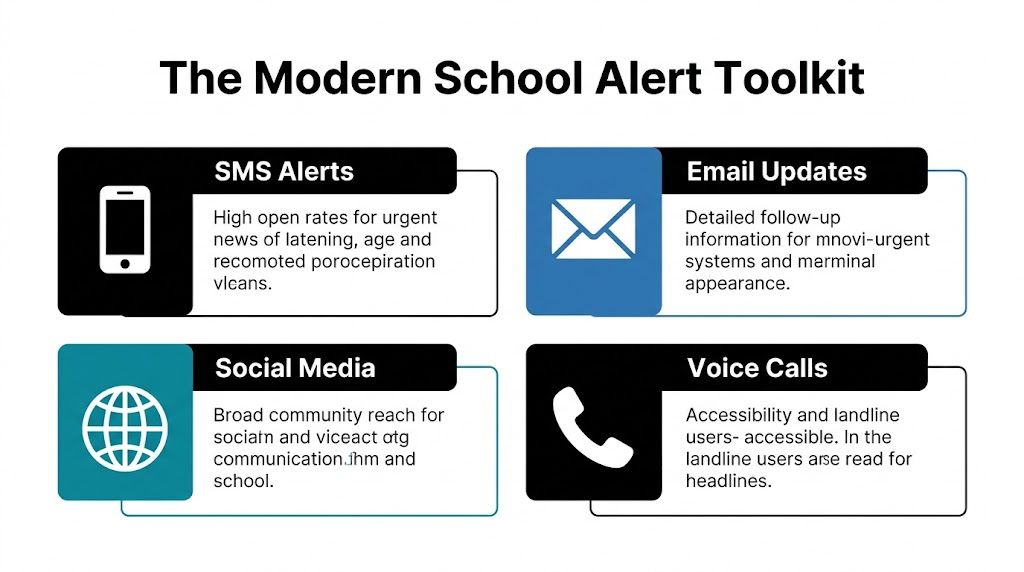
An effective workflow should use a multi-channel cascade. First SMS to opted-in parents, then backfill with email and website updates. The reason is practical. Text messages have a 98% open rate with 95% read within three minutes, but a text-only approach can still miss families because of opt-in gaps or device access limits, according to this guidance on sending school closings and delays by text.
| Channel | Best use | Limitation | Where it fits |
|---|---|---|---|
| SMS | Fast headline alert | Misses non-opted-in contacts | First alert |
| MMS | Useful when an image or graphic adds context | Not ideal for every device or audience | Selective follow-up |
| Detailed instructions and links | Slower attention in urgent moments | Backfill and documentation | |
| Voice broadcast | Strong for landlines and accessibility | Longer listen time | Backup and broad reach |
| Ringless voicemail | Personal recorded update without requiring a live answer | Not as immediate as a short text | Secondary reassurance and nuance |
Ringless voicemail is especially useful when a principal or district leader needs a human voice in the mix. Families often trust a calm recorded message more than a screenshot floating around social media. That matters for weather closures, safety concerns, and situations where the school day changes in stages.
Good uses include:
Use text for the decision. Use voice for reassurance and clarification.
If your team is comparing systems, it helps to review practical examples of texting workflows for schools and then decide which channels your community actually uses, not which ones look best in a demo.
Social media has a place, but it shouldn't be the primary source of truth. Posts get reshared without context, screenshots outlive corrections, and comment threads turn into rumor mills fast.
A safer channel order looks like this:
Call Loop is one example of a platform that supports SMS, voice broadcasting, and ringless voicemail in the same communication stack, which can make this kind of layered outreach easier to manage from one workflow.
Manual sending sounds manageable until the first real closure morning. Then someone has to wake up, confirm the message version, pull the right list, avoid duplicate sends, update the website, and coordinate with transportation before families start calling. That's too much to leave to muscle memory.
The need for automation isn't theoretical. The National Center for Education Statistics reported 755 school closures in the U.S. in 2021–22 in its school closure fast facts data. Closures happen often enough that your communication process should be built like an operational system, not a one-off emergency reaction.
The most dependable setup usually includes prebuilt assets and simple approval paths.
A lot of districts also benefit from syncing website forms and operational requests into communication workflows. If your team is handling inbound updates from departments or campuses, a Twilio form integration can be a useful reference for routing form submissions into messaging actions without relying on manual copy-paste.
The best closure systems don't fully automate the decision. They automate the heavy lifting after the decision is made.
That can mean:
If your team still uses a call chain for backups, studying a modern phone tree system approach can help you replace fragmented outreach with a cleaner automated flow.
Automation reduces the chance that your first public message is delayed by one missing spreadsheet or one sleeping staff member.
Automation should remove busywork, not judgment. Someone still needs to confirm that the right schools, dates, and activity impacts are named correctly. A fast wrong alert is worse than a slightly slower accurate one.
A fast alert only works if families believe it. That's the part many districts still underweight. They put energy into sending messages, but not enough into proving that those messages are authentic, accessible, and consistently delivered.

Districts now have a newer problem to manage. As AI-generated fake school closure posts begin circulating online, schools need a clear way for parents to verify what's real. Most current guidance still lacks verification protocols, which creates a trust gap, as highlighted in this report on AI-generated fake school closure alerts and verification concerns.
Every school should publish a short, repeatable rule families can remember under stress. Keep it simple enough that a parent can explain it to a grandparent or caregiver.
A practical protocol looks like this:
Check the sender
Parents should know the exact phone number, shortcode, caller ID, website, and social account names the district uses.
Confirm through a second official channel
If a text says school is closed, the same update should appear on the district site and another official channel.
Ignore screenshots without source context
A screenshot isn't proof. It should push families back to the official website, not serve as the decision itself.
Use one official details page
Every alert should point to the same verified closure page so families aren't comparing conflicting posts.
Most testing focuses on whether messages send. You also need to test whether the community recognizes and trusts them.
Run drills that answer questions like these:
If families need to ask, “Is this real?” your communication system has an identity problem, not just a delivery problem.
Trust is built before the emergency. Use the same sender names, the same website location for alerts, and the same wording conventions every time. Don't switch tools, phone numbers, or approval voices casually. Familiarity helps families spot imposters.
This is also where policy matters. District leaders who are reviewing broader safety planning may find it helpful to think about closure messaging as part of managing risks in educational settings, not just as a front-office task.
For consent and audit protection, make sure your notification workflow aligns with documented opt-in practices. This overview of express written consent requirements is a useful reference point when your team is tightening its process.
A trustworthy school closings text system does more than push alerts. It gives families a reliable habit. When your community knows where real information comes from, fake alerts lose power.
If your school needs a practical way to send closure notices across SMS, voice, and ringless voicemail from one workflow, Call Loop is one option to evaluate. Set it up around consent, segmentation, and clear approval rules, and you'll be in a much better position the next time the weather turns before sunrise.
Chris Brisson
Chris is the co-founder and CEO at Call Loop. He is focused on marketing automation, growth hacker strategies, and creating duplicatable systems for growing a remote and bootstrapped company. Chat with him on X at @chrisbrisson


Trusted by over 45,000 people, organizations, and businesses like


