
See a Demo
You're just one step away from seeing Call Loop in action.
Enter your information below to watch a demo right now.

You're just one step away from seeing Call Loop in action.
Enter your information below to watch a demo right now.

It's usually a normal workday when the problem shows up. A manager needs to reach everyone fast. The office is closed. A shift start changed. A delivery is delayed. Someone tries email first, then realizes half the team won't see it in time.
That's why so many owners search for ways to send a mass text message to employees free. It sounds simple enough. Use what's already on your phone, avoid new software, and get the message out. For a very small team, that can work for a while.
The issue isn't whether free methods exist. They do. The issue is whether those methods still work once the message is important, time-sensitive, or recurring.
At 7 AM, a broken pipe, power outage, or site closure can turn into a payroll and staffing mess if your team doesn't hear from you quickly. Calling people one by one takes too long. Email often sits unread. A phone tree depends on too many people doing their part perfectly.
Texting solves the speed problem because employees already carry the device. They don't need to log into a portal or check a company inbox. They just get the alert.
Around 39% of businesses and organizations use SMS text messages to communicate, and 30% specifically use texting for employees and staff. Among organizations that text, 63% are SMBs, which shows this isn't just an enterprise habit. Smaller organizations use it too, according to business texting adoption data from MessageDesk.
Some employee messages need immediate attention. Others just need to be seen reliably.
Practical rule: If the message affects where someone should be, when they should arrive, or whether they should come in at all, text is usually the right first channel.
A lot of owners start with free tools because that feels responsible. That instinct makes sense. What matters is knowing where free methods are useful, and where they start costing you more time, more confusion, and more risk than they save.
The free path usually starts with whatever you already have. Your phone. Your email account. Maybe a basic voice number. That's fine for testing the habit of faster communication, but each method breaks in a different way.
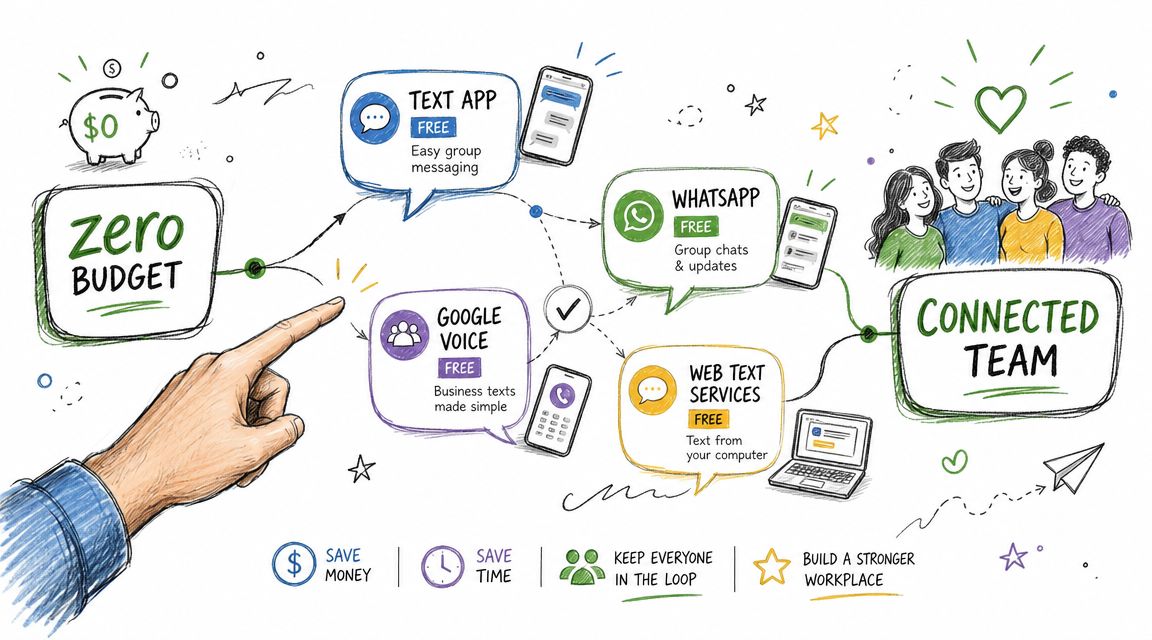
This is the most obvious option. Open Messages, add your employees, type the alert, send it.
It works best for a tiny team that already knows one another and doesn't mind seeing replies from everyone else. If you're messaging a few people about a same-day adjustment, it's the fastest no-budget method.
The downside shows up immediately once replies start. One employee says “Got it.” Another asks a side question. Someone else replies hours later. The original alert gets buried, and everyone sees everyone else's response.
Best use: One-off updates for a very small team
Main drawback: Reply-all clutter and no real list management
Some carriers support email-to-text delivery through a special address tied to a mobile number. In practice, that means you can send a message from your email account and it may arrive as a text on the employee's phone.
This can be useful if you're at a desk and need a quick workaround. But it's clunky. You need the right carrier format for each person, and the setup gets messy if your team uses different carriers or changes numbers often.
Best use: Last-resort desktop workaround
Main drawback: Carrier dependency and tedious upkeep
A basic texting number can help if you want to avoid using your personal mobile number. For very small teams, that can be a step up from texting from your own phone.
The problem is scale and workflow. These tools aren't built for structured employee broadcasts, organized segmentation, or repeat operational messaging. Once you're texting by shift, location, or role, you'll feel the friction fast.
The practical version is less about “free” and more about “low-cost and manageable.” The usual workflow is to collect consented mobile numbers, upload them into a bulk SMS platform, segment by location, shift, or role, write a short alert, and schedule or send it. Platforms used for employee communication also describe filtering bad numbers and saving reusable groups. The strongest alerts stay brief and use a short link for details because SMS is limited by the 160-character limit before messages split into segments, as described in Text-Em-All's employee communication workflow guide.
That workflow matters because it fixes the biggest amateur mistake. Owners often treat employee texting like a personal group chat when they really need one-to-many delivery with private replies.
Here's a practical comparison:
| Method | Good for | Where it breaks |
|---|---|---|
| Phone group text | Tiny teams, rare messages | Reply-all chaos, no privacy |
| Email-to-SMS | Desk-based emergency workaround | Carrier issues, manual setup |
| Basic texting number | Very small teams | Weak segmentation, limited management |
| Bulk SMS platform | Repeated employee alerts | Usually not fully free |
If you want a broader look at no-cost starting points, this guide to free group text messaging service options is useful as a comparison point. The key is to treat free tools as a short runway, not as a permanent system.
Keep the text short. Put the action first. If employees need detail, send them to a short link rather than cramming the whole explanation into the message.
Free tools look cheap because the invoice is low or nonexistent. The actual cost shows up in missed alerts, manual cleanup, and compliance problems.
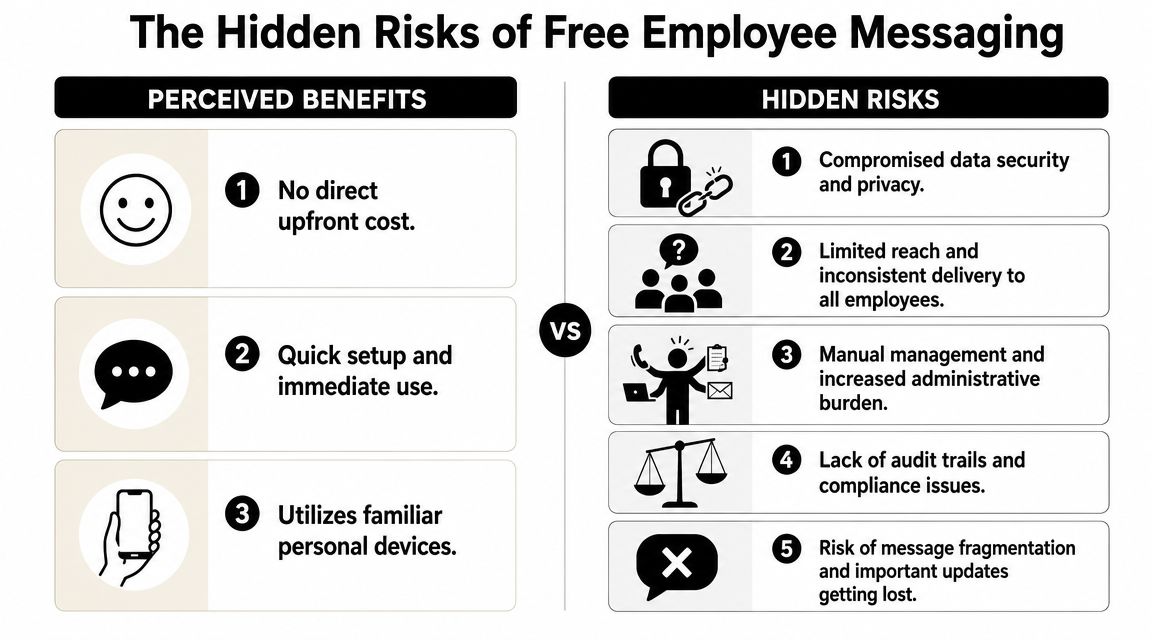
A business can't treat employee mobile numbers like an informal contact list forever. If you're sending broadcast texts, the safest operating standard is clear opt-in handling, a clear opt-out path, and prompt removal of unsubscribed or former employees.
Employee-messaging vendors also note that broadcast sending often requires a registered sender, and some platforms require free 10DLC registration for workforce messaging, according to Textedly's guidance on mass texting employees. That's the part many “free” guides skip. The software might be cheap, but compliance-ready delivery still needs structure.
If you need a plain-English primer on permission standards, this explainer on express consent for texting is worth reading before you upload a single employee list.
A manager sends a text and assumes it landed. That assumption is dangerous.
With improvised methods, you usually don't know whether a carrier filtered the message, whether the number was bad, or whether the employee ever received the alert. You also won't have a clean reply log or delivery view for auditing what happened after the send.
Free sending feels cheap until the first urgent message goes missing and you find out from the employee who never showed up.
The bigger your team gets, the more free methods create busywork. You update numbers manually. You remove old employees by hand. You copy and paste the same reminders again and again. You scroll through mixed-up replies trying to figure out who answered.
The practical problems usually look like this:
The hardest part about trying to send a mass text message to employees free is that the tool can seem functional right up until the moment it matters. Routine reminders may get through. Then a weather closure, compliance notice, or staffing change exposes the weak spots all at once.
That's why “free” often means “unmanaged.” And unmanaged employee communication becomes a real business problem quickly.
Most employee texts fail because they're too long, too vague, or missing a clear action. A useful alert tells people what happened, what they need to do, and where to get more detail.
Use this when employees need immediate direction.
[Business Name]: Location closed today due to a facility issue. Do not report to the site until further notice. Check updates here: [short link]. Reply STOP to opt out.
Why it works: the action comes early, and nobody has to guess whether they should still come in.
Use this for attendance and simple accountability.
[Business Name]: Reminder that your shift starts at [time] today at [location]. Reply YES to confirm you received this. Reply STOP to opt out.
This format is simple enough for fast reading and easy enough for employees to answer without friction.
Use this for policy changes, meetings, or benefits updates when the full explanation doesn't fit in a text.
[Business Name]: New employee update available. Please review here before [deadline]: [short link]. Questions? Reply to this message. Reply STOP to opt out.
For more complex internal cascades, it helps to map your backup path in advance. A simple phone tree template for urgent communication can support your text workflow when a critical notice needs another layer of follow-up.
Short texts get read. Long texts get skimmed. Put the instruction in the first sentence.
Free tools don't fail all at once. They fail in pieces. One missed shift reminder here. One former employee still on the list there. One morning where you spend too long sorting replies instead of running the business.
That's the tipping point.

If several of these are true, free methods are already costing you more than they save.
Industry providers describe the core benefit clearly. You upload a contact list, broadcast to the right audience, and a single message can reach an entire workforce in seconds, as described by TXTImpact's overview of mass texting workflows.
That speed matters, but the bigger upgrade is control. A real platform lets you segment, schedule, track replies, and operate from a registered sender instead of improvising from personal devices.
One option in this category is Call Loop, which supports bulk SMS along with voice broadcasting and ringless voicemail. That matters when text isn't the only channel you need. A short SMS is often right for urgent instructions. A ringless voicemail can work better for a more personal message, such as a leadership update, schedule change explanation, or non-urgent policy note where tone matters.
Owners usually think only in terms of texting. That's too narrow.
Ringless voicemail helps when you want employees to hear a human voice without creating an inbound call spike. It won't replace SMS for immediate action alerts, but it can support broader internal communication, especially when the message benefits from warmth, clarity, or leadership presence.
Strong employee communication doesn't rely on one channel. It assigns a job to each one.
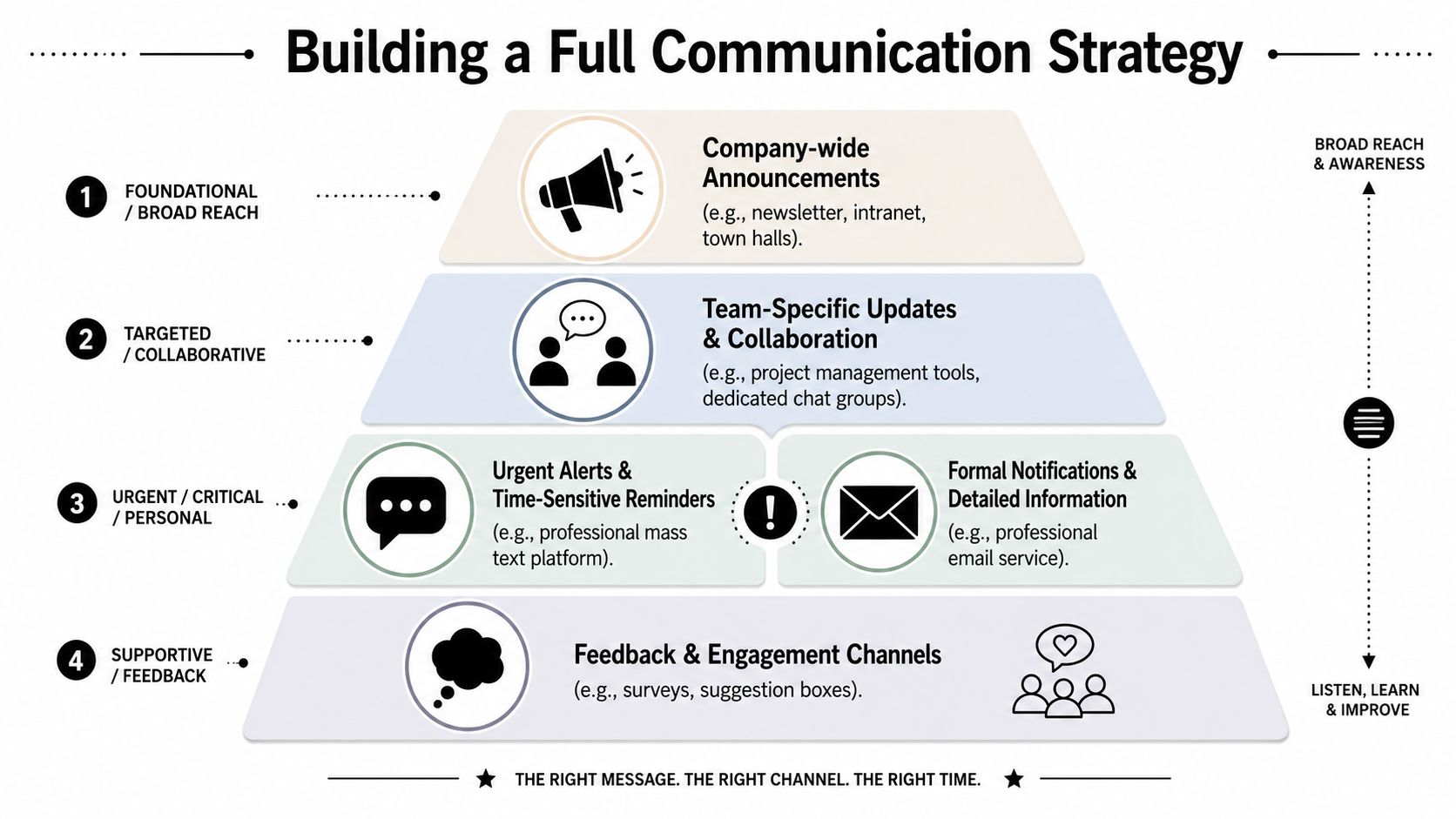
Texting handles urgent alerts and short reminders. Email holds the detailed version. Voice broadcasts can support critical notifications when confirmation matters. Ringless voicemail fits updates that need a more human tone without requiring everyone to answer a live call.
| Channel | Best use |
|---|---|
| SMS | Closures, shift reminders, immediate instructions |
| Policies, benefits details, long-form updates | |
| Voice broadcast | Critical notifications that need broader reinforcement |
| Ringless voicemail | Personal leadership messages, explanatory updates |
There's also a practical budgeting truth here. The main limit on “free” mass employee texting usually isn't the app itself. It's compliance, sender registration, and deliverability management, which is why the key question is whether you can send at low cost without getting blocked by carriers or creating compliance risk, as discussed in Text-Em-All's analysis of free mass texting limits.
For non-urgent internal updates, benefits enrollment, or policy communication, the message itself matters just as much as the channel. Benely's guide to effective benefits communication tips is a useful companion resource because it focuses on clarity, timing, and avoiding employee confusion.
A good system is simple. Use SMS for urgency. Use voice and ringless voicemail when tone matters. Use email for detail. Keep all three coordinated so employees know where to look, what to do, and how to respond.
If your team has outgrown group texts and improvised workarounds, Call Loop gives you a structured way to handle SMS, voice broadcasts, and ringless voicemail from one platform so your employee communication stays fast, organized, and easier to manage.
Chris Brisson
Chris is the co-founder and CEO at Call Loop. He is focused on marketing automation, growth hacker strategies, and creating duplicatable systems for growing a remote and bootstrapped company. Chat with him on X at @chrisbrisson


Trusted by over 45,000 people, organizations, and businesses like


